What Is Salesforce CLM? Benefits, Tools & Setup Guide
Salesforce CLM is a collection of tools and workflows that are used to manage contracts directly within the Salesforce environment, from creation through renewal. It includes native capabilities such as Salesforce Contracts, plus third-party CLM add-ons that Salesforce teams use to achieve greater automation, e-signature, and compliance visibility. Salesforce CLM simplifies the process for sales, legal, and finance teams that are coping with spreadsheets and email threads by providing a single, trackable system that ensures that contract data remains intact and linked to the CRM record it originated from. Whether it’s native tools, an add-on, or expert implementation support, this guide will explain what it is, how it fits into the larger picture of the contract lifecycle, and how to select the right one for your business.
What Is Salesforce CLM, Exactly?
It’s simply using Salesforce to manage all the parts of the contract lifecycle: request, author, negotiate, approve, execute, and renew. It is a particular use of contract lifecycle management and is based on the same CRM data that sales teams already use for pipeline and opportunity tracking.
For instance, if you had to read the name on the check, the reason the customer is buying, and the price the customer paid, that isn’t necessary with your CRM. Salesforce CLM simply brings this know-how to the contract itself, placing the legal terms, pricing, and approval history with the deal data, rather than in a different silo that no one remembers to update.
Why Are Businesses Moving From Manual Contracts to Salesforce CLM?
Manual contracts are not scalable. Version confusion, missed renewal dates, and endless chains of emails between sales, legal, and procurement cost time and pose a true financial risk. That’s why more companies are making Salesforce contract management a part of their business.
This is confirmed by the market data. The global CLM solution market is expected to reach USD 5.09 billion by 2034, with a compound annual growth rate (CAGR) of almost 12% from 2026 to 2034. It’s a simple fact that businesses aren’t going to lose revenue to obsolete, slow, and manual contracting.
Speed is not the only thing that’s important; there’s governance as well. Spreadsheets are not always the most effective solution for regulated industries, such as healthcare, finance, and manufacturing, which require audit trails and obligation tracking. It provides a clear, approved, and signed structure for these teams, with all versions, approvals, and signatures automatically recorded.
There’s also a talent and bandwidth angle. Legal and revenue operations teams are rarely staffed to keep pace with growing deal volume. Automating the repetitive parts of contracting- routing, reminders, data entry- frees up legal reviewers to spend their time on the clauses and negotiations that need human judgment, rather than chasing signatures over email.
How Does Salesforce CLM Fit into the Broader Contract Lifecycle Management Process?
Contract lifecycle management isn’t a single feature; it’s a chain of stages that a contract moves through before it becomes a live, revenue-generating agreement. Salesforce CLM maps directly onto this chain, which typically includes:
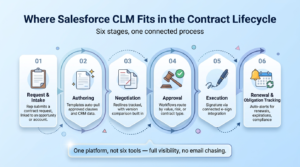
- Request and intake: A sales rep or business user submits a request for a new contract, tied to an existing opportunity or account.
- Authoring: Templates pull in approved clauses and CRM data automatically, cutting down on manual drafting.
- Negotiation: Redlines and comments are tracked, often with version comparison tools built into the CLM add-ons Salesforce users layer on top of native functionality.
- Approval: Multi-step approval workflows route contracts to the right stakeholders based on value, risk, or contract type.
- Execution: Contracts move to signature through a connected e-signature integration.
- Renewal and obligation tracking: Automated reminders flag upcoming renewals, expirations, and compliance milestones.
When these stages run inside Salesforce rather than across disconnected tools, teams get real-time visibility into where every contract stands, without chasing updates over email.
What Are the Most Common Bottlenecks in This Process?
Even with a defined process, contracts tend to stall in predictable places: waiting on a single approver who’s out of office, redlines bouncing back and forth over email attachments, or a signed contract that never gets logged against the right account. Mapping your contract stages inside Salesforce doesn’t just speed things up; it makes these bottlenecks visible, so teams can fix the step that’s slowing everything down instead of guessing.
What Native Salesforce Contract Management Capabilities Should You Know About?
Salesforce Contracts, a Salesforce Revenue Lifecycle Management (RLM) solution, has added many new capabilities to Salesforce’s native contract functionality. This provides pre-built Salesforce contract management tools—such as contract templates, version history, approval routing, and e-signature integration—in Salesforce, without having to leave the CRM.
In the case of smaller groups with simple sales contracts, this native layer is sufficient. It brings together deals, quotes, and contracts all in one place, which decreases the number of tools reps have to manage.
Native functionality, however, does not offer unlimited possibilities. It’s more about the structured CRM data than the less structured and more human aspect of negotiation, such as redlining, legal review cycles, and going back and forth with external counterparties. It’s that very disparity that’s what makes so many businesses turn to tools outside the box.
Why Do Teams Add CLM Add-Ons Salesforce Instead of Relying on Native Tools Alone?
As contract volume and complexity grow, native tools often can’t keep pace with legal and procurement needs. This is where CLM add-ons that Salesforce customers rely on- platforms like Conga, DocuSign CLM, Ironclad, and Sirion- come into play.
These add-ons typically bring:
- AI-powered clause review that flags risky or non-standard language before a contract goes out
- Deeper obligation management for regulated industries with strict compliance requirements
- Advanced analytics on cycle time, bottlenecks, and renewal forecasting
- Broader integration options connecting Salesforce with ERP systems, document repositories, and legal workflow tools
Choosing between native Salesforce contract management and a dedicated add-on isn’t about picking a “better” option; it’s about matching the tool to your contract complexity, deal volume, and compliance obligations.
How Does Salesforce E-Signature Integration Streamline Contract Execution?
Signing is when the contract becomes legally binding, as well as when deals become deadlocked. But a properly set-up Salesforce e-signature integration eliminates that hurdle, as contracts can be approved and then signed without a drop in the CRM.
After a contract is complete, it automatically goes to signers, both internal and external, via tools such as DocuSign or Adobe Sign, integrated natively into Salesforce. A complete audit trail is automatically recorded and sent back to the relevant record in the signed document. No manual uploads, no lost attachments, and no “did they sign it yet?” follow-up emails.
For sales teams, this brings the journey towards a revenue-recognized opportunity a step closer to the verb, which in turn has a direct impact on the revenue recognition timeline.
What Does Contract Automation Salesforce Actually Look Like in Practice?
Contract automation Salesforce workflows go beyond simply generating documents faster. Done well, automation touches every stage of the lifecycle:
- Auto-populated contract fields pulled straight from opportunity and account records
- Conditional approval routing based on deal size, discount level, or contract type
- Automated reminders for upcoming renewals, expirations, or required compliance reviews
- Triggered notifications when a contract sits too long at any single stage
The result isn’t just speed; it’s consistency. Every contract follows the same governed process regardless of which rep or legal reviewer is involved, which matters enormously when audits or disputes come up later.
Which Is the Best Salesforce CLM Tool for Your Business?
The best Salesforce CLM tool for you is going to vary based on factors such as the number of contracts you’re processing, industry regulation, budget, and level of legal involvement. However, some key attributes distinguish good from bad selections:
- Native Salesforce object alignment – Does the tool support syncing bi-directionally with opportunities, accounts, and quotes, or does it need you to manually enter the data?
- AI review- Is it capable of automatically identifying clauses that pose risks, and comparing the language with your playbook?
- Scalability – will it scale as the number of contracts increases beyond sales?
- Implementation support- Does the vendor (or your implementation partner) provide a login and link to a help center, or also implement it?
Don’t look for the most paper-heavy platform; assess tools based on your real contract processes. An enterprise CLM might not suit a mid-market sales organization and vice versa.
It also makes the commitment to run a short pilot first in order to avoid the risk. Choose one contract type (e.g., standard sales agreements) and implement it through the entire lifecycle in your shortlist tool before deploying it to the whole organisation. This reveals gaps, missing fields, and workflow bumps at low risk instead of high risk, once the entire sales team is on the same process but it doesn’t really fit.
How Can Salesforce Development Services Help You Implement CLM Successfully?
No matter how great the Salesforce CLM tool is, it falls short if it’s poorly configured or put on a “dirty” Salesforce org. That’s where the expertise of Salesforce development services really comes into play – setting up approval workflows, tailoring the contract objects, incorporating e-signature applications, and ensuring that the CLM add-ons that Salesforce teams select communicate with existing CRM data without causing any hassle.
A good implementation partner also ensures that the following elements are taken care of- elements that teams often forget to consider when getting it going for the entire sales organization: Data migration from existing contract repositories, user permissions, and rules for testing automation before going live organization-wide. Right-first-time ensures that the business doesn’t end up going in the opposite direction of most CLM implementations, with rework and adoption resistance.
There’s also the question of long-term maintenance. Salesforce releases new updates multiple times a year, and contract workflows that worked perfectly at launch can quietly break after a release if no one is monitoring them. Ongoing support, not just a one-time setup, is what keeps approval rules, e-signature triggers, and CRM integrations working as your sales process evolves.
Conclusion
Note that contracts should not be a showstopper between a closed deal and recognized revenue. The common thread among all these options, whether you are new to using native Salesforce Contracts or considering specialized CLM add-ons, is that you’ll have fewer repetitive manual transfers, quicker approvals, and complete visibility of every contract in your pipeline. It typically takes more than just a flip to get there; the proper configuration, integrations, and support are required to ensure the system remains viable as it becomes more successful. This is where AnavClouds Software Solutions can help businesses design, implement, and fine-tune Salesforce CLM systems that work the way their sales and legal teams do, from setup to support.
Frequently Asked Questions
What is Salesforce CLM used for?
From the beginning to renewal, Salesforce CLM tracks and handles contracts, enabling sales and legal teams to collaborate from a single connected system rather than from disjointed documents.
Is Salesforce CLM the same as contract lifecycle management?
Salesforce CLM is a particular application of Salesforce data to Contract Lifecycle Management (CLM). CLM as a concept goes across any type of platform; Salesforce CLM connects that process with CRM records.
Do I need a CLM add-on if I already use Salesforce Contracts?
It depends on the complexity. While Salesforce for basic needs will suffice, expanding legal review, compliance, and/or negotiation requirements may necessitate dedicated CLM add-ons to Salesforce to meet those needs.
How long does it take to implement Salesforce CLM?
The duration of the most common Salesforce CLM implementations ranges from a few weeks to a few months, depending on the complexity of your contract, any integrations you’re required to do, and how much customization is needed in your current Salesforce org.
Search Posts
Popular Posts
Author profile: Saransh Maurya, Content Writer at AnavClouds Software Solutions
Saransh
Maurya
About the author
Saransh Maurya is a dynamic and results-driven professional with a passion for innovation and problem-solving. Known for his analytical mindset and attention to detail, he excels at delivering high-quality solutions that drive business growth and operational efficiency. With strong communication skills and a collaborative approach, Saransh effectively bridges ideas and execution, contributing to successful projects and meaningful outcomes across diverse domains.
Recent Posts