Vector Databases in Salesforce: Risks, Benefits & ROI
Your Salesforce is loaded with customer data — but most of it is completely invisible to your AI. Emails, call transcripts, support tickets, and PDFs make up nearly 90% of enterprise data, yet traditional CRM systems can’t process any of it.
That’s exactly the problem vector databases in Salesforce are built to solve. Natively embedded within Salesforce Data Cloud, the vector database turns unstructured content into searchable, AI-ready intelligence — all without stepping outside the Salesforce ecosystem.
In this guide, we break down how this technology works, the Salesforce Vector Database Architecture, the real business benefits, risks to plan for, and the ROI you can realistically expect from a well-executed implementation.
What Is a Vector Database in Salesforce?
Before diving into the Salesforce-specific context, let’s establish the basics.
A vector database in Salesforce is a specialized storage system that represents data as high-dimensional numerical arrays — called vectors or embeddings — instead of traditional rows and columns. Rather than matching exact keywords, vector databases in Salesforce find information based on meaning and context, making them far more suited for AI-driven applications that need to understand language, intent, and relationships.
In the context of Salesforce Data Cloud, the vector database ingests, indexes, and unifies unstructured data alongside structured CRM records within the Salesforce Platform. The result is an AI layer that can reason over the complete picture of a customer — not just the fields you’ve logged, but everything you’ve said, sent, and recorded about them.
The vector database in Salesforce Data Cloud was announced at the London World Tour 2024 and reached general availability the same year — one of the fastest-growing capability releases in Salesforce’s history. For businesses investing in AI in Salesforce, this is a foundational shift in what’s possible.
The global vector database market is projected to grow from $2.65 billion in 2025 to $8.95 billion by 2030 at a CAGR of 27.5%, driven by generative AI and Retrieval Augmented Generation (RAG) adoption.
Salesforce Vector Database Architecture: How It Actually Works
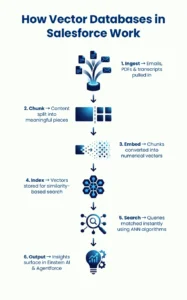
Understanding Salesforce Vector Database Architecture is essential for any business planning to implement it. Here is how unstructured data flows through the system from ingestion to AI output:
Data Ingestion
Unstructured content — PDFs, emails, transcripts, knowledge articles — is brought in via connectors linked to blob storage systems. Importantly, the platform does not copy the files; it extracts content and metadata to make them searchable within the Salesforce AI Architecture.
Chunking
Large documents are split into smaller, semantically coherent pieces. This step is critical — how intelligent content is chunked directly determines the quality of AI outputs downstream.
Vector Embeddings
Each chunk is converted into a high-dimensional numerical vector using an embedding model. These vectors capture the contextual meaning of content, not just literal words — the foundation of what makes this technology so powerful for AI applications in Salesforce.
Indexing
Vectors are stored in a search index within the Salesforce AI Architecture layer. This enables similarity-based retrieval — the system can surface content that means the same thing, even when entirely different words are used.
Vector Search and Retrieval
When a user or AI agent submits a query, it is also converted into a vector and compared against indexed vectors using Approximate Nearest Neighbor (ANN) algorithms. The most contextually relevant results are returned in milliseconds.
Integration with Salesforce Einstein AI and Agentforce
Retrieved data feeds directly into Salesforce Einstein AI prompts, generative AI copilots, Agentforce agents, and Tableau dashboards — no separate pipeline needed. Everything remains within the Salesforce trust boundary.
This end-to-end Salesforce Vector Database Architecture is what makes vector databases in Salesforce uniquely valuable. Unlike standalone tools that require separate infrastructure, Salesforce’s native implementation keeps governance, security, and compliance built in from the start.
Key Benefits of Vector Databases in Salesforce
Let’s be honest — most businesses already know they’re sitting on more customer data than they can use. The problem isn’t the volume. It’s that the vast majority of that data — call recordings, support emails, chat logs — has always been out of reach for structured CRM workflows. That’s what makes vector databases in Salesforce worth paying attention to.
You Finally Get Access to the Data You’ve Been Ignoring
Think about what lives outside your Salesforce fields: a frustrated tone in a support email, a pattern of complaints across service transcripts, an upsell signal buried in a chat conversation. None of that shows up in your opportunity stages or contact records. With vector databases in Salesforce, that context is no longer invisible. It feeds directly into your Customer 360 view — and suddenly, that view earns its name.
Your Generative AI Stops Guessing
One of the biggest frustrations with Generative AI Salesforce tools is when they sound smart but miss the point. That happens because the AI is working without real context about your business, your customers, and your history. Vector databases in Salesforce fix this by grounding your generative AI copilots in actual enterprise data — your own cases, your own documents, your own conversations. The difference in output quality is significant.
Customer Service Gets Faster — Without More Headcount
Picture a support agent in mid-call, scrambling through articles while the customer waits. With vector databases in Salesforce, that scramble disappears. The system doesn’t hunt for a keyword match — it understands what the agent is asking and pulls out the most contextually relevant resolution, instantly. Teams that have adopted this report meaningful drops in handle time, and customers notice.
Marketing Can Move Beyond Demographics
Segmenting by age or region only gets you so far. With Salesforce Loyalty Management connected to vector-based intelligence, marketers can read between the lines — picking up on intent signals from reviews, email replies, and chat interactions that traditional segmentation completely misses. The targeting gets sharper, the messaging gets more relevant, and engagement follows.
It Cuts AI Costs, Too
Fine-tuning a large language model on your proprietary data is expensive and time-consuming — and most businesses must do it repeatedly as data changes. With vector databases in Salesforce, that cost largely goes away. Generative AI Salesforce implementations using this approach handle grounding at query time, which means the model doesn’t need to be retrained every time your data evolves.
Where Vector Databases in Salesforce Are Already Making a Difference
This isn’t hypothetical. Across industries, businesses are putting vector databases in Salesforce to work in ways that are genuinely changing how their teams operate.
In financial services, advisors no longer need to manually dig through years of client communication to prepare for a meeting. With Salesforce Data Cloud powering vector search, the relevant compliance notes, risk flags, and client history surface automatically — saving prep time and reducing the chance of missing something important.
In healthcare, care teams are using vector databases in Salesforce to pull up contextually similar patient records and clinical notes during consultations. It’s not replacing clinical judgment — its making sure relevant information is in the room when decisions are being made.
Retailers are finding that standard recommendation engines only go so far. By integrating vector databases in Salesforce with Salesforce Data Cloud, they’re analyzing what customers write in reviews and chat interactions — and using that to power product recommendations that feel genuinely personalized, not just algorithmically obvious.
And in manufacturing and field service, the value shows up in reduced downtime. Teams using Salesforce Loyalty Management alongside vector search can pull up the right technician notes or equipment manual sections in seconds — on-site, mid-job — instead of waiting on a call to the back office.
Risks and Challenges to Be Aware of While Adopting Vector Databases in Salesforce
No technology is without its trade-offs. Here are the risks businesses must account for when adopting vector databases in Salesforce:
Implementation Complexity
Configuring vector databases in Salesforce is not a simple out-of-the-box process. Chunking strategies, embedding model selection, and search index configuration all require deliberate planning. Poor chunking produces low-quality AI outputs that can quickly erode user confidence.
Data Quality Dependency
Vector databases in Salesforce are only as good as the data fed into them. Poorly organized, inconsistently labeled, or outdated unstructured data will produce equally poor semantic search results. Data hygiene matters more here than in almost any other Salesforce implementation.
Cost Considerations
Salesforce Data Cloud licensing is a meaningful investment, particularly for mid-market businesses. Adding vector database capabilities compounds that cost. A clear ROI model is essential before scaling adoption across the organization.
Skills Gap
Working effectively with the Salesforce Vector Database Architecture demands a rare combination of Salesforce platform expertise and AI/data engineering knowledge. Finding professionals who bridge both disciplines is one of the more practical challenges for most organizations.
Security and Compliance
While Salesforce Shield provides enterprise-grade encryption, event monitoring, and field audit trail capabilities within the Salesforce ecosystem, organizations still need to evaluate how unstructured data — especially content containing PII — is ingested, chunked, and stored. Compliance frameworks like GDPR and HIPAA require careful configuration at every layer of the Salesforce AI Architecture.
ROI Guide: What Can You Actually Expect?
Return on investment from vector databases in Salesforce typically shows up across four areas:
- Productivity Gains: Service agents and sales repslocate information in seconds rather than minutes. Over time, these compounds into significant hours recovered per employee per week — directly reducing operational costs.
- Improved AI Accuracy: When Salesforce Einstein AI is grounded in your real enterprise data via vector retrieval, AI hallucinations drop sharply and response relevance improves — with a direct positive impact on customer satisfaction scores and agent confidence.
- Reduced Infrastructure Costs: By eliminating the need to fine-tune separate LLMs for each business unit, organizations cut AI infrastructure to spend considerably. All of it runs natively within the Salesforce trust layer, reducing vendor sprawl.
- Revenue Impact: Richer personalization through vector-enriched Customer 360 view data leads to higher conversion rates, stronger loyalty program outcomes, and faster deal cycles. Businesses leveraging Salesforce Loyalty Management with vector intelligence consistently see stronger engagement metrics as a result.
ROI timelines vary by organization’s size and data maturity, but most enterprises see measurable gains within 6–12 months of a properly configured deployment. Partnering with experienced Salesforce development services professionals who understand both the technical architecture and business context is one of the fastest ways to accelerate that return.
Conclusion
Vector databases in Salesforce are no longer a future capability — they are live, enterprise-ready, and deliver real ROI today. By unlocking unstructured data within Salesforce Data Cloud, businesses finally achieve a customer 360 view that reflects reality, not just what was manually entered.
The architecture is proven, the use cases are tangible, and the competitive edge is measurable. What separates businesses that benefit from those that don’t is the quality of implementation.
AnavClouds Software Solutions, a Salesforce Silver Consulting Partner, specializes in Data Cloud, Einstein AI, and vector databases in Salesforce deployments. If you’re ready to make your Salesforce truly AI-ready, our experts are just one conversation away.
Frequently Asked Questions (FAQs)
What does a vector database do in Salesforce?
A vector database in Salesforce indexes unstructured data as numerical vectors, enabling AI to search by meaning — not just keywords — across emails, transcripts, and documents.
Do I need Salesforce Data Cloud to use the vector database?
Yes. The vector database is a native Salesforce Data Cloud feature and requires a separate Data Cloud license. It is not included in standard Sales or Service Cloud subscriptions.
How do vector databases improve AI accuracy in Salesforce?
They ground Salesforce Einstein AI in real enterprise data using RAG, reducing hallucinations and producing more relevant, context-aware responses across Agentforce and generative AI copilots.
What are the main risks of vector database implementation in Salesforce?
Key risks include poor chunking strategies, low data quality, high licensing costs, a skills gap in AI-plus-Salesforce expertise, and compliance gaps around PII handling within unstructured data.
Search Posts
Popular Posts
Author profile: Saransh Maurya, Content Writer at AnavClouds Software Solutions
Saransh
Maurya
About the author
Saransh Maurya is a dynamic and results-driven professional with a passion for innovation and problem-solving. Known for his analytical mindset and attention to detail, he excels at delivering high-quality solutions that drive business growth and operational efficiency. With strong communication skills and a collaborative approach, Saransh effectively bridges ideas and execution, contributing to successful projects and meaningful outcomes across diverse domains.
Recent Posts