Salesforce Data Cloud: 2026 Guide to AI-Ready Data
As you can imagine, it’s the engine driving the way today’s businesses are able to pull their disorganized customer data together into one usable, real-time view. You may have heard the term a lot, from sales calls to LinkedIn posts, to your own IT team’s roadmap — but you’re not the only one that doesn’t know what the heck it does. It’s a data platform that aggregates data from all aspects of your business — from your CRM system to your website, purchase history and your support tickets — and creates a single, real-time, unified customer profile. It’s currently the backbone of Salesforce’s AI agents, personalized marketing and smarter service. In this guide to Salesforce Data Cloud for business, we’ll explain how it works, how much it costs, how it differs from services like Snowflake, and whether your business really needs it.
This change is hard to miss. Businesses are quickly needing to unify their data strategy to the unified data platforms backed by AI, as Salesforce recently revealed a 141% year-over-year increase in paying Data Cloud (now Data 360) customers, according to Gartner’s 2026 Magic Quadrant for Customer Data Platforms
What Is Salesforce Data Cloud, Really?
Think of it as the connective tissue between all your disconnected systems. Most businesses don’t have one source of customer truth — they have five or six. Sales data lives in the CRM. Purchase history sits in the commerce platform. Support tickets are in a separate service tool. Website clicks are tracked somewhere else entirely.
The platform ingests all of that — structured and unstructured — and merges it into a single, harmonized customer record. It doesn’t replace your existing systems; it sits on top of them, pulling in data without forcing you to migrate everything into Salesforce first.
Notably, Salesforce rebranded the product as Data 360 in late 2025, positioning it less as a standalone tool and more as the enterprise-wide data foundation for everything Salesforce builds — including Agentforce, Marketing Cloud, and Tableau.
How Does Salesforce Data Cloud Work for Beginners?
If you’re new to this, here’s the simplest way to understand the flow:
- Ingest — Data Cloud connects to your existing sources (Salesforce Sales Cloud, Service Cloud, Marketing Cloud, Commerce Cloud, external data warehouses, even Google Drive or SharePoint files) and pulls in data without disrupting where it already lives.
- Unify — Using identity resolution rules, it matches records that belong to the same person — even if the name, email, or ID format is slightly different across systems — and merges them into one profile.
- Harmonize — It maps all the ingested data into a common data model, so a “customer” in your CRM and a “shopper” in your commerce platform are recognized as the same entity.
- Activate — Once profiles are unified, you can segment them, trigger personalized campaigns, or feed them directly into AI agents for real-time decision-making.
For a beginner, the key mental model is this: it isn’t another database you manage manually — it’s an automated pipeline that keeps your customer view current without spreadsheets, exports, or manual reconciliation. Moreover, you can take help from experienced Salesforce development services to guide you for a successful implementation.
What Is Salesforce Data 360 Explained Simply?
Salesforce Data 360 is simply the new name for Data Cloud, reflecting its expanded role. It’s no longer just a customer data platform (CDP) — it’s being positioned as the central nervous system for Salesforce’s entire AI and automation strategy.
The rename also reflects a broader capability shift. Data 360 now includes Agentic Setup and Data Management, which lets teams use natural language to orchestrate data pipelines, plus deeper support for unstructured data — documents, PDFs, and files — not just structured CRM records. If someone on your team mentions “Data 360” in a meeting, they’re talking about the same platform with its 2026 feature set.
Salesforce Data Cloud Zero Copy Architecture Explained
One of the most important — and most misunderstood — pieces of this platform is its zero-copy architecture.
Traditionally, connecting data from an external warehouse (like Snowflake, Databricks, or Amazon Redshift) into a CRM meant physically copying and migrating that data — a slow, expensive, and often risky process. Zero copy eliminates that step. Instead of duplicating data, Salesforce Data Cloud creates a live, federated connection to where your data already sits, querying it in place.
Why this matters practically:
- No duplicate storage costs for data that already lives elsewhere
- No stale data — you’re always querying the live source
- Reduced security risk since data isn’t being moved and re-copied across systems
- Faster time-to-value since there’s no lengthy migration project before you can start using the data
This is also the architecture behind Salesforce’s newer Clean Rooms in Data Cloud, which let multiple organizations collaborate on customer insights securely without ever exposing raw data to each other.
Salesforce Data Cloud vs Snowflake Which Is Better?
This comparison comes up constantly, and the honest answer is: they’re not really solving the same problem.
Snowflake is a cloud data warehouse. It’s built for storing, processing, and analyzing massive volumes of raw data — ideal for data engineering teams, complex analytics, and cross-departmental data science work.
It’s a customer data platform built specifically to unify customer-facing data and activate it inside business processes — marketing campaigns, service workflows, AI agents, and sales automation.
| Factor | Salesforce Data Cloud | Snowflake |
| Primary purpose | Unify & activate customer data | Store & analyze all enterprise data |
| Best for | Marketing, sales, service teams | Data engineering & analytics teams |
| Native Salesforce integration | Deep, built-in | Requires connectors |
| Identity resolution | Native, purpose-built | Requires custom logic |
| AI agent grounding (Agentforce) | Native foundation | Not natively built for this |
In practice, many enterprises use both — Snowflake as the underlying data warehouse, and Data Cloud’s zero-copy connectors to query that Snowflake data directly for activation, without ever duplicating it. It’s less “either/or” and more “which layer handles which job.”
Salesforce Data Cloud Implementation Steps 2026
A successful rollout in 2026 typically follows this structure:
- Define your use case first — Don’t ingest data just because you can. Start with one clear business goal, like unifying service and sales profiles or powering a specific marketing segment.
- Audit your data sources — Map out where customer data currently lives across CRM, commerce, support, and external systems.
- Set up data streams and connectors — Connect your sources, including the newer zero-copy connectors for external warehouses and unstructured file connectors for Drive or SharePoint.
- Build your unified data model — Map fields into a common data model so records align consistently across sources.
- Configure identity resolution — Set matching rules to merge duplicate or fragmented profiles into single customer records.
- Test segmentation and activation — Build initial segments and connect them to marketing, service, or sales workflows.
- Ground your AI agents — If you’re using Agentforce, connect it to your unified profiles so agents have accurate, real-time context.
- Monitor and optimize — Use the Digital Wallet tool to track credit consumption and refine usage over time.
Most standard implementations take 8 to 16 weeks, while enterprise-scale rollouts spanning multiple clouds can run 3 to 12 months, depending on data complexity and the number of source systems involved.
Do I Need Salesforce Data Cloud for Agentforce?
Short answer: effectively, yes, Salesforce Agentforce — the platform’s autonomous AI agent system — relies on this data foundation as its grounding layer. AI agents need accurate, real-time context to make decisions and take action, and that context comes from unified customer profiles inside Data Cloud.
Without it, Agentforce agents are working with fragmented or outdated information, which limits their reliability. If AI-driven automation is part of your 2026 roadmap, Data Cloud isn’t an optional add-on — it’s the foundation that makes those agents trustworthy and accurate in the first place.
Salesforce Data Cloud Pricing and Credits Explained
Salesforce Data Cloud pricing has been simplified in recent updates, but it’s still consumption-based rather than a flat per-user fee. Here’s the current structure:
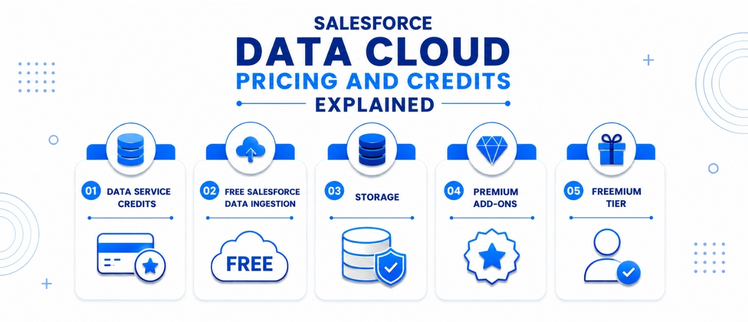
- Data Service Credits — A single, unified credit type (previously split into four categories) used across ingestion, unification, segmentation, and activation. Priced around $500 per 100,000 credits at list rate.
- Free Salesforce data ingestion — Structured data from Sales Cloud, Service Cloud, Marketing Cloud, and Commerce Cloud can now be ingested at no credit cost.
- Storage — Billed separately, roughly $23 per TB per month.
- Premium add-ons — Features like Data Spaces, real-time profiles, or advertising audiences are priced separately, often in the $60,000/year range for enterprise-scale add-ons.
- Freemium tier — A limited free provision is available for existing Salesforce customers, typically capped at 10,000 unified profiles with no segmentation or activation.
The takeaway: don’t budget based on license cost alone. Factor in credit consumption based on data volume, plus any add-ons your use case requires, and use Salesforce’s official pricing calculator to model real-world scenarios before committing.
Salesforce Data Cloud Use Cases for Marketing Teams
There are some immediate value marketing teams can derive from this platform, such as:
- Unified audience segmentation — Create segments from full history of behavior and transactions, not slices of that data.
- Real-time personalization — Send campaigns based on the actions of your customers and not the previous day’s batch processing.
- Journey orchestration – Cross-channel: Manage email, SMS, and ad messaging with a single customer profile
- Personalised content and offers — Introduce single data into generative AI tools to scale personalisation.
- Wasted customer acquisition — With better identity resolution, you’ll have fewer duplicate contacts to deal with, which will lead to better targeting.
Salesforce Unified Customer Profile Setup Guide
Setting up a unified customer profile is the core exercise inside any Data Cloud implementation. Here’s the basic flow:
- Connect your data sources into Data Cloud using native connectors or zero-copy federation
- Map fields to Salesforce’s standard data model objects (like Individual, Contact Point, or Party Identification)
- Define match rules — decide which fields (email, phone, loyalty ID) determine whether two records represent the same person
- Run identity resolution to merge matching records into a single unified profile
- Validate the output — spot-check merged profiles to confirm accuracy before activating them downstream
- Set refresh frequency — determine how often profiles update as new data streams in
Getting this step right is what determines whether your marketing, service, and AI initiatives downstream actually work as intended.
Salesforce Data Cloud Benefits for Small Business India
For small and mid-sized businesses in India, Salesforce Data Cloud is often seen as an enterprise-only tool — but that’s changing. A few reasons it’s becoming relevant for smaller teams too:
- Free structured data ingestion from existing Salesforce products removes a major upfront cost barrier
- Freemium tier lets smaller teams test unified profiles (up to 10,000) before committing to a paid plan
- Faster customer insight without needing a dedicated data engineering team, since identity resolution and unification are built-in
- Better ROI on existing Salesforce investment — if you’re already using Sales or Service Cloud, Data Cloud extends that value without a separate platform purchase
- Scalable pricing — since it’s consumption-based, smaller businesses can start small and scale credit usage as they grow, rather than committing to a large flat license fee
That said, businesses should still budget carefully, since credit consumption can add up quickly with high data volumes — a phased implementation is usually the smarter starting point.
Final Thoughts:
For companies committed to personalization and automation powered by AI, Salesforce Data Cloud has transformed from a nice-to-have feature to a must-have tool. From connecting siloed customer data to providing Agentforce with the right context to the disconnect between your marketing and service teams to finding a solution to that problem at scale, Salesforce Data Cloud is designed to help you. The platform is not enough; it’s the implementation of that platform that is the thing that gets it done right.The platform is only half the story; how it is implemented is the other half. Businesses often secure salesforce data cloud solutions that never materialize because the design is wrong, the budget is inadequate, or they don’t understand the long-term AI path. At AnavClouds Software Solutions, we take the time to get to know our clients, determine their requirements, and then put together a data cloud strategy that works for them, within their budget, and in line with their long-term AI plans for profitability.
Frequently Asked Questions
1. Is Salesforce Data Cloud the same as Data 360?
Yes, As Salesforce has grown and evolved its role as the central data foundation for the Salesforce ecosystem, including Agentforce, the company changed the name of Data Cloud to Data 360, in late 2025.
2. Can Salesforce Data Cloud work with non-Salesforce data sources?
Yes. It can connect to external sources, such as Snowflake, Databricks, or Google Drive, without moving the data, through zero-copy connectors.
3. How long does a typical Salesforce Data Cloud implementation take?
The time required for standard implementations is 8 to 16 weeks. Multiple cloud, complex data models enterprise rollouts can take 3-12 months.
4. Is Salesforce Data Cloud worth it for small businesses?
That can be, particularly if there is a freemium model and free structured data ingestion. Take a bottom-up approach and begin with a specific use case for businesses in credit use.
Search Posts
Popular Posts
Author profile: Saransh Maurya, Content Writer at AnavClouds Software Solutions
Saransh
Maurya
About the author
Saransh Maurya is a dynamic and results-driven professional with a passion for innovation and problem-solving. Known for his analytical mindset and attention to detail, he excels at delivering high-quality solutions that drive business growth and operational efficiency. With strong communication skills and a collaborative approach, Saransh effectively bridges ideas and execution, contributing to successful projects and meaningful outcomes across diverse domains.
Recent Posts