Salesforce Sales Cloud: Features, Pricing & ROI in 2026
If you’ve spent any time evaluating CRMs this year, you’ve probably noticed Salesforce Sales Cloud comes up in nearly every conversation — and for good reason. It’s the platform built specifically to manage the sales side of the business: leads, pipeline, forecasting, and now a growing layer of AI that actually does work on a rep’s behalf. In 2026, Salesforce Sales Cloud sits inside a CRM software market that Statista projects will generate $109.07 billion in global revenue this year growing at close to 10% annually through 2030. That’s not a niche category anymore — it’s infrastructure. This guide walks through how Salesforce Sales Cloud works, what it costs per user, how it compares to Service Cloud, and whether it’s the right investment for your team in 2026.
How Does Salesforce Sales Cloud Work?
Strip away the marketing language, and Salesforce Sales Cloud is really a very well-organized system of record for your entire sales process. Understanding how Salesforce Sales Cloud works starts with one simple idea: every lead, account, contact, and opportunity lives in one place instead of scattered across inboxes, notebooks, and someone’s memory.
Picture a lead coming in from a web form. The moment it lands, Salesforce Sales Cloud scores it based on rules your team sets — company size, engagement level, source — and routes it to the right rep automatically. Every call, email, and meeting note gets logged against that record, so the deal history is never dependent on one person’s recollection. Managers get live pipeline dashboards instead of asking for a Friday status update, and Einstein AI runs quietly in the background, flagging which deals are likely to close and which are stalling before they fall off the radar. That’s how Salesforce Sales Cloud works in practice — less like software, more like an operating system for the sales team.
What Are the Benefits of Salesforce Sales Cloud for Sales Teams?
Ask ten different sales leaders what they value most, and you’ll get ten different answers — but the benefits of Salesforce Sales Cloud for sales teams consistently cluster around the same themes. These benefits of Salesforce Sales Cloud for sales teams show up whether the org is a lean startup or a scaling enterprise:
- One source of truth. No more guessing which spreadsheet has the current numbers or chasing a rep for a deal update.
- AI-backed forecasting. Einstein scores deals on real conversion probability, not gut feel or optimistic estimates.
- Less busywork per rep. Automated follow-ups and data logging mean reps spend more time selling and less time typing.
- Mobile-first access. Updating a deal from a parking lot after a client meeting is a basic expectation now, not a bonus feature.
- A genuinely flexible foundation. Custom fields and workflows adapt to your process instead of forcing you into a rigid default structure.
- A powerful app ecosystem. AppExchange services connects Salesforce Sales Cloud to marketing, finance, and operations tools without needing a developer for every integration.
Teams that commit fully tend to see the payoff less in any single feature and more in the compounding effect — cleaner data leads to better forecasts, which lead to smarter decisions about where reps invest their effort.
Is Salesforce Sales Cloud for Small Business a Good Fit or Overkill?
Here’s a misconception worth addressing directly: Salesforce Sales Cloud for small business isn’t automatically the wrong call just because “Salesforce” sounds like an enterprise word. The Starter Suite at $25 per user per month was built for smaller teams that need core CRM functionality without the complexity of higher tiers. And Salesforce Sales Cloud for small business scales in a way most lightweight CRMs simply don’t — you’re not outgrowing it in two years.
What actually matters for a small business isn’t the AI layer or advanced forecasting. It’s the discipline a real CRM enforces on an early-stage sales process. Instead of deals living in someone’s inbox or a shared spreadsheet nobody updates consistently, everything sits in one system, follow-ups stop getting missed, and whoever is managing sales gets a clear view of what’s in the pipeline.
When the business does grow, moving from Starter Suite to Pro Suite or Enterprise is a configuration upgrade, not a platform migration — and that’s the strongest case for Salesforce Sales Cloud for small business right there. You’re building on a foundation that doesn’t need to be ripped out later.
What Is Salesforce Sales Cloud Pricing Per User in 2026?
Salesforce Sales Cloud pricing per user in 2026 spans five tiers, and the gap between them is wider than most buyers expect:
| Edition | Price (per user/month) | Best Suited For |
| Starter Suite | $25 | Small teams, CRM basics |
| Pro Suite | $100 | Growing teams needing automation |
| Enterprise | $175 | Mid-size to large sales orgs |
| Unlimited | $350 | Advanced AI, 24/7 support |
| Agentforce 1 | $550 | Full AI agents, unmetered usage |
One detail that catches teams off guard: Salesforce raised Enterprise and Unlimited pricing by approximately 6% in August 2025, so any quote compared to a pre-2025 contract will look meaningfully higher. Salesforce Sales Cloud pricing per user in 2026 also doesn’t stop at the license — implementation, data storage, and add-ons layer on quickly. Always get a complete cost picture before comparing tiers on list price alone. Most growing sales teams land on Enterprise at $175/user/month since it’s the first tier with full API access and advanced pipeline management.
What Does the Salesforce Sales Cloud Setup Checklist Cover?
Buying the license is the easy part. Getting Salesforce Sales Cloud working properly requires preparation that most vendors gloss over. A solid Salesforce Sales Cloud setup checklist before go-live should cover:
- Clean your data before migration. Duplicate leads and outdated accounts will follow you into the new system if you don’t fix them first.
- Map your actual sales stages. Configure Salesforce Sales Cloud to reflect how your team genuinely sells, not the other way around.
- Set roles and permissions before anyone logs in. Decide who sees and edits what before a data issue forces the conversation.
- Configure lead assignment rules. Inbound leads should route to the right rep automatically, not sit in a general queue.
- Standardize your fields and picklists. Inconsistent inputs now mean unreliable reports six months later.
- Sync email and calendar on day one. If reps have to manually log every interaction, they won’t — and your data quality will reflect that.
- Build core dashboards before launch. Managers need pipeline and forecast visibility from day one, not after a month of guessing.
- Train the team properly. Poor adoption, not bad software, is the single most common reason a Salesforce Sales Cloud setup checklist gets followed perfectly, and the rollout still underdelivers.
- Run a pilot group before company-wide launch. A small test group surfaces configuration issues before they affect the whole team.
If your organization needs support working through this Salesforce Sales Cloud setup checklist end to end, partnering with a team that provides professional Salesforce development services makes the difference between a rollout that stalls and one that delivers from day one.
What Is the Salesforce Sales Cloud vs Service Cloud Difference?
The Salesforce Sales Cloud vs Service Cloud difference trips up more buyers than it should, partly because both products sit on the same platform and share a familiar interface. But the Salesforce Sales Cloud vs Service Cloud difference really comes down to what happens on either side of the sale.
Salesforce Sales Cloud manages everything on the revenue generation side — leads, opportunities, pipeline stages, quotes, and everything involved in moving a deal to closed-won. Service Cloud picks up from there, handling support cases, omnichannel service, and everything a customer needs after they’ve signed. Many businesses end up running both because support interactions in Service Cloud regularly surface upsell signals that belong back in Salesforce Sales Cloud. If your immediate priority is generating and closing revenue, Sales Cloud is the right starting point. If it’s managing post-sale customer experience at scale, Service Cloud fills that gap.
What Are the Salesforce Agentforce Sales Features Worth Knowing in 2026?
The AI layer is where the platform has changed most heading into 2026, and the Salesforce Agentforce Sales features represent a genuine shift rather than a cosmetic update. Salesforce Agentforce Sales features introduce autonomous AI agents that operate directly inside the CRM — not as bolt-on chatbots, but as active participants in the sales workflow.
The Salesforce Agentforce Sales features worth paying close attention to:
- Agentforce SDR — engages inbound leads around the clock, answers product questions, handles objections, and books qualified meetings without a rep ever touching the initial conversation.
- Sales Coach — delivers AI-driven role-play sessions so reps can rehearse pitches and objection handling against real deal scenarios pulled directly from the CRM.
- One-Click Summaries — Einstein reads an entire record’s history and produces a call-ready summary in seconds, cutting meeting prep to almost nothing.
- Triggered Agents — launch automated workflows the instant a meaningful data event occurs, whether that’s a deal going cold or a renewal window opening.
None of these replaces the sales team. They absorb the repetitive, top-of-funnel work so human reps spend their time on conversations that genuinely need a person in the room.
Is Salesforce Sales Cloud Worth It for SMB Teams in 2026?
The truth is, the value of Salesforce Sales Cloud for SMB is more about sales complexity than size. The pipeline visibility and automation that Salesforce Sales Cloud delivers are often the primary driver of value for an SMB with a sales team of multiple people, multiple product lines, or a buying cycle that involves multiple decision makers, just based on the number of deals they miss and the accuracy of their forecasting. For these SMB teams, who are executing a simple, one-product motion with two reps, is Salesforce Sales Cloud worth it? Probably not at the Enterprise level, yet – that’s okay.
The best way to do this is to begin at the level that makes sense and upgrade only when there really is a need within the sales process. Salesforce Sales Cloud grows and develops with the business; you don’t have to purchase for growth. But if setup is intimidating, it’s often easier and easier to call in professional Salesforce development services and get it set up properly from the start than to fix a bad rollout within six months.
How Do You Build a Salesforce Sales Cloud ROI Calculator for 2026?
A practical Salesforce Sales Cloud ROI calculator in 2026 should measure total cost of ownership against outcomes that are actually trackable. Using a Salesforce Sales Cloud ROI calculator before implementation — not after — gives leadership a defensible business case and a real benchmark to measure against. Build the Salesforce Sales Cloud ROI calculator around these inputs:
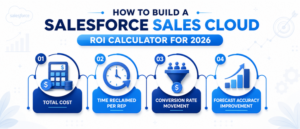
- Total cost — license fees per tier, implementation, training time, and Agentforce credit consumption
- Time reclaimed per rep — hours saved weekly on manual data entry, follow-up scheduling, and activity logging
- Conversion rate movement — the change in lead-to-opportunity and opportunity-to-close rates after proper team adoption
- Forecast accuracy improvement — how much the gap between projected and actual revenue narrows over two to three quarters
Having this model in place from the start makes it significantly easier to know whether Salesforce Sales Cloud is delivering or whether there’s an adoption issue worth addressing.
Conclusion
Salesforce Sales Cloud in 2026 is more capable than it has ever been — and with Agentforce now embedded directly into the workflow, the platform has moved well beyond basic CRM territory. The teams that get the most out of it aren’t necessarily the ones with the biggest budgets. They’re the ones who set it up properly, train their people well, and consistently use the data it produces to make smarter decisions. Whether you’re a small business just getting structure into your pipeline or a growing sales org ready to activate AI-driven automation, getting the implementation right from day one changes everything. AnavClouds Software Solutions offers end-to-end Salesforce development services — from initial setup and data migration to Agentforce configuration — so your Salesforce Sales Cloud investment delivers real, measurable results from the start.
Frequently Asked Questions
Is Salesforce Sales Cloud the same as Salesforce?
No. Salesforce is a platform, and Sales Cloud is one of the products in the platform, and it is about the sales pipeline, leads, opportunities, and everything in between.
How much does Salesforce Sales Cloud cost per user in 2026?
The pricing varies based on the features and AI capabilities included, ranging from $25/user/month for the Starter Suite to $550/user/month for Agentforce 1 tier.
Can small businesses realistically use Salesforce Sales Cloud?
Yes. The Starter Suite and Pro Suite are targeted at smaller teams that require the basic CRM features without enterprise depth or configuration complexity, and without the cost.
What is the main difference between Sales Cloud and Service Cloud?
Sales Cloud tracks sales from lead to closed. Service Cloud provides for post-sale customer service, case management, and omnichannel service.
Search Posts
Popular Posts
Author profile: Saransh Maurya, Content Writer at AnavClouds Software Solutions
Saransh
Maurya
About the author
Saransh Maurya is a dynamic and results-driven professional with a passion for innovation and problem-solving. Known for his analytical mindset and attention to detail, he excels at delivering high-quality solutions that drive business growth and operational efficiency. With strong communication skills and a collaborative approach, Saransh effectively bridges ideas and execution, contributing to successful projects and meaningful outcomes across diverse domains.
Recent Posts