Salesforce Implementation Healthcare: From Setup to Scale
Today’s healthcare providers are managing data, workflows, compliance, care teams, and patient expectations – all while caring for patients, and often across disparate systems. That’s more complex than off-the-shelf software can manage. Salesforce implementation healthcare leaders is changing this equation. The Salesforce Health Cloud unites patient data, care processes, automation, and analysis systems, efficiently bridging the gaps that are wasting organizations’ time, money, and patient loyalty. If your healthcare organisation is considering a Salesforce implementation healthcare, here’s what you need to know about dealing with HIPAA, EHR integration, security setup, and automating patient engagement.
Why Salesforce Health Cloud Is Becoming the Go-To Choice for Modern Healthcare Organizations
Healthcare has always involved a lot of data. But the need to put it to work – quicker, smarter, and in a way that complies with the latest regulations – is a new challenge. Traditional systems and isolated tools can’t prioritise speed, accuracy, and compliance. And that’s why we’re seeing a dramatic pace of Salesforce implementation healthcare organizations today.
The world’s healthcare CRM market is set to hit USD 43.40 billion by 2034, with a CAGR of 9.76% between 2025 and 2034 – and Salesforce is a driving force behind this growth, as one of the top healthcare CRM solutions for patient management on the market today.
But beyond the numbers, what’s driving healthcare towards Salesforce Health Cloud? There are some common themes.
From Reactive to Proactive Care Delivery
Health-care providers are still primarily reactive – they react when the patient comes to them. Salesforce for healthcare enables proactive care by delivering insights into who is at risk, requires follow-up, or is at risk of dropping out of care. Healthcare providers can get ahead of potential problems.
Breaking Down Data Silos
Data about patients is spread across EHRs, billing systems, phone calls, and scheduling software. Healthcare CRM Salesforce rollouts integrate all that data in a single Patient 360 record, so that every member of the care team has the same view of the patient, regardless of which department they work in.
Scaling Without Adding Headcount
Healthcare organizations can’t simply add headcount to handle increasing patient volumes. Salesforce healthcare automation allows teams to manage more patients, interactions, and processes without hiring more people – by using smarter automation, not just automation.
Meeting Regulatory and Interoperability Demands
Laws such as the 21st Century Cures Act are moving towards interoperability. Salesforce implementation healthcare teams that focus on interoperability in their initial setups are putting their organizations in the best place to comply with these standards while also improving their own efficiency – a win-win proposition.
What Every Salesforce Implementation Healthcare Team Must Know About HIPAA
Salesforce implementation healthcare projects require compliance, but it isn’t something that can be tacked on to the end of a project or left to the last minute. Health care data is the most sensitive data of all, and the penalties for HIPAA violations include severe fines and reputation damage that can be difficult to overcome.
Business Associate Agreement (BAA)
A Business Associate Agreement (BAA) must be in place between healthcare organizations and Salesforce before patient data can be entered into the Salesforce system. This is a legal requirement for HIPAA compliance – not optional and not something that should be revisited after implementation.
Minimum Necessary Data Principle
Only the minimum necessary patient information should be accessed, used, or disclosed for the intended purpose under HIPAA requirements. During Salesforce Health Cloud implementation, this requires appropriate configuration of user roles, data access, and sharing rules – so that, for instance, a front-desk coordinator does not have access to the clinical notes they do not need to know.
Consent Management
Consent must be maintained for data use cases. Salesforce implementation healthcare enables this through consent management that records the patient’s agreement and ensures that any communications and access to data are in line with their consent during the patient journey.
Ongoing Compliance Monitoring
HIPAA compliance is an ongoing effort. In any formal Salesforce implementation healthcare program, audit trails are to be regularly reviewed, access rights are to be updated as team members change jobs, and security settings are to be reviewed anytime new features or systems are added to the environment.
Building the Right Foundation: Configuration in Salesforce Health Cloud
The key to a successful Salesforce implementation healthcare project is how well the system is configured to align with the real world of the healthcare organisation. Three areas of configuration are the most critical – and if any of them is wrong, it impacts all of them.
Patient Data Model
The patient data model is the foundation for Salesforce implementation healthcare. This affects how patient records are organised, what data is collected, how patients, providers, and cases are related to each other, and how information is shared throughout the system. The key to success is to understand your current data model before you start to configure – not afterwards. The data model is one of the most complex elements to correct during a Salesforce implementation healthcare project, so it requires significant time and investment in planning and clinical consultation before working on the new system begins.
Among the considerations are person account (or individual) model, household and family relationships (if the patient has dependents or caregivers), and custom fields that can capture information specific to the healthcare industry that does not exist in the core Salesforce objects. It’s also the area where Salesforce development services may be required – custom objects and fields that extend the out-of-the-box Health Cloud functionality need to be developed and managed correctly.
Care Plans
Care plan configuration is where the healthcare element of Salesforce comes to life. A well-designed care plan defines the patient’s goals, tasks, and interventions, and maps their progress against those tasks and interventions to members of the care team. Health care providers must create care plan templates for common diagnoses, assign tasks to care team members, and set up progress indicators to provide the right information to the right person at the right time. This is a substantial configuration project that involves working closely with clinical staff.
Provider Network Management
For providers with extensive providers, specialists, and partner networks, provider network management is also key. Using Salesforce healthcare solutions, health systems can create a searchable provider network, map referral relationships, create processes to onboard new providers, and integrate provider information with patient data. When properly set up, this decreases referral time, enhances care coordination, and provides patient-facing staff with real-time provider data.
Connecting Salesforce Healthcare Solutions with Epic, Cerner, and Allscripts
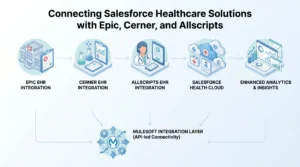
EHR integration is among the most challenging of technical tasks in Salesforce implementation healthcare projects. The objective is simple – provide a single view of the patient to all members of the care team, regardless of system. But the approach needs to be well thought out and strategic.
Why EHR Integration Is Non-Negotiable
Salesforce Health Cloud is a CRM – it’s about relationships, processes, and engagement. An EHR handles patient records, diagnoses, prescriptions, and orders. Neither replaces the other. They need to work together. If they’re not integrated, care teams are left with the difficult task of reconciling data from multiple systems, which leads to mistakes, delays in care, and erodes the value of the Salesforce patient management system.
Epic Integration
Epic is the leading large-system EHR in the US. Healthcare Salesforce Implementation is usually accomplished by using FHIR APIs – in particular, Salesforce’s native FHIR Connect app, which provides real-time access to patient demographics, encounters, and clinical records within Epic. This enables care team members to view clinical information in Salesforce without logging into Epic.
Cerner (Oracle Health) Integration
Salesforce healthcare implementation with Cerner facilitates data interoperability, enhances care coordination, and enhances workflows. After Oracle acquired Cerner, it is now known as Oracle Health, but integration methods using HL7 v2 and FHIR R4 are still common and used in many Salesforce implementation healthcare projects.
Allscripts (Veradigm) Integration
Allscripts, now called Veradigm, is most prevalent in smaller practices. Connecting Allscripts to the Salesforce healthcare solutions ecosystem provides a single view of patient data, improving clinical workflows and patient experience. Allscripts systems are typically integrated via HL7 interfaces.
MuleSoft as the Integration Layer
MuleSoft is the preferred integration layer for organizations with multiple EHR systems or those integrating Salesforce with multiple billing, lab, pharmacy, and scheduling systems. It provides uniform data mapping, API management, and data consistency across the board. Any major Salesforce implementation healthcare that includes three or more system integrations should consider MuleSoft as the integration layer rather than point-to-point integrations that can become increasingly complex.
How Salesforce Healthcare Automation Transforms Patient Engagement and Follow-Up
Salesforce implementation healthcare sees patient engagement automation as one of the first things to have a measurable impact after go-live. Salesforce healthcare automation converts patient engagement from a manual, labour-intensive process into a systematic, scalable approach – and it shows up quickly in metrics such as no-show rates, readmissions, and patient satisfaction.
Appointment Reminders and Confirmations
Appointment reminders (text, email, patient portal) greatly increase patient attendance. Using workflow automation in Salesforce Health Cloud, reminders can be set up according to appointment type, time of day, lead time, patient preferences, and provider. Responsive confirmations can automatically update the appointment record.
Post-Discharge Follow-Up Workflows
Discharge is a critical time for patient care. They’re given instructions, prescriptions, and appointments, and if these are not followed up on, readmissions increase. In any Salesforce implementation healthcare, workflows can automate check-in messages to patients at specific times after discharge, prompt the care team to follow up and investigate if the patient does not respond, and escalate the situation if the patient reports symptoms indicating a potential complication – all without the need for manual intervention.
Chronic Disease Management Outreach
Patients with chronic diseases – diabetes, hypertension, COPD, for instance – need regular follow-up. Healthcare automation with Salesforce allows disease-specific outreach journeys: reminders to take medications, follow up on lab results, check on lifestyle choices, and alert for care gaps, all automatically triggered by patient information and key milestones.
Care Gap Identification and Outreach
Einstein AI in Salesforce Health Cloud monitors patient groups to identify those who are past due for screenings, vaccinations, or appointments. Care Gap campaigns can be automatically triggered, so patients don’t have to learn during a crisis to visit that their car seat is expiring.
Common Challenges That Can Derail a Salesforce Implementation Healthcare Project
Failure of Salesforce implementation healthcare projects is more likely to be due to planning and people’s problems than technical problems. Understanding the most common issues will help you prepare them in advance. Whether you’re undertaking a Salesforce CRM implementation 2026 or a multi-year rollout in stages, here are the issues that keep recurring.
- Data Migration Underestimation: Patient data is messy. Data duplication, field mismatch, and data format issues lead to migration problems that are time-consuming to resolve.
- Lack of Clinical Input – IT-led projects without input from clinicians and care coordinators end up with systems that technically work but don’t align with clinical practice.
- Compliance is an Afterthought – Security and HIPAA configurations that are added at the end are often inadequate. The HIPAA strategy should be part of project planning.
- Poor Change Management – Adoption is not a given. Without dedicated training, communication, and support from the leadership team, employees will fall back into their old habits regardless of the system’s sophistication.
- Lack of Change Control – There are feature requests from all corners without change control, scope creep occurs, projects go over time, and over budget.
Conclusion
The right Salesforce implementation services is not just a technological project – it is a commitment to improving care, enhancing efficiency, and planning for the future. Whether it is the patient data model selected or the way PHI is secured at the field level, all aspects of a healthcare implementation impact what users can do with the platform. Healthcare providers who are clear, compliance-focused, and choose the right partner to undertake this work stand a better chance of success than those who view it simply as a technology rollout. The best Salesforce implementation healthcare is done by partners with both the technical and clinical expertise, and that is exactly what AnavClouds Software Solutions delivers, from scoping through go-live and on to continuous improvement.
FAQs
What is the difference between Salesforce Health Cloud and standard Salesforce CRM?
The Salesforce Health Cloud is a healthcare-specific solution that provides patient 360 views, care plans, integration with Electronic Health Records (EHR) systems, and HIPAA-compliant security – something that is not provided with Salesforce CRM.
How long does Salesforce implementation in healthcare typically take?
Salesforce implementation healthcare project durations vary from three to six months for simple implementations, to twelve months or more for complex projects, which include multiple EHR integrations, data migration, and workflow automatons.
Is Salesforce Health Cloud HIPAA-compliant out of the box?
No. Although Salesforce offers the right security features, healthcare companies must properly set them up (including signing a Business Associate Agreement with Salesforce) to ensure HIPAA compliance.
What should healthcare organizations look for in a Salesforce implementation partner?
Look for partners with the best healthcare CRM solutions for patient management and experience with HIPAA, EHR integration, and Salesforce-certified consultants who understand clinical practice – not just the ability to implement a CRM system.
Search Posts
Popular Posts
Author profile: Saransh Maurya, Content Writer at AnavClouds Software Solutions
Saransh
Maurya
About the author
Saransh Maurya is a dynamic and results-driven professional with a passion for innovation and problem-solving. Known for his analytical mindset and attention to detail, he excels at delivering high-quality solutions that drive business growth and operational efficiency. With strong communication skills and a collaborative approach, Saransh effectively bridges ideas and execution, contributing to successful projects and meaningful outcomes across diverse domains.
Recent Posts