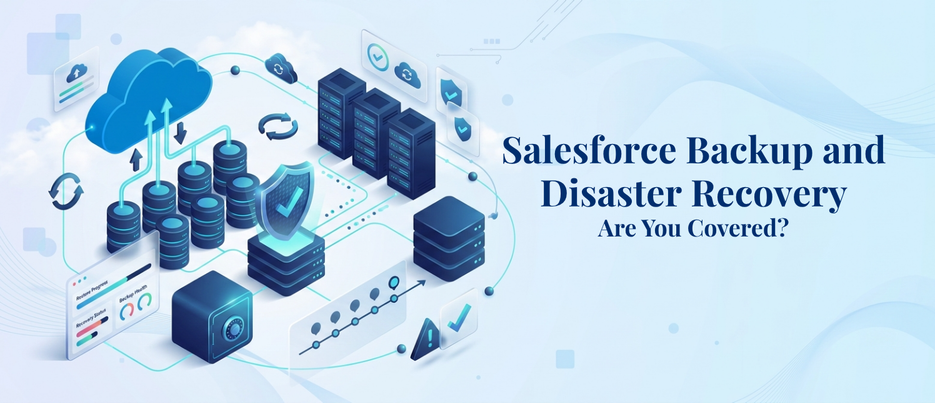
Salesforce Backup and Disaster Recovery: Are You Covered?
For most Salesforce admins, the platform’s built-in redundancy is sufficient to safeguard their Salesforce org. It isn’t. Salesforce backup and disaster recovery are a joint effort, and it’s the responsibility of both the company and you. By 2028, 75% of large enterprises will consider backup of SaaS applications such as Salesforce, a critical business requirement, compared with 15% in 2024. It’s a significant five-year leap, and it speaks for itself: businesses are beginning to see a void they didn’t realize existed. This blog explains what a real Salesforce backup and disaster recovery plan should entail, why native tools are inadequate, and how to create a plan that is viable in times of crisis.
What Is Salesforce Backup and Disaster Recovery, and Why Does It Matter Now?
Salesforce Backup and Disaster Recovery: The overall process of copying, storing, and restoring your Salesforce data and metadata to ensure your business can recover its data rapidly in the event of data loss, data corruption, or a Salesforce outage. It sounds straightforward. In reality, one of the most neglected aspects of Salesforce administration.
This is the fallacy that gets in the way of people: Salesforce runs your data on secure, redundant infrastructure, which means many teams think they have a backup. It isn’t. The infrastructure will keep Salesforce available in case of hardware failure or platform-level outages. It will not prevent an admin from deleting the wrong records, a bad integration from overwriting thousands of fields, or a user from running a mass update on the wrong list view. That takes place weekly, in organizations of all sizes.
This brings a growing amount and complexity of data into Salesforce, which is now being used in workflows in sales, service, marketing and, yes, even AI. That means Salesforce backup and disaster recovery becomes more than an IT checkbox and becomes a business continuity requirement.
Why Isn’t Salesforce’s Native Data Protection Enough?
Salesforce also has native solutions, but each has its limitations:
- Recycle Bin – 15-day limited retention period for deleted records – No assistance with metadata or configuration changes.
- Weekly Data Export – Free but manual – available as plain CSV files without a restore capability. It’s up to you to restore connections between objects.
- Salesforce Backup & Restore – A native add-on for Salesforce that is paid and provides automated backups plus point-in-time recovery; a step up. It still has a schedule that is controlled by Salesforce, however, and granular, field-level restores may be restricted based on your plan.
For teams that need protection beyond backup — like field-level encryption, event monitoring, and audit trails — Salesforce Shield adds another critical layer to your data security strategy.
None of these solve all of the problems of metadata protection, cross-object relationships, and speed and selectivity of recovery. Which is why Salesforce backup and disaster recovery planning is no longer a nice-to-have feature, particularly in industries such as healthcare, finance, insurance, and others that demand data integrity rather than just a desire.
This gap is felt by industries that have strict compliance requirements. A Health Cloud enabled healthcare provider has patient records associated with consent forms, case history, and integration with other systems. The financial services company has audit trails in place that regulators would expect to be complete years further down the road. These teams already have an advantage when it comes to Salesforce backup and disaster recovery – they don’t need to take just anyone’s word for it.
What Does a Strong Salesforce Disaster Recovery Plan Actually Include?
A controlled recovery is the difference between a disaster recovery plan and a scramble, and it is documented in a plan for Salesforce. It should outline what will happen at the first instance of data loss – who will be notified, who has permission to restore it, and how fast it needs to be restored.
Recovery Time Objective and Recovery Point Objective
Every serious plan has two numbers:
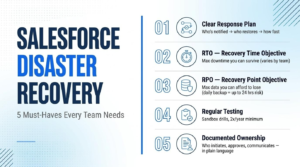
Salesforce recovery time objective (RTO) – What is the maximum time you can operate without certain data or workflows before it takes a toll? A two-hour locked-out sales team is not the same issue as a two-hour locked-out support team.
Recovery Point Objective (RPO) – How much data can be lost? With a daily backup, the worst-case scenario of losing up to 24 hours of records is possible.
When it comes to backup frequency, vendors routinely tout “point-in-time recovery,” but with once-a-day backups, your actual recovery point objective is much lower than it seems. The key to having a disaster recovery plan instead of just a theoretical plan is to be realistic about your Salesforce recovery time objective, which is based on the tolerance of each business function.
Testing, Documentation, and Ownership
A plan that has never been tried is just a plan. Conduct a recovery drill at least twice annually in a sandbox. Define clear responsibility in who initiates restores, who approves them, and who will communicate to affected teams. Record in plain language and be able to use it if the person who wrote it cannot use it that day.
What Are the Best Salesforce Data Backup Solutions Available Today?
The decision between using native tools and third-party Salesforce backup tools relies on the level of control, frequency, and granularity that your business requires.
Native Salesforce Backup & Restore is suitable for small organizations, with simple data models and minimal compliance requirements. It comes with it, comes at a reasonable price and is easy to switch on.
Third-party Salesforce backup tools (such as third-party tools like Gearset, Own (formerly OwnBackup) and Flosum) generally provide more frequent backup cycles, more depth of metadata backup, sandbox seeding and more flexible, field-level restore capabilities. These Salesforce data backup solutions typically more than make up for the extra expense for businesses with complex organizations, more environments, or strict compliance requirements.
The answer depends on the volume of data you’re handling, industry requirements, and how much downtime your business can afford. You’ll typically be able to see the answer by doing a quick scan of your most critical objects and workflows. Either way, use it as part of a larger Salesforce backup and disaster recovery strategy, rather than as an entire strategy.
How Can You Build Salesforce Data Loss Prevention Into Daily Operations?
This is part of a broader approach to Salesforce risk reduction — catching small issues before they turn into org-wide incidents.Backup is recovery as a backup. Salesforce data loss prevention is a topic of minimizing the likelihood of recovery in the first place. Some practices can make a difference:
- Restrict access to and editing of field-level and object-level data to only those who need it.
- Catch bad data – don’t let it in after you’ve entered it!
- Regularly audit integration and API activity. One of the most common reasons for data loss on a large scale is when an integration is misconfigured, and often it’s not until after the loss that you realize what went wrong.
- Educate users about bulk actions. Mass updates and mass deletes can be potent and hazardous if they’re in the wrong hands.
This is not a replacement for Salesforce backup and disaster recovery. It decreases the number of times you have to rely on it and makes a significant impact when each recovery event takes time, trust, and revenue.
How Does Salesforce Data Cloud Change the Backup Conversation?
Salesforce Data Cloud is gathering data from more sources than ever and is bringing customer data together across systems in near real time. It’s a strong argument for personalization and insights using AI, but it also means it’s a wider pool of things to protect. These errors, duplications, or omissions can climb up the data stream from sources to Salesforce Data Cloud, and the impact of these issues now cascades to a much larger, more connected data model.
With more teams utilizing Salesforce Data Cloud, the Salesforce backup and disaster recovery planning should follow suit. It’s not just about your CRM records anymore; it’s about the one that’s essential to the whole of your business.
What Role Do Salesforce Development Services Play in Disaster Recovery?
Backup tools safeguard your data. Salesforce development services ensure that your org’s architecture does not introduce any unnecessary risk in the first place. Commonly, the root causes of major data incidents are poor automation design, complex dependency relationships among objects, and undocumented custom code.
The recovery aspect is built into the development process with experienced Salesforce development services teams: cleaner data models, well-documented custom logic, and configuration changes that are tracked and reversible. That foundation creates your Salesforce backup and disaster recovery strategy to be significantly more effective, as you’re not simply backing up data; you’re backing up an org built to be recovered.
How Much Should You Budget for Salesforce Backup and Disaster Recovery?
The initial thought on leadership’s mind is always about cost. Salesforce backup and disaster recovery pricing depends on the volume of data, number of Salesforce orgs, frequency of backups, and additional advanced features such as sandbox seeding or granular metadata restore. When you get this budget conversation right early, Salesforce backup and disaster recovery won’t be an afterthought when it is time to renew.
Native Salesforce Backup & Restore is an add-on that is generally targeted for smaller, simpler Salesforce orgs. The Salesforce backup tools provided by third parties normally come with tiered pricing structures based on either the quantity of data you’re backing up or the number of users in your Salesforce org. The more effective approach to the question is not “How much is backup?” but rather “What is the cost of an uncovered data loss event?” The value of lost productivity, compliance risk, and the need to restore lost customer trust often make the cost of a well-designed backup and disaster recovery plan well worth the investment.
A short, practical checklist before you commit to any solution:
- Ensure that the backup frequency is correct and not simply what a vendor promises.
- Test restore speed in a sandbox environment BEFORE using in production.
- Ensure that metadata is backed up as well as records.
- Verify the solution applies to your Salesforce Clouds (Sales Cloud, Service Cloud, and Health Cloud, as appropriate).
- Review who needs to trigger a restore and how and where they are logged.
How Do You Choose the Right Salesforce Backup and Disaster Recovery Partner?
Not all internal teams have the capacity to implement, test, and audit data loss prevention (DLP) in addition to their regular Salesforce administration tasks. That’s where the right partner comes in.
Find a partner who understands your industry’s compliance needs, has real-world experience with both native and third-party Salesforce backup tools, and can help you establish realistic recovery time objective and recovery point objective targets that are specific to your business, not industry-generic targets. A well-rounded partner sees Salesforce backup and disaster recovery as a continuous process, rather than a set-up task.
Final Thoughts
Salesforce backup and disaster recovery are not a one-time solution. It’s a discipline that is ongoing and must keep evolving as your data grows, your integrations change, and your team expands. While native tools provide a foundation, there are several layers required to make most growing businesses better: effective data loss prevention practices, the proper third-party backup tools, and a disaster recovery plan that has been tested.
For businesses at AnavClouds Software Solutions, creating a Salesforce environment that is resilient isn’t something you do as an afterthought—it’s part of the design. The first indicator that it’s time to take another look at the current setup is if it has not been stress-tested in recent years.
FAQs
What is Salesforce backup and disaster recovery?
Salesforce backup and disaster recovery involves the process of backing up and archiving Salesforce data and metadata to enable swift recovery in the event of accidental deletion, corruption, or system failure, ensuring the continuity of the business.
Does Salesforce automatically back up my data?
Salesforce offers some built-in functionality, such as the Recycle Bin and weekly export, but a full backup and disaster recovery solution is usually required.
How often should Salesforce data be backed up?
This relies on the amount of data loss that your enterprise will be able to handle. Data that is subject to frequent changes or is critical may require daily or more frequent backups compared to static data.
What’s the difference between backup and disaster recovery?
Backup creates copies of data. The wider plan for restoring operations, systems, and access after an incident, which utilizes those backups, is called disaster recovery.
Search Posts
Popular Posts
Author profile: Saransh Maurya, Content Writer at AnavClouds Software Solutions
Saransh
Maurya
About the author
Saransh Maurya is a dynamic and results-driven professional with a passion for innovation and problem-solving. Known for his analytical mindset and attention to detail, he excels at delivering high-quality solutions that drive business growth and operational efficiency. With strong communication skills and a collaborative approach, Saransh effectively bridges ideas and execution, contributing to successful projects and meaningful outcomes across diverse domains.
Recent Posts