RAG on Salesforce: Build AI That Knows Your Business
Salesforce has always been the system of record for customer relationships. But as AI moves from buzzword to boardroom priority, the question has shifted from “should we use AI?” to “how do we make sure it doesn’t embarrass us?”
That’s where RAG on Salesforce comes in. Retrieval-Augmented Generation is the architecture that gives your AI real answers — grounded in your own data, not guesswork. It’s the difference between a chatbot that sounds helpful and one that actually is. If you’re a Salesforce-powered business thinking seriously about AI implementation in Salesforce, this guide covers everything you need to get it right from the start.
The Real Problem with AI in CRM: It Doesn’t Know Your Business
Here’s something most AI vendors won’t tell you upfront: large language models don’t know anything about your company. They’ve been trained on the internet — not your product catalog, your service policies, your case history, or your internal documentation.
When you deploy a generic LLM inside Salesforce without grounding it properly, it fills those knowledge gaps with confident-sounding assumptions. That’s called hallucination, and it’s more common than most businesses realize — in fact, 47% of enterprise AI users admitted to making at least one major business decision based on hallucinated AI content in 2024 (Fullview AI Statistics, 2025).
This isn’t a reason to avoid Generative AI in Salesforce. It’s a reason to implement it the right way — and that means building your Salesforce AI architecture around RAG.
What Is RAG on Salesforce, and Why Does It Matter?
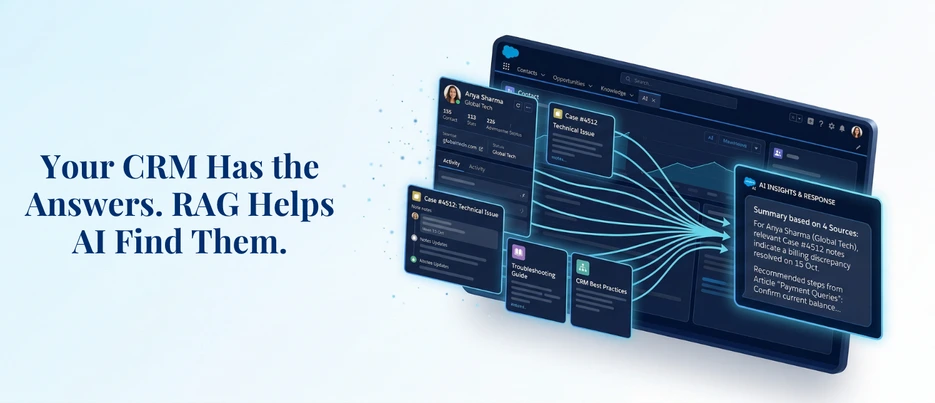
Retrieval-Augmented Generation (RAG) is a framework that combines the reasoning power of LLMs with real-time retrieval of relevant information from your own knowledge base. Instead of relying on what the model already “knows,” RAG pulls the right data at the moment of the query and injects it into the prompt before generating a response.
On Salesforce, RAG on Salesforce works within the Salesforce Data Cloud and Agentforce ecosystem. Your business data — knowledge articles, case resolutions, emails, product PDFs, call transcripts — gets processed, chunked, vectorized, and indexed. When a query comes in, the system retrieves the most relevant pieces of that indexed content and hands them to the LLM as context.
The result is an AI that speaks in your business language, uses your actual policies, and cites real sources instead of making things up.
How the Salesforce RAG Architecture Actually Works
Understanding the Salesforce RAG architecture at a component level helps you make smarter decisions during setup.
The process runs in two phases:
Offline Preparation is where the groundwork happens. Your data sources are connected to Salesforce Data Cloud, which ingests and processes both structured data (CRM records, case fields, knowledge articles) and unstructured data (PDFs, emails, audio transcriptions, notes). The content is chunked into meaningful units, each chunk is converted into a vector embedding, and everything is stored in a searchable index.
Online Usage is what happens every time a user submits a query. The query gets vectorized, the retriever searches the index for semantically relevant chunks, those chunks are injected into the LLM prompt, and the model generates a grounded response.
A key design decision in any RAG on Salesforce implementation is whether to use vector search, keyword search, or hybrid search. Hybrid search — combining semantic similarity with traditional keyword matching — consistently outperforms either approach alone. It reduces the inconsistency that comes with pure vector search and surfaces more precise results, especially when your content includes technical terminology or product-specific language.
Retrievers act as the bridge between your search indexes and your prompt templates. You can start with default retrievers and build custom ones as your use case matures — adding filters, adjusting result counts, and specifying exactly which data fields are returned.
RAG on Salesforce and Agentforce: Where It All Comes Together
The most practical place to see RAG on Salesforce in action today is through Agentforce, Salesforce’s AI agent platform. Agentforce agents are only as good as the context they have access to — and RAG is what gives them that context.
Salesforce has made the setup path fairly accessible through the Agentforce Data Library (ADL). When you configure an ADL, it automatically provisions the data streams, search index, retrievers, and prompt templates needed for a working RAG pipeline. You don’t need to configure every component from scratch — ADL handles the defaults while leaving room to customize as you scale.
For more advanced scenarios — multiple data sources, custom Salesforce objects, external document repositories — manual setup through Data Cloud gives you finer control. You can build separate search indexes for different content types (cases, knowledge articles, product specs) and connect multiple retrievers to a single prompt template or use an ensemble retriever that dynamically reranks results across sources. But make sure you hire reliable and expert Salesforce development services for better experience.
Salesforce Einstein AI runs throughout this architecture — managing the trust layer, handling model inference, and ensuring that your proprietary data isn’t exposed to external model training. This is a non-trivial benefit for regulated industries where data governance is a hard requirement.
Salesforce RAG Implementation: A Practical Step-by-Step Approach
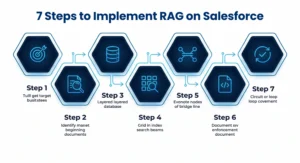
A successful Salesforce RAG implementation isn’t just a technical exercise — it’s a content and data strategy project as much as a configuration one.
Start With a Defined Use Case
Don’t try to solve everything at once. The most effective starting points for RAG on Salesforce are typically service resolution (helping agents find answers faster), internal knowledge Q&A (employees asking questions about policies or processes), and sales enablement (briefing reps before key meetings).
Audit Your Content Before You Ingest It
Garbage in, garbage out applies here more than almost anywhere else. Outdated knowledge articles, poorly structured PDFs, and fragmented case notes will produce poor retrievals no matter how well your index is configured. Clean, well-structured, context-rich content is the single biggest driver of RAG quality.
Set Up Salesforce Data Cloud as Your Data Foundation
Connect your Salesforce objects and external sources as data streams. Map your unstructured files from storage platforms like AWS S3, Azure Blob Store, or Google Cloud Storage. Data Cloud’s zero-copy architecture means files stay in their original location — only the processed chunks and vectors are stored in the index.
Configure Your Search Index With Hybrid Search Enabled
Choose your chunking strategy carefully — chunk size affects both retrieval precision and context quality. Use Data Cloud’s Intelligent Context workspace to test chunking configurations on sample documents before deploying at scale.
Build and Test Your Retrievers in Einstein Studio
Start with the default retriever, then create custom ones as needed. Test retrieval of quality across a range of realistic queries. If your retriever is returning irrelevant or incomplete chunks, the problem is usually either content quality or chunking strategy — not the retriever itself.
Connect Retrievers to Prompt Templates and Agent Actions
This is where LLMs in Salesforce receive their grounded context. Write prompt instructions that tell the model to rely only on retrieved content and to acknowledge when it doesn’t have enough information.
Monitor Continuously
RAG quality drifts when your underlying data changes and the index isn’t updated. Build a review cycle into your deployment plan — especially for knowledge articles and case resolutions that evolve over time.
What RAG on Salesforce Looks Like Across Industries
The use cases for RAG on Salesforce span virtually every sector that relies on a CRM.
- In financial services, relationship managers can ask Salesforce AI for a full client briefing — drawing from email history, call notes, and financial product documentation — before a client call. The response is grounded in actual CRM data, not generated from a general knowledge base.
- In healthcare, patient support teams can use RAG on Salesforce to surface the right care pathway documentation or insurance policy details in real time, reducing resolution time and improving compliance accuracy.
- In retail and e-commerce, service agents handling complex return or warranty queries get AI-assisted responses built from the actual product policies, not approximations.
- In manufacturing, teams dealing with technical product queries can pull from spec sheets, service manuals, and historical case resolutions — all unified through Salesforce Data Cloud — so every answer is precise and backed by documentation.
The common thread across all these scenarios is the same: RAG on Salesforce turns your CRM from a passive data store into an active intelligence layer.
Common Mistakes That Undermine RAG on Salesforce Deployments
Even experienced Salesforce teams run into avoidable problems. A few worth flagging:
- Treating Rag as a Plug-And-Play Feature.
It isn’t. The configuration is straightforward, but the content preparation, testing, and iteration cycle requires real investment.
- Ingesting Everything Without Curation.
More data doesn’t automatically mean better retrieval. Focused, well-structured content outperforms large, poorly organized knowledge bases every time.
- Skipping Hybrid Search.
Pure vector search produces inconsistent results on domain-specific content. Hybrid search is worth enabling from day one.
- Ignoring Governance.
Every piece of content going into your search index should be subject to the same access controls as the rest of your Salesforce data. RAG surfaces information — make sure the right information reaches the right users.
- Not Measuring Retrieval Quality Separately From Response Quality.
These are two different things. A well-written response built on poorly retrieved context is still wrong. Test your retrievers independently before evaluating end-to-end RAG performance.
Build Trustworthy AI on Salesforce — With the Right Partner
RAG on Salesforce is one of the most practical ways to make your Salesforce investment smarter without ripping anything out or starting from scratch. It works with what you already have — your data, your knowledge base, your CRM — and gives your AI the grounding it needs to be genuinely useful.
At AnavClouds Software Solutions, we help businesses design and implement RAG on Salesforce solutions that are built for real-world performance, not just proof-of-concept demos. And when your AI ambitions extend beyond CRM — into machine learning, advanced analytics, or custom model development — our sister company AnavClouds Analytics.ai brings deep AI and data engineering expertise to the table.
Frequently Asked Questions
What is RAG on Salesforce?
RAG on Salesforce is a framework that retrieves relevant business data at query time and injects it into LLM prompts, producing accurate, grounded AI responses within Salesforce.
How does RAG on Salesforce prevent AI hallucinations?
RAG grounds every AI response in retrieved content from your actual knowledge base, eliminating reliance on model assumptions and significantly reducing the risk of inaccurate or fabricated outputs.
Do I need Salesforce Data Cloud to implement RAG?
Yes. Salesforce Data Cloud handles data ingestion, chunking, vectorization, and search indexing — making it the essential foundation for any RAG on Salesforce deployment.
How long does it take to implement RAG on Salesforce?
A basic RAG on Salesforce setup using Agentforce Data Library can go live within days. Complex, multi-source deployments typically take a few weeks depending on data readiness and configuration scope.
Search Posts
Popular Posts
Author profile: Saransh Maurya, Content Writer at AnavClouds Software Solutions
Saransh
Maurya
About the author
Saransh Maurya is a dynamic and results-driven professional with a passion for innovation and problem-solving. Known for his analytical mindset and attention to detail, he excels at delivering high-quality solutions that drive business growth and operational efficiency. With strong communication skills and a collaborative approach, Saransh effectively bridges ideas and execution, contributing to successful projects and meaningful outcomes across diverse domains.
Recent Posts