Gaurav AnavClouds Software Solutions +1 917 266 9985 info@anavcloudsoftwares.com
admin – Page 5
Salesforce CRM analytics

Salesforce CRM Analytics can help unlock the full potential of your customer data, which can be a game-changer in business growth. Converting raw data into digestible insights helps organizations to maximize sales, increase the effectiveness of marketing, and ensure that customer experiences are improved. Providing businesses with the means to facilitate quantifiable outcomes, Salesforce CRM Analytics will enable them to reduce Customer Acquisition Cost (CAC), minimize decision-making, and simplify the process of ongoing business decisions. This is a roadmap to maximizing ROI using Salesforce CRM analytics, strategies to achieve it, including aligning goals with what the business needs, key metrics, automation, customization, and predictive insights that can turn your CRM investment into actual business value. 

Maximising ROI using Salesforce CRM Analytics: Competitive Business Strategic value 

Salesforce CRM Analytics is not merely a data tool, but the engine of smarter marketing, sales, and customer service strategies. Although Salesforce is already considered a top Customer Relationship Management (CRM) solution, numerous companies cannot discover the complete potential of this solution. Implementing CRM analytics within the companies will lead to the achievement of measurable outcomes, lowering Customer Acquisition Cost (CAC), and enhancing efficiency in operations. 

This guide will discuss practical solutions to enhance ROI with CRM Analytics, manage Salesforce investments, and use its customization and automation capabilities to succeed in the long term. As you grow your business and either scale your operations or speed up your digital transformation, maximizing your ROI on Salesforce CRM Analytics is no different. 

Integrating CRM Analytics: The Foundation of Salesforce ROI Success 

In order to realize the optimal ROI with Salesforce CRM Analytics, companies should not view Salesforce as a database but as a core system. Incorporating CRM analytics will turn Salesforce into a strategic asset by integrating it into workflows, automating repetitive work, and aligning it with customer and business requirements. This integration is what will make the difference between how simple to use Salesforce CRM Analytics is and how much potential there is to unlock. 

Make smarter sales decisions – Explore Salesforce Analytics!


Key Areas to Optimize Salesforce CRM Analytics for Higher ROI 

Data Integration with Salesforce CRM Analytics 

A combination of Salesforce CRM Analytics and business-critical systems (e.g., marketing automation platforms or financial software) will give the full picture of customer interactions, preferences, and history. CRM analytics integration can improve productivity and provide a long-term CRM approach when carried out by skilled Salesforce Development Services providers. 

Better ROI with Business Process Automation 

Automation within Salesforce CRM Analytics is a crucial element of any CRM strategy. Repetitive processes such as lead nurturing, follow-ups, and data entry can be automated, enabling teams to work on higher-value activities such as closing deals or addressing more difficult issues. These efficient workflows directly affect ROI with CRM Analytics and enhance operational efficiency. 

Personalized Customization through Salesforce consulting 

Every business has unique needs, and generic CRM analytics tools rarely deliver maximum value. The use of Salesforce consulting services and Salesforce Development Services will assist businesses in executing customization and automation in accordance with their workflows. This custom-oriented strategy supports the entire CRM strategy, as Salesforce CRM Analytics will provide real results and increase financial gains. 

Why Salesforce Consulting Services Are Critical for Maximizing CRM Analytics ROI 

 The single most likely missing link in making the full potential of Salesforce CRM Analytics realization is the engagement of expert Salesforce consulting services. When you do not have the technical depth of your internal team, a rational consultant will be needed to make the right decision regarding CRM analytics integrations, customization, and automation, all essential elements of Salesforce ROI optimization. 

 By collaborating with a reliable partner such as AnavClouds Software Solutions, you will have the advantage of Salesforce-certified professionals who offer extensive expertise in best practices, CRM analytics applications, and industry trends. Their advice will ensure that Salesforce CRM Analytics is aligned to your business objectives, lowers Customer Acquisition Cost (CAC), and solves digital transformation solutions faster. Through their Salesforce Development Services, your organization will be able to realize the maximum operational efficiency, workflow streamlining, and a measurable ROI on your CRM investment. 

Aligning Salesforce CRM Analytics with Business Goals for Maximum ROI 

In order to really optimize ROI using Salesforce CRM Analytics, companies have to align their CRM analytics strategy with the overall business objectives. Start with how CRM analytics can contribute to goals like better customer retention, more sales, or marketing efficiency. Monitoring KPIs using dashboards and reports will help you maintain control of how your team is performing, but a cross-functional team will maintain the relationships with customers at the forefront of the organization. 

 Optimizing your CRM system regularly is an important aspect to make sure that it meets the changing business requirements. Combining CRM analytics with other business intelligence tools would improve decision-making because they would present a holistic picture of operations. As an illustration, merging CRM information with financial data can assist in resource distribution at a better level. Increasing the accuracy and timeliness of the data ensures that all the decisions are made using trustworthy information, which can be simplified by professionals employed at AnavClouds Software Solutions via Salesforce Development Services. 

Key Metrics to Measure ROI with CRM Analytics 

 Tracking the right metrics is essential for measuring the effectiveness of Salesforce CRM Analytics. Pay attention to the indicators that have a direct effect on business performance, such as: 

  • Customer Acquisition Cost (CAC): Get to know the amount you pay to obtain a new customer. 
  • Customer Lifetime Value (CLV): Determine the amount of revenue a customer brings throughout his/her life cycle. 
  • Customer Churn Rate: Determine the percentage of customers who cease interacting with your business. 
  • Conversion Rate: Monitor the number of leads that are converted into paying customers. 
  • Customer Satisfaction (CSAT) Score: Measure satisfaction levels using feedback. 
  • Lead to Customer Conversion Rate: Determine the effectiveness of your sales funnel. 
  • ROI: Determine the financial payoff of your CRM investments against the expenditures. 

 These figures give a clear understanding of the performance of your CRM analytics strategy and areas that can be improved to increase ROI. 

Establishing Attainable Objectives to Realize Measurable ROI 

 Having attainable goals makes your group objective and productive. Analyze historical data to establish benchmarks and use them to set realistic goals for your Salesforce CRM Analytics initiatives. Indicatively, you have a lead to customer conversion of 20% today, then set the target of improving by 5% within the next quarter. 

 Break down the break goals into smaller steps that are easily achievable in order to monitor the progress made and to adjust the strategies accordingly. The review of targets ought to be periodically carried out in order to keep in line with the business goals. Businesses can develop a clear roadmap to success with the help of AnavClouds Software Solutions, as CRM analytics initiatives will guarantee returns on investment and streamlined interactions with customers. 

Choosing CRM Analytics Tools with Scalability, Customization, and Long-Term Growth 
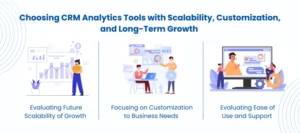
CRM Analytics Tools

In the implementation of Salesforce CRM Analytics, scalability, customization, and long-term business success rely on the selection of appropriate CRM analytics tools. Your CRM software must be capable of handling the increased volume of data and users without compromising performance as your organization expands. Scalable software Salesforce, HubSpot, Zoho CRM, and Pipedrive are flexible, scalable software with high-quality analytics and reporting features that can meet changing business needs. 

Evaluating Future Scalability of Growth 

To make your CRM analytics tools scale, concentrate on three points: 

  • Data Management: Ensure that the software will be in a position to hold huge volumes of data and provide advanced analytics, including predictive analytics and AI-based insights. 
  • Customization and Automation: Find tools implementing workflow customization and repetitive tasks automation to increase efficiency. 
  • Cloud-Based vs On-Premise: Cloud-based solutions are typically more scalable and will provide access and flexibility as the team grows, without losing the integration with Salesforce CRM Analytics. 

Focusing on Customization to Business Needs 

Customization will make sure that your CRM fits your own unique business processes. Pay attention to the tools that provide easy-to-use dashboards, interactive data visualization and powerful filtering. These attributes allow teams to study customer information in order to make a knowledgeable choice. 

As an example, Salesforce CRM Analytics provides a wide range of customization via workflow automation and custom dashboards. On the same note, Zoho CRM offers AI-enhanced sales forecasting and multi-channel communication, which is applicable to any business regardless of its size. AnavClouds Software Solutions assists organizations in deploying such customized solutions so that all features facilitate their own business needs. 

Evaluating Ease of Use and Support 

Friendly CRM analytics applications enhance adoption and enable teams to capture the full potential of the platform. There are platforms such as HubSpot and Pipedrive, which are famous due to their user-friendly interface, which can be used by teams with different technical backgrounds. 

Strong support possibilities are also crucial. Search through tools that provide training materials, live support, and community forums. These aspects improve the decision-making process, operational efficiency, and customer engagement and can help you achieve the full ROI of CRM Analytics. 

Taking Actionable Insights and Customer Segmentation with Salesforce CRM Analytics 

When Salesforce CRM Analytics is efficiently applied, businesses can transform raw data into actionable insights that can spur growth. Customer segmentation is one of the most effective strategies as it allows marketing and selling to the individual customer groups in a personalized way. Using demographics, purchase history, and behavior, businesses can develop separate segments and come up with personas that reflect the preferences and needs of each segment. 

Segmentation may be improved by combining external sources of data, and the sophisticated CRM analytics tools may anticipate upcoming behaviors and preferences. When equipped with such insights, organizations are able to customize their communication strategies, deliver personalized offers, and are also able to continuously monitor their performance to optimize campaigns. AnavClouds Software Solutions assists businesses in putting these strategies into practice successfully so that CRM analytics will produce results that are measurable in regard to customer retention and engagement. 

The Art of Maximizing Sales Funnels With Data-Driven Insights 

To optimize the sales funnel, it is important to know the progress of the prospects in each stage. Salesforce CRM Analytics gives an insight into all the interactions, be it in terms of calls and emails, to meetings and follow-ups. Through monitoring such activities, companies are able to discover what spurs deal movement, recalibrate tactics, and predict the results with precision. 

The duration reports of the stages display the bottlenecks, and the analysis of the won and lost deals demonstrates some efficient methods and the spheres that should be enhanced. Leveraging CRM analytics in this way streamlines sales processes, improves conversion rates, and maximizes ROI with CRM Analytics. 

Anticipating and Countering Customer Churn 

Predictive CRM analytics detects customers who are likely to leave, as well as assisting businesses in making proactive retention actions. Using demographics, purchase history, and feedback, organizations are able to develop churn prediction models and risk-score customers. 

The high-risk customers can be segmented, thus enabling improved retention strategies, including the use of loyalty or personalized problem-solving. On-the-fly tracking and target marketing can be used to ensure engagement and lessen the churning over the long term. Using Salesforce CRM Analytics, businesses can use predictive analytics to their advantage with the help of Salesforce development services and build and enhance relationships with the highest ROI. 

Conclusion 

To achieve maximum ROI with Salesforce CRM Analytics, a strategic plan that integrates information into actionable decisions, personalization, automation, and recommendations is essential. Through aligning CRM analytics to the business purpose, monitoring key performance indicators, and making use of predictive insights, the business is in a position to lower Customer Acquisition Cost, enhance customer retention, and streamline sales and marketing activities. Collaboration with reputable suppliers such as the AnavClouds Software Solutions will provide a smooth integration, custom-made solutions, and useful CRM analytics deployment. Through the proper approach and tools, Salesforce CRM Analytics can be a potent catalyst for digital transformation, operational effectiveness, and quantifiable growth for companies of all sizes. 

FAQs 

What is Salesforce CRM Analytics, and why is it important to ROI? 

Salesforce CRM Analytics is a tool that analyzes data about customers to provide actionable information that enhances decision-making and operational efficiency. With these findings, the businesses will be in a position to enhance customer experiences, boost sales and marketing strategies, and achieve significant ROI. 

How do I select the right CRM analytics tools for my business? 

Choose the instruments that are scalable, customized, and user-friendly. Identify such features as workflow automation, advanced data visualization, predictive analytics, and seamless integration with other business systems to make sure your CRM analytics strategy contributes to growth. 

Can small businesses benefit from Salesforce CRM Analytics? 

Absolutely. Salesforce CRM Analytics can help small businesses to determine customer behavior, improve marketing campaigns, and streamline sales activities. Cloud-based solutions can be expensed to allow small groups to start with limited functionality and add additional features as requirements arise. 

How frequently should I monitor CRM analytics performance? 

Reviewing those trends on a monthly or quarterly basis should be important to gauge progress and streamline strategies. Target such metrics as Customer Acquisition Cost (CAC), conversion rates, and customer retention to get the most ROI with Salesforce CRM Analytics. 
 

Custom Salesforce Development

Any business is entitled to a CRM that functions in a manner that it requires. Custom Salesforce development takes the default Salesforce CRM and turns it into a robust, customized solution that fits your workflow, automates processes, and surfaces actionable insights. With the help of the role of Salesforce developers, organizations will be able to facilitate operations, improve customer relations, and achieve sustainable growth. Individualized dashboards to flawless system integrations, specialized Salesforce solutions empower opportunities that are not merely achievable with off-the-shelf platforms. We will discuss how custom Salesforce development can help streamline operations to become a big part of businesses. 

What is Custom Salesforce Development?  

The Custom Salesforce development is about how to make Salesforce CRM to suit your business requirements. Utilizing Salesforce development services, companies can optimize customer relationship management, collaborate more efficiently, and generally be more effective. 

Custom Salesforce solutions can be used with cloud-based technology to reach customers, partners, and clients in a seamless manner. They can help you to monitor and examine how you are interacting with your customers, automate your routine activities, and concentrate on what is actually making your business go. 

This has obvious advantages of Salesforce custom development: rather than managing with features you do not even need and/or reducing your operations to workflows, you have the flexibility of customizing Salesforce to your specific operations. This guarantees that your business develops stably with complete control of your CRM environment. 

Custom Salesforce development for smoother operations


Key Areas for Salesforce Custom Development 

When you hire Salesforce developers, they can transform your Salesforce CRM into a highly tailored platform that fits your business processes perfectly. The following are the key areas that Salesforce custom development can really impact: 

  • Custom Objects: Store and process data according to your business requirements. 
  • Custom Fields: Add the necessary data and use other fields that fit in your unique processes. 
  • Custom Workflow Rules: Custom workflow rules are used to automate routine business activities through rules that are defined based on their conditions in order to save time and minimize errors. 
  • Custom Validation Rules: This ensures that incoming data is up to the expected standards before it is stored to be accurate and consistent. 
  • Custom Reports & Dashboards: Get valuable analytics by using custom reports and dashboards to make smarter decisions. 
  • Visualforce Pages: A Visualforce Page is a special-purpose user interface created by developers to meet specific business needs. 
  • Lightning Components: Develop reusable elements of the dynamic and modern web applications on Salesforce. 
  • Apex Classes and Triggers: Custom code also allows complex business processes to be automated and enables extending. 
  • Third-Party Integrations: Integrate Salesforce with ERP, eCommerce, and other tools needed. 
  • Designed User Interfaces: Customize themes and layouts to match your brand. 
  • Custom Email Templates: Visualforce Design visually appealing email templates (branding). 
  • Custom Community Portals: Strengthen teamwork by creating collaboration portals with partners, customers, or employees. 
  • Event Management Tools: Simplify event activities using check-in, scheduling, and tracking capabilities. 
  • Better Views and Layouts: Ease of use through improved list views and page layouts to access key information easily. 

These Salesforce development areas will enable your business to fully exploit the strength of CRM without making workflows complex and difficult to use. 

Essential Components in Salesforce Custom Development 

The major elements of Salesforce development are important to businesses that want to make the most out of their CRM. When you contract developers to do a custom Salesforce development, they apply these tools to create customization, automation, and optimization of your Salesforce CRM efficiently: 

Apex 

The Salesforce proprietary programming language is called Apex. It is automated by certified Salesforce developers in order to automate business processes, process certain business rules, and develop scaling apps that can expand with your organization. Apex is used to ensure a seamless transaction and operations on the Salesforce platform. 

Visualforce 

Visualforce is a dedicated markup language to create interface customization in Salesforce. It is also integrated with the Lightning platform, which enables developers to build dynamic pages that interoperate with your Salesforce data, just like HTML with Salesforce. Visualforce Standard controllers are used to perform simple database operations effectively. 

Lightning Components 

Lightning Components allow developers to develop contemporary and performance-oriented user interfaces in Salesforce applications, Experience Builder websites, and the Lightning Experience. Lightning Web Components (LWC) is a developer technology that enables programmers to build web-based applications using common web technologies, such as HTML, CSS, and JavaScript. 

Salesforce Object Query Language (SOQL) 

SOQL enables developers and users to search through Salesforce data to retrieve information. It eases data searches, report-making, and filtering of records, and is an essential resource in tailored Salesforce development. 

Salesforce APIs 

The Salesforce APIs (REST, SOAP) offer the guidelines and instruments to unite external applications with Salesforce. These APIs enable developers to access, update, and automate Salesforce data, integrating your CRM with ERP systems, eCommerce platforms, and other important applications. 

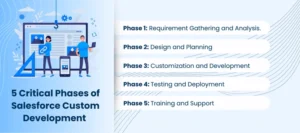
5 Critical Phases of Salesforce Custom Development 

Phases of Salesforce Custom

A systematized approach to Salesforce development is necessary to make sure that your Salesforce CRM perfectly fits your business objectives. When you contract Salesforce developers, they consider the following main steps to develop successful custom Salesforce development: 

Phase 1: Requirement Gathering and Analysis

The process starts by gathering and evaluating all the business requirements. It is an important step towards you knowing your processes, goals, and expectations. Through involvement of the stakeholders, the developers can determine the critical functions, challenges, and opportunities, which will lead to a customized solution that will result in a successful Salesforce implementation. 

Phase 2: Design and Planning 

The developers and designers then come up with detailed blueprints depending on the requirements collected. This involves data models, workflows, UI layouts, and the choice of the appropriate tools, including Apex to use as a backend logic and Lightning Components as a user interface. Effective planning facilitates the alignment of the end Salesforce solution to the business. 

Phase 3: Customization and Development 

The development team now starts to write code and assemble your custom Salesforce development solution using blueprints. The stage is associated with developing unique applications, automation, and linking third-party systems through Salesforce APIs and tailoring options to optimize workflows and give users a better experience. 

Phase 4: Testing and Deployment 

Once developed, extensive testing of the project is undertaken, in terms of unit testing and user acceptance testing (UAT), to ascertain the proper functioning of workflows, data, and integrations. The deployment is done in a controlled manner, typically through Change Sets or DevOps tools, to facilitate a smooth transition with minimum impact to the business operations. 

Phase 5: Training and Support 

The last stage is dedicated to user empowerment. On-the-job training, documentation, and constant Salesforce consulting will guarantee that your company will be able to utilize the system. Ongoing support and maintenance assistance resolve problems promptly and make updates as your company changes to ensure your Salesforce CRM is streamlined to succeed over time. 

Key Advantages of Salesforce Custom Development 

By collaborating with the appropriate Salesforce development services, you can be sure that your CRM will be adjusted to the objectives of your business and will provide tangible outcomes. In the case of custom Salesforce development, the skills of the developers lead to each and every step, from strategy to implementation, unlocking the complete strength of Salesforce CRM. Custom Salesforce development has the following benefits to your organization: 

Customized Products to meet Special Business Requirements 

No business functions alike, and Salesforce custom development can give your CRM the exact match to your goals. Store shelf solutions can be lacking in essential nuances, whereas custom development will provide: 

  • Custom Workflows: Workflow Automation Workflows that resemble your business processes. 
  • Customized Dashboards: Get the metrics that are most important to your teams to make more decisions. 
  • Business-Specific Solutions: Customize Salesforce to fit the specific demands of companies in specific industries such as healthcare, retail, finance, or manufacturing. 

These custom-built solutions make them more productive, less manual, and more customer-oriented. 

Scalability to Support Business Growth 

Your CRM must increase in tandem with your organization. Custom Salesforce solutions empower: 

  • Execution of New Features: Integrate third-party tools, plug-ins, or applications seamlessly. 
  • Dealing with Greater Data Velocity: Optimally scale your system to handle larger datasets without reducing its performance. 
  • Future-proof operations: Construct a scalable design that can adapt to new technologies and market demands. 

Improved User Adoption and Experience 

The user-based CRM leads to increased adoption and ROI. Custom development enhances usability with: 

  • Streamlined Interfaces: User-role-specific interfaces. 
  • Robotic Processes: Have the free teams do away with monotonous activities so that they can concentrate on strategic work. 
  • Easy to Use: Smoother operations to access tools and data more quickly. 

Intuitive connection with the existing systems 

Tailored Salesforce development guarantees seamless access to your business ecosystem: 

  • ERP Systems: Combine financial and operational data to have a single insight. 
  • Marketing Tools: Connect apps such as HubSpot or MailChimp to do comprehensive campaigns. 
  • E-Commerce Platforms: Track customer experiences across the board by integrating CRM and online stores. 

Advanced Analytics and Insights 

Custom Salesforce development will make data-driven decisions easier: 

  • AI and ML Integration: Make predictions and anticipate customer trends. 
  • Custom Reports: Create insights about individual metrics. 
  • Real-Time KPI Tracking: See the performance and take initiative. 

Better Security and Compliance 

Secure confidential information and remain within regulatory provisions: 

  • Role-based access: Multi-Factor authentication and custom Security Protocols. 
  • Regulatory Compliance: Meet GDPR, HIPAA, or CCPA standards. 
  • Audit Trails: Keep a record of system activities to ensure accountability and transparency. 

Efficiency in the Long Run 

The cost of custom development is initially expensive, but it saves money in the long term by: 

  • Optimization of Resources: Concentrate on value-adding activities and reduce unnecessary activities. 
  • Minimizing Downtime: Develop a high-quality system to avoid breakdowns. 
  • Maximize ROI: Improve productivity, efficiency, and customer satisfaction in the long term. 

Through Salesforce custom development, companies acquire an efficient, secure, and scalable CRM system, which expands to their requirements whilst ensuring measurable value. 

Conclusion 

Custom Salesforce development is the beginning of unlocking the full potential of Salesforce CRM. Through collaborating with certified Salesforce developers and Salesforce implementation partners such as AnavClouds Software Solutions, the businesses will enjoy custom workflows, advanced analytics, better security, and scalable solutions that will expand as their needs grow. AnavClouds Software Solutions will help you achieve the desired result of your CRM and achieve long-term business success, whether it is a goal of increasing efficiency, enhancing user adoption, or integrating multiple systems. 


Frequently Asked Questions 

Is Salesforce truly customizable to my business needs? 

Absolutely! The custom Salesforce development makes it possible to do whatever you desire with your CRM, whether it is by workflows or dashboards, and align it to your business. This will guarantee you a system that works in your favour and not vice versa. 

How quickly can I see results after hiring Salesforce developers? 

The appropriate Salesforce development services will allow you to begin realizing the benefits of efficiency, automation, and enhanced insights in a few weeks of implementation. Furthermore, all modifications can be made to make the most of your team from the first day. 

Will custom Salesforce development help my team actually use the CRM more effectively? 

Yes! Salesforce has customized interfaces, streamlined navigation, and automated functionality, making it easy to operate to increase adoption and ensure your staff remains productive. This will make sure that your employees will not take so much time to learn the system, but instead, they will focus on attaining business objectives. 

Does Salesforce integrate with the rest of the tools that my business utilizes? 

Definitely. Salesforce development can be extensively customized to integrate with ERP systems, marketing platforms, and e-commerce applications, and so forth, to disperse data and make smarter decisions. Having all things linked, your business will have a 360-degree perspective of operation and customer relationships. 

Salesforce Data Compliance

One of the crucial elements of the present-day business is data, and data mismanagement can expose organizations to grave danger. Salesforce Data Compliance provides a way to ensure your sensitive information is stored safely and corresponds to all regulatory requirements. Companies can use AI to automate compliance work, increase Salesforce Data Security, and reduce workflows without efficiency loss by employing Salesforce AI models. But failure to adhere to data compliance can lead to hefty penalties of about 4% of annual turnover. Based on the presence of tracking data access and accuracy-related concerns, as well as the convenience of consent and retention policies management, AI-driven Salesforce tools can assist businesses in remaining compliant and generating smarter and faster operations. 

Understanding Salesforce Data Compliance 

Salesforce Data Compliance is the method that guarantees that all personal and sensitive information in Salesforce is gathered, processed, and stored in a system that has high legal and organizational standards. 

As AI in Salesforce grows, maintaining compliance is essential, but using Salesforce AI models to derive data-driven insights is also essential. The principles of Salesforce Data Compliance include data minimization, purpose limitation, and accountability to ensure the safety of information about individuals. 

It also places individuals in control of their data, including access, correction of errors, and the opportunity to request deletion, which contributes to trust and transparency in Salesforce Data Security practices. 

AI-Powered Tools in Salesforce for Data Compliance 

Salesforce artificial intelligence (AI) solutions are crucial in improving Salesforce Data Compliance since they can automatically discover, classify, and identify anomalies in data. 

The real-time monitoring of the data activity through tools such as Einstein Analytics enables organizations to locate and fix possible compliance issues promptly. The abilities are particularly useful in handling big data and being transparent across operations, which is guaranteed by strong Salesforce Data Security. 

To enterprises, to streamline marketing activities and remaining within the confines of the law, Salesforce provides customized AI solutions that optimize data utilization within the secure and legal frameworks. The use of these Salesforce AI models can guarantee effective operations without damaging data compliance. 

Collaborating with Salesforce development services or professional consultants will enable organizations to use AI capacity to the fullest extent without compromising Salesforce Data Compliance. Workflow optimization, data management, and improved marketing strategies can be achieved by the consultants in a secure and compliant environment. 

As well, Salesforce AI Copilot shows how AI can enhance business productivity and assist data protection and compliance initiatives, showcasing the usefulness of adopting AI into Salesforce. 

Take control of Salesforce data compliance with smart AI tools


How to Implement AI in Salesforce for Data Compliance 

The application of AI in Salesforce can greatly improve Salesforce Data Compliance by making sure that your organization adheres to regulatory and in-house data requirements and utilizes Salesforce AI models to their advantage. Here’s a step-by-step approach: 

Test Your Salesforce Data Compliance 

Prior to implementing AI solutions, measure your current Salesforce Data Compliance framework. Perform a comprehensive data audit to establish the presence of any personal and sensitive data stored and processed in Salesforce. 

Data flows Map data, examine processing activities, and indicate any areas of compliance that might be weak. Maintaining a clear view of your current Salesforce Data Security posture, use Salesforce reporting and analytics to understand data usage and access patterns, as well as provide a clear picture of current Salesforce Data Security practices. 

Choose AI Solutions for Salesforce Data Compliance 

Once you have calculated the status of compliance, you will select AI tools that resonate with your Salesforce Data Compliance goals. Salesforce provides effective AI applications, such as Einstein Analytics, helping to find, classify, and keep track of data. 

Based on these AI models, compliance tasks are automated, including the process of identifying sensitive data, detecting anomalies, and securely handling data. Ensure that these tools can be seamlessly incorporated into your current Salesforce setting to ensure data integrity and privacy. 

Establish a Strong Data Governance System 

AI-based Salesforce Data Compliance requires a powerful data governance framework. Have clear data ownership, firm access controls, and a set of overall data processing policies. 

Integrate AI into such procedures in order to automate data management, which is to ensure the uniform implementation of compliance standards. Review and revise the structure every now and then to fit new regulations and changing organizational requirements. 

Educate Your Workforce on AI and Salesforce Data Compliance 

The awareness of the employees plays a vital role when utilizing AI in Salesforce Data Compliance. Train employees about compliance, the place of AI in Salesforce, and best practices in using AI models. 

Concentrate on the privacy of data, security, and practical use of AI-based compliance systems. To maintain a smooth transition, take into account Salesforce development services to tailor your platform to compliance requirements and streamline the workflows. 

Monitor and Maintain Continuous Salesforce Data Compliance 

After implementing AI solutions, initiate monitoring mechanisms so that compliance is maintained. Keep track of data processing, access logs, and identify the possible compliance risks in real-time using AI models. 

Establish automatic notices of abnormalities, so that corrective measures can be taken promptly. Frequent audit of AI tools will help keep AI tools effective, secure, and in line with Salesforce Data Compliance and Data Security standards. 

Overcoming Salesforce Data Compliance Challenges with AI 

Not only do AIs at Salesforce make the company more efficient, but they also increase Salesforce Data Compliance, which allows organizations to effectively address typical issues in data management. 

Data Access Requests Salesforce Automation 

One of the most important matters of Salesforce Data Compliance is administering the access requests to the data. These requests may be processed manually in a slow and error-prone manner. 

Using AI in Salesforce, companies can delegate the process of identifying and retrieving personal data and delivering it by using AI to make sure that the information is delivered in a timely fashion and is accurate. AI models developed by Salesforce are capable of sifting through massive amounts of data to identify the required information, integrating it, and delivering it in an understandable format, simplifying the process of compliance. 

Enhancing Consent Management using Salesforce AI 

Data compliance standards require keeping a clear consent for data processing. Manual consent management can be complicated in the case of organizations that have a large number of customers. 

Consent collection, monitoring, and tracking are the areas of AI use in Salesforce. It breaks down customer contacts to make sure that consent is adequately sought and sustained, and any anomalies are noted. Such a proactive strategy enhances Salesforce Data Security and establishes confidence in users. 

Identifying and averting Data breaches 

Data breaches are a major risk to Salesforce Data Compliance. The Salesforce Data Security is improved with the help of AI tracking access patterns and identifying suspicious behavior that can signal a breach. 

Machine learning models can detect intruder access or data leakages so that corrective measures can be taken immediately. The use of AI in continuous monitoring will enable the keeping of data in accordance with Salesforce Data Compliance. 

Data Minimization and Retention 

Salesforce Data Compliance focuses on the need to store and remove only the required information. 

Salesforce AIs are able to locate duplicate or outdated information, automate routine data cleaning, and impose retention regulations. This saves on the cost of storage, lowers risks, and adheres to the data compliance principles. 

Assuring Data Accuracy and Integrity 

Salesforce Data Compliance requires the accuracy of data. AI at Salesforce is capable of cross-checking documents, identifying anomalies, and automating data verification operations. 

This guarantees trusted client details, decision-making, and minimizes the chances of compliance problems introduced by inaccurate or obsolete data. 

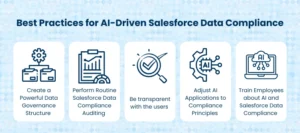
Best Practices for AI-Driven Salesforce Data Compliance 

AI-Driven Salesforce Data Compliance

Salesforce Data Compliance can be greatly improved through the adoption of AI in Salesforce if best practices are implemented. This is the way organizations can achieve greater compliance and use Salesforce AI models to their advantage. 

Create a Powerful Data Governance Structure 

Salesforce Data Compliance is heavily based on a robust data governance framework. Particularly clarify the data ownership, establish stringent access control, and establish processing principles within Salesforce. 

AI in Salesforce is able to track compliance with these policies, identify exceptions, and maintain continuous adherence. Regular audits and updates ensure your governance architecture is consistent with the changing data compliance regulations and Salesforce Data Security standards. 

Perform Routine Salesforce Data Compliance Auditing 

It is necessary to conduct periodic audits to determine the effectiveness of your compliance measures. The AI models will be able to study the process of data processing within Salesforce, pinpoint the possible gaps, and propose the corrective measures automatically. 

Automated reporting tools give in-depth information about compliance performance and assist organizations in continually improving and actively managing Salesforce Data Compliance. 

Train Employees about AI and Salesforce Data Compliance 

Employee awareness is key to maintaining Salesforce Data Compliance. Regularly conduct data protection principles, AI use in Salesforce, and secure data management best practice training. 

Artificial intelligence is able to complement training initiatives, provide personalized learning content, interactive lessons, and performance testing, so that your staff is ready to work with data responsibly. 

Be transparent with the users 

Salesforce Data Compliance is based on transparency. Advertise the application of AI to data processing, describe data processing and collection practices, and educate people on their rights. 

AI may help to create explicit privacy statements and find methods of controlling communications channels to build trust without violating Salesforce Data Security policies. 

Adjust AI Applications to Compliance Principles 

When incorporating AI in Salesforce, it is essential to make sure that the AI models comply with the most important principles of fairness, accountability, and transparency. 

Complete Data Protection Impact Assessments (DPIAs) of AI projects, reduce the risks of the projects, and make the decisions made by AI explainable. By connecting AI applications to Salesforce Data Compliance, organizations can access AI use without losing regulatory compliance.  

Future of Salesforce Data Compliance: AI and Evolving Regulations 

The future of Salesforce Data Compliance will be determined by the progressive AI opportunities, the changing regulations, and the adoption of ethical AI practices, which will help organizations to remain at the forefront of data protection. 

The future of AI in Salesforce Data Compliance 

The Salesforce AI is a constantly developing field, and predictive analytics and compliance monitoring are being improved with the help of machine learning and natural language processing. 

These AI models enable organizations to actively predict possible risks, foresee compliance challenges, and take corrective measures before they deteriorate and enhance Salesforce Data Security and general compliance frameworks, on the whole. 

Compliance with changing security rules for data 

With the increase in data protection issues, the movement of regulations such as GDPR and other international standards is likely to change and come with more stringent demands. 

AI can assist companies in tracking changes in regulations, evaluating how it will affect current Salesforce Data Compliance mechanisms, and implement strategies as quickly as possible, so that uninterrupted compliance with the legal requirements and Salesforce development services can be maintained. 

Integrating AI Ethics into Compliance Strategies 

Ethical AI is becoming a critical component of Salesforce Data Compliance. Organizations have to make sure that AI applications in Salesforce are just, open, and considerate of individual rights. 

Combating AI bias, providing explainable judgments, and responsible AI practices would both assist organizations in earning trust and support Salesforce’s Data Security and compliance initiatives. 

Improved AI in Salesforce to meet Compliance 

Salesforce is still bolstering its AI services to contribute to compliance work. Such technologies as more sophisticated AI-based data classification, anomaly detection, automated reporting, and real-time monitoring may be added to Salesforce Data Compliance in the future so that it will become more efficient and reliable than ever. 

Conclusion 

Maintaining Salesforce Data Compliance is no longer a manual, time-consuming process. Through Salesforce with the integration of AI, companies are capable of automating the monitoring process, enhancing Salesforce Data Security, and compliance with changing regulatory requirements. Other best practices, such as effective governance systems, employee education, and open data management, also contribute to compliance efforts. Collaborating with a professional Salesforce development service, e.g., the ones at AnavClouds Software Solutions, gives companies an opportunity to take the best out of AI and remain in full compliance. Use the force of Salesforce AI models in the modern world to protect your data, optimize your workflows, and earn the confidence of your customers. 

Custom Salesforce Integration

Consider having a professional services firm, and all processes, including client onboarding and updates on their projects, run smoothly, and your team is free to establish relationships rather than manage a variety of systems. That is precisely what a custom Salesforce integration can do. With Salesforce integrating with your current tools and processes, your company can automate repetitive processes and workflows, get real-time insights, and improve your operational processes. This guide will discuss how professional services firms may develop custom Salesforce CRM integrations, the major considerations to make before beginning, the development stages involved, and the ways to address obstacles to success. 

Streamline Professional Services with Custom Salesforce Integrations 

Professional services companies exist based on trust, experience, and close relations with clients, not on clear products. All interactions, bills, and project updates create the experience of the client. Salesforce for professional services provides all of these essential factors on a single platform, which makes the operation of professional services smooth and efficient. 

  • Improve Client Experience: Utilize a centralized system to store all communications, proposals, and follow-ups, providing clients with uniform, high-quality services. 
  • Engineer Growth Without Strain: Automate the repetitive processes to liberate the time of your staff so that they can concentrate on developing relationships with clients that matter. 
  • Have Full Operational Visibility: Trace resources, budgets, and project schedules without having to switch between tools or programs. 

Nevertheless, it is not only necessary to rely on Salesforce. Compliance tools and project management software, a finance system, and a collaboration application are also used by most firms. These systems also become disconnected, and teams become more likely to work harder rather than smarter. Here is where Salesforce custom integration will be important, as they will allow companies to integrate all platforms into a more streamlined workflow and more intelligent decision-making. 

The Reason Professional Services require Tailored Salesforce CRM Integrations 

Asking yourself whether your company needs a custom Salesforce integration? The custom integrations are needed in most situations to: 

  • Integrate Salesforce into your current software ecosystem: Connect Salesforce to other applications in your daily work environment, including ERP systems, accounting applications, and eCommerce platforms. 
  • Facilitate easy data movement: make sure that information is flowing easily between Salesforce and internal or legacy systems, without any need to manually enter data or make mistakes. 
  • Automate workflows with many tools: Integrate workflows such as marketing campaigns, client onboarding, and customer support without balancing on many tools. 

Salesforce is the biggest CRM market with a 22% share, but it also has thousands of ready-built integrations available in its AppExchange. Ready-to-use connections are available to LinkedIn, Zoom, DocuSign, Stripe, and others. 

Nevertheless, ready-to-use integrations are not unrestricted. Relating Salesforce with custom applications or legacy systems is not always possible without in-the-box applications. Custom Salesforce CRM integrations customize every part from data security to automation scripts. It also make sure that your business-specific workflows are optimized. 

Custom Salesforce solutions designed for your business needs.


6 Essential Considerations Before Launching a Custom Salesforce Integration 

Building a custom Salesforce integration is not merely a way to connect systems, but also to change the way your professional services organization functions. An effective integration has the potential to simplify the workflows, enhance relationships with clients, and offer real-time insights. But since custom development is costly, time-intensive, and requires planning, it is important to consider these six key points before making your project a success and achieving a tangible ROI.  

Have Your Objectives Clearly Defined 

The first thing that any successful Salesforce custom integration should do is to know what you want to accomplish. In the absence of a clear objective, developers will just make guesses about what you need, which may lead to time-consuming revisions. Begin by identifying: 

  • Basic functionality: Choose whether you will require real-time data synchronization, batch updates, or bidirectional flow of data. 
  • Direction of integration: Decision on whether to have an inbound and/or outbound flow of data. 
  • Involvement of systems and processes: Determine which software, databases, or legacy systems will integrate with Salesforce. 
  • Use cases: Indicate individual business processes, like automating client onboarding, project updates, or financial reconciliation. 
  • Success KPIs: Establish quantifiable results, e.g., a decrease in the number of manual entries, a shortened project delivery time, or better customer satisfaction. 

These goals should be clearly documented not only to show the direction to developers but also to make sure that the integration aligns with your long-term business strategy. 

Determine and Map Your Data Requirements 

Any custom Salesforce integration is based on data, and it is important to know what you need to do in the first place. Consider: 

  • Types of data: Does the integration support customer data, lead data, inventory data, or project data? 
  • Storage and volume: Figure out what you store where and whether you need large volumes to be optimized. 
  • Data flow and frequency: Determine the frequency of data syncing; real-time, scheduled, or not. 
  • Information integrity and converters: Develop data accuracy, data validation, and data formatting standards to avoid redundancies or inconsistencies. 

At this stage, it is important to conduct a data mapping exercise. You can identify transformations that are needed, minimize errors, and produce smooth compatibility of data across all platforms. 

Select the Appropriate Integration Method 

Choosing the most effective integration strategy provides efficiency, security, and scalability. Typical custom Salesforce integration are: 

  • API-Based Integrations: Use Salesforce REST, SOAP, or Bulk APIs to integrate systems. APIs are reliable, Salesforce-supported, and standardized, which makes them best suited to real-time data. They need technical skills and supervision, though, to prevent the overuse of calls. 
  • Middleware Solutions: Middleware systems, such as MuleSoft or Zapier, serve as intermediaries, facilitating complicated data manipulation between two or more systems. The middleware is easy to use and there are drag-and-drop interfaces; however, it may add expenses and dependency on third-party vendors. 
  • Direct Database Access: Access your database directly and interact with it as quickly as possible, and have full control over data queries. Although more affordable, such an approach poses greater security challenges and must be maintained. 

The selection of the appropriate method will rely upon your technical knowledge, budget, and complexity of your systems. 

Know Salesforce API Limits and Costs 

It is important to note that Salesforce APIs have limitations in case your integration depends on them. Custom Salesforce integration has both hard and soft restrictions on API calls, asynchronous requests, and access tokens. Anything above these limits may result in errors, slow processing, or extra expenses. 

  • Hard limits: Requests exceeding this limit are denied. 
  • Soft limits: Once these limits are exceeded on a routine basis, the performance may suffer, and it will need the subscription of extra API allocations. 

Addressing API capacity planning is necessary in firms with professional services that have a significant amount of data flowing or often require automation. Also, remember that the Salesforce plans should have different API access, with Starter plans being typically unavailable and Professional plans being limited in the number of calls. 

Focus on Security and Compliance 

Any custom Salesforce integration has security and regulatory liabilities. The security of sensitive client and operational data is not negotiable. Key practices include: 

  • Access control: Impose authentication based on either OAuth 2.0 or any other protocol. 
  • Encryption: Safe data rest and transit. 
  • Error processing and logging: Eliminate possible data loss, monitor the activities, and keep audit trails. 
  • Detection: Establish notifications to monitor and handle security attacks promptly. 

Also, make sure that your custom Salesforce integration is going to comply with other laws, including GDPR, CCPA, HIPAA, or GLBA, based on your industry and region. Security and compliance are not only best practices, but also crucial in establishing trust with the clients. 

Scalability Plan and Future Growth 

An custom Salesforce integration must serve not only the current demands but also keep up with the expansion of your firm. Consider: 

  • Data volume: Does your integration support more client records, leads, and transactions? 
  • New data types: Does the system support new lines of products or services? 
  • Automation and functions: Will it be possible to add more processes, such as AI-driven insights or workflow automation, without needing to rebuild the integration? 

Scalable and Flexible Future-proof your technology is scalable and adaptable so that as your business develops, your Salesforce ecosystem changes with it. 

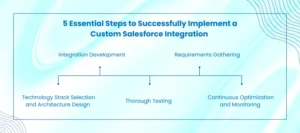
5 Essential Steps to Successfully Implement a Custom Salesforce Integration 

Steps to Implement Salesforce Integration

Developing a custom Salesforce integration is a key strategic task that must be planned and implemented cautiously. A formal methodology will help make your integration sound, scalable, and fully compatible with your professional services business. Here are the five key phases: 

Requirements Gathering 

The first step is to be familiar with your business requirements. Gather and capture functional and non-functional requirements. This includes: 

  • Determining core processes to be incorporated. 
  • Identifying involved data sources and systems. 
  • Setting up project schedules and cost factors. 

Clear requirements assist developers in converting your objectives into a custom Salesforce CRM integration to fulfill your firm’s objectives, both in operations and serving your clients. 

Technology Stack Selection and Architecture Design 

Selecting the correct tools and shaping integration architecture is key to success in the long run. This step involves: 

  • The correct type of integration (API-based, middleware, or direct database access) 
  • Mapping data fields and workflow designing. 
  • Scalability, security, and compatibility of system planning. 

The proper architecture guarantees a seamless information flow and makes your custom Salesforce integration future ready. 

Integration Development  

In this step, developers develop the integration on Salesforce development services and selected tools. This can include: 

  • Setting up APIs to facilitate free data. 
  • Writing specialized scripts or middleware connectors. 
  • Achieving data consistency, accuracy, and reliability in all systems. 

The idea is to build a custom Salesforce integration that would easily integrate with your existing technology ecosystem. 

Thorough Testing  

It should also be tested to make sure that the integration is working. Key activities include: 

  • Making certain that all data flows in and out of systems. 
  • Automation and testing workflows in a Salesforce sandbox. 
  • Detecting and repairing bugs to maximize performance and scalability. 

This is because extensive testing minimizes the chances of disruptions and provides a smooth transition to live operations. 

Continuous Optimization and Monitoring 

After deployment, constant monitoring will keep your integration sound and working. Key practices include: 

  • Monitoring performance and revealing possible problems. 
  • Releasing updates, bug fixes, and security patches. 
  • Streamlining processes as business requirements change. 

Your custom Salesforce CRM integration should be maintained and optimized regularly to keep providing value, which helps not only with operational efficiencies but also with improved client experiences. 

5 Common Challenges in Custom Salesforce Integrations and How to Overcome Them 

A custom Salesforce integration has the potential to unlock some potent efficiencies, yet it may have some obstacles. Learn these issues early and learn how to resolve them so that integration brings the greatest value. These are five barriers to entry and how to overcome them: 

Data Quality Issues 

Integration effectiveness can be undermined by incompatible data formats, data duplication, or mismatches between source and target systems. 

Solution: Perform data mapping and integration of validation rules and transformation processes to ensure the data is clean and accurate throughout the systems. 

Synchronization Errors 

A failure to synchronize, time difference, and data conflicts between integrated systems may cause workflow and operational impacts. 

Resolution: Use synchronization schedules harmoniously or apply real-time synchronization and reconciliation to solve the conflict so that information flows in your custom Salesforce CRM integration correctly. 

Performance Bottlenecks 

When creating a custom Salesforce integrationhe architecture may become slow due to improper design or the amount of Salesforce API, particularly when dealing with large dataset. 

Solution: To improve performance, employ efficient data transfer protocols, load balancing, and distributed processing to minimize latency and ensure smooth operation. 

Security Concerns 

In the course of integration, vulnerable information can be opened to hypothetical threats, posing a threat to internal systems and customer data. 

Recommendation: To enhance security, it is recommended to use powerful encryption, both at rest and in transit. It is also important to use powerful authentication procedures, and authorization controls to prevent unauthorized access and enhance compliance. 

Absence of Proper Documentation 

Systems with incomplete or old-style documentation of the legacy systems may prolong the development time and bring errors in the system. 

Solution: Before beginning the integration, review and revise all system documentation. Proper documentation assists your development team in the creation of a custom Salesforce integration effectively and properly. 

Conclusion 

An custom Salesforce integration is not a simple software connection. It is a strategic investment that streamlines business operations, improves client relationships, and fills your professional services firm with the capacity to expand in the future. It requires proper setting of goals, data mapping, selection of the appropriate integration process, and security and compliance. With Salesforce integration services your business becomes well-integrated, streamlined, and customer-centric system. AnavClouds Software Solutions provides professional Salesforce development to create custom integrations that meet your business requirements and assist you in automating your operations and performance, as well as attain quantifiable outcomes. 

AI Data Cloud

The world that businesses are operating in today is awash with data, and how the data can be translated into meaningful action is the saving grace to success. The AI and Data Cloud is transforming how organisations operate customer data, offering real-time metrics and predictive intelligence, and automation within sales, marketing, and service units. Through AI in Salesforce and Salesforce Data Cloud, businesses are able to optimise their business CRM, provide extremely personalised experiences, and make smarter and faster decisions. This blog will examine how AI and Data Cloud are revolutionising Salesforce projects, the real outcomes of these in the form of tangible benefits to enterprises, and the necessity of learning these skills among Salesforce professionals. 

What is the importance of Mastering AI and Data Cloud among Salesforce Professionals? 

A skill in AI and Data Cloud is now a skill that Salesforce professionals cannot afford to do without, as businesses continue to base their strategies on data. Those who can utilise these technologies to their advantage become the pioneers in Salesforce development services and business CRM innovations, and those who do not. 

Salesforce Data Cloud is not just a powerful integrator but a transformative solution to businesses that have many-systems environments. Data Cloud can be used to integrate the various sources of data, thereby facilitating the smooth running of operations within the company and the coherent flow of information between the departments and platforms. 

In the case of large organisations, this involves integrating regional databases and third-party systems onto one unified platform. What happens is a 360-degree customer interaction picture, which allows teams to be data-driven and make informed decisions. Through Salesforce AI and Salesforce AI integration, businesses are able to increase operational efficiency, provide personalised experiences, and keep a competitive advantage in a modern data-driven business environment. 

AI and Data Cloud in Salesforce enable smarter decisions and seamless customer experiences.


Transforming Business CRM with AI and Data Cloud 

AI and Data Cloud are transforming how companies store and use customer information. They help gain a better understanding of customer behaviours and preferences by processing huge datasets in real-time. Combining with AI in Salesforce, this data transforms into actionable strategies, which optimise decision-making and interaction with customers. 

Maximize Enterprise Growth with AI and Salesforce Data Cloud

Salesforce Data Cloud is a kind of central repository that organically incorporates customer data from various sources, including websites, ERP, POS systems, marketing platforms, and third-party tools. It provides a single, usable source of truth, rather than the piecemeal information in various systems, which is vital when a business wants to use AI and Data Cloud to its advantage. 

Creation of Full Customer Profiles 

All customer interactions are combined into one detailed profile (emails, calls, past purchases or web activities). This cohesive strategy guarantees that sales, marketing, and service divisions have the most current customer information at all times, which allows them to provide personalised and effective experiences powered by AI in Salesforce.  

Eliminating Data Silos for Improved Collaboration  

Disconnected data in different departments of the enterprise is one of the gravest issues of enterprise projects. The Salesforce Data Cloud does not create such silos and allows all sales and marketing teams, service, and analytics teams to work on the same accurate dataset. 

Real-Time Personalization Powered by AI and Data Cloud 

The interaction can be tailored in real-time according to the most recent customer action, and the business is not reliant on stagnant lists or slow reports. This sales force AI integration empowers this level of agility, which allows brands to interact with customers in real time and boost the satisfaction level of the customers. 

Compliance and Data Governance 

Salesforce is a development service that allows enterprises to handle sensitive customer data in a responsible manner with built-in compliance and governance. These characteristics assist organisations in satisfying privacy regulations as well as enabling them to utilise their data resources flexibly and efficiently. 

Harnessing AI in Salesforce to Transform Business CRM 

AI within Salesforce is driven by Einstein AI, and it is much more than a mere stationary dashboard or report. It allows proactive and prescriptive moves that have a direct effect on the business outcomes. Integrated with AI and Data Cloud, organisations will have the opportunity to automate the decision-making process, improve customer experiences, and make quicker and more informed decisions. 

Predictive Lead Scoring 

The Salesforce AI integration is an artificial intelligence-driven predictive lead scoring using past information of customers, purchase behaviours, and interactions as predictive data to determine high-value prospects. Instead, sales teams can prioritise leads with the highest likelihood of conversion, boosting the number of wins and reducing sales cycles. Such a prioritisation built on data not only enhances efficiency, but it also makes sure that resources are deployed where they can have the most substantial payoff. 

Service Automation 

Customers with AI-based case routing and smart chatbots can receive faster, more consistent, and less manpower-intensive customer service. Salesforce AI can be used to automatically route cases to the appropriate agents depending on their urgency and expertise or intelligent chatbots can answer common questions immediately. This leads to better customer satisfaction, less time taken in handling, and uniformity in the quality of service provided by various channels. 

Opportunity Insights 

With the help of AI and Data Cloud, a business can have a better understanding of the sales pipeline. The AI evaluates the patterns, customer interactions, and market signals and selects which opportunities require urgent attention. It can predict deal closures more precisely, point out potentially risky deals, and provide upselling or cross-selling opportunities, thereby empowering teams to close more deals strategically. 

Suggestions for Offers and Content 

Personalization guided by AI means that marketing teams will target customers with the most appropriate message at the right moment. AI in Salesforce recommends suggestions, products, or content that have the best chance of resonating by analysing behavioural data and preferences in real-time. This improves interaction, increases the number of conversions, and generates purposeful customer experiences that seem up-to-date and personal instead of being generic. 

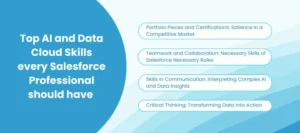
Top AI and Data Cloud Skills every Salesforce Professional should have 

AI and Data Cloud Skills

In the case of Salesforce professionals, learning AI and Data Cloud will not be a luxury anymore–it is the only way to remain relevant in a fast-changing ecosystem. As AI in Salesforce and Salesforce Data Cloud become the core of business, learning those technologies will help you improve your present position and become eligible for a new career. 

Portfolio Pieces and Certifications: Salience in a Competitive Market 

Certifications are a great means to show your knowledge and dedication to prospective employers. Programs, Salesforce Einstein Analytics, and Discovery Consultant are certifications that confirm your knowledge of Salesforce AI integration and AI and Data Cloud applications. But it is not enough to have certifications. Using these skills in actual life in the form of internships, volunteering projects, or personal initiatives creates a strong portfolio that reflects your hands-on experience and problem-solving capabilities. 

Teamwork and Collaboration: Necessary Skills of Salesforce Necessary Roles 

Collaboration is important in the contemporary globalized work environment. Whether you are dealing with a team of developers, business stakeholders, or interacting with clients, teamwork skills are a strong guarantee of efficient execution and coordination of projects between departments. Individuals who are skilled at working on Salesforce development services projects can have an advantage. 

Skills in Communication: Interpreting Complex AI and Data Insights 

Effective consulting relies on clear communication. The ability to demystify complex AI in Salesforce concepts to non-technical stakeholders or communicate actionable and data-driven strategies to executives greatly increases your influence. Professionals who are able to demonstrate that Salesforce Data Cloud and AI and Data Cloud solutions bring a lot of value are considered to be invaluable assets to any organization. 

Critical Thinking: Transforming Data into Action 

Critical thinking is one of the distinctions in the face of AI automation of routine tasks. Businesses make informed decisions when Salesforce professionals can analyze data, identify patterns, and draw actionable conclusions. Adequacy in AI and Data Cloud enables experts to derive meanings and motivate their ideas, which raises efficiency, customer experiences, and overall business performance. 

Conclusion  

The AI and Data Cloud are changing the business operating model and offer a powerful tool for integrating data, automating processes, and decision-making. This means enhanced customer relations, operational efficiencies, and a competitive edge in a society that is always data-driven. When it comes to Salesforce professionals, they will need to learn about Salesforce AI integration, AI in Salesforce, and Salesforce Data Cloud to not only expand their career but also keep pace with the ever-changing digital environment. By adopting these technologies and developing skills consistently, the organizations and professionals are all going to be in a position to attain the full potential of their business CRM systems. AnavClouds Software Solutions can provide the team with specialized guidance on Salesforce development projects and AI-based CRM migrations to explore custom solutions and build your Salesforce skills. 


FAQs 

Why is it easier to integrate Salesforce AI with Data Cloud? 

By using Salesforce AI coupled with Salesforce Data Cloud, models will have a single, real-time customer profile. Predictions will be more precise, personalization will be enhanced, and continuous learning will reinforce results throughout your business CRM. 

What is the impact of AI on cloud computing? 

Cloud computing AI eliminates repetitive tasks, minimizes human error, and streamlines expenses. Teams are strategic, task-oriented, and intelligent; workflow is reliable at an organizational level. 

How does AI and Data Cloud enhance CRM performance on Salesforce? 

AI and Data Cloud make it possible to segment in real-time, offer next-best-actions, and proactive outreach. The outcome is expedited decision-making, increased conversion, and seamless experiences with Salesforce AI connectivity. 

What is the Salesforce development service that can jump-start AI implementation and Data Cloud usage? 

Special Salesforce development solutions are involved in data integration, governance, and deploying models. They give operationalized use cases, align stakeholders, and are capable of producing Salesforce Data Cloud-compliant, production-grade results rapidly. 

Build AI Agents

Imagine creating AI-powered agents that not only respond to customer queries but also make proactive decisions, streamline workflows, and deliver personalized experiences—without writing endless lines of code. That’s the power of an AI Agent with Agentforce. Designed to integrate seamlessly with Salesforce, this low-code platform enables businesses to develop intelligent agents that combine human input with autonomous AI capabilities. 

From managing sales interactions to automating service tasks and powering marketing journeys, these agents bring Einstein Generative AI and advanced automation directly into your CRM environment. In this guide, we’ll explore how to build, customize, and deploy your first AI Agent with Salesforce Agentforce while ensuring security, compliance, and business alignment at every step. 

How AI Agents with Agentforce Operate at Varying Levels of Autonomy 

AI Agent with Agentforce can function at multiple levels of autonomy, enabling businesses to customize control, performance, and compliance according to their needs. Below is an overview of these levels and their operational guardrails.

Assistive AI Agents – Supporting Human Decisions

Assistive AI Agents, also known as copilots, work alongside humans. They enhance decision-making by providing intelligent recommendations while relying on human input and feedback. With Salesforce Agentforce services, these agents help create a collaborative environment that blends human expertise with AI-driven insights.

Autonomous AI Agents – Operating with Greater Independence

Autonomous AI Agents can perform tasks without constant supervision. However, AI Agent with Agentforce strikes a unique balance—they execute tasks independently but can escalate decisions to humans whenever required. This flexibility ensures a perfect mix of automation and human oversight.

Built-in Guardrails for Risk Prevention

Both assistive and autonomous agents rely on robust guardrails. These safeguards prevent harmful content, hallucinations, and toxic outputs. Salesforce development services integrated with Agentforce ensure these guardrails are multilayered, maximizing the benefits of Generative AI in Salesforce while minimizing risks.

Einstein Trust Layer – Securing Enterprise Data

The Einstein Trust Layer plays a crucial role in keeping sensitive business data secure. It includes data masking, toxicity detection, secure gateways, and audit trails to monitor agent activities. This makes AI Agent testing in Salesforce safer and compliant with enterprise-grade standards.

Natural Language Instructions for AI Agents

Instructions defined in natural language guide the behavior of an AI Agent with Agentforce. These rules specify the actions an agent must perform and what it should avoid, ensuring clear operational boundaries.

Shared Metadata and Data Governance

Salesforce’s metadata framework applies governance rules to both AI agent with Agentforce and traditional applications. This includes permissions, sharing models, validation rules, and workflow automation to protect business processes and ensure data compliance.

AI Test Center – Ensuring Reliability Through Testing

The AI Test Center provides a standardized testing framework to evaluate agent performance. It enables batch testing of prompt templates, retrieval-augmented generation (RAG), and other capabilities to ensure AI agents deliver reliable, accurate, and business-ready outcomes. 

Building and Customizing an AI Agent with Agentforce 

Salesforce Agentforce model architecture

Salesforce Agentforce enables companies to design and develop an AI agent with Agentforce that is capable of integrating human knowledge with autonomous functions. Using artificial intelligence, actionable insights, and a powerful development model, companies can create trusted agents without compromising oversight. The following are the most important elements that render the AI Agent with Agentforce very adaptable and business-friendly.

Metadata – Rules and Context Definitions of AI Agents

Salesforce metadata forms the basis for rules that manage both conventional applications and AI agent with Agentforce. It guarantees effective operations, data compliance, and data integrity by controlling: 

  • Permissions – Data permissions according to roles. 
  • Sharing Models – Characterizes the movement of data across teams and departments. 
  • Validation Rules – Implement data entry accuracy and consistency. 
  • Workflow Automation – Automates daily work procedures and operational processes. 

With metadata, an AI Agent can have a more contextual understanding of the data and therefore respond appropriately, produce actionable results in CRM settings with a Salesforce connection.

Data Cloud – Facilitating Coherent and Practical Data

Effective AI agents with Salesforce are based on high-quality, unified data. Salesforce Data Cloud unites organized and unstructured data and Salesforce and external data to form one source of truth. Key highlights include: 

  • 200+ Ready-made connectors for data integration. 
  • Custom Connectors to shape connections according to business requirements. 

This data, once unified, drives AI agents, analytics, and applications, siloing them out and providing customized, data-driven experiences at scale.

Models – Flexible and Configurable Architecture

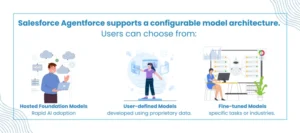
Salesforce Agentforce supports a configurable model architecture to suit diverse business requirements. Users can choose from: 

  • Hosted Foundation Models for rapid AI adoption.
  • Fine-tuned Models trained for specific tasks or industries.
  • User-defined Models developed using proprietary data.  

This flexibility ensures that AI agent with Agentforce can evolve alongside business needs, whether through Einstein Generative AI or custom-built solutions.

Einstein Trust Layer – Ensuring Secure AI Interactions

The Einstein Trust Layer provides enterprise-grade security for AI agents by safeguarding sensitive data and maintaining compliance. It includes: 

  • Secure Gateway to enforce consistent policies across model providers.
  • Data Masking and Compliance Controls to anonymize PII.
  • Zero Retention Policy ensures no data is stored or reused for training.  
  • Post-processing Steps, including toxicity detection, audit trails, and real data demasking for transparency.

Actions – Enabling Business-Specific AI Logic

Actions empower the AI agent with Agentforce to perform sales, marketing, service, commerce, and industry-specific tasks. Developers can also create custom actions using APIs, flows, or custom code, making Salesforce Agentforce services highly extensible.

Topics – Organizing AI Functions for Focused Execution

Topics group related actions under logical categories, allowing AI agents to focus on areas such as: 

  • Order Management
  • Warranty Services
  • Pricing Strategies
  • Frequently Asked Questions (FAQ)  

This modular approach helps businesses structure their AI agent with Agentforce around real-world operational needs.

Tooling – Low-Code Development for Faster Deployment

Agentforce provides powerful low-code tools to accelerate AI agent development: 

  • Prompt Builder – Create dynamic, reusable prompt templates using real-time data sources.  
  • Agent Builder – A visual interface to configure, customize, and test AI agents within a sandbox environment. 

With these tools, organizations can easily build and deploy their first AI Agent with Salesforce Agentforce without complex coding or extensive technical expertise. 

How to create your first AI agent with Agentforce in a step-by-step guide

Salesforce Agentforce offers a low-code AI agent platform to construct, customize, and deploy without extensive technical skills. This facilitates the quick uptake of AI-driven automation within the operations of businesses. The following is an action-by-action guide to building your first AI Agent with Agentforce to make sure it fits your specific business objectives. 

Step 1: Prep Your Salesforce Environment 

Before you start, make sure that your Salesforce edition (Enterprise, Performance, or Unlimited) is compatible with Agentforce. In the case of Salesforce Playground, make sure it is configured accordingly, and all the necessary permissions and settings are turned on. You will build your AI agent on this environment and deploy it. 

Step 2: Just activate Einstein Generative AI

Go to the Salesforce setup menu, search for Einstein, and enable Einstein Generative AI. This is what drives the intelligence of your AI agent. Moreover, facilitate Einstein Bots to provide a free flow of interaction. The following steps make sure that your Salesforce-based AI Agent is equipped to provide intelligent answers. 

Step 3: Create a New AI Agent 

Go to the Settings menu and then to Access Agent Studio under Einstein Generative AI, and then click New Agent. Give it a descriptive title (e.g., Customer Support Agent), and give its purpose. Select a Basic or Custom User depending on your needs. After this, you can choose to create your AI agent under the Create option. 

Step 4: Agent Builder configuration

Define the core of the AI agent with the Agent Builder tool. With this low-code interface, you can: 

  • Assign themes that your agent will handle. 
  • Outline certain things it can do. 
  • Select desired languages of communication. 

It is a step to define how your AI Agent with Agentforce will respond to user interactions. 

Step 5: Determine Topics for Conversation Flows 

Design topics that are some major areas of interaction, like the scheduling of appointments, order tracking, or frequently asked questions. For each topic: 

  • Give a definite name and description. 
  • Specify the scope of tasks that it covers. 
  • Give comprehensive instructions on proper responses. 

Clear subjects assist AI agents in providing more situational and precise interactions. 

Step 6: Allocate Topics Action 

After topics have been placed, add actions that match the needs of users. As an example, develop booking appointment actions, returns actions, or quote actions. Use APIs, flows, or custom logic to make sure that all execution is smooth in each topic. 

Step 7: Test Your AI Agent Probingly 

AI Agent testing in Salesforce is essential. You can simulate real interactions using the preview mode of Agent Builder. Input different prompts to confirm the level of your AI agent performing well on specific topics and actions. 

Step 8: Activate Your Agent 

Once the test is completed, start your AI agent by turning it on. Activation accommodates its interaction with users in the supported channels, such as web, mobile, or service portal. Assure that every setting is checked to maximize the first-day performance. 

Step 9: Deploy Across Channels 

Use the deployment options of Agentforce to connect your AI agent to major channels like customer service platforms, chat interfaces, or mobile apps. This will enable the users to begin receiving support or information smoothly. 

Step 10: Monitor, Analyze, and Optimize

Monitor your agent performance with Agentforce analytics tools after deployment. Make sure such qualities as accuracy of the response, user satisfaction, and the rate of accomplishing the tasks are considered. Regularly update to enhance its reliability and efficacy. 

As you keep on monitoring, your Salesforce Agentforce, powered by AI Agent, will keep on improving to provide better experiences and keep up with the dynamics of the business requirements. 

Conclusion 

The age of intelligent automation is upon us, and AI Agent with Agentforce is making it available to all businesses. Combining support and control, as well as secure systems such as the Einstein Trust Layer, these agents provide practical insights, expedited solutions, and scalable processes. 

AnavClouds Software Solutions can assist your organization in implementing and optimizing AI agent with Agentforce specific to your Salesforce ecosystem. We are proficient in Salesforce development solutions, seamless integration, AI agents testing, and constantly optimize them to allow your company to attain higher levels of efficiency and smarter customer interactions. 


Frequently Asked Questions 

So what is an AI Agent with Agentforce? 

An AI Agent with Agentforce is an intelligent, low-code agent created in Salesforce to automate processes, assist users, and provide intelligent customer interactions with Einstein Generative AI. 

Do I require coding skills to develop an AI Agent in Salesforce? 

No, Salesforce Agentforce is a low-code platform. You do not need to know programming languages to create, customize, and deploy AI agents. 

What is the level of security of AI Agents in Salesforce Agentforce? 

The Einstein Trust Layer provides AIs in Agentforce with data masking, compliance controls, and secure gateways to ensure the safety of sensitive business information. 

Is it possible to personalize actions and topics with my AI Agent? 

Yes, Agentforce lets you specify your own topics, actions, and workflows so your AI agent can perform tasks unique to your business needs. 

Salesforce Flow Builder

Salesforce Flow Builder is now the preferred automation platform used by companies to build smarter workflows without heavy code. It gives admins and developers the power to automate processes, minimize manual work, and build end-to-end seamless user experiences across departments. Whether it be timely notification sending or data validation and scheduled updates, Flow Builder provides unparalleled flexibility over traditional Workflow Rules or Process Builder. We are going to discuss the most influential application of Salesforce Flow Builder in this blog that you can begin to apply today to make your teams more efficient, improve the accuracy of data, and build powerful teams. 

How Can Salesforce Flow Builder Simplify Your Automation Journey? 

The Salesforce Flow is simpler to transition than most businesses think, by swapping the Workflow Rules and Process Builder. If you have already developed declarative automation, then you can smoothly migrate those processes and obtain much more control. Today, Salesforce automation has become more flexible, and now it is possible to create smarter workflows that did not exist previously. 

All automations start with Flow Builder Salesforce, the user-friendly tool built into the Salesforce interface. This is a robust developer that lets you design custom automation through straightforward clicks and organized building blocks. Flow Builder also offers numerous options, including setting entry requirements, entering automation, including when you want automation to occur, like when you are creating the record or making the record. Moreover, Salesforce Flow Builder has advanced resources and settings, enabling companies to create customized automation for various Salesforce automation applications. 

Automate smarter and simplify processes with Salesforce Flow Builder.


Why Salesforce Automation Matters for Businesses 

The modern world of business requires businesses to work in a time-sensitive field where efficiency, precision, and smooth customer experiences are all essential factors. The automation of Salesforce processes is designed to assist companies with repetitive manual work, data integrity, and the optimization of essential work processes. Automation of routine processes can mean that teams work on more strategic initiatives that lead to growth and not on administrative overhead. 

The opportunity to decrease the number of mistakes related to manual data entry and disjointed processes is one of the most substantial benefits of Salesforce automation use cases. Automation also makes sure that all steps, including lead management and service delivery, adhere to a set of logic and enhance accuracy within departments. 

In addition, automation helps to take real-time steps and improve the communication of sales, marketing, and service teams. Using tools such as Salesforce Flow Builder, companies can create workflows that are not only time-saving but also help improve collaboration. With Salesforce integration services, automation integrates various systems, thereby facilitating the flow of data and establishing a single business ecosystem. 

To achieve scalability, an organization that subscribes to Salesforce development services can consider automating particular business-specific requirements, such as improving approvals, automating lead nurturing, or managing a post-sale process. 

Which Salesforce Automation Use Cases Should You Start With? 

Salesforce Automation Use Cases

Automating Salesforce workflows can be done in infinite ways, although there are use cases that give an instant business payoff. In the following, we discuss five of the most powerful Salesforce automation use-cases that can be implemented with ease in Salesforce Flow Builder. 

Automating Email, In-App, Slack Notifications

Intelligent notifications used to keep the teams informed and proactive are one of the most powerful Salesforce automation cases. Be it email alerts, in-app notifications, or Slack messages, these automated notifications help to alert the right people at the right time–no manual follow-ups. 

Consider having a sales manager instantly notified when a high-value opportunity has just been reported as Closed Won or the support team receiving a Slack notification when a case has violated its SLA. These little but effective automations allow companies to keep their response times shorter and their customer interactions more effective. 

Using Salesforce Flow Builder, it is easy to build these notifications. Record-triggered flows allow you to determine precisely when and how notifications are delivered- whether it is during record creation, updates, or during certain status changes. Moreover, through Salesforce integration services, you can easily replicate the notification to third-party platforms, such as Slack, Teams, or any other team-building resources your organization depends on. 

Through notifications automation, businesses can eradicate delays and missed notifications, as well as keep decision-makers one step ahead at all times. 

Self-Guided Tours with Salesforce Flow

Another important Salesforce automation application example is the development of custom guided experiences with Salesforce Flow Builder. Screen Flows, unlike more traditional tools like Workflow Rules or Process Builder, allow businesses to build interactive and easy-to-use processes without complex code. 

Such flows can simplify repetitive actions, such as adding contacts to existing accounts, through step-by-step instructions, required fields, and duplicate entries by avoiding repetition. These flows can be launched as quick actions, Lightning Pages, or even the home page, which saves much time and minimizes manual errors. 

Now, Salesforce Flow Builder has the newest capabilities with reactive Screen Actions, allowing businesses to develop more dynamic forms and guided steps that can increase the accuracy of data and user productivity. These may be further customized by integrating them with Salesforce development and can also be further tailored to fit bespoke business processes. 

Updating Salesforce with Flow Salesforce Fast Field

Repeatedly updating the fields referenced by the automation on the same record is also another application of Salesforce automation. In contrast to older Workflow Rules or Process Builder, Salesforce Flow Builder lets you decide whether the automation should be executed prior to or after record save, which is more flexible. 

This can be important, especially when you are interested in pre-filling fields with default values, using formulas to make calculations, or making instant updates on important information prior to the record being committed to the database. Take this as an example, when creating a new Partner Referral Lead, a flow can be used to fill out the Description field with business development team instructions-saving time and being consistent. 

In such a manner, Salesforce automation would remove the necessity of complex Apex code and speed up data processing. Businesses that use Salesforce development services can go a step further to include advanced logic or apply it to Einstein to Flow to create draft flows with natural language commands. 

Salesforce Flow Complex Validations

Ensuring the accuracy of data is highly important in ensuring business processes are reliable. Although standard validation rules can be effective with simple checks, they frequently fail when more complicated conditions are being considered, like checking related records or conditional relationships. This is where Salesforce Flow Builder can help considerably. 

The Custom Error Element in Salesforce Flow will allow businesses to build more advanced validations without using Apex code. As an example, a flow may enforce an Opportunity to contain a particular Contact Role, such as an Executive Sponsor, when the deal amount is above a certain threshold. When the necessary record is not present, a custom error message is shown in the flow, whether at the field level or across the record page, causing users to perform corrective action. 

Besides saving the hassle of having to develop it, this method also allows admins and teams more freedom in achieving data integrity. Through Salesforce development services, such complex validations may be further enhanced and expanded in other Salesforce automation applications. 

Scheduled Salesforce Flow Automations 

Not all processes do not have to be real-time processes. Other Salesforce automation applications require that the activities be undertaken either on a daily, weekly, or some other regular basis. Schedule-Triggered Flows: Salesforce flow builder allows businesses to rely on complex batch Apex jobs to automate their recurring tasks. 

These are the planned automations that work well with such processes as cleaning old lead records, inactivating unused products, or other account statuses as per related opportunities. As an example, you can run a weekly flow that looks at all customer accounts: where there are no opportunities, make it a prospect; where there is at least one successful deal within the last 180 days, make the account an active customer; and where there are opportunities, and any of them have not been closed yet, make the status an inactive one. 

This will keep your data up to date without the sales or operations team requiring constant manual updates. In combination with Salesforce integration services, even scheduled flows can be used to update records across interconnected systems, enhancing consistency throughout the business environment. 

Conclusion 

Flow Builder is not a replacement for old-fashioned automation tools anymore; Salesforce Flow Builder is a foundation of scalable, smart business processes. Flow Builder can support different business requirements, whether you require real-time updates of fields, advanced validations, or automations that can run on a cadence. With these established applications, you can get your operations running in a shorter period of time, user productivity will increase, and there will be an enhancement in data governance in your Salesforce org. With more knowledge, you can expand these flows with AI-driven functions such as Einstein for Flow, building even more dynamic and efficient workflows within your organization. 


Frequently Asked Questions 


Why do we use Flow Builder in Salesforce? 

One of the most useful tools that Salesforce Admins can use is Flow Builder. It lets you automate complicated business operations without code writing. As an example, you can do mass updates on many disconnected records, automate conversion stages of opportunities, or handle complicated approval logic-things that used to need programmer intervention. 

What is a Flow Builder? 

Flow Builder is a drag-and-drop, visual interface that enables users to build automated workflows in Salesforce. Flow Builder can help you create automation without any coding experience, whether it is a single email notification or a complex workflow with information updates and system integrations. 

What is the advantage of Salesforce Flow? 

Salesforce Flow is a no-code platform that allows streamlining business processes. It assists in automating repetitive processes, data manipulation, and user interactions, and enhances overall productivity. It can decrease manual processes and allow teams to perform higher-value tasks without compromising accuracy and consistency throughout Salesforce. 

What is the relation between Flow Builder and Salesforce Flow? 

Flow Builder: This is the design tool that you flowchart and set up automated processes. Salesforce Flow is the more general automation platform, which stores, administers, and implements such flows. Simply put, Flow Builder is the canvas, Salesforce Flow is the engine that drives your automation. 

Salesforce Flow

The Salesforce Flows are now the foundation of today’s Salesforce automation, allowing teams to automate sophisticated processes without code. We will describe Flow Builder Salesforce, discuss the key types of flows and the fundamental concepts, include a tutorial on how to make flows, and present best practices when integrating flows in this blog. Admins can create user-guided experiences, automate record updates, and tie systems to Salesforce integration services using Salesforce Flow Builder. This guide will assist you in applying a practical Salesforce automation, whether you are a Salesforce administrator or assessing Salesforce development services. 

What Are Salesforce Flows and How Do They Work? 

One effective method for automating intricate business procedures without writing any code is to use Salesforce Flows. They enable business users and Salesforce administrators to create and implement procedures that previously needed a high level of technical skill. Instead of depending on conventional code-based solutions like Apex, you can use Salesforce Flow Builder’s visual interface to construct smooth automations. 

Flows help businesses using Salesforce automation lessen their reliance on developers while maintaining the scalability and manageability of their processes. Administrators can save time and money on development by handling complex business needs on their own. 

Another major advantage of Salesforce Flows is their maintainability. Anyone familiar with Flow Builder can understand, modify, or extend the existing setup, making it a highly sustainable automation solution. 

Automate smarter with Salesforce Flows—expert development & integration by AnavClouds Software Solutions


Types of Salesforce Flows 

Salesforce offers different types of flows designed to meet varied automation needs. Each category serves specific use cases within your business process: 

Screen Flows 

These flows include a user interface (UI) and require user input. They can be launched as an action or embedded directly on a Lightning page. 

Schedule-Triggered Flows 

These flows run automatically at specified times or intervals, executing background processes for each record in a batch. 

Autolaunched Flows 

Ideal for automated tasks, these flows run without user interaction. They can be invoked from other flows (as subflows), Apex classes, record changes, scheduled jobs, or platform events. 

Record-Triggered Flows 

These flows are triggered when a record is created, updated, or deleted. They run either before or after the record is saved. 

Platform Event-Triggered Flows 

Activated when a platform event message is received, these flows execute in the background automatically. 

Record-Triggered Orchestration Flows 

This type enables multi-step or multi-user processes, orchestrating complex sequences whenever a record is created or updated. 

How Does Salesforce Flow Builder Simplify Automation? 

Salesforce flow builder is a drag-and-drop interface enabling the development and customization of specific Salesforce flows. It allows users to create workflows graphically without relying on complex code, which is an important aspect of Salesforce automation. 

Flow Builder Salesforce enables you to automate various processes, including the creation of various complex workflows considering the updates to the records and Salesforce connection services, record modification, and automated email notification. It is an excellent tool to employ when companies want to streamline operations without investing a significant amount of money in development because it is flexible. 

With Salesforce Flow Builder, organizations will lessen their reliance on coders and permit administrators and teams to develop scalable automation systems that will empower business objectives. 

What Are the Key Concepts Behind Salesforce Flows? 

Key Concepts of Salesforce Flow

Examining the fundamental components of Salesforce Flows is crucial to comprehending how they work. These key ideas outline the structure and operation of automation using Flow Builder Salesforce:

Components

The fundamental steps of a Salesforce flow are called elements. They specify what the flow does, including making decisions based on predetermined criteria, changing data, or creating records. These components can be arranged visually to create an automated process using Salesforce Flow Builder.

Materials

In Salesforce Flows, resources serve as dynamic data storage units. They allow customisation throughout the automation process and retain important items like transaction data or customer information.

Triggers

The circumstance or event that initiates the Salesforce Flow is known as a trigger. It might be an automated process that runs every day or every week, or it could be a user action like pressing a button or changing a record.

Logic

Your flow’s decision-making process is determined by logic. Salesforce automation makes sure that every step is carried out in accordance with specified business requirements by using conditional statements, loops, and rules.

Result

Whether it’s updating databases, sending automatic notifications, or utilizing Salesforce integration services to integrate with external systems, the result is the ultimate result of the flow. 

Businesses may fully utilize Salesforce Flows to automate intricate procedures and minimize manual labor by grasping these ideas. 

When Are Salesforce Flows Appropriate to Use and When Are They Not? 

The industry standard for Salesforce automation is Salesforce Flows, which enables companies to create user-guided experiences and automated procedures without the need for complicated coding. Flow Builder Salesforce is the ideal option if you need to automate processes that don’t call for Apex’s sophisticated logic. 

Workflow Rules and Process Builder are examples of legacy products whose support will terminate in December 2025. As a result, firms seeking to future-proof their systems are now placing a high premium on moving current procedures to Salesforce Flows. 

When to Use Salesforce Flows? 

  • Creating, updating, or deleting records in Salesforce.
  • Sending automated emails or notifications.
  • Displaying relevant data and capturing user input.
  • Generating outbound messages and integrating with other platforms using Salesforce integration services. 

When Not to Use Salesforce Flows? 

  • When there is a lack of clarity or consistency in the business process.  
  • If the reasoning is too complicated, Apex code is a better way to handle it. Direct Apex implementations may still be necessary for extremely sophisticated logic, even if Salesforce Flow Builder enables developers to define invocable Apex methods that can be invoked within flows.  
  • Sometimes, the number of flows you may create is restricted by your Salesforce edition (for example, the Essentials and Professional editions only permit five flows per category). 

What Are the Reasons Companies Should Automate Tasks with Salesforce Flows? 

There are several good reasons why businesses should incorporate Salesforce Flows in their work. Salesforce automation can help businesses reduce operational costs, enhance customer experiences, and streamline operations. 

Streamlines the Processes and Saves Time

Salesforce Flows enable personnel to prioritize what matters as it automates menial operations and repetitive tasks. This boosts overall productivity through the reduction of manual labor-intensive activities such as data entry and standard communications. 

Improves Customer Support 

With Salesforce Flow Builder, businesses can automate client follow-ups, answers, and data management, ensuring faster and more reliable interactions that increase customer satisfaction. 

Easy to Use and Free of Code 

Salesforce provides a drag-and-drop interface in its Flow Builder that allows admins and business users to build automation without programming knowledge, reducing the number of required technical staff. 

Economical Automation 

It often requires additional time, financial resources, and expertise to use Apex to develop custom solutions. A cheaper alternative is Salesforce Flows, which has a solid level of automation and does not demand excessive programming. 

Adaptable and Expandable 

Salesforce Flows can easily adapt to the changing requirements of the company, including simple workflows as well as complex automation. They can connect with other platforms easily and scale with growing operations with Salesforce integration services. 

However, Salesforce Flows may not be the best choice in situations where real-time and high-performance processing is needed or where very complex processes may need complex custom logic. There are some circumstances when Salesforce development services or a combination of processes with invocable Apex can yield better results. 

How Can I Use Flow Builder to Create a Salesforce Flow? 

You may effectively automate intricate business procedures while reducing manual labor by creating a Salesforce Flow. Even for non-developers, this procedure becomes simple with Salesforce Flow Builder. To begin, adhere to this detailed guide: 

Step 1: Access Flow Builder is the first step

Enter “Flows” in Salesforce’s Quick Find box to access Flow Builder. After choosing the desired flow type (such as Record-Triggered, Scheduled, or Autolaunched), click New Flow and click Create. 

Step 2: Establish the Context of the Flow 

Distinct qualities are offered by various flow types. For instance, the $Record global variable, which holds information from the triggering record, is accessible through Record-Triggered and Scheduled Flows. You might have to manually define the necessary input variables for Autolaunched Flows. 

Step 3: Set Up Inputs 

Configure the necessary inputs before adding elements. Proper input setup ensures the flow functions effectively. 

Step 4: Add Flow Elements 

Click the + button after the start element to add steps or actions. Choose from various elements—data updates, logic execution, or user interaction—depending on your process needs. 

Step 5: Save Your Flow 

Save regularly while building to protect your configurations and progress. 

Step 6: Test and Debug 

Thoroughly test your Salesforce Flow to confirm it behaves as expected. Use debugging tools to identify and fix any issues. 

Step 7: Activate and Deploy 

Activate the flow once testing is successful. Then, make it available to the intended users, whether internal teams or external stakeholders, ensuring seamless integration with your Salesforce automation strategy. 

Conclusion 

By leveraging the power of Salesforce Flow, companies can remove inefficiencies, improve their customer experience, and gain greater operational agility. It allows you to automate both simple and complex, multi-step processes without requiring heavy coding with its user-friendly Flow Builder. With Salesforce automation combined with professional Salesforce development services and Salesforce integration services, your business will be future-ready and save money, and enhance scalability. You can begin using Salesforce Flows today to make your workflows smarter and faster, and more connected business processes. 

Require assistance in designing flows or migrating flows? Call AnavClouds Software Solutions to receive a free Salesforce Health Check and customized automation assistance. Our team will assist you in leveraging Salesforce Flows to cut costs, scale operations, and time to value. 


Frequently Asked Questions  


What is the distinction between Workflow and Flow in Salesforce? 

Salesforce Flows are no-code automation platforms, and thus have effectively replaced the older Workflow Rules and Process Builder. Flows aid intricate reasoning, dynamic displays, and interpersonal communication among numerous objects. Workflow Rules, on the other hand, are highly restricted, only able to automate a single object behind the scenes and can no longer be considered modern. 

Flow or Apex Salesforce? What is better to use? 

Use Salesforce Flows when you require simple automation having an easy-to-use, drag-and-drop interface. Use Apex when these conditions apply: the logic is very complex, there are custom integrations or real-time processing that is beyond the limits of Flow Builder Salesforce. 

What is the purpose of using Flows in Salesforce? 

Salesforce Flows can give you the ability to create, update, and delete records in multiple objects, send feed-back automated emails, create tasks or approvals, and even execute Apex. They facilitate not only automation but also render it available to admins and business users. 

What are Salesforce Flows? 

Salesforce Flows are additionally employed to automate advanced business processes, optimize workflows, and enhance operational effectiveness without the use of code. They integrate with the Salesforce integration services supporting branching logic, data manipulation, and external system integrations. 

Salesforce Data Graph

Today’s consumers engage with companies through a variety of channels, gadgets, and touchpoints, resulting in a complicated web of behaviors that are difficult for traditional systems to monitor. Companies can no longer comprehend their consumers by using delayed data or fragmented insights. By combining all of the client data into a single, real-time profile, Salesforce Data Graphs offer a revolutionary solution. Additionally, businesses can obtain a comprehensive picture of each client by utilizing Salesforce Customer 360, and Data Cloud guarantees that data is processed instantly for insights that can be put to use. The main advantages of Data Graphs by Salesforce, as well as their useful applications that revolutionize how companies map and improve customer journeys, will all be covered in this blog. 

Why Traditional Customer Journey Tools Are Falling Behind 

Many businesses continue to use outdated customer journey mapping technologies that were developed for simpler times, despite the rapid evolution of customer expectations. In those days, there were few data sources, few customer encounters, and somewhat predictable behavior. These days, this antiquated method exposes serious flaws that may hinder client experience tactics. 

Fragmented Data Across Platforms 

Due of their isolated silos, many traditional path mapping systems have trouble. Customer profiles are frequently left incomplete due to the disconnection of data from CRM systems, marketing platforms, social media, and other touchpoints. Actionable insights are ultimately limited by this fragmented view, which makes it challenging to comprehend important behaviors or predict client needs. Businesses may combine all interactions into a single profile for precise insights by integrating Salesforce Customer 360 and Data Graphs 

Outdated Functionality Limits Real-Time Action 

Response times to current client activity are slowed down by legacy systems’ frequent reliance on batch processing or previous data analysis. This delay may lead to lost chances at a time when consumers want immediate personalization. Companies require technologies that can respond quickly and provide real-time insights. Live updates and continuous processing are guaranteed while using Salesforce Data Cloud. 

Difficulty Scaling With Growing Data 

Customer data grows quickly as businesses grow. This expansion is often too much for traditional techniques to manage effectively. Bottlenecks are caused by numerous API calls, intricate data joins, and resource-intensive processing, which limit scalability and raise infrastructure expenses. Working with a Salesforce implementation partner ensures performance at scale and facilitates the successful installation of Data Graphs. 

Unify customer touchpoints with Salesforce Data Graphs for real-time insights and personalized experiences


How Data Graphs Are Transforming Customer Insights 

Businesses require a more intelligent, dynamic approach to understanding customers, as evidenced by the problems of fragmented data, out-of-date tools, and scalability limitations. Here comes Salesforce Data Graphs, a cutting-edge solution made to manage the intricacy and sheer volume of client data of today while offering decision-makers reliable real-time insights. Given the anticipated high growth of the global customer journey analytics market, implementing this strategy is now imperative rather than optional. 

Understanding Data Graphs

In its most basic form, a data graph is a method of arranging and visualizing client information according to connections rather than discrete facts. Data graphs, as opposed to conventional tables or spreadsheets, display not just individual data items but also their relationships, interactions, and influences. 

A data graph is made up of: 

  • Nodes: Represent individual entities such as customers, products, transactions, or interactions
  • Edges: Represent the relationships or connections between these entities. 

This layout generates a web of interconnected information that is easier to navigate and evaluate.  Salesforce Data Graphs, which are often stored as JSON blobs, are extremely portable and easily integrated with current apps.  Their adaptable style enables quick retrieval of insights, making them ideal for real-time customer journey mapping with Salesforce Data Cloud.  For example, in Salesforce, data graphs can connect client interactions across several channels, providing a comprehensive perspective of each touchpoint and relationship. 

The Power of Salesforce Data Graphs for Complete Customer Insights 

Salesforce Data Cloud’s Data Graphs are revolutionizing how companies view customer journeys. These graphs create a coherent, linked network of client data, offering insights into every contact and touchpoint in almost real-time, in contrast to traditional systems that store information in discrete tables. 

Building Unified Customer Profiles Across All Channels 

Data Graphs combine information from multiple Data Model Objects (DMOs) to create comprehensive client profiles. Purchase history, engagement information, supportive interactions, social media activity, and behavioral trends are all included in these profiles. Companies may easily track trips through social media, mobile, web, and even in-store channels, providing a more complete view than older technology can provide. Complete and accurate profiles are ensured by using Salesforce Customer 360. 

Real-Time Updates for Accurate Journey Insights 

Salesforce Data Graphs maintain customer profiles up to date with the most recent interactions by continuously inputting and processing new data. The graph is dynamically updated to reflect new behaviors, preferences, and pathways when customers engage with different touchpoints. This dynamic visualization guarantees that businesses always have a precise, up-to-date picture of the journeys of their clients. 

Revealing Insights Through Relationship-Based Mapping 

Unlike flat-file systems, Salesforce Data Graphs concentrate on the connections between data points, creating a network of connected data. By exposing hidden patterns and insights that conventional tools overlook, this approach enables companies to identify opportunities, predict behavior, and deliver individualized experiences. Additionally, Salesforce development services can assist businesses in developing custom connectors and workflows. 

Why Leading Enterprises Rely on Salesforce Data Graphs 

Salesforce Customer 360

Data graphs are becoming more and more popular among modern businesses because they provide strong, real-time insights while overcoming the drawbacks of conventional customer journey mapping tools. 

Improved Efficiency and Quicker Understanding 

Salesforce Data Graphs precompute and store customer views as JSON blobs, enabling businesses to rapidly access massive datasets. Faster personalization and decision-making are made possible by this. 

Reduced Infrastructure Expenses 

Data Graphs remove the need for multiple API calls across systems by providing a single access point. Another way to cut expenses and complexity is to work with a Salesforce implementation partner. 

Easy Access to Vital Information 

Teams in marketing, sales, and customer support can easily access full profiles thanks to Salesforce Data Graphs’ consistent, unified interface to customer data. 

Large-Scale Customized Experiences 

Marketers can develop highly focused ads with the help of real-time access to thorough client profiles. A Salesforce developer can be hired by businesses to carry out sophisticated customization. 

Making Well-Informed Decisions in Multiple Teams 

Salesforce Data Graphs’ unified view facilitates better decision-making in all customer-facing tasks, improving campaign optimization, strategy formulation, and company results. 

Step-by-Step Guide to Building and Managing Data Graphs in Salesforce Data Cloud 

When done correctly, creating and maintaining Salesforce Data Graphs in Data Cloud is incredibly powerful, despite their apparent simplicity. 

Determine and Pick Data Sources 

Identify the Salesforce Data Graphs’ primary Data Model Objects (DMOs). Customer profiles, transaction histories, engagement logs, support correspondence, and behavioral data gathered from various touchpoints are a few examples of these. 

Select Fields and Data Maps 

Choose the most pertinent specific fields from each DMO. This improves performance and insights by guaranteeing that only necessary datasets are included. 

Describe the Connections Between the Entities 

Configure the connections between various data points. Your Salesforce Data Graphs map a real network of client touchpoints by establishing relationships. 

Utilize data transformations 

To get insights that can be put to use, use transforms. Your data graphs become a rich, valuable source of intelligence as a result. 

Configure Refresh Cycles 

To strike a compromise between system performance and freshness, decide on an update frequency of hourly, weekly, or daily for time-sensitive applications. 

Analyze and Display Data Graphs 

To query and view Salesforce Data Graphs, use the Salesforce Metadata API, Query API, or GraphQL. These tools integrate easily with both Salesforce apps and other systems. 

Data Graph Management and Optimization 

Optimize data structures, modify refresh cycles, and keep a close eye on metrics. To improve customization, use Salesforce developer services. 

Key Ways Salesforce Data Graphs Transform Customer Journeys 

Identity Resolution in Real Time and Integrated Customer Profiles 

Customer interactions from many channels are combined into a single profile using data graphs. Every interaction is consistent thanks to Salesforce Customer 360. 

Extremely Tailored Promotion and Interaction 

Marketing teams can create highly customized campaigns with complete, real-time profiles that quickly adjust to user behavior with Salesforce Data Graphs. 

Contextual and Simplified Customer Support  

Support personnel are empowered to provide contextual, individualized support by having immediate access to unified profiles. Companies that want more automation and deeper integration can also engage a Salesforce developer. 

Conclusion 

Customer journey mapping is being redefined by Salesforce Data Graphs. They help businesses make well-informed decisions, optimize service, and provide hyper-personalized experiences by combining data from many sources. Businesses who use this technology have an advantage over their rivals. You may use Salesforce development services to meet specific company demands and deploy and customize Data Graphs by collaborating with professionals like AnavClouds Software Solutions, a reputable Salesforce implementation partner. To begin using Salesforce Data Cloud and Salesforce Customer 360 products, schedule a consultation right now. 

Frequently Asked Questions 

What is a data graph in Salesforce?

A Salesforce Data Graph combines and transforms normalized table data from Data Model Objects (DMOs) into a new, materialized view of your data. These views can be used in cross-platform scenarios, such as displaying them on CRM records or querying them from internal platforms. 

How to create a data graph in Data Cloud?

To create a Salesforce Data Graph, select fields from existing DMOs that you want to merge. These fields are aggregated and transformed into a read-only data graph record, formatted as a single JSON blob. You can query both the metadata and JSON data using the Data Cloud Metadata API and Query API. 

Why should businesses use Salesforce Data Graphs?

Salesforce Data Graphs simplify data management by connecting multiple data sources into a unified view. This helps businesses enhance customer experiences, improve personalization, and streamline decision-making across platforms. 

Are Salesforce Data Graphs secure for enterprise use?

Yes, Salesforce Data Graphs are built within Salesforce Data Cloud’s secure infrastructure. They follow enterprise-grade security protocols, ensuring your sensitive data is protected while enabling real-time data connectivity. 

AI Agent Testing

Testing AI agents is more complicated than testing conventional software. Large language models (LLMs) drive these intelligent systems, which are built to respond, reason, and adapt to context. Their adaptability makes them both potent and surprising, particularly when slight changes in the prompt or the emotions of the user might elicit a range of reactions. Conventional testing techniques frequently fall short, creating holes that could let mistakes, delusions, or inefficiencies enter the production process. Salesforce’s Agentforce Testing Center provides a specially designed infrastructure to assist teams in validating, improving, and confidently launching AI agents in order to close this gap. It allows organizations to simulate real-world scenarios, track behavior across reasoning paths, and continuously fine-tune performance. In this blog, we’ll explore why AI agent testing requires a new approach, how Agentforce Testing Center addresses these challenges, and the strategies to get the most out of this powerful tool. 

Why Conventional Testing Falls Short for AI Agents 

Predictability is essential to traditional software testing. It functions according to a set of predetermined inputs, anticipated outputs, and dependable system behavior. This structured approach—where the number of possible outcomes is limited and the results are frequently well-understood—is followed by behavioral testing, regression checks, integration testing, and unit testing. 

However, AI agent testing deviates from this norm. AI agents don’t follow set routes or predictable rules since they are driven by large language models (LLMs) and sophisticated contextual reasoning. Rather, they adjust in real time, frequently generating distinct results depending on minute contextual clues. A small alteration to a cue, such as “I need help urgently” as opposed to “Can someone help me now?” can result in entirely different reactions. These changes could also be influenced by the time of day, user emotion, or past interactions. 

Because of this dynamic nature, conventional testing techniques are useless. They are unable to adequately represent the dynamic patterns and erratic actions of AI-powered systems. Businesses need to reconsider how they test AI agents in order to guarantee accurate results, quicker delivery times, better use of resources, and eventually, better customer experiences. 

Launch smarter, safer AI agents with Agentforce Testing and Salesforce expertise


Rethinking Testing for AI Agents: A Smarter Approach 

Large language models (LLMs) power AI agents, which function very differently from conventional software. Instead of following a predetermined set of instructions, they use reasoning, context-awareness, and dynamic memory and external tool interaction. Because of this flexibility, testing AI agents is a far more complex procedure. 

Conventional testing methods rely on: 

  • Predictable inputs and outputs  
  • Predefined state machines  
  • Linear, synchronous task execution  

However, agentic systems behave differently: 

  • Probabilistic: Their outputs may slightly vary across runs.  
  • Stateful: Memory affects both current and future decisions.  
  • Non-deterministic: The same task may lead to different paths or actions.

This fundamental difference creates challenges in standard CI/CD pipelines. Traditional static tests and string-based assertions often miss issues like hallucinations, incorrect tool usage, or logic loops—problems that can quietly make their way into production. 

To address this, tools like Agentforce Testing Center replicate real-world conditions to evaluate how agents behave in dynamic environments. This ensures more reliable AI agent testing and reduces the risk of unpredictable errors reaching users. 

Introducing Agentforce Testing Center: Smarter Testing for Smarter Agents 

Agentforce Testing Center (ATC) is purpose-built to address one of the biggest challenges in AI innovation—testing and validating large language model (LLM)-powered agents. Designed for Salesforce’s open-source Agentforce platform, ATC adds an intelligent, structured framework to ensure agents behave as intended under real-world conditions. 

Instead of relying on static checks, it brings a dynamic approach to AI agent testing by: 

  • Evaluating complex, multi-step agent workflows
  • Simulating realistic tool interactions without impacting live systems
  • Identifying risks like hallucinations, endless loops, or unwanted actions
  • Tracking reasoning paths to reveal testing blind spots

This level of precision helps teams catch edge cases, maintain safe and predictable outputs, and confidently upgrade models without fear of regression. 

Core Capabilities That Make a Difference 

  • Scenario Testing – Build realistic simulations with clear goals and expected results.
  • Tool Mocking – Safely mimic tools using controlled test stubs.
  • Memory Injection – Preload agents with facts, context, or chat history to test varied situations.
  • Coverage Tracking – Gain visibility into which reasoning paths your agents explore.
  • Guardrail Triggers – Automatically flag unusual or potentially unsafe behaviors.  

With these capabilities, ATC ensures AI agent testing remains reliable, secure, and ready for real-world challenges. 

Transforming the Classic Testing Pyramid for AI Agents 

batch testing AI agents

The traditional testing pyramid is still the first step in creating a reliable AI agent, but it requires an updated framework to account for the unpredictability of contemporary AI systems. Each layer serves a critical role in ensuring that AI agent testing generates consistent and compliant findings. 

Unit Testing 

At the foundation of this pyramid lies unit testing, which examines the agent’s ability to interpret prompts, respond accurately, and process essential components. For instance, an HR bot receiving the request, “I want to apply maternity leave starting Monday,” should identify the correct leave type, mark the start date, guide the user through the appropriate process, and execute the required action seamlessly. Additionally, unit testing guarantees that all of the agent’s components work as intended and that data retrieved from databases, CRMs, or APIs is correct, current, and error-free. 

Testing for Integration 

The effectiveness of the AI agent’s interactions with other systems, workflows, and APIs is the main emphasis of the following step, integration testing. It evaluates the smoothness of process flows and how the agent handles real-time data exchange with external services. A critical aspect here is environment simulation—testing how the agent responds under different emotional tones or states of the user. For instance, the agent should not escalate the situation when a user uses strong language or types in exasperation; instead, they should stay calm, helpful, and professional. Sandbox testing for AI becomes essential in this situation to guarantee regulated and compliant outcomes. 

Examining Behavior 

Behavioral testing, which is at the summit of the pyramid, ensures that the agent does well in realistic, useful activities. This entails confirming that it can accomplish particular objectives, such as updating a dashboard and delivering a follow-up reminder at the appointed time. It also tests decision-making boundaries by examining how the agent resolves ambiguous instructions, such as “I need assistance with my account.” Will it connect the user to billing support or technical assistance? Additionally, this layer focuses on ethics and compliance, ensuring that the agent’s tone, responses, and decision-making align with user satisfaction and organizational policies. 

Crafting a Smarter Testing Approach with Agentforce 

Creating a reliable testing strategy for AI agents can often feel overwhelming, but the Agentforce Testing Center simplifies this process significantly. Designed for Salesforce-based AI agents, it allows teams to run batch testing AI agents that evaluate multiple scenarios in a single cycle. For instance, by executing 50–60 variations simultaneously, you may quickly evaluate how an agent understands various password reset requests, saving hours of manual testing. 

Generative AI testing can be utilized to automatically produce a variety of test cases, which will expedite the preparation and deployment process. 

Step 1: Activate Agentforce in a Safe Environment 

Begin by enabling Agentforce within your sandbox environment. This ensures all AI agent testing is conducted in a secure setup that won’t interfere with live production data. 

Step 2: Create and Customize Your Test Set 

Generate a new test covering multiple topics and actions. Start with a batch testing template—typically in CSV format—that includes parameters like utterances, expected topics, and desired actions. You can also use generative AI testing to add variations automatically, expanding your coverage without the manual effort. 

Step 3: Analyze Results and Improve the Agent 

Examine the results when the tests are finished to determine which cases were successful and which were unsuccessful. Before going to production, identify the reasons behind any failures, modify the utterances or configurations, and repeat the test to verify the changes. 

Essential Best Practices for Using Agentforce Testing Center 

When working with AI agents, especially in environments where accuracy and compliance are critical, a structured AI agent testing approach can make all the difference. The Agentforce Testing Center offers the flexibility to thoroughly evaluate agents, but following a few best practices ensures smoother testing and reliable results. 

Start with a Phased Deployment 

Don’t launch everything at once and overload your system. To reduce risks and identify issues early, test and release one function at a time. Using each iteration, you may make small, significant changes and troubleshoot more easily using this staged method.

Always Test in a Sandbox Environment 

In order to protect your live systems, Agentforce offers User Acceptance Testing (UAT) in a sandbox. This is particularly crucial when working with regulated or sensitive data. For accurate and realistic testing results, make sure your sandbox is as near to your production environment as feasible.

Map Topics and Actions Clearly

Each test utterance is matched against the expected topic and action defined in your testing template. While generative AI testing can help you create diverse scenarios, unclear or incomplete mappings in your file can lead to inconsistent results. Take the time to configure your topics and actions thoroughly before running large-scale tests.

Commit to Continuous Monitoring

AI agents are not static—they evolve with user interactions and changing contexts. Regularly retest and refine your agents using updated utterances to keep them aligned with user needs. Agentforce services such as ATC make it simple to re-run tests and fine-tune agent behavior, ensuring consistent performance over time.

Conclusion 

Although AI agent testing is revolutionizing corporate operations, its full potential is still unrealized in the absence of an appropriate testing methodology. By facilitating systematic, scalable, and context-aware testing that mimics real-world interactions, tools such as the Agentforce Testing Center make this difficulty easier to handle. 

Businesses may provide more intelligent, secure, and dependable AI-driven experiences by implementing phased deployments, utilizing sandbox testing for AI, and continuously improving agents through batch testing AI agents. 

Looking to ensure your AI agents deliver consistent and reliable results? Partner with AnavClouds Software Solutions for expert Salesforce development services and Agentforce development services, including advanced AI agent testing built on Agentforce. Book a consultation today to start testing smarter and deploying with confidence.