
Salesforce API Integration Guide: Pick REST, SOAP, or Bulk
If you’ve ever attempted to integrate Salesforce with another system, you’ve probably heard of three names: REST, SOAP, and Bulk. If no one told you about the difference, you’re not alone. That’s why this Salesforce API integration guide was created. APIs truly are the lifeblood of Salesforce CRM integration, and getting it wrong not only slows you down but also builds up technical debt that accumulates over the years. A study shows that the global API management market is projected to reach $37.43 billion by 2034. That trajectory tells you everything about where enterprise technology is headed — and why following a proper Salesforce API integration guide from the start matters more than ever.
What Is Salesforce API Integration and Why Does It Matter?
Before diving into the REST vs SOAP debate, it helps to understand what Salesforce API integration does. At its core, it allows Salesforce to communicate with other software — your ERP, marketing platform, e-commerce store, or any third-party tool your team relies on daily. Instead of manually moving data between systems or dealing with duplicate records, a well-built integration keeps everything in sync automatically.
For businesses running on Salesforce, this is where a significant chunk of the platform’s ROI is unlocked. Salesforce development services often spend as much time on integration architecture as on core CRM configuration itself — because the quality of that integration directly affects how clean, accurate, and usable your data is.
Any reliable Salesforce API integration guide will tell you the same thing: Salesforce offers several API types, but three dominate most integration conversations — REST, SOAP, and Bulk. Each one was designed with a specific purpose in mind, and using one in place of another can cause real problems — performance bottlenecks, data errors, or unnecessary complexity in your stack.
Understanding the Three APIs: A Salesforce API Integration Guide Breakdown
Imagine that there are three different roads to the same place: REST, SOAP, and Bulk. All of them have the ability to programatically interact with Salesforce data, but they do so in different ways.
REST API communicates and operates over HTTP on a JSON/XML basis. It’s fast, lightweight, and designed for real-time interactions. For mobile app development, web integration, anything that requires a push or pull of data on the fly, REST is likely to be your first port of call.
SOAP API was an older, stricter, and more structured XML-based protocol. It has been designed for complex enterprise-level integration scenarios where security, transactional accuracy, and legacy system compatibility are imperative. Do not judge a book by its cover — SOAP is still alive and kicking in industries such as banking, insurance, healthcare, and others.
Bulk API is specifically designed for bulk usage. If you have to process tens of thousands — or even millions — of records at once, Bulk does so asynchronously, without consuming Salesforce’s servers or API limits.
The focus of a focused Salesforce API integration guide is to get comfortable with all three, and that’s what this Salesforce API integration guide does in detail.
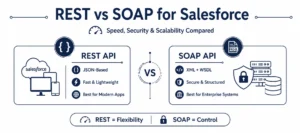
Salesforce REST vs SOAP: Breaking Down the Core Differences
This is where most teams spend the most time deciding. The Salesforce REST vs SOAP debate is really a conversation about priorities — speed, structure, security, and compatibility. Referencing a solid Salesforce API integration guide at this stage helps teams avoid the costly mistake of choosing based on familiarity rather than fit.
Data Format and How Each API Communicates
By default, REST is based on JSON, but XML is supported as well. JSON is compact, easy to read, and supported natively by nearly any modern coding language and framework. This simplifies or makes REST more easily implementable for most teams building with newer stacks.
SOAP, however, is all XML. That implies that you will have larger-sized messages, longer code, and a steeper learning curve for developers not so familiar with the format. REST, however, doesn’t have this… a Web Services Description Language (WSDL) file, which outlines all the operations, data types, and structures that are available. That’s really helpful for enterprise teams that have heavy governance and compliance needs.
Performance: Salesforce REST API vs SOAP API
When comparing Salesforce REST API vs SOAP API purely on performance, REST comes out ahead. Smaller payloads translate to faster request and response cycles, which matters significantly for integrations that serve end users in real time.
SOAP requests carry more overhead. For time-sensitive applications, this is noticeable. But for batch processes or backend synchronization that doesn’t need to happen instantly, the difference is often negligible — and not worth letting it drive the entire decision.
Security in Salesforce CRM Integration
This is one area where SOAP holds a genuine advantage. SOAP natively supports WS-Security — a robust, enterprise-grade standard for securing XML-based messages. REST relies on external layers like OAuth 2.0 and SSL/TLS to achieve comparable protection. These approaches work well, but they require deliberate setup, while SOAP’s security framework is built in by design.
If your Salesforce CRM integration touches regulated data — patient health records, financial transactions, insurance claims — this distinction frequently tips the decision toward SOAP.
When REST API Is the Right Choice
- Integrating Salesforce with a new mobile or web app
- Creating a live dashboard or report tool
- Simple CRUD integration with SaaS platforms
- Developing using a middleware tool such as MuleSoft, Node.js, or a Python-based service.
When SOAP API Makes More Sense
- Connecting Salesforce to legacy applications like ERP, banking, or insurance. Connecting Salesforce to legacy applications such as ERP, banking, or insurance.
- Business environments that have strict rules or regulations about data governance or compliance
- Use cases with complex multiple transactions and rollback.
- When you have to design each data contract ahead of time, such as in a healthcare system or a financial application.
Where Bulk API Fits in This Salesforce API Integration Guide
Bulk API is a vital Salesforce API integration that offers a wide range of capabilities. Bulk API is another essential Salesforce API integration that has many capabilities.
Given that the Salesforce REST vs SOAP dynamic, Bulk API is straightforward to fit into place — it is a class unto itself, addressing a different problem entirely.
Bulk API is optimized for large data operations, such as mass insert, updates, deletes, or queries with hundreds of thousands of records. It is executed asynchronously, which means it runs Salesforce’s job in the background, without keeping the connection live until it finishes executing.
This is important because Salesforce has strict API call limits. If you ran a simple REST or SOAP call, processing 500,000 records one by one, you would hit those limits pretty quickly! Bulk API is designed to do just that and not strain your org.
Bulk API belongs in your integration stack when:
- You’re running a large data migration into or out of Salesforce
- Nightly or weekly batch sync jobs need to run between Salesforce and an external data warehouse
- De-duplicating or cleaning large record sets across your org
- ETL tools like Informatica, Talend, or Dataloader.io are part of your pipeline
Bulk API v2 — the current version — simplifies the workflow significantly compared to v1. You upload a CSV, close the job, and poll for results rather than manually managing multiple batches.
Custom Integration Strategies: What a Salesforce API Integration Guide Won’t Always Tell You
Here’s the reality — most production Salesforce environments don’t rely on a single API type. A well-designed Salesforce API integration guide accounts for a mixed approach, because real business architectures are rarely simple enough for one API to cover everything.
A practical example: A mid-sized retail company connects Salesforce with their e-commerce platform. They use REST API for real-time order updates and customer data sync throughout the day. Every night, a Bulk API job syncs the full product catalogue and historical order records for reporting. And they use SOAP to connect Salesforce with their legacy inventory system built over a decade ago that doesn’t support JSON.
This kind of layered custom integration strategy is exactly what experienced Salesforce integration partners design and implement. The goal isn’t to pick the “best” API — it’s to know which one belongs where in your architecture.
A few questions that help guide this decision:
- How many records are involved — dozens or hundreds of thousands?
- Does the sync need to happen in real time, or can it run on a schedule?
- How old is the system you’re connecting to, and what protocols does it support?
- Are there compliance or security standards that limit your options?
- What does your development team have the most hands-on experience with?
These are the kinds of questions Salesforce integration services teams work through with clients during discovery — before a single line of code is written.
Common Challenges Every Salesforce API Integration Guide Should Address
Even with the right API selected, Salesforce integration projects run into predictable problems. No Salesforce API integration guide is complete without addressing the ones that trip up even experienced teams.
Authentication failures are one of the common failures. Access can be completely denied due to an OAuth 2.0 token mismatch, session expiration, or incorrect permission scopes. Named Credentials remove hardcoded secrets, and it makes the management of credentials much easier.
Data synchronization conflicts occur when there is no conflict resolution rule for multiple systems writing to the same data. Keeping a record clean with a source of truth and ensuring that it is respected in your integration logic.
API governor limit breaches catch teams off guard, especially when REST or SOAP is used for operations that Bulk API should be handling. Proactive monitoring and retry logic help manage this before it becomes a production incident.
Silent failure due to poor error handling is the most expensive problem. A failed API call that goes unlogged can corrupt records quietly for hours. Every production integration needs structured logging, alerts, and graceful failure handling built in from day one.
These aren’t edge cases — they come up regularly, which is why working with experienced Salesforce integration partners or relying on Salesforce managed services for long-term support reduces risk considerably.
Why Salesforce Managed Service Providers Are Critical for Salesforce API Integration Guide Success
Building an integration is one thing. Keeping it healthy as your business grows and Salesforce evolves is a different challenge entirely.
Salesforce releases three major updates every year. Each one can introduce changes that affect how your integrations behave — deprecated endpoints, updated authentication flows, new API versions with altered response structures. Without someone actively watching for these changes, integrations can start failing silently.
A Salesforce managed service provider takes ongoing responsibility for monitoring integration health, catching errors before they escalate, managing version updates, and ensuring performance doesn’t degrade as data volumes grow. Following a thorough Salesforce API integration guide during the build phase matters — but pairing it with a reliable Salesforce managed service provider ensures the long-term health of every connection you build. Many companies that initially engage Salesforce integration partners just for the build eventually retain them for managed support, because the value of well-maintained integrations far outweighs the ongoing cost.
Conclusion
Choosing between REST, SOAP, and Bulk isn’t a one-size-fits-all decision — and that’s the core message of this Salesforce API integration guide. REST gives you speed and modern compatibility. SOAP gives you structure and enterprise-grade security. Bulk gives you the ability to move data at scale without hitting limits. In most real-world scenarios, the smartest approach combines all three, each deployed where it genuinely fits. This Salesforce API integration guide should give you the clarity to start making those decisions with confidence. If you’re looking for experienced Salesforce integration partners to help design, build, and maintain integrations that scale with your business, AnavClouds Software Solutions brings the certified expertise and hands-on experience to make that happen — right from day one.
FAQs
What is the difference between REST and SOAP API in Salesforce?
REST is lightweight, uses JSON, and is good for modern real-time applications. SOAP is structured, more XML-based and is better suited for enterprise or legacy system integrations that have advanced security needs and/or strict data contracts.
When should I use Bulk API instead of REST or SOAP in Salesforce?
Use Bulk API for large volumes of records (usually 50,000 or more). It is asynchronous, won’t violate API limits, and will work well for data migration, batch syncing, and ETL pipelines.
Can I use multiple API types in a single Salesforce CRM integration?
Yes. In most enterprise Salesforce environments, REST is used for “real time” operations, Bulk is used for large batch jobs, and SOAP is used for legacy connectivity. The APIs have different architectural functions.
Do I need Salesforce integration services to set up API connections?
Low code tools is the answer for simple use cases. While a basic integration with Salesforce is possible for most companies, it is advisable to work with an experienced Salesforce integration services company or a certified partner for scalable and production-ready integrations, with proper error handling and compliance requirements.
Search Posts
Popular Posts
Author profile: Saransh Maurya, Content Writer at AnavClouds Software Solutions
Saransh
Maurya
About the author
Saransh Maurya is a dynamic and results-driven professional with a passion for innovation and problem-solving. Known for his analytical mindset and attention to detail, he excels at delivering high-quality solutions that drive business growth and operational efficiency. With strong communication skills and a collaborative approach, Saransh effectively bridges ideas and execution, contributing to successful projects and meaningful outcomes across diverse domains.
Recent Posts