Salesforce Integration Guide Your Business Needs in 2026
You are not merely wasting time by manually copying information between your CRM and other applications; if you are doing it, you are working against your own growth, and you are running Salesforce. The year 2026 will not be a small inconvenience; the disconnected tech stack will be a competitive disadvantage. This Salesforce integration guide is created to help you cut through the noise and get everything you need to know: what integration really is, why it is more important than before, what methods are the most effective, and how to develop an integration strategy that will be able to support your business as it grows. You are either new to the game, or you want to streamline an existing system. This Salesforce integration guide will have you covered.
Why Salesforce Integration Is No Longer Optional
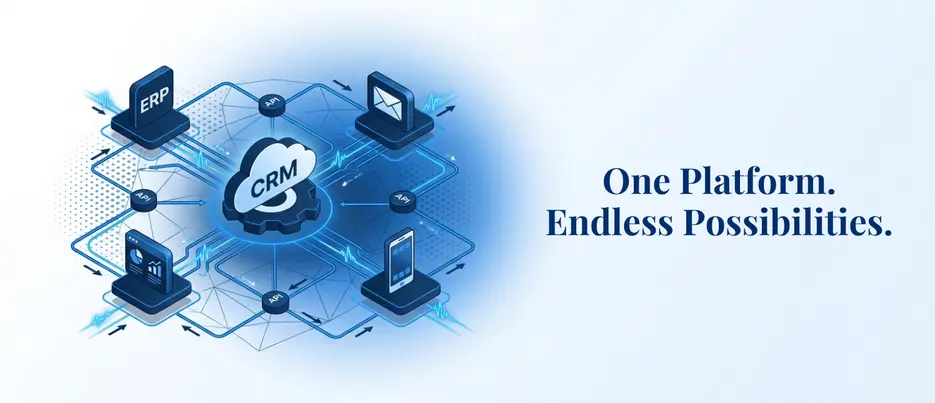
We all know that not all businesses operate on one platform. Your sales crew resides in Salesforce integration guide, your finance team operates in an ERP, your marketing crew conducts campaigns in some other automation tool, and your support crew has its own helpdesk. With no sound CRM integration plan, all these systems are reduced to running in silos, and your customer data is scattered all over.
This is what Salesforce CRM integration is solving. Replacing spreadsheets and messages that you receive in response to the question, Do you have the latest information on this account? When you integrate CRM with other systems, you have one source of truth, one place where all the teams can find correct and up-to-date information about a customer without having to hunt it down or send them a message asking.
And the figures confirm this. The 2026 Connectivity Benchmark Report by MuleSoft indicates that 95% of businesses are experiencing issues with data integration, which directly impacts their capacity to use AI effectively.
The business case should be clear just because of that stat. However, in addition to data access, all the trustworthy Salesforce integration guides will inform you of the same thing: integration today is an integration that can learn, automate, and scale. Even the most well-configured Salesforce org will not achieve its potential without a well-developed CRM integration strategy.
What Does Salesforce Integration Guide Actually Mean?
Before immersing ourselves in the tools and techniques, it is good to first define what it is that we are talking about. Fundamentally, a good Salesforce integration guide begins here:
Salesforce integration is the process of linking your CRM to external systems, applications, or data sources in a way that information flows reliably between them in real time or in batches. It is not a one-time arrangement; it is a continuous process of the way your business is running, and the intensity of your integration directly influences the extent to which your CRM data can be beneficial in all departments.
This isn’t just about moving data from point A to point B. In 2026, a mature Salesforce integration guide will address three different types of integration:
Data Integration
Data synchronization between Salesforce and other applications, such as ERPs, data warehouses, or marketing applications. Bulk data movement is done through standard platforms, such as MuleSoft or Informatica, but Salesforce APIs provide more control when you need to do it in a specific situation.
Process Integration
Linking systems. As an example, when you close a support ticket in Salesforce, a refund is automatically triggered in your finance system – no handoff required. It is these types of cross-system, automated processes that modern CRM integration solutions and Salesforce integration guides are designed to facilitate.
UI Integration
Providing a single interface to the users to avoid switching platforms. Consider putting an external inventory dashboard right into a Salesforce Lightning page, or a chat tool right on Salesforce itself.
The first step to any serious CRM integration guide is to understand what kind of integration fits your situation.
The Core Methods to Connect CRM With Other Systems
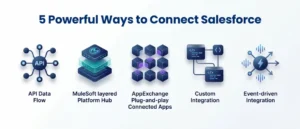
There are several approaches you can take when you combine CRM with third-party applications, and the key is to select the one that suits your use case, access to technical resources, and the real-time nature of the data you require. There is no one-size-fits-all approach to business, and because of this, any useful Salesforce integration guide will always give an emphasis on considering your options first, before committing to an architecture.
REST and SOAP APIs
These are the basic building blocks of Salesforce third-party integrations. Most modern SaaS-to-SaaS connections use REST APIs – they are simple, scalable, and appropriate to real-time interactions of data. SOAP APIs are older, but still popular in enterprise settings where tightly structured and reliable messaging is paramount. The MuleSoft Salesforce Connector is compatible with SOAP, REST, Bulk, and Streaming API, depending on the operation, and allows the teams a lot of flexibility.
MuleSoft Anypoint Platform
MuleSoft continues to be the industry leader when it comes to enterprise-grade Salesforce integration services. It offers a single point of management and security of APIs, integrations, and automation processes. As of 2026, MuleSoft has expanded its role as it is tightly integrated with the Agentforce – Salesforce AI agent platform. MuleSoft unlocks data in third-party, hard-to-reach, and on-premises systems and provides Agentforce with the context it requires to be intelligent across your entire business infrastructure.
AppExchange Connectors
Salesforce AppExchange contains thousands of connectors where businesses can easily integrate without having to write a lot of code. Purpose-built integrations are available in tools such as DocuSign, HubSpot, Zendesk, Jira, Slack, and Zoom, and can be easily deployed. This is particularly useful in Salesforce services for small businesses, where speed and simplicity can be more important than such in-depth customization. For most of the small businesses and mid-sized businesses, entry into a bigger Salesforce CRM integration plan is through AppExchange connectors.
Custom Salesforce Integrations
In some cases, ready-made solutions do not suffice. Business-specific, use-case-specific needs that cannot be approached by an off-the-shelf connector can be managed with custom Salesforce integrations, using Apex callouts, Platform Events, or Change Data Capture. They suit businesses well in whose workflows are unique, legacy systems, or have specific compliance needs. It is highly advisable to tie in an established Salesforce development service here – the choices taken during integration in the early stages of a custom development will determine the scalability and maintainability of the integration in the long run.
Event-Driven Architecture
This is where things get genuinely exciting in 2026. Gartner projects that over 60% of enterprise integration plans will use event-driven patterns to support AI and automation at scale. Leading businesses are already connecting Salesforce’s Event Bus with platforms like AWS Event Bridge or Google Pub/Sub, allowing external AI models to process CRM events and send insights back in real time. Agentforce is built around exactly this kind of event-driven design — and this shift is redefining what modern Salesforce integrations 2026 can actually accomplish.
Building a CRM Integration Strategy That Actually Works
Having the right tools is only half of the battle. A lot of Salesforce integrations fail — not because the technology didn’t work, but because the strategy behind it was weak. Before selecting tools or writing a single line of configuration, businesses need a documented plan that maps systems, defines data ownership, sets clear success metrics, and assigns accountability across teams. Treating Salesforce integration guide as a strategic framework rather than just a technical checklist will change how your team approaches every integration project going forward.
Start With Business Outcomes, Not Features
The biggest mistake teams make is leading with technology decisions before they’ve defined what success looks like. Which systems need to talk to each other, and why? What workflows are currently broken? What data do your teams not have access to? These answers should drive your integration architecture — not the other way around. A well-defined outcome makes it far easier to scope the Salesforce integration guide correctly and avoid scope creeping.
Prioritize Data Quality Before You Connect Anything
Integrating Salesforce with a messy data source just moves the mess into your CRM. Before connecting systems, clean your data. Map fields carefully, remove duplicates, validate records, and decide what actually needs to migrate. As one consistent principle across every Salesforce integration guide: connecting bad data at scale only amplifies existing problems.
Phase Your Rollout
Don’t try to integrate everything at once. Scope creep is one of the leading reasons integration projects go over budget and over deadline. Start with the highest-impact connections — usually your ERP, marketing automation platform, and helpdesk — and stabilize each before moving to the next.
Test Before You Go Live
This sounds obvious, but it gets skipped constantly. Run integrations in a sandbox environment first. Test for data accuracy, workflow triggers, error handling, and edge cases. Broken integrations discovered in production are far more costly than issues caught in testing.
Govern Your APIs
As your integration footprint grows, so does the risk. Implement OAuth 2.0 authentication, use named credentials, apply role-based access controls, and encrypt data in transit and at rest. As Salesforce development services grow more AI-dependent, clean governance becomes foundational infrastructure — not an afterthought.
The Top Salesforce Integrations Businesses Are Using in 2026
The following are the categories that businesses are prioritizing to make their Salesforce integrations as robust as possible by 2026. These are not merely buzzword choices – all of them fill a particular operational gap caused by disjoined systems every day:
- Marketing Automation – HubSpot, Pardot, and Marketo Hub integrations ensure that sales and marketing are in sync with each other, lead scoring is enhanced, and conversion tracking is fastened.
- ERP and Finance – Integrating Salesforce with other services such as NetSuite, SAP, or QuickBooks keeps the financial and CRM data aligned – essential to revenue operations.
- Communication and Collaboration – Slack (64% of Salesforce customers also use it), Zoom, and Google Workspace integrations keep deal collaboration in real time.
- Customer Support – Zendesk and Jira integrations add support and engineering data to Salesforce dashboards, enabling businesses to monitor the resolution time and churn risk in addition to sales performance.
- E-commerce – Salesforce is in the early stages of a pilot to enable integrations with OpenAI ChatGPT to make the product catalogs of retailers discoverable through AI-based search channels.
- Contract Management – DocuSign and PandaDoc integrations introduce the e-signing workflow to Salesforce and minimize the delays between the sales and legal departments.
All of these are valuable Salesforce CRM integration use cases that extend much further than simple data integration.
Common Integration Mistakes to Avoid in Salesforce Integration Guide
Even the seasoned teams falter at this point. Here is your pre-launch Salesforce integration guide checklist to use before going live with any new integration:
- Omitting the integration approach – Leap tool selection without mapping your data flows first is a formula to re-work.
- Premature over-customizing– Customize on solid, standard patterns, and place custom logic on top of them. Complexity compounds quickly.
- Leaving error handling aside, each integration must have a strategy for what to do when it fails. Never assume that it won’t.
- Integration as a one-time undertaking – Systems evolve. The integrations require continuous monitoring, optimization, and updating as your business evolves.
- Under-estimating the complexity of legacy systems – Legacy systems may include unrecorded dependencies. Have them audited and then associate them with Salesforce.
Conclusion
Salesforce is a powerful CRM platform in the world, yet its full potential is only realized when it is connected appropriately to the rest of your business. The Salesforce integration guide is not a technical report that has been done well, but a map to operational efficiency, improved customer experiences, and a technology stack that is future ready. With AI and automation taking a central role in the way businesses operate, it will be directly dependent on the quality of your CRM integration solutions that will dictate the extent to which your systems will be able to act intelligently. When you are willing to create something that works, AnavClouds Software Solutions can help get you there with Salesforce experience, proven practices, and pragmatism.
Frequently Asked Questions
What do you mean by Salesforce integration, and why does my business require it?
With Salesforce integration, your CRM is linked to other business systems to ensure that the information flows automatically. It breaks down silos, harmonizes teams, lessens manual labor, and provides you with a customer-real time perspective of all customers.
What are the most popular techniques of a Salesforce integration guide?
Common integration methods in 2026 are REST and SOAP APIs, MuleSoft Anypoint Platform, pre-built AppExchange connectors, custom Apex-based builds, and event-driven architectures using Salesforce Platform Events or Change Data Capture.
What is the time for integrating CRM with third-party applications?
Simple AppExchange connectors are deployed in hours. Depending on the scope, custom integrations between Salesforce and legacy systems or complex workflows with third-party systems may require several weeks to a few months.
How do I know what to look for in Salesforce integration services?
Look for certified Salesforce skills, a formalized discovery methodology, practical exposure to patterned integration, effective data management habits, and steady post-implementation assistance by your implementation vendor of choice.
Search Posts
Popular Posts
Author profile: Saransh Maurya, Content Writer at AnavClouds Software Solutions
Saransh
Maurya
About the author
Saransh Maurya is a dynamic and results-driven professional with a passion for innovation and problem-solving. Known for his analytical mindset and attention to detail, he excels at delivering high-quality solutions that drive business growth and operational efficiency. With strong communication skills and a collaborative approach, Saransh effectively bridges ideas and execution, contributing to successful projects and meaningful outcomes across diverse domains.
Recent Posts