HubSpot to Salesforce Migration: A 2027 Roadmap for Teams
A HubSpot to Salesforce migration converts contacts, companies, deals, activities, and custom properties from HubSpot to Salesforce objects, and creates workflows, reports, and integrations in Salesforce. Typically, most teams go through the following five steps to audit data, map fields, clean records, test the load, and finally cut over with training. Businesses usually migrate from HubSpot to Salesforce, typically ones where they require more customization, more governance and control, or AI agents on a single data set. Cost will vary based on volume of records, customization, and integrations: a checklist and a tried-and-tested mapping plan safeguard the integrity of data and budget. This guide addresses all aspects of migration – when, how, where, cost, risk, and frequently asked questions.
What Is a HubSpot to Salesforce Migration, and Why Are Teams Making the Move?
A HubSpot to Salesforce migration is a managed move of customer data and business logic from HubSpot to Salesforce. It is NOT a copy-and-paste job, and the reasons vary from team to team. The following sections describe the project, the reasons behind the growing demand, and changes to AI.
What the Project Involves
Objects and properties are used to store information in HubSpot, whereas objects, fields, record types, and relationships are not the same in Salesforce. Each record must have a destination, and each automation must have a rebuild. Hence, the migration is more of a redesign than a transfer, which is why.
Market Momentum Behind the Shift
A latest forecast projects worldwide CRM software spending to grow from $170.5 billion in 2026 to $289.8 billion by 2030. That growth fuels a deeper ecosystem of apps, certified talent, and integration options for companies planning a HubSpot to Salesforce migration after outgrowing lighter tools.
The AI Factor Going Into 2027
Agentforce and other agents operate at their peak when their data is clean and connected, and many expanding companies want to have sales, service, marketing, and analytics on a single platform. A migration is frequently the first step for these teams to that configuration.
When Is the Right Time to Move Off HubSpot?
Understanding when to move off HubSpot helps to avoid moving too early or waiting till workarounds accumulate. Most signals can be categorized as short-term and long-term.
Operational Warning Signs
- Custom data needs: Relationships that cannot be captured cleanly in a standard object are required by your business model
- Complex permissions: Records need to have multiple business units with a strict set of permissions on them.
- Reporting gaps: Leadership wants cross-object reports that currently require manual exports.
- Integration sprawl: Multiple tools must now be synced back and forth with ERP, billing, and/or support.
Strategic Triggers
- Rising costs: Seats, contact tiers, and add-ons push the bill up faster than the value.
- AI roadmap: You plan to deploy agents that need governed, unified data.
- Industry requirements: Regulated sectors need deeper compliance controls and dedicated industry clouds.
If you have three or more of these, it’s time to look at a HubSpot to Salesforce migration, rather than patching some more. Having a list of blockers (in writing) helps you decide when to move off HubSpot.
What Are the HubSpot CRM Limitations Enterprise Teams Face?
For marketing teams looking to get up and running quickly, HubSpot can be a good fit. The HubSpot CRM limitations enterprise users mention generally only manifest when scaled up and come in three categories.
Customization and Data Model Depth
Complex data models, formula logic, and declarative automation are more flexible than custom objects in Salesforce.
Governance and Security Controls
Salesforce is more secure at the field level, has sandboxes, and has structured release management, which are important for audits and regulated data.
Developer Extensibility and Industry Depth
Apex, Lightning Web Components, and AppExchange provide engineering teams greater flexibility to build. Salesforce has dedicated clouds of your own for Financial Services, Health and Education, too.
None of these things mean HubSpot isn’t a good product. These HubSpot CRM limitations enterprise teams complain about must be met by a genuine need.
How Do You Migrate From HubSpot to Salesforce Step by Step?
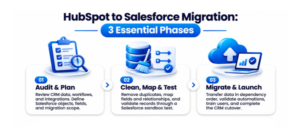
Those teams who migrate from HubSpot to Salesforce have been successful in viewing the project as a business change rather than an IT project. It goes through three stages, and each of these requires an explicit owner.
Phase 1: Audit and Planning
- Audit your HubSpot data. Identify objects, properties, workflows, forms, sequences, and integrations. Indicate those that should be moved, archived, or retired.
- Define the target model. Determine which Salesforce objects, record types, and fields are used for each data set.
Phase 2: Cleanup, Mapping, and Testing
- Clean the data. Identify and remove duplicate records, standardize picklist values, correct formats, and eliminate outdated records.
- Map fields and relationships. Document every source-to-target pair before any loading begins.
- Run a sandbox load. Migrate a sample, check counts and relationships, and fix errors.
Phase 3: Cutover and Adoption
- Execute the full migration. Load in dependency order: accounts, contacts, deals, then activities and attachments.
- Validate, train, and hand over. Reconcile totals, test automations, train users, and keep HubSpot read-only for a short safety window.
HubSpot to Salesforce Migration Checklist
Before you migrate from HubSpot to Salesforce, confirm every item on this migration checklist. If an item is open, the go-live date moves.
- Stakeholder sign-off on scope and timeline
- Full backup and export of HubSpot data
- Duplicate and data quality report
- Approved field-mapping document
- Salesforce sandbox with objects, validation rules, and permissions
- Test migration with record count reconciliation
- Plan to reconnect email, calendar, and marketing tools
- User training plan and post-launch support window
How Does HubSpot to Salesforce Data Mapping Work?
HubSpot to Salesforce data mapping is where most projects succeed or fail. Every property needs a home in Salesforce, and relationships between records must survive the move. Careful HubSpot to Salesforce data mapping also protects reports and automations after launch.
Object-Level Mapping Reference
| HubSpot Object | Typical Salesforce Object | Watch Out For |
| Contacts | Contact or Lead | Lifecycle stage logic |
| Companies | Account | Parent-child hierarchies |
| Deals | Opportunity | Pipeline and stage values |
| Tickets | Case | Status and priority picklists |
| Notes, Calls, Emails | Task, Event, Email Message, Note | Links to the correct records |
| Custom Properties | Custom Fields | Data types and picklist values |
Field and Data Type Rules
- Convert data types deliberately. Multi-checkbox and dropdown properties often need picklist or multi-select fields.
- Preserve associations. Store original HubSpot record IDs in external ID fields so relationships rebuild correctly.
- Decide lead versus contact logic early. Lifecycle stages do not translate one-to-one into Salesforce lead statuses.
Freeze Points and Sign-Off
Freeze the HubSpot to Salesforce data mapping document before the test load, and get sales, marketing, and service leaders to approve it. Changing it mid-project is the quickest way to wreck a timeline in any HubSpot to Salesforce migration.
What Changes for a HubSpot to Salesforce Migration in 2027?
The rules are still the same, but the objectives have changed. Most projects were to copy records and keep the lights on a few years ago. The goal now is to become an AI-ready foundation, and a proper modern migration plan should take that into account.
AI-Ready Data Quality
When agents work with your records, they work with your data – and when you migrate to Salesforce, you’re left with obvious errors caused by agents using records that are duplicates or stale.
Unified Profiles and Consent
Outline the process for sales, service, and marketing data to work together, preferably to Data Cloud. Preserve opt-in status, preferences, and communications history exactly as captured.
Governance Before Automation
Governance is one of the most popular HubSpot CRM limitations enterprise teams cite, so make sure to specify who can view, edit, and automate on each object before agents and flows go live.
Who Should Be on Your HubSpot to Salesforce Migration Team?
Project roles are necessary even in small projects. Having a HubSpot to Salesforce migration early helps to split the responsibility.
Leadership and Delivery Roles
- Executive sponsor: Approves scope, budget, and trade-offs.
- Project manager: Owns the timeline, risks, and weekly updates.
- Business owners: Sales, marketing, and service leaders who confirm the new setup matches how they work.
Technical Roles
- Salesforce architect: Designs the data model and security.
- Data lead: Handles cleanup, mapping, and reconciliation.
- Admin or developer: Builds flows, validation rules, and integrations.
How Much Does a HubSpot to Salesforce Migration Cost?
The HubSpot to Salesforce cost isn’t one single rate, but rather a number of factors. Each bucket has significant meaning, and understanding each one can make comparing quotes fairly.
Licensing Costs
Salesforce charges for each user per month, on an annual basis. Entry editions begin at about $25, while the Core edition, which was released in September 2026, will go for $195. Always check the price with Salesforce before you budget. While the obvious HubSpot to Salesforce cost is the license fee, it’s typically not the biggest expense.
Implementation and Data Migration Effort
Every new object, new record, and dirtier data equals more time. Scope is provided by custom objects, flows, approval processes, and Lightning components.
Training and Post-Launch Support
Training is usually overlooked, and hypercare in the first few weeks after go-live keeps the momentum going for adoption.
Don’t request an hourly range for the discovery phase; request a fixed-scope estimate instead, based on a written discovery phase. Any estimate that doesn’t consider your record counts or needs is a guess for a HubSpot to Salesforce migration quote. When comparing HubSpot to Salesforce cost, be sure that the comparison is with the same scope.
What Is the Salesforce Integration Cost After Moving?
Many teams keep part of the HubSpot stack, usually Marketing Hub, and connect it to Salesforce. That choice changes your Salesforce integration cost, and it belongs in the overall HubSpot to Salesforce cost plan.
Factors That Drive Integration Spend
- Sync direction: One-way sync is simpler than bi-directional.
- Object coverage: Syncing leads, contacts, and deals costs less than syncing custom objects.
- Tooling: Native connectors, middleware, and custom APIs each carry different license and build costs.
- Maintenance: API limits, field changes, and error monitoring need an owner.
A clear view of these factors makes your Salesforce integration cost forecast far more reliable.
Keep, Replace, or Retire HubSpot Tools
If you’re only keeping HubSpot for marketing automation, then compare the cost over the long run with the cost of Salesforce’s marketing tools. That’s the business case to include in your HubSpot to Salesforce migration. A realistic Salesforce integration cost estimate will avoid unexpected costs after the launch.
Which Mistakes Cause a HubSpot to Salesforce Migration to Fail?
The majority of the failures stem from avoidable planning gaps. Staying away from them helps maintain a HubSpot to Salesforce migration budget and timeline.
Data and Mapping Mistakes
- Skipping data cleanup. Bad data moves just as fast as good data.
- Mapping without business input. Fields mean different things to sales, marketing, and finance.
- Skipping reconciliation. Always compare record counts and sample values.
Process and Adoption Mistakes
- Ignoring automation. HubSpot workflows must be rebuilt as Salesforce Flows, not forgotten.
- Underestimating adoption. A perfect load fails if reps keep working in spreadsheets.
- No cutover freeze. Edits made during the move create gaps.
Conclusion
The time, the data, and the discipline of mapping are the keys to a successful HubSpot to Salesforce integration. Understand when to move off HubSpot, audit to analyze what has been built, and apply a checklist to ensure that nothing gets missed during a cutover. Plan for users beyond the license and user adoption as a project, not an add-on. AnavClouds Software Solutions provides expert planning and execution for all HubSpot to Salesforce migrations from discovery to after-launch support, including both onshore and offshore teams and a response time of less than five hours. If you’re considering moving, you can speak with our Salesforce experts and get a scoped plan that is tailored to your data, your integrations, and your goals.
FAQs
How Long Does a HubSpot to Salesforce Migration Take?
The timelines are dependent on the amount of data, customization, and integrations. Small and simple datasets can move in a couple of weeks, while large, multi-team projects can take a couple of months from discovery until they go live.
Can You Move HubSpot Data Without Losing Anything?
Yes. To ensure data stays intact, you should back up your data, map all of the fields, preserve original IDs as external IDs, test in a sandbox, and compare the number of records.
Is Salesforce Better Than HubSpot for Enterprise Teams?
It will depend on your requirements. Salesforce is best for complex processes, extensive customization, and robust governance, while HubSpot is more suited to quick adoption and marketing-driven teams. Select the platform suitable for your business needs.
Do You Need a Partner for a HubSpot to Salesforce Migration?
Not always, but a certified partner reduces risk with complex data and a multitude of integrations. Data Import Wizard and Data Loader can be used to import small, clean datasets in-house.
Search Posts
Popular Posts
Author profile: Saransh Maurya, Content Writer at AnavClouds Software Solutions
Saransh
Maurya
About the author
Saransh Maurya is a dynamic and results-driven professional with a passion for innovation and problem-solving. Known for his analytical mindset and attention to detail, he excels at delivering high-quality solutions that drive business growth and operational efficiency. With strong communication skills and a collaborative approach, Saransh effectively bridges ideas and execution, contributing to successful projects and meaningful outcomes across diverse domains.
Recent Posts