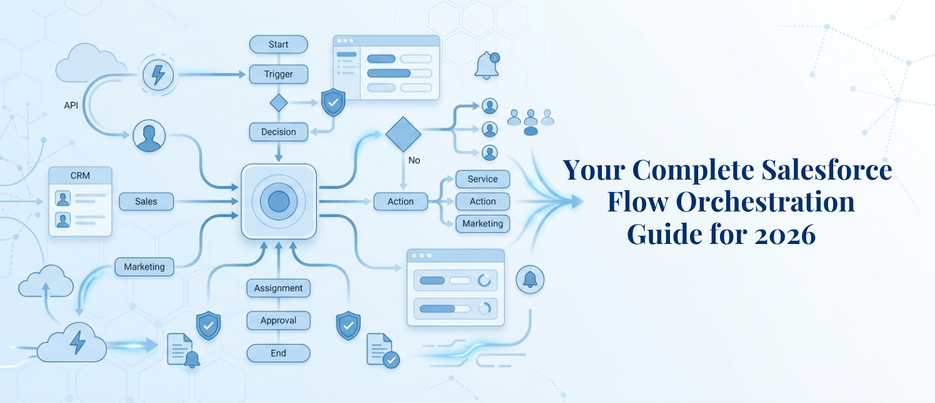
Your Complete Salesforce Flow Orchestration Guide for 2026
Businesses waste hours each week waiting for approvals to be made and handoffs to be completed between departments. If there are multiple teams, multiple people, and multiple decisions in a process, then a single flow was never created for that. By 2025, 70% of organizations will be adopting structured automation, a 3.5x growth rate in less than four years, and that’s why the Salesforce Flow Orchestration guide has come into existence: because Salesforce process automation 2026 is among the most obvious signs of that enterprise software shift. This Salesforce Flow Orchestration guide is designed from the very basics of the Flow Orchestration architecture and use cases all the way up to the difference between Salesforce Flow Orchestration and Flow Builder – which any Salesforce team must know to make informed decisions, plan, and confidently implement orchestration.
What Is Salesforce Flow Orchestration and Why Does It Exist?
The Salesforce Flow Orchestration Guide begins with the basics: Orchestration is a Salesforce automation feature that links multiple individual flows together into one unified, multi-user, multi-stage business process. It doesn’t have to rebuild the flows you are already building; it is orchestrating the flows. It provides sequencing, human handoff, stage-level visibility, and parallel workstreams in addition to what Flow Builder does very well at the individual task level.
In the real world, enterprise processes are not confined to a single flow. Consider hiring new staff: HR verifies the record, IT assigns accounts, facilities assigns workspace, etc., and payroll assigns compensation. All those steps are to be carried out by one person in each department and in a particular sequence. This Salesforce Flow Orchestration guide takes a deep dive into this situation from the ground up, and these are the kinds of scenarios that Salesforce services teams routinely see businesses hit when they need orchestration and the need for Flow Builder isn’t enough.
Every orchestration in this Salesforce Flow Orchestration guide is built on two structural elements:
- Stages: It is a collection of one or more steps and are processed sequentially. The exit conditions determine when each stage is done so that the next stage can start.
- Steps: The individual parts of the work within a stage. Steps can be executed as a series or in parallel, by a particular user, a queue, or as a completely automatic background action.
This step-by-step approach is what sets apart orchestration from all other Salesforce process automation 2026 and allows it to handle complexity that Flow Builder couldn’t. This is the backbone of any Salesforce Flow Orchestration guide.
How Does Flow Orchestration vs Flow Builder Actually Differ?
Before making any implementation decision, it is crucial to understand Flow Orchestration vs Flow Builder. Flow Builder is designed to automate one specific defined process, trigger an action, do a series of actions, and end. It’s linear and reactive and does a great job of it within that scope.
Flow Orchestration is not competing with Flow Builder; it’s a distinction of scope. Flow Builder processes one task at a time. As this Salesforce Flow Orchestration guide explains, orchestration controls what happens when a series of tasks are performed in a particular order by a number of people. All existing flows are directly usable in an orchestration without rebuilding; both tools are running on the same Flow engine.
Here is a direct comparison:
| Flow Builder | Flow Orchestration | |
| Scope | Single automated process | Multiple flows coordinated together |
| Users involved | Usually one | Multiple users across teams |
| Structure | Linear, trigger-based | Stages and steps, sequential or parallel |
| Human handoffs | Not natively supported | Built-in via the Work Guide |
| Approval handling | Basic | Parallel, dynamic, with recall paths |
| Error handling | Flow level | Orchestration level with separate notifications |
When the process requires one person to act once, Flow Builder is the right answer. When it requires five people to act in a coordinated sequence with conditional branching, that is where Flow Orchestration vs Flow Builder stops being a comparison and starts being an obvious choice. Every Salesforce Flow Orchestration guide worth reading makes this distinction the starting point.
What Has Changed in Salesforce Process Automation 2026?
Two things have changed with Salesforce process automation 2026 that impact all organizations considering orchestration: price and ability. Both are significant in making a case for this Salesforce Flow Orchestration guide; they cannot be overlooked.
As of the Spring ’26 release in February 2026, Flow Orchestration runs are free of any usage-based limits in applicable editions. Full access, no metering, no entitlement caps, and no procurement friction for Enterprise, Performance, Unlimited, Einstein 1, and Developer Edition orgs. There are no longer excuses for organizations not to deploy orchestration due to licensing concerns.
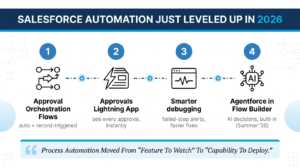
In terms of capability, Salesforce Process Automation 2026 added some beneficial features to the capabilities of orchestration:
- Approval Orchestration Flow types: Approval Orchestration Flow types, Autolaunched Approval Orchestration (triggered by other processes or custom buttons), and Record-Triggered Approval Orchestration (when a record is created or updated).
- Approvals Lightning App: dedicated approver interface with 100% visibility of where any approval is in the process without requiring the approver to conduct manual digging through the records.
- Improved debugging tools: failed steps produce individual notifications at orchestration and also flow levels, which makes debugging significantly quicker.
- Agentforce agents in Flow Builder: Flows now have native AI agent actions, which are introduced in Summer’26, allowing orchestrated processes to harness AI for making decisions in real time.
These changes are reflected in this Salesforce Flow Orchestration guide, as Salesforce process automation 2026 is when process automation shifted from a feature to watch to a necessary capability to deploy today.
What Are the Real-World Flow Orchestration Use Cases Worth Knowing?
The most useful part of any Salesforce Flow Orchestration guide is practical evidence: where is orchestration being deployed and what does it replace? Here are the Flow Orchestration use cases that appear most consistently across industries.
Employee Onboarding, HR and IT
One of the most widely implemented Flow Orchestration use cases, onboarding triggers when an employee start date field is set. HR confirms personal details through a screen flow step, IT provisions accounts in the next step, and facilities handles workspace assignment in parallel. Every team sees only their assigned task in the Work Guide. Salesforce implementation services frequently cite this as the fastest-ROI orchestration a company can build.
Claims Processing, Insurance
A claim filed through a contact center kicks off an orchestration that routes sequentially through damage inspection, adjuster review, QA verification, and payment approval, one auditable process instead of disconnected systems and email follow-ups.
Sales Quote-to-Contract , Sales Operations
Pricing review, legal approval, contract generation, and countersignature run as defined steps. Each person sees their task in the Work Guide at the moment it is ready for them, without needing visibility into the full record or surrounding steps.
Mortgage Approval, Financial Services
Document collection and property appraisal run as parallel steps within the same stage while underwriting proceeds independently; one of the Flow Orchestration use cases where parallel execution alone cuts multiple days off a traditionally linear cycle.
Incident Response, IT and Service
When a service outage triggers a spike in cases, orchestration assigns investigation to engineering, coordinates customer communication through marketing, and tracks every resolution step across ops inside a single trackable workflow.
Return Merchandise Authorization, Retail
Warranty checks, service agreement validation, and field service dispatch connect as sequential steps rather than across three separate systems. This is one of the Flow Orchestration use cases where the visibility benefit alone justifies the implementation.
Every one of these Flow Orchestration use cases shares the same core characteristic: the process crosses department lines, involves multiple people acting in a defined sequence, and breaks down when managed through anything less structured. Reviewing this Salesforce Flow Orchestration guide alongside your existing processes is the fastest way to identify which of these scenarios applies to your organization first.
How Does Multi-Step Approval Automation Work Inside Salesforce Orchestration?
As any reliable Salesforce Flow Orchestration guide will confirm, multi-step approval automation Salesforce teams have historically handled complex sign-off chains through classic Approval Processes. Those work for simple single-path approvals, one approver, one outcome, one direction. They fail the moment the business needs parallel approvers, conditional branching, or a way to return a record for revision without rejecting it entirely.
This Salesforce Flow Orchestration guide documents what multi-step approval automation Salesforce orchestration now makes possible that classic Approval Processes never could:
- Parallel approval paths: multiple approvers review simultaneously within the same stage rather than forming a single sequential queue.
- Dynamic routing: the record routes to different approvers automatically based on deal size, region, risk tier, or any field value on the record.
- Recall paths: a step can be returned for correction without collapsing the entire approval chain or forcing a restart from the beginning.
- Mixed automation and human review: automated background compliance checks run in the same stage as manual review steps without requiring separate orchestrations.
- Stage-level error handling: a failed step generates separate notifications at both orchestration and flow level, so failures are captured and actionable rather than silent.
Multi-step approval automation: Salesforce orchestration also benefits from the new Approval Orchestration types introduced in Spring ’26, Autolaunched and Record-Triggered, which give Salesforce development services teams the flexibility to initiate approval chains from almost any entry point in the platform.
For any scenario involving more than one approver, conditional logic, or parallel review paths, multi-step approval automation through Salesforce Flow Orchestration is the architecturally stronger choice. Any serious Salesforce Flow Orchestration guide will tell you the same: classic Approval Processes were not built for this level of complexity.
How Should You Approach Building Your First Salesforce Flow Orchestration?
This Salesforce Flow Orchestration guide closes the implementation section with what matters when moving from evaluation to build. The technical setup inside the builder is straightforward; the harder part is the process design that happens before you open Salesforce.
Map every handoff before touching the builder
Write the full process out on paper first. Identify every person who acts, every condition that changes the path, and every point where the process could stall. Most orchestration problems are process-design problems baked in during the build because the logic was never properly mapped beforehand.
Start with flows you already have
Salesforce Flow Orchestration is explicitly designed to reuse existing flows, one of the most practical advantages this Salesforce Flow Orchestration guide can highlight for teams already invested in the platform. Auto-launched flows become background steps. Screen flows become interactive steps surfaced through the Work Guide. You orchestrate what you have already built; you do not rebuild it.
Design stages before steps
Getting the stage structure right determines how visible, manageable, and scalable the orchestration will be as it grows. Stage boundaries set during early design tend to be difficult to restructure later, a detail every practical Salesforce Flow Orchestration guide will emphasize. Getting them right at the start matters more than most first-time builders expect.
Test the Work Guide experience with real users
The Work Guide is where assigned users see and complete their interactive steps. How clearly tasks are presented to approvers matters as much as how correctly the automation logic runs. Salesforce development services teams that neglect the approver experience consistently see low adoption even when the technical build is solid.
Build narrow, then expand
The first orchestration should solve one well-defined process completely. Once the team understands how stages, steps, and exit conditions interact in practice, expanding to more complex multi-step approval automation Salesforce scenarios becomes far more manageable. Salesforce development services partners with orchestration experience will help you avoid the scoping mistakes that almost every first-time build makes without external guidance.
Conclusion
Salesforce Flow Orchestration is no longer a “watch and wait” technology to be admired from afar. Since there is no usage-based cost (UBC) for this Salesforce Flow Orchestration guide, and a feature set that is maturing to include Approval Orchestration types, enhanced debugging, and native Salesforce Agentforce integration, there’s a gap between your existing automation capabilities and orchestration capabilities – and it’s measurable, real, and easily closed today. Looking for a solution to get cross-departmental approvals off email threads and disconnected flows? Look no further than orchestration. This Salesforce Flow Orchestration guide is all about starting points; the results occur at the implementation. Built the first time, scalable by the nature of your processes, the Salesforce development services team at AnavClouds Software Solutions designs and deploys Flow Orchestration strategies right from the beginning.
Frequently Asked Questions
What is Salesforce Flow Orchestration used for?
It orchestrates and integrates complex multi-user business processes by linking together multiple flows and steps to stages, managing handoffs, approvals, and parallel workstreams across teams in one auditable workflow.
Is Salesforce Flow Orchestration available at no extra cost in 2026?
Yes, Orchestration runs aren’t limited by usage and are included in Enterprise, Performance, Unlimited, Einstein 1, and Developer editions as of Spring ’26 (no additional licensing).
How is Flow Orchestration different from Flow Builder?
Flow Builder automates single tasks; Flow Orchestration allows for multiple flows to be chained together in stages and steps, supports multiple users and departments in the same process, allows for the approval of multiple flows in parallel, and supports end-to-end processes with human handoffs.
Can Flow Orchestration replace classic Salesforce Approval Processes?
Yes, for most of the scenarios. Unlike classic Approval Processes, it allows for parallel approvals, dynamic routing, and recall paths, making it more powerful and flexible for complex approval processes.
Search Posts
Popular Posts
Author profile: Saransh Maurya, Content Writer at AnavClouds Software Solutions
Saransh
Maurya
About the author
Saransh Maurya is a dynamic and results-driven professional with a passion for innovation and problem-solving. Known for his analytical mindset and attention to detail, he excels at delivering high-quality solutions that drive business growth and operational efficiency. With strong communication skills and a collaborative approach, Saransh effectively bridges ideas and execution, contributing to successful projects and meaningful outcomes across diverse domains.
Recent Posts