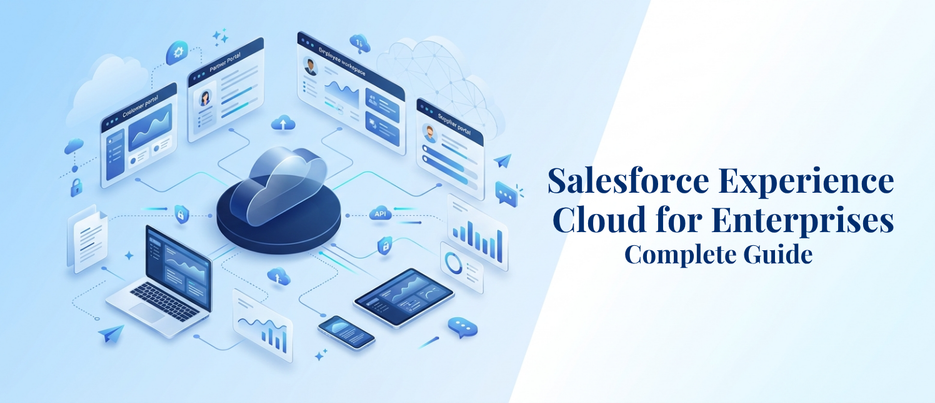
Salesforce Experience Cloud for Enterprises: Complete Guide
When enterprise IT and CX leaders need one place for customers, partners, and employees to log in, get answers, and complete their work without having to open a case, Salesforce Experience Cloud for Enterprises is the one place to go. It is about a platform that enables any large organization to create a branded portal, self-service hub, and partner community on top of their own Salesforce information. This blog will cover the functionality of Salesforce Experience Cloud for Enterprises, its licensing options, the differences between this and the previous version of Community Cloud, and the role that nonprofits and growing businesses can play.
What Is Salesforce Experience Cloud for Enterprises?
Salesforce Experience Cloud for Enterprises is a digital experience platform that enables you to create safe, branded portals, websites, and communities on the Salesforce platform. It is directly tied to your CRM information, so what a client, partner, or employee sees in a portal will mirror real-time information from Sales Cloud, Service Cloud, or any other system that is connected to it.
For businesses, this is important for two reasons: first, scale and, second, the fact that the average is 4.6% for them. An average-sized company may require one portal for support tickets. Typically, an enterprise has multiple: a customer hub, a dealer/reseller network, an employee help desk, and possibly a public-facing knowledge base, all sharing the same governance model, and all based on the same underlying data. This multi-audience complexity is exactly what Salesforce Experience Cloud for Enterprises was designed to manage – without requiring businesses to integrate multiple systems. Also, it’s important to note that Salesforce Experience Cloud for Enterprises is integrated on the same platform as Sales Cloud and Service Cloud, meaning that admins enable permissions and sharing rules without having to learn a new portal product.
Why Are Enterprises Investing in Salesforce Experience Cloud for Enterprises Right Now?
Advances in technology have changed customer expectations for self-service, and statistics support this. While most organizations still aren’t doing well at making self-service a successful experience, 73% of customers use it at least once in their service journey. That’s the space that drives enterprises to Salesforce Experience Cloud for Enterprises: a connected portal that brings in real-time case status, order history, and account info, effectively eliminating the need for customers to hop from email to phone to a static FAQ page.
There are two drivers! Companies now must strive to lower cost per resolution with no impact on customer satisfaction. A robust portal handles simple queries, password resets, and status updates to relieve support and sales staff from dealing with tedious and trivial matters. The real, cost-driven justification for Salesforce Experience Cloud for Enterprises is that it gets discussed in digital transformation road maps.
How Do Enterprises Measure ROI from Salesforce Experience Cloud for Enterprises?
Typically, ROI discussions on Salesforce Experience Cloud for Enterprises revolve around three numbers: support cases averted, average handle time saved, and engagement rate of partners/customers within the portal. IT/CX leaders monitor the number of logins that are resolved without an escalation to a case, against the pre-portal baseline.
The other side of the ROI equation is partner productivity. Deal cycles are faster when a channel team can view deal registrations, commission status, and marketing assets in a single spot versus sifting through spreadsheets and email threads. The typical before-and-after example that most businesses consider when checking out Salesforce Experience Cloud for Enterprises is cost per resolution, time to onboard a new partner, and portal adoption rate in the first two quarters.
What Are Some Real Experience Cloud Portal Examples?
Experience Cloud portal examples give you a clearer idea of the flexibility of the platform. It’s used in various ways in different industries:
- Retail and e-commerce: Order tracking, loyalty program dashboards, and return management hubs that are seamlessly connected to order and inventory data.
- Financial services: Provide secure online portals with statements, service requests, and message advisors without needing to call.
- Healthcare: Patient and provider portals for scheduling appointments, managing referrals, and securely sharing documents.
- Manufacturing and distribution: Dealer and distributor websites to keep track of inventory, order placement, and co-op marketing tools.
- Telecom: Self-service billing, plan changes, and troubleshooting centers that reduce call center volume.
These Experience Cloud portal examples have one common pattern: They eliminate all the disparate spreadsheets, emails, and manual approvals and create one logged-in experience, based on a live CRM record. This consistency is a huge reason why Salesforce Experience Cloud for Enterprises is the platform of choice for large, multi-department organizations.
How Does a Customer Self-Service Portal Salesforce Build Actually Work?
Customer self-service portal Salesforce implementation begins with the use of a knowledge base, case deflection tools, and account-specific dashboards on a customer self-service portal. Customers log in, view their own orders, tickets, or invoices, and can search your knowledge base, containing all your support team’s articles.
But there are objects that your customer service teams are already using, such as Cases, Orders, Accounts, and Contacts, that power the customer self-service portal (Salesforce site), but are exposed to your customers through carefully controlled sharing rules and permission sets. The key to remember about Salesforce Experience Cloud for Enterprises is that you’re not storing data in a different customer-facing application; you’re just securely making that data visible. This can significantly reduce ticket volume and AHT for enterprises that support thousands of tickets each month.
What Is a Partner Portal Salesforce Setup Used For?
A partner portal Salesforce deployment is created for the B2B portion of the company — resellers, distributors, agents, and channel partners that require access to leads, opportunities, and deal registration, yet don’t need to be full-fledged internal CRM customers.
A partner portal Salesforce site lets partners register deals and verify their status on commission or incentive, download marketing content, and submit support requests, all in a branded experience that still follows your internal sales hierarchy and approvals. This is one of the most straightforward enterprise use cases for Salesforce Experience Cloud for Enterprises because the programs tend to be quite large, and each outside user has their own unique viewpoints based on their role and location.
A properly configured partner portal Salesforce site also helps to resolve a less conspicuous issue: consistency, for enterprises with channel networks around the world. When partners do not have a central hub to see order status and submit claims, regional teams are likely to develop their own workarounds, resulting in data silos and varying partner experiences across markets. One controlled portal eliminates that “fragmentation” and enables one place for leadership to view partner performance across all regions.
How Does Experience Cloud Licensing Work for Enterprises?
Many Enterprise projects underrun or just overrun the budget on Experience Cloud licensing, so it’s important to get in the know. Salesforce organizes Experience Cloud licensing around a handful of models:
- Member-based (named user) licenses: a set of licenses for an annual period, based on the number of users who use the software, such as active partners or support staff who work with the software internally.
- Login-based licenses: these are sold every month as a pool of logins, more appropriate for occasional users who may log in a few times per month.
- External Apps licenses: transaction / usage-based model, typically for customer portals that involve lighter-touch transactions for high volume.
It’s important to get Experience Cloud licensing right because each audience segment — daily partner users, occasional customers, anonymous site visitors — needs to be mapped to the model that best fits each of them. Businesses that fail to do this are subject to paying for unused memberships or logins that expire during high traffic. The fix is typically a segmentation project, as Salesforce Experience Cloud for Enterprises is available in various types of licenses and can be used on a single site.
It also has the advantage of re-evaluating the licensing of Experience Cloud at least once a year rather than making it a standalone choice point for setup. When a portal scales up, partners join and leave, and new business units are introduced to an existing portal, usage patterns change. Businesses that review logins, inactive member seats, and External Apps usage on an annual basis are more likely to spot cost creep early, even before it gets to a point where renewal is required.
Experience Cloud vs Community Cloud: What’s the Difference?
For those who have been around Salesforce for some time, you may occasionally hear people use the term “Community Cloud.” The simple answer to the Experience Cloud vs Community Cloud question is that they are the same product; Salesforce renamed its Community Cloud to Experience Cloud and made it much more than just an online community.
The rebrand was more than just a name change. While Community Cloud was primarily used for discussion forums and simple case portals, today’s Salesforce Experience Cloud for Enterprises is enhanced by more page-building options, a more advanced CMS, deeper Data Cloud and Einstein integration, and mobile-first, headless, and multi-brand experiences. That makes the practical question of Experience Cloud vs Community Cloud rather easy: If your organization is still on older Community Cloud license contracts, then those licenses will still apply, but the platform in between has evolved quite a bit.
Can Salesforce Experience Cloud for Nonprofits Deliver the Same Value?
That’s a reasonable question, as the majority of this discussion is focused on big business. Indeed, Salesforce uses the same underlying platform to create donor portals, volunteer management hubs, and program participant self-service sites—all with the help of Nonprofit Cloud.
A giving-focused donor site on Salesforce Experience Cloud for Nonprofits could enable supporters to see giving history, update giving frequency, and sign up for events; a volunteer-focused site will track hours and upcoming volunteer opportunities. The costing of nonprofits’ use of Salesforce is similar to its enterprise licensing programs, though that doesn’t mean it looks the same; rather, the function — secure, branded, data-connected portals — is the same. It’s a good illustration of the platform’s versatility with such disparate organizations and missions.
Why Do Enterprises Need Expert Salesforce Development Services for Experience Cloud?
While an out-of-the-box template provides a good start to an Experience Cloud project, most large deployments require custom Lightning Web Components, intricate sharing rules, multi-org data models, and integrations with ERP, billing, or legacy systems. That is where expert Salesforce development services can make a difference.
A team that specializes in Salesforce development services can build the proper licensing model from the ground up, create custom components that are more than just pre-made, and implement governance that allows multiple business units to host their own websites without conflicting configurations. For an initiative as central to customer and partner experience as Salesforce Experience Cloud for Enterprises, getting the architecture right the first time avoids expensive rebuilds down the line.
Bringing It All Together
Salesforce Experience Cloud for Enterprises is not just a single feature; it is a versatile platform that caters to various external touchpoints a large enterprise manages, such as customers, partners, donors, and volunteers. Regardless of whether you’re implementing a self-service solution to save on support costs, scaling your channel program with a partner portal, or deciding between Experience Cloud vs Community Cloud for your existing org, the common denominator is that it’s a single secure, connected experience layer over top of the CRM data you already trust. The smoothness of the journey depends on the licensing choices that you make and your implementation partner. Our Salesforce consulting and development team at AnavClouds Software Solutions can help enterprises plan, build, and scale Experience Cloud sites that are truly designed for how customers and partners use them, not just a template that is forced onto all of them.
FAQs
What is Salesforce Experience Cloud used for?
It’s used to build secure, branded portals where customers, partners, or employees can log in, access relevant data, and self-serve, reducing dependence on phone or email support.
Is Experience Cloud the same as Community Cloud?
Yes, Salesforce rebranded Community Cloud as Experience Cloud, keeping existing license entitlements while adding stronger CMS, integration, and page-building capabilities.
How much does Salesforce Experience Cloud cost?
Cost depends on license type — member-based, login-based, or External Apps — plus the number of users, so pricing varies by audience size and usage pattern.
Can small organizations or nonprofits use Experience Cloud?
Yes, nonprofits and smaller organizations can use it too, often through nonprofit-specific licensing programs that make the same portal capabilities more accessible.
Search Posts
Popular Posts
Author profile: Saransh Maurya, Content Writer at AnavClouds Software Solutions
Saransh
Maurya
About the author
Saransh Maurya is a dynamic and results-driven professional with a passion for innovation and problem-solving. Known for his analytical mindset and attention to detail, he excels at delivering high-quality solutions that drive business growth and operational efficiency. With strong communication skills and a collaborative approach, Saransh effectively bridges ideas and execution, contributing to successful projects and meaningful outcomes across diverse domains.
Recent Posts