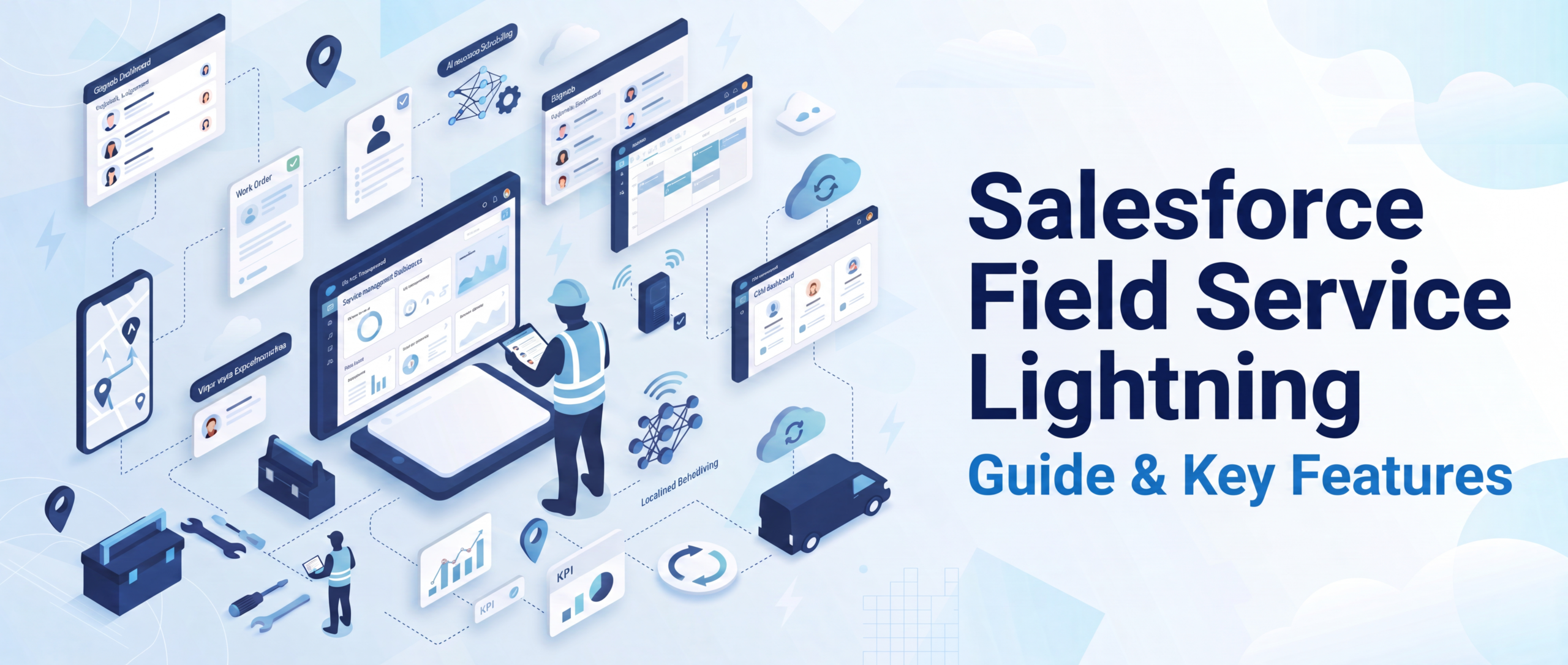
Salesforce Field Service Lightning: Guide & Key Features
If your field team is still making and receiving calls and filling out spreadsheets and estimating the cost to book technicians, then you’re missing out on money and customer satisfaction. Salesforce Field Service Lightning is a consolidated platform that connects dispatchers, mobile workers, and customers, helping minimize first-visit failures and shorten response times through AI-driven scheduling, real-time updates, and mobile access. We will discuss the basics of Salesforce Field Service Lightning, its essential capabilities, pricing models, implementation process, and where it is most valuable for field-based companies. The global field service management market is expected to expand from $6.26 billion in 2026 to $9.68 billion by 2030, with Salesforce Field Service Lightning at the forefront of this transformation.
What Is Salesforce Field Service Lightning?
Salesforce Field Service Lightning (FSL) — known as Salesforce Field Service — is a cloud-based extension of Salesforce Service Cloud that offers one system to manage mobile workforces. It combines 3 moving parts that are usually used separately: the dispatcher console, the mobile application for the technician, and the case that is presented to the customer. This is not a call to dispatch, then dispatching back to a tech; it’s all in one connected record!
Salesforce Field Service Lightning was built for organizations that dispatch people into the field like utilities, telecom, manufacturing, healthcare equipment, HVAC, and more. It removes the need for work order entry, scheduling, inventory management, and communication that forces teams to merge and match different tools.
The big idea of Salesforce Field Service Lightning is visibility. Managers can see where their technician is, what they are working on, and if their technician will be at their next appointment on time. Customers are provided exact arrival times – not 4 hours. This is the first real change that has to happen internally for field teams – a shift from being cost centers to being quantifiable customer-retention drivers.
How Does Salesforce Field Service Lightning Actually Work?
At a functional level, Salesforce Field Service Lightning runs on three connected layers:
- Core Service Cloud data — cases, work orders, assets, and customer history—are all contained within the same records that dispatchers and agents already use.
- The Scheduling and Optimization Engine — an algorithm-driven layer that uses the skills, location, availability, and even parts availability in the vehicle to assign the right technician to the right job.
- The Field Service mobile app — the interface technicians use onsite to access job information, update job status, capture signatures, and access knowledge articles without calling the office.
Once a customer submits a case, the system looks for the skills of the available technicians, their location, and slots the job in the best route and sends it directly to the available technician’s cell phone. The scheduling engine re-optimizes the day as soon as a job is going to take longer or a technician is going to be out sick, rather than the dispatchers having to go and rebuild the schedule.
What Are the Core Salesforce FSL Features?
The power of Salesforce Field Service Lightning hinges on a few key Salesforce FSL features designed to address the pain points of field service:
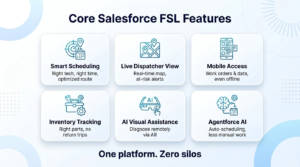
1. Intelligent Scheduling and Optimization
The scheduling engine considers the skill level, certification, travel time, working hours, and job priority of the technician to devise the most efficient route for the day (not the fastest one).
2. Dynamic Dispatcher Console
A live map view of all technicians, jobs, job status, and jobs that are at risk of being late (appointment risks) provides dispatchers with the information they need to intervene before a customer complains.
3. Mobile Workforce Enablement
With minimal connectivity, technicians can access work orders, asset history, knowledge articles, and inventory data from their phones.
4. Inventory and Asset Tracking
Parts, tools, and equipment are tracked against each work order, which means the techs will know what’s in their van before they get there, eliminating the common “I don’t have the part” return trip.
5. AI-Powered Visual Remote Assistance
The newer features allow technicians and support staff to remotely diagnose problems with image recognition and AR overlays before even dispatching a truck.
6. Agentforce Integration
Recent Salesforce releases have expanded Salesforce Agentforce to Field Service, allowing AI agents to automatically schedule appointments, guide techs, and retrieve knowledge from a knowledge base, eliminating the need for manual dispatchers.
All these Salesforce FSL features work together, and that’s why businesses choose Salesforce over the sum of its parts: a scheduling system, a mobile app, and an inventory solution.
Why Is Salesforce Field Service Lightning Different From Basic Field Service Tools?
Typically, when it comes to standalone field service tools, they only solve one problem, or one part of the problem, whether it’s scheduling, mobile check-in, or inventory, but not all three in relation to one customer’s record. The best thing about Salesforce Field Service Lightning is that it’s natively integrated into Salesforce:
- The techs can see the customer’s history before they even ring the door, and past cases and service agreements.
- Reports and analytics automatically update with information without manual data entry.
- It integrates seamlessly with Salesforce Data Cloud, enabling the alignment of field service data with sales, marketing, and support data to create a unified customer record, essential for businesses aiming to deliver personalized service based on customers’ purchase history or SLAs.
- When it comes to Sales Cloud and Service Cloud integration, once a technician completes a job, it can automatically create an upsell opportunity or a renewal reminder.
That’s why businesses with intricate service contracts such as utilities, medical device firms, and manufacturing facilities prefer Salesforce Field Service Lightning to point solutions that do not communicate with the rest of the CRM.
What Are the Real-World Field Service Lightning Use Cases?
Field Service Lightning use cases across almost all industries that send employees out for repair, installation, or inspection:
1. Utilities and Energy
Utilizing up-to-the-minute outage data to schedule emergency repair crews, as well as technician certifications for high-voltage work and regulatory compliance needs.
2. Healthcare Equipment Servicing
Schedules critical medical devices for maintenance, automatically dispatches certified technicians, and keeps compliance records.
3. Manufacturing and Industrial Equipment
Successful implementation of preventive maintenance programs for machines, decreasing unscheduled shutdowns by predictive service alerts.
4. Telecom and Field Installation
Planning for major installations across regions, matching up technicians to customer appointment times.
5. Retail and Field Merchandising
One dashboard to manage in-store equipment repairs, POS system maintenance, and multi-location service coordination.
Across these Field Service Lightning use cases, the common thread is the same: fewer missed appointments, faster first-time fixes, and a single source of truth between dispatch, technician, and customer.
How Do You Approach a Field Service Lightning Implementation?
This is a typical result of a hurried FSL implementation guide: features not used and frustrated technicians. A more practical way to do this is:
- Document existing field service processes — create a map of existing field service processes first, as a way to understand how jobs are currently being created, assigned, and closed before configuring.
- Determine service territories and technician skill sets — the data is directly used by the logic that the scheduling engine use.
- Set up work order types and templates — standardize the classification of the jobs so that it’s clean to report on later.
- Define scheduling policies — determine what jobs the system is supposed to schedule (urgency, SLA terms, distance, technician skill match, etc.)
- Install the mobile application to a small group of technicians for testing — deploy to a small group of technicians to test the usability and usefulness of the mobile application in the field before rolling it out.
- Connect existing systems — sync inventory, ERP, or Data Cloud sources, ensuring technicians don’t miss out on information.
- Separate training of dispatchers and technicians – dispatchers should be console trained; technicians should be mobile app trained. The combination of these two often confuses.
- Track and tweak scheduling rules — The optimization engine gets better as it sees more usage, so expect to review scheduling rule configuration 60-90 days after launch.
A structured FSL implementation guide minimizes the most frequent problem – purchasing the platform and setting it up as a simple scheduling system, without realizing the potential for automation.
How Does Salesforce Mobile Field Service Support Technicians On-Site?
Salesforce mobile field service is probably the least celebrated aspect of the system. It has been designed for technicians with poor mobile reception, short time budgets, and customers who want answers quickly.
The mobile application provides the technicians with:
- The ability to access work orders and asset history offline, then synchronising automatically when reconnected to the Internet.
- Step-by-Step guided workflows for standardised jobs
- The ability to enter signatures, photos and notes directly on the job record.
- Articles on access to knowledge, for troubleshooting (without calling the office)
- Real-time inventory to ensure that technicians can see if a needed part is in their van or must be ordered real time inventory checks.
For businesses that are field-oriented, it’s not a luxury. This is the difference between a tech guy and calling it a day or making a return trip that will cost you a lot of money.
What Does Salesforce Field Service Lightning Pricing Look Like?
Field Service Lightning pricing works on a per-user, per-month licensing model layered on top of an existing Service Cloud license, since FSL extends rather than replaces it. Pricing typically scales based on:
- Whether users need dispatcher console access or just mobile technician access
- The number of scheduling optimizations required per day
- Add-on features like Visual Remote Assistant or advanced Data Cloud integration
Because field service lightning pricing depends heavily on team size, existing Salesforce setup, and which add-ons are needed, most businesses get an accurate figure only after a scoping conversation with a certified Salesforce partner — generic published price lists rarely reflect real deployment costs once customization and integrations are factored in.
How Does Salesforce Field Service Management Fit Into a Broader CRM Strategy?
Salesforce field service management isn’t just about scheduling technicians — it’s about closing the loop between service delivery and the rest of the customer relationship. When field service data lives inside the same platform as sales and marketing data, businesses can:
- Trigger renewal or upsell opportunities based on completed service visits
- Feed real service history into Data Cloud for more accurate customer segmentation
- Use AI-driven insights (via Agentforce) to flag customers at risk of churn based on repeat service issues
- Give support agents full visibility into field activity before a customer even calls back
This is where Salesforce field service management earns its keep for larger organizations — it turns field operations from a cost center into a data source that improves marketing, sales, and retention decisions.
Should You Handle Implementation In-House or With Salesforce Development Services?
Configuring the scheduling engine, building custom Lightning Web Components for technician workflows, and integrating with legacy inventory or ERP systems is rarely a DIY project for teams without in-house Salesforce expertise. This is where experienced Salesforce development services make the difference — particularly for:
- Custom scheduling logic beyond out-of-the-box rules
- Integrating FSL with third-party inventory, IoT, or ERP systems
- Building custom mobile workflows for industry-specific compliance needs
- Data migration from legacy field service tools without losing historical service records
A certified partner also helps avoid the most common implementation mistake: treating Salesforce Field Service Lightning as a simple scheduling tool instead of configuring it to use the full optimization and mobile capabilities it’s built for.
Conclusion
Salesforce Field Service Lightning unifies the entire field process — from the dispatchers to the technicians to the customers’ data — into one system, thereby scheduling jobs smarter and solving them faster. It features AI-powered scheduling, mobile-first tech tools, and Data Cloud integration, designed for businesses that can’t afford to miss an appointment or repeat visit. But the true benefit only comes with effective implementation and configuration for your workflows. That’s why AnavClouds Software Solutions is a Salesforce Silver Consulting Partner – we know how to implement, customize, and optimize Salesforce Field Service Lightning to actually meet the needs of your field teams.
FAQs
What is Salesforce Field Service Lightning used for?
It is used to control mobile workforces, including technician scheduling, monitoring work orders, managing inventory, and real-time connecting field teams to customer data from one platform.
Is Salesforce Field Service Lightning the same as Field Service?
Yes. The Field Service Lightning has been renamed to Salesforce Field Service; however, many continue to use the name FSL as a synonym.
How much does Salesforce Field Service Lightning cost?
It is priced per user/month built on top of the Service Cloud licensing. The price range will vary based on team size, features, and integrations – a partner scoping call provides accurate pricing.
Can Salesforce Field Service Lightning work offline?
Yes. The mobile app can be used offline and can be synced automatically when the technician’s device reconnects to the network, and work orders and asset data is available in the mobile app.
Search Posts
Popular Posts
Author profile: Saransh Maurya, Content Writer at AnavClouds Software Solutions
Saransh
Maurya
About the author
Saransh Maurya is a dynamic and results-driven professional with a passion for innovation and problem-solving. Known for his analytical mindset and attention to detail, he excels at delivering high-quality solutions that drive business growth and operational efficiency. With strong communication skills and a collaborative approach, Saransh effectively bridges ideas and execution, contributing to successful projects and meaningful outcomes across diverse domains.
Recent Posts