
Gaurav AnavClouds Software Solutions +1 917 266 9985 info@anavcloudsoftwares.com
salesforce CRM integration |

HOME.PHP LOADED

Salesforce Integration Guide

You are not merely wasting time by manually copying information between your CRM and other applications; if you are doing it, you are working against your own growth, and you are running Salesforce. The year 2026 will not be a small inconvenience; the disconnected tech stack will be a competitive disadvantage. This Salesforce integration guide is created to help you cut through the noise and get everything you need to know: what integration really is, why it is more important than before, what methods are the most effective, and how to develop an integration strategy that will be able to support your business as it grows. You are either new to the game, or you want to streamline an existing system. This Salesforce integration guide will have you covered. 

Why Salesforce Integration Is No Longer Optional 

We all know that not all businesses operate on one platform. Your sales crew resides in Salesforce integration guide, your finance team operates in an ERP, your marketing crew conducts campaigns in some other automation tool, and your support crew has its own helpdesk. With no sound CRM integration plan, all these systems are reduced to running in silos, and your customer data is scattered all over. 

This is what Salesforce CRM integration is solving. Replacing spreadsheets and messages that you receive in response to the question, Do you have the latest information on this account? When you integrate CRM with other systems, you have one source of truth, one place where all the teams can find correct and up-to-date information about a customer without having to hunt it down or send them a message asking. 

And the figures confirm this. The 2026 Connectivity Benchmark Report by MuleSoft indicates that 95% of businesses are experiencing issues with data integration, which directly impacts their capacity to use AI effectively. 

The business case should be clear just because of that stat. However, in addition to data access, all the trustworthy Salesforce integration guides will inform you of the same thing: integration today is an integration that can learn, automate, and scale. Even the most well-configured Salesforce org will not achieve its potential without a well-developed CRM integration strategy. 

Connect your tools, automate workflows, and scale faster—start your Salesforce integration today.


What Does Salesforce Integration Guide Actually Mean? 

Before immersing ourselves in the tools and techniques, it is good to first define what it is that we are talking about. Fundamentally, a good Salesforce integration guide begins here:  

Salesforce integration is the process of linking your CRM to external systems, applications, or data sources in a way that information flows reliably between them in real time or in batches. It is not a one-time arrangement; it is a continuous process of the way your business is running, and the intensity of your integration directly influences the extent to which your CRM data can be beneficial in all departments. 

This isn’t just about moving data from point A to point B. In 2026, a mature Salesforce integration guide will address three different types of integration: 

Data Integration 

Data synchronization between Salesforce and other applications, such as ERPs, data warehouses, or marketing applications. Bulk data movement is done through standard platforms, such as MuleSoft or Informatica, but Salesforce APIs provide more control when you need to do it in a specific situation. 

Process Integration 

Linking systems. As an example, when you close a support ticket in Salesforce, a refund is automatically triggered in your finance system – no handoff required. It is these types of cross-system, automated processes that modern CRM integration solutions and Salesforce integration guides are designed to facilitate. 

UI Integration 

Providing a single interface to the users to avoid switching platforms. Consider putting an external inventory dashboard right into a Salesforce Lightning page, or a chat tool right on Salesforce itself. 

The first step to any serious CRM integration guide is to understand what kind of integration fits your situation. 

The Core Methods to Connect CRM With Other Systems
CRM integration strategy  

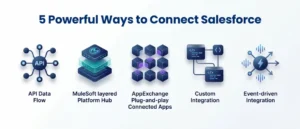
There are several approaches you can take when you combine CRM with third-party applications, and the key is to select the one that suits your use case, access to technical resources, and the real-time nature of the data you require. There is no one-size-fits-all approach to business, and because of this, any useful Salesforce integration guide will always give an emphasis on considering your options first, before committing to an architecture. 

REST and SOAP APIs 

These are the basic building blocks of Salesforce third-party integrations. Most modern SaaS-to-SaaS connections use REST APIs – they are simple, scalable, and appropriate to real-time interactions of data. SOAP APIs are older, but still popular in enterprise settings where tightly structured and reliable messaging is paramount. The MuleSoft Salesforce Connector is compatible with SOAP, REST, Bulk, and Streaming API, depending on the operation, and allows the teams a lot of flexibility. 

MuleSoft Anypoint Platform 

MuleSoft continues to be the industry leader when it comes to enterprise-grade Salesforce integration services. It offers a single point of management and security of APIs, integrations, and automation processes. As of 2026, MuleSoft has expanded its role as it is tightly integrated with the Agentforce – Salesforce AI agent platform. MuleSoft unlocks data in third-party, hard-to-reach, and on-premises systems and provides Agentforce with the context it requires to be intelligent across your entire business infrastructure. 

AppExchange Connectors 

Salesforce AppExchange contains thousands of connectors where businesses can easily integrate without having to write a lot of code. Purpose-built integrations are available in tools such as DocuSign, HubSpot, Zendesk, Jira, Slack, and Zoom, and can be easily deployed. This is particularly useful in Salesforce services for small businesses, where speed and simplicity can be more important than such in-depth customization. For most of the small businesses and mid-sized businesses, entry into a bigger Salesforce CRM integration plan is through AppExchange connectors. 

Custom Salesforce Integrations 

In some cases, ready-made solutions do not suffice. Business-specific, use-case-specific needs that cannot be approached by an off-the-shelf connector can be managed with custom Salesforce integrations, using Apex callouts, Platform Events, or Change Data Capture. They suit businesses well in whose workflows are unique, legacy systems, or have specific compliance needs. It is highly advisable to tie in an established Salesforce development service here – the choices taken during integration in the early stages of a custom development will determine the scalability and maintainability of the integration in the long run. 

Event-Driven Architecture 

This is where things get genuinely exciting in 2026. Gartner projects that over 60% of enterprise integration plans will use event-driven patterns to support AI and automation at scale. Leading businesses are already connecting Salesforce’s Event Bus with platforms like AWS Event Bridge or Google Pub/Sub, allowing external AI models to process CRM events and send insights back in real time. Agentforce is built around exactly this kind of event-driven design — and this shift is redefining what modern Salesforce integrations 2026 can actually accomplish. 

Building a CRM Integration Strategy That Actually Works 

Having the right tools is only half of the battle. A lot of Salesforce integrations fail — not because the technology didn’t work, but because the strategy behind it was weak. Before selecting tools or writing a single line of configuration, businesses need a documented plan that maps systems, defines data ownership, sets clear success metrics, and assigns accountability across teams. Treating Salesforce integration guide as a strategic framework rather than just a technical checklist will change how your team approaches every integration project going forward. 

Start With Business Outcomes, Not Features 

The biggest mistake teams make is leading with technology decisions before they’ve defined what success looks like. Which systems need to talk to each other, and why? What workflows are currently broken? What data do your teams not have access to? These answers should drive your integration architecture — not the other way around. A well-defined outcome makes it far easier to scope the Salesforce integration guide correctly and avoid scope creeping. 

Prioritize Data Quality Before You Connect Anything 

Integrating Salesforce with a messy data source just moves the mess into your CRM. Before connecting systems, clean your data. Map fields carefully, remove duplicates, validate records, and decide what actually needs to migrate. As one consistent principle across every Salesforce integration guide: connecting bad data at scale only amplifies existing problems. 

Phase Your Rollout 

Don’t try to integrate everything at once. Scope creep is one of the leading reasons integration projects go over budget and over deadline. Start with the highest-impact connections — usually your ERP, marketing automation platform, and helpdesk — and stabilize each before moving to the next. 

Test Before You Go Live 

This sounds obvious, but it gets skipped constantly. Run integrations in a sandbox environment first. Test for data accuracy, workflow triggers, error handling, and edge cases. Broken integrations discovered in production are far more costly than issues caught in testing. 

Govern Your APIs 

As your integration footprint grows, so does the risk. Implement OAuth 2.0 authentication, use named credentials, apply role-based access controls, and encrypt data in transit and at rest. As Salesforce development services grow more AI-dependent, clean governance becomes foundational infrastructure — not an afterthought. 

The Top Salesforce Integrations Businesses Are Using in 2026 

The following are the categories that businesses are prioritizing to make their Salesforce integrations as robust as possible by 2026. These are not merely buzzword choices – all of them fill a particular operational gap caused by disjoined systems every day: 

  • Marketing Automation – HubSpot, Pardot, and Marketo Hub integrations ensure that sales and marketing are in sync with each other, lead scoring is enhanced, and conversion tracking is fastened. 
  • ERP and Finance – Integrating Salesforce with other services such as NetSuite, SAP, or QuickBooks keeps the financial and CRM data aligned – essential to revenue operations. 
  • Communication and Collaboration – Slack (64% of Salesforce customers also use it), Zoom, and Google Workspace integrations keep deal collaboration in real time. 
  • Customer Support – Zendesk and Jira integrations add support and engineering data to Salesforce dashboards, enabling businesses to monitor the resolution time and churn risk in addition to sales performance. 
  • E-commerce – Salesforce is in the early stages of a pilot to enable integrations with OpenAI ChatGPT to make the product catalogs of retailers discoverable through AI-based search channels. 
  • Contract Management – DocuSign and PandaDoc integrations introduce the e-signing workflow to Salesforce and minimize the delays between the sales and legal departments. 

All of these are valuable Salesforce CRM integration use cases that extend much further than simple data integration. 

Common Integration Mistakes to Avoid in Salesforce Integration Guide 

Even the seasoned teams falter at this point. Here is your pre-launch Salesforce integration guide checklist to use before going live with any new integration: 

  • Omitting the integration approach – Leap tool selection without mapping your data flows first is a formula to re-work. 
  • Premature over-customizing– Customize on solid, standard patterns, and place custom logic on top of them. Complexity compounds quickly. 
  • Leaving error handling aside, each integration must have a strategy for what to do when it fails. Never assume that it won’t. 
  • Integration as a one-time undertaking – Systems evolve. The integrations require continuous monitoring, optimization, and updating as your business evolves. 
  • Under-estimating the complexity of legacy systems – Legacy systems may include unrecorded dependencies. Have them audited and then associate them with Salesforce. 

 Conclusion 

Salesforce is a powerful CRM platform in the world, yet its full potential is only realized when it is connected appropriately to the rest of your business. The Salesforce integration guide is not a technical report that has been done well, but a map to operational efficiency, improved customer experiences, and a technology stack that is future ready. With AI and automation taking a central role in the way businesses operate, it will be directly dependent on the quality of your CRM integration solutions that will dictate the extent to which your systems will be able to act intelligently. When you are willing to create something that works, AnavClouds Software Solutions can help get you there with Salesforce experience, proven practices, and pragmatism. 


Frequently Asked Questions 

What do you mean by Salesforce integration, and why does my business require it?  

With Salesforce integration, your CRM is linked to other business systems to ensure that the information flows automatically. It breaks down silos, harmonizes teams, lessens manual labor, and provides you with a customer-real time perspective of all customers. 

What are the most popular techniques of a Salesforce integration guide?  

Common integration methods in 2026 are REST and SOAP APIs, MuleSoft Anypoint Platform, pre-built AppExchange connectors, custom Apex-based builds, and event-driven architectures using Salesforce Platform Events or Change Data Capture. 

What is the time for integrating CRM with third-party applications?  

Simple AppExchange connectors are deployed in hours. Depending on the scope, custom integrations between Salesforce and legacy systems or complex workflows with third-party systems may require several weeks to a few months. 

How do I know what to look for in Salesforce integration services?  

Look for certified Salesforce skills, a formalized discovery methodology, practical exposure to patterned integration, effective data management habits, and steady post-implementation assistance by your implementation vendor of choice.

Salesforce Integration

Salesforce has robust CRM capabilities that offer businesses a powerful suite of tools to manage customer relationships effectively. Businesses often have multiple systems, applications, and platforms, making managing data difficult. Through Salesforce Integration Services, they can harness the platform’s full potential, which makes managing data easier, enhances productivity, and boosts efficiency. However, it is necessary to consult or hire a certified Salesforce partner before choosing integration with Salesforce. In this Salesforce integration guide for 2025, we will learn about the challenges, tips, and its benefits. 

Why is Salesforce Integration Necessary for Business? 

With growing business, they adopt multiple specialized software to streamline operations to ensure every department is aligned. Salesforce CRM integration is the most powerful tool and its full potential can be leveraged once it is connected with other business systems. Integration with Salesforce is important for transforming existing and isolated systems into a unified, efficient, and data-driven system. Some of the benefits of integration with Salesforce are mentioned below. 

Streamlined Data Flow Across Departments 

Integration with Salesforce ensures that customer data flows seamlessly from business systems to Salesforce, such as ERP, customer support tools, marketing automation platforms, etc. This allows teams across multiple departments to access up-to-date information which reduces duplication, minimizes manual entry errors, and eliminates data clusters. Having a unified flow of data, employees can work more efficiently and ensure all customer interactions are based on the latest information. 

Enhanced Customer Experience 

It is important to provide customers with personalized, timely, and relevant interactions. With Salesforce CRM integration your teams can easily access all the customer insights and information. With this, they can tailor each interaction for a better customer experience and this comprehensive view leads to fast response time and enhanced engagement. 

Boosted Productivity Through Automation 

Salesforce integration with other business applications allows automation capabilities of many repetitive manual tasks that are time-consuming. This boosts productivity and integration with Salesforce not only saves time but also reduces human errors and allows teams to focus on more valuable tasks. 

Data-Driven Decision Making with Real-Time Insights 

Getting instant updates and insights is one of the greatest benefits of integrating Salesforce. Businesses can easily access real-time data across multiple platforms, offering insights to drive smarter decision-making. Integration with Salesforce empowers businesses to implement quick strategies, leverage new opportunities, and improve performance based on updated data. 

Better Alignment and Collaboration Across Teams 

Salesforce integration creates a unified information source for departments. Sales, marketing, customer service, and finance can collaborate more effectively with a comprehensive view of customer data. This unified alignment ensures consistency and accuracy in customer interactions. 

Improved Scalability for Business Growth

With a growing business, their software needs also increase to handle multiple tasks or systems. Integration with Salesforce provides a flexible and scalable system which is ideal for businesses looking to integrate or expand. Salesforce integration enables businesses to adapt easily which ensures your technology grows without requiring any major changes every time. 

Increased ROI from Salesforce Investment 

Integrating Salesforce with other business systems maximizes the ROI through connected and streamlined data. Only using the Salesforce platform can provide limited insights, but when it is integrated with other systems it works at its full potential. Gaining insights across businesses can help identify areas of saving cost, improvement, optimizing resource allocation, and focus on growth. 

Challenges for Integrating Salesforce Seamlessly 

While the benefits of Salesforce integration are great achieving a seamless integration can be challenging. Salesforce CRM integration is a powerful tool, but connecting it to multiple other business systems can be a bit difficult. Each of them comes with its own data formats, functionalities, and security requirements that can involve navigating complex technical and operational challenges. Here are some of the most common challenges of integration with Salesforce that can be faced. 

Data Compatibility Issues 

One of the most common challenges in Salesforce integration is data compatibility because every application or system has its unique data formats, structures, and protocols. Integration with Salesforce and these systems can lead to unorganized data, inaccurate information, data loss, duplicate entries, and impacts on decision-making. 

Complexity of Multi-System Integrations 

Businesses often use multiple software tools like marketing platforms, ERP systems, or custom applications. Integrating Salesforce with one platform is manageable but connecting multiple systems at once can be a task. However, doing this can provide an array of advantages for businesses. 

Real-Time Data Syncing Challenges 

Getting real-time insights is beneficial but it can be difficult to achieve without seamless integration with Salesforce. Ensuring data updates instantly across multiple systems involves handling differences in system speeds, connectivity issues, or processing delays. Moreover, to eliminate all the hectics choosing the right Salesforce implementation partner can be beneficial. 

Security and Compliance Risks 

Integrating Salesforce with other systems can put sensitive data at potential security risks until the integration is completed successfully. Every data transfer point can be vulnerable if not done securely along with compliances like GDPR, HIPAA, or industry-specific data security standards. So it is important to look at these issues and take precautions to avoid data breaches, legal issues, etc. 

Maintaining Data Integrity Across Platforms

It can be a challenge to ensure that data remains accurate, consistent, and complete throughout the integration process. When multiple systems are integrated, it is easy for data complications to arise due to syncing errors, duplicate entries, or partial updates. Make sure to regularly audit and validate data integrity to avoid these issues. 

System Downtime and Performance Issues 

Integration with Salesforce adds complexity to the overall system infrastructure, and as more systems are connected the chances of downtime or impact on performance can increase. Each system’s uptime directly affects the integration, meaning if one system is affected, data syncing can be delayed or stopped. Make sure that you have an experienced Salesforce consultant by your side to address any issue that may arise. 

Ongoing Maintenance and Updates

Salesforce often releases frequent updates to enhance features, improve security, or fix bugs. Each update can impact an existing integration, as changes in data structure, API endpoints, or system behaviors may need adjustments with the integration code. This ongoing maintenance and updates require efforts to keep integration with Salesforce functioning smoothly. 

8 Tips for Successful Integration with Salesforce

Benefits of Salesforce integration

Integration with Salesforce and other business systems can be a great advantage for organizations. No matter if you are integrating Salesforce with marketing tools, ERP systems, or other platforms following the best practices is important. Moreover, ensuring a seamless and effective process requires careful planning and execution and you can even hire a certified and experienced Salesforce development services. Below mentioned are some great tips that can help ensure a successful integration with Salesforce.

Define Clear Objectives and Integration Goals

Before starting implementation and diving into the technical aspects of Salesforce integration, it is important to identify the objectives. Understanding what you want to achieve is the most important factor before integrating with Salesforce. This can ensure that you choose the right strategies, tools, or consulting partner. Whether it is enhancing customer experience, automating workflows, improving data accurcy, or gaining real-time insights. Setting clear goals can help with seamless navigation throughout the entire process, from selecting the right tools to measure outcomes. 

Choose the Right Integration Tools and Platforms

Salesforce offers several native integration tools and third-party applications through its Salesforce AppExchange platform. So based on your goals and objectives choosing the right integration tool is the key to achieving seamless data sync between Salesforce and other systems. If your integration needs are complex or include a large volume of data, invest in an advanced platform for integration with Salesforce.  

Ensure Data Mapping and Standardization

Data mapping is an important aspect of any integration process because it involves aligning Salesforce with other systems to ensure that data flows seamlessly and accurately. Data formats, field types, etc. can vary across different systems, so it is important to order the information to avoid any errors. With clear data mapping ensures that Salesforce CRM integration and other systems can work effectively. 

Test the Integration in a Sandbox Environment

Testing is an important step to make sure that your integration works as expected. Implement the integration with Salesforce in a sandbox or staging environment first before deployment. A sandbox allows one to simulate real-world cases and test the data flow, functionality, and performance of the integration. Also, make sure to test the integration across different systems and ensure all use cases are covered.  

Implement Robust Security and Compliance Measures

Integration with Salesforce often involves transferring important and sensitive data between multiple systems. Therefore, maintaining strong protocols is necessary to avoid any data breaches or unauthorized access. Integrating Salesforce with other systems can increase the number of entry points into your network creating more security vulnerabilities. Prioritize security and compliance during integration and protect sensitive and important information. 

Provide Training and Change Management Support

For successful integration with Salesforce, your team must be able to use the new systems effectively. Once the integration is done, ensure that your teams are trained well to use the new integrated workflows. Conduct proper training sessions for your teams so that they can learn how the integrated system will affect their day-to-day tasks. Additionally, you need to ensure a change management plan to address any concerns or resistance to the new systems. 

Monitor the Integration Continuously

Once you have integrated Salesforce successfully, your work is not over. Make sure to continuously monitor the systems to ensure the integrations function smoothly and adapt to evolving business needs. You can even set automated alerts if something goes wrong such as delays in data syncing, system errors, etc. Moreover plan regular system audits to ensure Salesforce integration remains secure and aligned with business objectives. 

Plan for Ongoing Maintenance and Updates

A maintenance plan in place can play a major role in successfully integrating with Salesforce. The platform releases updates that can impact the functionality of your integration. Similarly, other connected platforms can also undergo changes that require adjustments in your integrated setup. So it is important to have a proactive maintenance plan that ensures that your Salesforce integration runs smoothly and effectively. 


Conclusion

Integration with Salesforce is more relevant than ever, with businesses increasingly relying on unified data systems to gain a competitive edge. From enhancing productivity and improved customer experience to providing real-time insights and a comprehensive view of operations. The benefits of Salesforce integration are substantial. However, for successful integration, it is important to plan carefully, choose the right tools, and understand the associated challenges. It is also important to choose a certified Salesforce partner like AnavClouds Software Solutions to overcome challenges and for the system to perform well. To learn more and unlock Salesforce’s full potential within your business ecosystem, book a demo now and learn more! 


FAQs

What are the benefits of hiring a certified Salesforce partner for integration? 

A certified Salesforce partner has the expertise to manage the technical complexities of integration, ensuring data integrity, security, and seamless processes. This maximizes your Salesforce investment and provides many great benefits. 

Can integration with Salesforce scale as my business grows?

Yes, integration with Salesforce is highly scalable, making it suitable for growing businesses. The platform can easily adapt to increasing demands, third-party applications, and complex data needs with the right setup. 

What types of systems can be integrated with Salesforce?

Salesforce can be integrated with a wide range of systems, including ERP, marketing automation, customer service platforms, e-commerce solutions, and more to create a unified platform. 

How long does it typically take to integrate Salesforce with other systems?

The time required for integration with Salesforce depends on the complexity of your systems and specific integration needs. Basic integration may take a few weeks, while more complex setups can take upto months.

How does integration with Salesforce improve customer experience?

By centralizing customer data from various platforms, Salesforce integration enables teams to access accurate and up-to-date information, leading to more personalized interactions, faster response times, and higher customer satisfaction. 

salesforce integration solutions

With advancements in technology, using a software system provides multiple advantages. Salesforce integration solutions are one of the best ways to enhance productivity and streamline processes. Businesses can easily leverage them for seamless and efficient operations, which is key to their success. By integrating the Salesforce solution, it is easier to unlock its full potential as it can easily connect with other essential business systems. This reduces manual workloads, provides valuable insights into business aspects, and improves overall efficiency. In this blog, we will look at the important aspects of integrating Salesforce solutions, its benefits, and essential features that make it a valuable resource for businesses.

Why Integrating Salesforce Solutions is Important? 

Integrating Salesforce solutions not only enables businesses to connect with other systems or applications but it also provides a unified view of every business aspect. These solutions can easily connect with ERP, marketing automation tools, e-commerce platforms, etc. which helps in better decision-making. Moreover, businesses can access real-time customer data, inventory information, financial insights, marketing responses, and more, all in one place. 

With Salesforce CRM integration your teams can share centralized data sets which leads to better customer service. You can send personalized emails or serve them better according to their interaction. Without integrating Salesforce solution, data remains scattered across different departments or places which makes it difficult to get a holistic view of the business processes. 

Top Benefits of Integrating Salesforce Solutions

Benefits of salesforce integration

Salesforce integration is more than just connecting multiple systems or applications. It is about creating a centralized system where data can be accessed easily, hectic processes are automated, and teams can collaborate with great insights. Below mentioned are the top benefits of integrating Salesforce solutions.

Enhanced Data Accuracy and Consistency

When integrating Salesforce solutions with other core business systems like ERP, HR, or inventory management, data syncs automatically across all platforms. This eliminates the need for manual work, and reduces errors, and inconsistency in records. Salesforce integration solutions provides accurate and correct data to ensure that everyone remains on the same page.

Better Productivity and Efficiency

Switching between multiple applications or systems to find information can be challenging for businesses. By integrating Salesforce solutions, it is easier for your teams to access all the data they need over a single platform. This streamlines multiple workflows and frees up time for your team to focus on other important work, improving overall efficiency.

Better Customer Insights and Personalization

One of the key aspects for businesses is to provide personalized customer experiences because it plays a major role in their success. Salesforce CRM integration provides a 360-degree view of each customer. This provides data like their purchase history, preferences, interactions, etc. allowing you to provide more comprehensive solutions based on their unique needs. With Salesforce integration solutions businesses can access better insights that empower teams to boost customer satisfaction through personalized experience. 

Streamlined Operations

Salesforce integration solutions streamline operations through real-time data sharing and communication between multiple teams. For example, through Salesforce ERP integration they can ensure that sales and finance are on the same page. This eliminates misunderstandings and bottleneck situation to foster better collaboration across departments. 

Real-Time Analytics and Reporting

Integrating Salesforce solution for business is an advanced system that allows access to real-time data, analytics, and reporting tools for up-to-date insights. These capabilities of providing real-time analytics offer insights into customer behavior, trends, and performance metrics to adapt strategies. Moreover, it enables every team member to make timely and data-driven decisions. 

Increased Sales and Revenue Opportunities

Salesforce CRM integration provides unified customer data that helps in boosting sales. Your team can access instant data for each and every stage of the process like stock availability, shipping status, and order history. This allows them to set expectations and improve customer satisfaction. Moreover, integrating Salesforce solutions also helps speed the whole process of sales from order processing to payments. 

Enhanced Scalability and Flexibility

With growing businesses, their needs also evolve, Salesforce integration services allow organizations to scale without the hassle of managing multiple platforms. Businesses can easily add or upgrade software systems without setting up the entire structure. This flexibility is important for growth, entering new markets, or introducing new products.

Improved Collaboration Across Teams

Integrating Salesforce services fosters cross-functional collaboration by enabling shared access to data and insights. Marketing, sales, support, and finance teams can easily work together more effectively as they have access to the same data and can see the customer journey. This contributes to a cohesive customer experience as they can be provided with better solutions.

Reduced Operational Costs and Error Rates

Integrating salesforce with other business systems eliminates many repetitive tasks and manual processes, reducing operational costs over time. With automated workflow, instant updates can be made available to reduce manual workflows. This automation not only saves time and money but also minimizes errors, which can be costly and affect customer relationships.

Compliance and Data Security

Data privacy and security are the top priorities, especially when dealing with customer information. Salesforce integration solutions come with compliance and data security features, like encryption and access controls, that extend to the systems it connects with. For businesses, it is important to meet industry standards and regulatory requirements. By ensuring data handling complies with necessary guidelines, businesses can avoid unnecessary fines. 

10 Features of Integrating Salesforce Solutions 

When integrating the Salesforce solution, certain features can maximize its functionality, and usability, and impact your organization. This is why getting help from certified Salesforce development company is important. Here are the key features of Salesforce integration solutions that empower businesses to work more efficiently and effectively. 

Instant Data Synchronization

Real-time data synchronization ensures that data across Salesforce and integrated systems are updated instantly. This eliminates lagging of processes and your teams can work with the latest information at all times. Real-time data is important for businesses that require instant accuracy.

Customizable Workflows

Every business has its own unique processes, so flexibility in creating workflows is critical. Integrating Salesforce solutions often allows businesses to customize workflows, enabling teams to set up the process specific to their needs. Moreover, it even allows you to automate the process, this ensures that workflows align with business objectives, enhancing productivity and accuracy.

Data Mapping and Transformation

Integration with Salesforce solutions streamlines the process of data storage because not all systems are capable of storing data in the same format which leads to compatibility issues. Salesforce integration solutions allow data mapping and transformation features for users to align and standardize data fields across platforms. This ensures that information flows seamlessly making it accessible across all platforms.

Advanced API Integration

Salesforce’s API (Application Programming Interface) support allows it to connect with multiple applications, from internal systems to third-party platforms like ERP, marketing tools, etc. APIs provide the initial platform for seamless and automated data exchange between Salesforce and other software. With this businesses can access data from all connected systems within Salesforce, creating a unified view.

User-Friendly Interface

A successful integration should be easy to use for everyone, Salesforce integration solutions often feature intuitive interfaces for seamless navigation and task management. With a user-friendly dashboard, your team members can access key metrics, reports, and updates without extensive technical knowledge. Integrating the Salesforce solution fosters quick adoption and makes the system accessible to everyone.

Scalability to Support Business Growth

Integrating salesforce solutions is scalable they can easily adapt to growing data, new users, and additional systems without compromising performance. As your business expands, a scalable integration allows you to bring new software or sources without reconfiguring the whole setup. This feature is beneficial for businesses that are planning to expand their capabilities. 

Automated Triggers and Actions

Automated triggers allow Salesforce to initiate actions based on specific conditions, this reduces the need for manual input and helps streamline workflows. These triggers and actions can be set across multiple processes, from customer service to sales, reducing response time. This ensures that all the work is done on time and tasks don’t slip through the cracks.

Error Handling and Alerts

There are chances for errors to occur during the integration process, especially when data is transferred between different systems. Integrating Salesforce solutions can provide advanced error-handling features that can detect and log issues. Even if integration fails to sync data an alert will notify the related team and allow them to address the issue promptly. Salesforce integration solutions minimize risks of business operations and maintain data integrity.

Compliance and Data Security Features

Maintaining data security and compliance is important while integrating Salesforce solutions. Many offer built-in data security features, including encryption, access control, and authentication protocols. For businesses in regulated industries, these compliance and security features help ensure that data is protected and managed according to industry regulations such as GDPR and HIPAA. 

Comprehensive Analytics and Reporting Tools

Salesforce integration solutions come with advanced analytics and reporting tools to help businesses monitor key metrics, track performance, and generate detailed reports. It reduces the manual workload of gathering data from multiple platforms. Integrating the Salesforce solution provides enhanced insights into customer trends, product performance, and more to make informed decisions.


Final Thoughts 

Salesforce integration solutions are great for businesses, they can easily improve data accuracy, operational efficiency, and customer satisfaction. Whether you are considering Salesforce ERP integration or connecting other CRM systems, these benefits extend to every aspect of business. Integrating Salesforce solutions with features that align with your objectives is important. It can unlock new efficiencies, boost collaboration, and ultimately drive growth. With AnavClouds Software Solutions you can take your business to the next level, with comprehensive solutions tailored to fulfill all your needs. Book a demo now and learn more!


FAQs 

Is integrating the Salesforce solution secure? 

Yes, integrating the Salesforce solution is secure, as the platform offers robust security features, including encryption, access controls, and compliance with GDPR and HIPAA. Standard industry regulations measures extend to integrated systems, ensuring data protection and privacy. 

How long does Salesforce integration take? 

The time taken for integrating Salesforce solutions varies based on complexity, number of systems, and specific requirements. However, simple integrations can take a few days, while more complex setups may require weeks. Working with an experienced Salesforce consultant can streamline the process. 

Which systems can be easily integrated with Salesforce? 

Salesforce can easily integrate with multiple systems like ERP platforms, marketing automation tools, e-commerce platforms, financial management tools, etc. Even if you have any existing systems for your business Salesforce integration has the flexibility to create a fully connected ecosystem. 

Can you customize Salesforce integration for business needs? 

Yes, Salesforce integration solutions can be customized according to business needs, allowing businesses. You can tailor workflows, data mapping, and automated processes to align with your specific needs and objectives. 

What are the key benefits of integrating Salesforce solutions? 

The key benefits includes enhanced data accuracy, streamlined operations, improved customer insights, better collaboration, real-time reporting, and scalability. Salesforce integration creates a centeralized system for seamless workflows and better decision-making.Â