
Lightning Web Components for Modern Salesforce App Development
Businesses today want faster applications, cleaner interfaces, and flexible tools that scale easily. Salesforce helps them achieve this, but companies need modern frameworks that simplify custom app development. Lightning Web Components plays a central role here. It offers a powerful way to build apps that feel fast, responsive, and lightweight. Developers choose it because it uses core web standards, supports reusable designs, and delivers excellent performance for today’s complex needs.
This blog explains how Lightning Web Components helps teams build custom Salesforce apps with greater speed and flexibility. You will also understand how it works with Salesforce tools like Agentforce and Salesforce CLI. The goal is to help beginners and experts understand LWC better with a clear explanation and structured guidance. You will learn how to get started, how to set up your development environment, and how to design components suited for real business use.
What Makes Lightning Web Components So Powerful?
Lightning Web Components is a current framework that is implemented on native browser technologies. It is not bulky, and developers can learn it more easily since it makes use of the known standards such as JavaScript, HTML, and CSS. Salesforce Lightning Web Components are designed in a way that facilitates modular development. One component provides a solution to one task and can be used in numerous applications by teams.
The framework allows high performance since it is based on the browser capabilities rather than on custom layers. This builds speedy applications at a lower load time. Lightning Web Components are favored by companies since they are easier to maintain. Changing needs make developers change only one component rather than changing the whole application.
How Salesforce Lightning Web Components Improve Custom App Development
Businesses in the modern world demand clean-looking and smooth-behaved apps. Lightning Web Components assists teams in providing this in reusable blocks of UI and rapid rendering. The pages are contemporary, and logic is easier to manage.
LWC alters the process of development in the following way:
Cleaner, Modular Architecture
Each one of the parts in the Salesforce LWC developer guide serves a specific purpose. These components can be combined by the developers to create the complex workflows that minimize errors and enhance the flexibility in the long term. In cases where teams need updates, they can customize they would like only the affected parts.
Better Performance Across the Platform
Salesforce Lightning Web Components relies on new capabilities of browsers. This saves time and decreases overhead. The Salesforce applications are loaded more quickly, are more responsive, and smoother. This advantage in performance is relevant to applications on the enterprise level and the large volume of data.
Strong Compatibility with Salesforce Ecosystem
Lightning Web Components works seamlessly with Salesforce data models, security features, and platform services. Developers can call Apex, use LDS, and manage data without complexity. It works with the Lightning App Builder, making it easy to assemble pages.
Improved Developer Experience
The framework matches modern JavaScript standards. Developers who understand ES6 or web development adapt quickly. This reduces training time and improves productivity across large development teams. Moreover, the Agentforce Salesforce tutorial also helps in enhancing the developers experience.
Getting Started: A Simple Lightning Web Components Tutorial
Beginners often start with a basic Lightning Web Components tutorial that covers folder structure and component setup. Every LWC follows a simple structure with HTML, JavaScript, and metadata configurations. This structure helps developers separate logic from layout. It also improves readability and helps teams work collaboratively. These are also becoming a Salesforce development trend 2026 because it streamlines the process.
Developers use Salesforce CLI to create, test, and deploy each component. This process creates discipline and makes the development cycle consistent. When developers follow these standards, they build custom Salesforce applications faster.
Setting Up Your Environment: Salesforce CLI Setup Tutorial
A Salesforce CLI setup tutorial is essential for anyone starting with LWC. Salesforce CLI helps developers create scratch orgs, deploy components, and run tests. This tool also supports version control, which is important for stable teamwork.
Here are the simple steps involved:
- Install Salesforce CLI from the official site.
- Authenticate with your Salesforce org.
- Create a project with the standard template.
- Build your first LWC component.
- Push it to your scratch org and test the results.
Salesforce CLI setup tutorial ensures that every developer works in an isolated environment. It also supports clean deployments and reduces production risks.
Building Custom Salesforce Apps with LWC
Businesses often need tailored features. They want dashboards, forms, workflows, and unique data interactions. Salesforce Lightning Web Components helps teams build these features without heavy coding. Developers can create visual components, connect them to data, and use Apex for complex logic.
Key advantages when you build custom apps using the Salesforce LWC developer guide include:
- Faster development speed
- Reusable components
- Reduced maintenance
- Better alignment with Salesforce platform changes
- Improved testing and debugging
- Lightweight structure for scaling apps
This flexibility helps companies deliver solutions faster.
Integrating LWC with Agentforce
Agentforce is gaining attention because of its powerful automation capabilities. Developers now combine Lightning Web Components with Agentforce to design smarter user experiences. An Agentforce Salesforce tutorial often explains how LWC interacts with prompts, actions, and agent-driven workflows.
When teams combine LWC and Agentforce custom app development, they unlock powerful features:
- Automated responses
- Intelligent data handling
- Dynamic UI changes based on agent output
- Personalized suggestions within the UI
This combination offers advanced capabilities suited for modern digital teams.
Using Salesforce Development Services for Enterprise Projects
Not every business has a team trained in Salesforce LWC. Many rely on the Salesforce LWC developer guide to speed up their projects. These teams help companies build scalable applications using LWC. They offer design planning, component development, and end-to-end deployment support.
Working with experienced Salesforce developers ensures consistent coding patterns. It also increases the reliability of each application. Companies receive components that perform well and follow Salesforce standards.
Best Practices for Building Lightning Web Components
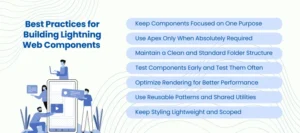
Developers rely on several proven methods to create stable and efficient LWC. These practices ensure better performance, cleaner code, and smoother collaboration across teams. They also help developers build custom Salesforce apps that scale confidently.
Keep Components Focused on One Purpose
Each Lightning Web Components unit should handle one specific function. This keeps your design simple and reduces confusion. Focused components are easier to test and maintain. Teams can update or replace them without disturbing the entire system. This clarity supports long-term stability across complex Salesforce environments.
Use Apex Only When Absolutely Required
Salesforce LWC developer guide supports strong data handling through Lightning Data Service. LDS handles simple operations without server calls. Use Apex only for advanced logic or heavy data processing. This approach reduces load on your org and improves overall performance. It also keeps your components lightweight and easier to manage.
Maintain a Clean and Standard Folder Structure
A standard folder structure helps every developer understand the project layout. Organized files reduce duplication and prevent errors. Teams collaborate faster when components follow consistent patterns. This structure becomes important as your codebase grows. It also helps with onboarding new developers with minimal effort.
Test Components Early and Test Them Often
Testing is essential for reliable Lightning Web Components development. Small tests help teams identify issues before deployment. Salesforce CLI supports automated testing for faster feedback. Regular testing prevents failures during release cycles. It also improves confidence when working with multiple components across large projects.
Optimize Rendering for Better Performance
Rendering plays a major role in user experience. Lightning Web Components supports conditional rendering to minimize unnecessary updates. Use this feature to keep the DOM clean and efficient. Fewer updates improve speed on all device types. This step becomes important when building dashboards or interactive components.
Use Reusable Patterns and Shared Utilities
Create shared utilities when multiple components need similar functions. Reusable services reduce code repetition and improve quality. These shared pieces also simplify debugging and version control. Standard patterns help your team deliver consistent results across every project.
Keep Styling Lightweight and Scoped
Use minimal CSS inside Lightning Web Components. Scoped styles ensure designs remain isolated and predictable. Lightweight styling improves load times and reduces conflicts. This practice also helps maintain a clean design system across your application.
Conclusion
Lightning Web Components has changed how developers build custom Salesforce applications. It blends modern Web standards with the power of the Salesforce ecosystem. Businesses now enjoy faster apps, modular designs, and cleaner user experiences. Developers also gain flexibility and simplicity because they work with familiar languages.
Companies that adopt Lightning Web Components build applications that perform better and scale easily. They create solutions that support complex workflows and integrate smoothly with Salesforce capabilities. If your business wants to modernize, this framework is an excellent starting point.
AnavClouds Software Solutions helps companies build reliable applications using Lightning Web Components. Our experts design custom solutions, optimize performance, and support full-scale Salesforce development services. You can partner with us to speed up your project and improve your app experience.
FAQs
What are Salesforce Lightning Web Components?
The Lightning Web Components are contemporary user interface components that are created using the core web standards. They can assist developers to create Salesforce applications that are fast, flexible, with better performance, and less polluted architecture.
Is Lightning Web Components hard to learn for beginners?
No, Lightning Web Components are not difficult to learn since they are written in HTML, CSS, and modern JavaScript. With structured practice, developers with the knowledge of basic web development can learned in a short period.
How do I start building LWC?
You can begin by installing Salesforce CLI, creating a project, and creating your first component. Salesforce offers tools, templates, and scratch orgs that assist a beginner to learn the framework step by step.
Why should businesses choose LWC for custom apps?
Some of the reasons why businesses opt to use Lightning Web Components are their high performance, reuse capability, scalable design, and improved compatibility with Salesforce functionality. It assists teams in developing secure and efficient programs at a rapid pace.

