Gaurav AnavClouds Software Solutions +1 917 266 9985 info@anavcloudsoftwares.com
admin – Page 6
AgentForce vs Salesforce GPT

Consider having a digital co-pilot, such as Salesforce GPT, that manages routine chores and helps your support and sales people make better decisions in real time. That’s precisely what Agentforce and Salesforce GPT (Einstein AI) offer. Agentforce concentrates on streamlining daily operations and enabling teams during real-time interactions, whereas Salesforce GPT offers predictive insights and data-driven tactics. Your company can save time, increase productivity, and improve employee and customer experiences by understanding how each tool functions and how it complements the others. 

What Is Salesforce GPT and Agentforce? 

Salesforce Agentforce: Your Team’s Productivity Partner 

Your sales and support teams can benefit from having an additional set of hands thanks to Agentforce. It handles the time-consuming, repetitive chores that frequently cause teams to lag. It keeps your operations running smoothly and effectively, from allocating leads to handling support tickets and making sure that customers are followed up with on time. 

The best part? To begin using AI, you don’t have to be an expert. Agentforce’s plug-and-play configuration allows it to easily interface with Salesforce and begin managing daily chores right away. Your staff will be able to focus more on building relationships and closing business and less on busywork as a result. Implementing and maximizing these functionalities for your company can be facilitated by our AgentForce consulting services. 

Salesforce GPT: Turning Data into Smarter Decisions 

Salesforce GPT elevates business information through its integration with Salesforce Einstein GPT. Salesforce GPT concentrates on making those tasks more intelligent and significant, whereas Agentforce handles task management. It assists companies in making data-driven decisions, forecasting trends, and providing actionable insights. 

Consider it your smart strategist that guides every step by learning from sales trends, customer behavior, and service encounters. Salesforce GPT guarantees your team operates with accuracy and foresight in everything from recognizing high-value leads to optimizing marketing campaigns and improving customer service methods. 

Ready to leverage Salesforce GPT and AgentForce for your business?


How Salesforce GPT Supercharges Your Business Insights 

Salesforce GPT (powered by Einstein GPT) acts as your intelligent co-pilot, transforming raw data into actionable insights so your team can work smarter, not harder. Here’s what it brings to the table: 

Instantaneous Analysis of Large Datasets 

Most teams cannot manually comb through thousands of client interactions. It would take days or weeks to find patterns, trends, and untapped opportunities without Salesforce GPT. It does this by transforming complicated data into an unambiguous direction for your business choices. 

Offers Direct Insights in Salesforce 

Don’t switch between different tools. Predictions, ideas, and recommendations are provided by Salesforce GPT directly within your Salesforce interface. You already have everything you need, so decision-making is quick and easy. This holds for ChatGPT and Salesforce workflows as well. 

Boosts Efficiency in Marketing, Sales, and Service 

Salesforce GPT enhances the functionality of your current tools rather than only existing in the background. Lead scoring, opportunity forecasting, and customer sentiment tracking are just a few of the ways it helps your team take data-driven, meaningful actions. 

Acquires Knowledge and Adjusts Like an Actual Co-Pilot 

Your team’s proficiency with Salesforce GPT increases with use. It identifies irregularities before you do, identifies high-potential transactions, rationally divides up its clientele, and continuously enhances itself in the background. It helps you take proactive rather than reactive action by adjusting to your company’s rhythm. 

Some Limitations to Remember 

Despite its strength, Salesforce GPT has flaws: 

  • Since it doesn’t monitor license consumption or identify inactive users, internal audits are still necessary for efficiency. 
  • Tasks like clearing out unwanted records or licenses aren’t automated because its primary focus is on providing consumers, not managing internal resources. 
  • Data must be clear and organized. Inaccurate predictions can result from incomplete or inconsistent data. Unstructured text is handled better by Agentforce, although no AI can completely correct data that has underlying flaws.  

How Salesforce Agentforce Boosts Team Efficiency and Optimizes Your Org 

Salesforce Agentforce tackles a different challenge than Salesforce GPT. While GPT focuses on intelligence and insights, Agentforce is all about making your team and Salesforce environment run more efficiently. It acts like a smart partner for your staff—helping conversations flow smoothly, improving customer experiences, and keeping your Salesforce setup in top shape. 

Why Agentforce Stands Out 

Unlike GPT, Agentforce homes in on how your Salesforce licenses and resources are being used. If you’ve ever wondered who’s actively using Salesforce, how often, or whether you need all those seats, Agentforce is designed to answer those questions and prevent unnecessary costs. 

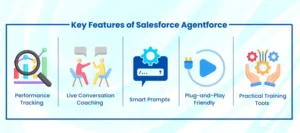
Key Features of Salesforce Agentforce 

Key Features of Salesforce Agentforce 

Performance Tracking 

Agentforce logs and analyzes every interaction, giving managers a clear view of team performance. You can see which strategies are effective, identify areas for improvement, and make data-driven decisions to boost productivity. 

Live Conversation Coaching 

Without being intrusive, Agentforce listens to live conversations and provides on-the-spot tips. This helps your team navigate calls and chats more confidently, improving customer interactions instantly. 

Smart Prompts 

Agentforce jumps in with relevant suggestions and information right when your team needs it. No more digging through documents or manuals mid-conversation—everything is delivered contextually to save time. 

Plug-and-Play Friendly 

You don’t need a complete tech overhaul to start using Agentforce. Its features integrate smoothly with most existing Salesforce setups, allowing your team to benefit immediately without disruption. 

Practical Training Tools 

Agentforce provides hands-on training resources derived from real interactions. Employees gain actionable insights that improve their skills and efficiency, helping your team grow while working. 

Optimizing Your Salesforce Setup 

Agentforce optimizes your Salesforce environment and safeguards your budget in addition to increasing team productivity. Here’s how: 

  • Tracks Real-Time License Activity: Keep track of who enters Salesforce, how frequently they do so, and what they do there. 
  • Determines Inactive Users: Terminate monthly payments for seats that are not used. 
  • Dissects License Types: Offers more affordable tiers without denying access to necessary functionality. 
  • Matches Roles with Real Behavior: Identifies discrepancies between roles that are assigned and how they are actually used. 
  • Identifies Optimization Opportunities: Offers administrators doable actions to cut waste without interfering with your team’s productivity.  

Salesforce GPT vs Agentforce: Understanding the Key Differences 

Salesforce offers several AI-powered solutions; however, the functions of AgentForce and Salesforce GPT differ. Understanding their differences can help you select the best tool for your particular requirements, save money, and save your team time. 

Focus 

The goal of Salesforce GPT is long-term planning. It sorts through massive datasets, finds trends, predicts patterns, and helps your company make better decisions. Consider it your digital strategist, assisting in the development of your long-term goals. 

On the other hand, Agentforce prioritizes operational effectiveness and real-time support. It intervenes during live chats to assist agents in responding more quickly, making better judgments at the moment, and ultimately increasing customer happiness. Agentforce operates in the present, whereas GPT plans. 

Audience 

For analysts, sales teams, and marketers who require information on consumer behavior, sales trends, and campaign effectiveness, GPT is perfect. It works in the background, evaluating data and providing dashboards and reports with practical suggestions. 

Agentforce is designed for service departments, contact centers, and frontline support personnel. It’s designed for users who interact with customers daily, giving them guidance during live calls or chats rather than just providing insights after the fact. 

Type of Intelligence 

Salesforce GPT functions as a predictive advisor. It uses AI and machine learning to recommend next steps, estimate deal closures, or suggest marketing strategies based on historical data. 

Agentforce is more like a conversational coach. It actively listens to live interactions and provides real-time prompts, suggestions, and guidance to help your team respond effectively and handle customer queries confidently. 

Autonomy 

GPT assists but does not act independently. It gives recommendations that users must implement themselves. 

By fusing AI and autonomy, Agentforce enables it to carry out tasks, manage workflows, and make decisions without continual human oversight. For instance, it can automatically recommend cost-saving adjustments to your Salesforce configuration or optimize workflow procedures. 

Ease of Use 

Although GPT has a lot of features, customers who are unfamiliar with analytics tools may find it difficult to learn. Reports and dashboard navigation might need some ramp-up. 

Agentforce is a plug-and-play, user-friendly solution designed for teams who require results right away. Its user interface is simple, intuitive, and made to be used efficiently by support teams with no training. 

Data Use 

GPT relies on historical data—past lead behavior, campaign results, and purchase history—to generate insights and predictions. 

Agentforce focuses on real-time data. It analyzes conversations as they happen, paying attention to tone, language, and speed, helping agents adjust on the fly for better customer interactions. 

Context Awareness 

Salesforce GPT works best with structured CRM data, making it excellent for trend spotting, forecasting, and deriving insights from consistent datasets. 

Agentforce taps into the Atlas Reasoning Engine and Data Cloud, giving it the ability to handle both structured and unstructured data—like PDFs, call transcripts, and customer-uploaded images. It can understand complex situations, execute meaningful actions, and adapt to irregular or messy data in real time. 

Integration and Customization 

GPT is native to Salesforce, so it integrates smoothly into the platform’s ecosystem. Data flows easily, and workflows remain connected. 

Agentforce is highly adaptable. It can integrate into multiple tech stacks and custom setups. Its Agent Builder feature allows you to create AI agents from scratch or use pre-built actions, tailoring workflows precisely to your team’s needs. 

Automation Style 

GPT excels in background automation, handling repetitive tasks like report generation, lead prioritization, and record updates. It reduces manual work but doesn’t intervene in live interactions. 

Agentforce emphasizes action-oriented automation. It assists agents during live workflows, providing prompts and relevant information to help them respond quickly and efficiently, improving outcomes without cutting corners. 

Conclusion 

By fusing real-time assistance with strategic intelligence, Salesforce GPT and Agentforce are revolutionizing corporate operations and increasing productivity. Organizations may empower their staff, streamline processes, and make AI-supported choices by utilizing these tools. 

Are you prepared to advance your Salesforce experience? AnavClouds Software Solutions can help you implement, customize, and optimize Salesforce GPT and Agentforce to fit your business goals. With expert AgentForce consulting services and professional Salesforce development services, your workflows will be smarter, faster, and more efficient. Schedule a call and start transforming your Salesforce operations. 

Low-Code vs Pro-Code

Salesforce customization and development trends are changing very fast. Businesses today are looking to innovate fast and provide robust digital experiences, and choosing between Low-Code vs Pro-Code in Salesforce development has never been more relevant. The drag and drop on low-code environments offers speed, agility, and accessibility, while pro-code development provides more control, scalability, and customization options.  

A recent study has shown that by 2026, 75% of new applications will be based on low-code strategies. Organizations must make a choice as to which method works best for them. Do they opt for Pro-Code Salesforce Development with advanced features and scalability, or Low-Code Salesforce Development with a faster time to market? To help you decide on the ideal Salesforce approach, this paper discusses the pros and cons and ideal use cases of each. 

Understanding Low-Code vs Pro-Code in Salesforce Development 

When it comes to designing Salesforce solutions, businesses often face difficulty in choosing between Low-Code vs Pro-Code development. Although they cater to different needs and skill sets, both these strategies can develop efficient, scalable applications. 

Low-Code Salesforce Development: What Is It? 

Low-code platforms use pre-built templates with drag-and-drop functionality and less manual coding to make the process of creating applications easier. Teams with little technical know-how can create and implement business apps more quickly with this method. In contrast to learning full-scale programming, even a non-technical Salesforce user may design custom workflows with Salesforce low-code in a few months with some guided instruction. 

Pro-Code Salesforce Development: What is it? 

Pro-Code Salesforce development applies standard coding strategies to create programs that are highly customizable, scalable, and stable. Unlike low-code Salesforce development, pro code leaves developers free from constraints. This enables them to integrate APIs, implement complex business logics, and customize every feature to exact business needs. For many enterprises looking for advanced Salesforce development solutions, a pro-code approach promises enhanced scalability and long-term flexibility. 

Get expert insights on Salesforce development strategies for 2025


Low-Code vs Pro-Code: Selecting the Proper Salesforce Approach 

The decision between Low-Code and Pro-Code development has become important as businesses realize digital transformation rapidly. This requirement can’t be fulfilled by conventional development alone; therefore, low-code platforms are taking center stage. 

When Does Low-Code Salesforce Development Work Best? 

Ease and speed of low-code place it above the discussion between Low-Code vs Pro-Code. With drag and drop functionality, visual flows, and pre-built templates, businesses can create useful apps without much hassle or wasting time. Basic apps with heavy customization or ongoing maintenance are not top priorities, such as portals or basic enterprise applications; low code is suitable. This reduces the cost and makes delivery streamlined and fast, making it an appropriate solution for businesses developing custom workflows in Salesforce low-code environments.  

When Is Pro-Code Salesforce Development the Best Option? 

On a different side of the Low-Code vs Pro-Code differences, pro code is designed for large-scale applications that need extensive customization. Many professional developers use this strategy to create solutions that are scalable, reliable, and future-ready. Businesses that choose pro-code Salesforce development can gain long-term flexibility and improved integration. To leverage pro code for robust integration, choosing expert Salesforce development services is the right choice, no matter if it’s for new features, APIs, or scaling. 

Low-Code vs Pro-Code: Balancing Benefits and Drawbacks 

Businesses frequently concentrate on the advantages and disadvantages of each technique when contrasting Low-Code vs Pro-Code in Salesforce development. Both have special advantages, but they also have drawbacks. Comprehending these enables firms to make well-informed choices regarding their development plan. 

Advantages of Low-Code Salesforce Development 

Speed and agility 

Low-code Salesforce development eliminates human coding as the applications can be deployed quickly. This is extremely beneficial for businesses that move quickly and where time is an important factor. Low-code platforms can easily automate multiple processes, like moving data into a dashboard quickly, while pro-code development can take days or weeks. 

Giving Non-Developers More Power 

Streamlined low-code development is one of its greatest benefits. It does not require much coding knowledge; non-technical business teams can easily use drag-and-drop functionality to design their own solutions. More team members can easily participate in creativity and problem-solving strategies due to this accessibility. 

Economic Efficiency 

Usually, fewer specialist resources are needed for low-code development. Businesses may implement bespoke workflows in Salesforce low-code environments for a fraction of the expense of hiring a complete staff of professional coders because of the shorter training cycles and decreased reliance on experienced developers. 

Smooth Cooperation and Integration 

In most low-code platforms, pre-built connections can be found, which make it simple to integrate them with existing tools and systems. This enables business teams to communicate and speed up the deployment process. It is crucial for businesses looking for Salesforce development services that are adaptable and versatile. 

Limitations of Low-Code Salesforce Development 

Controlling Complex Use Cases 

Low code is well-suited for simple to moderately complex applications. However, low-code platforms may be unable to address projects that require customization or complex aspects. In these cases, only Pro-Code Salesforce Development can fulfill the requirements. 

Customization Constraints 

Low-code tools deliver prefabricated items or templates. While this reduces the time required for development, it can take away the level of flexibility required from the platform. Complex custom workflows or unique business processes often necessitate a pro-code approach. 

Shadow IT Issues and Governance 

While drag and drop is an easy platform to develop apps, it can lead to “Shadow IT,” where non-technical persons build solutions without following the proper processes. Without supervision, this can lead to scalability issues or security vulnerabilities. 

Advantages of Pro-Code Salesforce Development 

Adaptability and Personalization 

Regarding the Low-Code vs. Pro-Code argument, pro-code excels in situations where customization is essential. Low-code systems frequently lack the ability for developers to create highly customized, sophisticated programs that satisfy extremely particular needs. 

Scalability 

Pro-code is the optimal solution for enterprise-level applications. It gives businesses the ability to develop solutions that can scale reliably. Pro-code is better equipped to manage large volumes of data and complex workflows, and can allow for international business processes where low-code will become less effective as the company grows. 

Enhanced Security and Control 

Pro-Code Salesforce Development includes total control over infrastructure, data governance, and security policies of industries where compliance and security are most important, such as finance and healthcare. Regulations are stringent, and custom coding that can obscure off-the-shelf low-code solutions or no-code platforms is often necessary. 

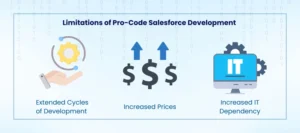
Limitations of Pro-Code Salesforce Development 

Limitations of Pro-Code

Extended Cycles of Development 

When comparing Low-Code vs Pro-Code, pro-code usually takes longer. Custom-coded apps need a lot of work to develop, test, and deploy, which delays time to market. 

Increased Prices 

Pro-Code Salesforce Development is frequently more expensive since it requires more experienced developers and longer development cycles. This can be a big obstacle for companies with limited resources. 

Increased IT Dependency 

Pro-code techniques frequently depend heavily on professional IT staff. When opposed to low-code settings where business people can actively contribute, this can lead to bottlenecks, decrease agility, and impede innovation. 

Conclusion 

A one-size-fits-all approach does not work anymore when choosing between Low-Code vs pro-code Salesforce development. While low code provides accessibility, speed, and cost-efficient solutions, pro code allows businesses to create complex, customizable, scalable, and secure systems. Moreover, the complexity, timeline, and long-term vision of your project help you determine the best solution.  

Most businesses take a hybrid approach by using pro code to create custom yet complex workflows inside Salesforce’s low-code platforms for faster development. Furthermore, integrating the flexibility of low code with pro code will become the pathway to success in the future. As Salesforce continues to grow, partnering with experienced Salesforce development services like AnavClouds Software Solutions can help in creating a development plan that fits your business needs. Book a meeting today and learn more! 

Frequently Asked Questions 

What is the distinction between low-code and standard coding? 

The main difference is the amount of coding knowledge needed. Low-code development relies on graphical interfaces, drag-and-drop editors, and pre-built templates, and it can be used by non-technical people. Standard coding (pro-code) necessitates deep programming knowledge and offers complete customization and sophisticated application building. 

What’s the difference between low-code and no-code? 

Low-code and no-code platforms cater to different sets of users and use cases. Low-code platforms are intended for IT professionals or users with some coding knowledge to develop personalized applications rapidly. No-code platforms, on the other hand, enable non-technical business users to develop simple solutions without coding expertise. 

What are the advantages of low-code development? 

Low-code development has a number of benefits: shorter development cycles, less dependence on IT, lower expense, better automation, ease of updates, better security, and useful data analytics capabilities. It also assists companies in reacting rapidly to shifting market requirements without the need for a lot of programming. 

When should I use low-code versus pro-code for my Salesforce projects? 

Low-code is best suited to quick prototyping, quick apps, or workflow automations with minimal IT intervention. Pro-code development is the best option when you require extreme customization, heavy integrations, or enterprise-level scalability. Most companies today follow a hybrid approach—using low-code for speed and pro-code for intricate, custom workflows. 

Generative AI in Salesforce

Salesforce’s incorporation of Generative AI is transforming customer relationship management by increasing its intelligence, speed, and predictiveness. Manual methods are no longer the only method used by businesses. Rather, companies are adopting Salesforce development driven by AI to improve decision-making, automate repetitive operations, and provide highly customized client experiences. 

Generative AI is opening up new avenues for expansion, from employing sophisticated data to forecast consumer behavior to intelligently automating processes to streamline communication. In addition to increasing operational effectiveness, these features allow Salesforce to provide tailored suggestions and forge closer bonds with clients. 

How Generative AI Enhances Salesforce Development 

The entire Salesforce ecosystem is changing as a result of the revolutionary leap that is the implementation of generative AI in Salesforce. Generative AI helps businesses to build more flexible, responsive, and effective CRM environments by fusing automation, intelligent data modeling, and predictive analytics. AI-powered Salesforce development is being used by developers, consultants, and companies to achieve new heights of creativity and scalability. The main places where this impact is most noticeable are listed below. 

Improved Salesforce Assistance 

Salesforce support is being redefined by generative AI, which turns it from reactive to proactive. It continuously examines large datasets to find early indicators of performance snags or system faults. Businesses can handle possible disruptions before they have an impact on operations thanks to this predictive method. 

  • In addition to saving important developer time, automated ticket resolution expedites the support process and minimizes manual intervention. 
  • Salesforce’s AI-powered chatbots expedite first-level help by responding to inquiries immediately and elevating only when required. 

Because of these developments, companies looking to increase uptime, lower operating costs, and improve customer experience must use generative AI technologies for Salesforce.

Unlock the Full Potential of Salesforce with Generative AI to Drive Smarter Growth.


Cloud-Based Predictive Sales Features 

Generative AI-powered enhanced predictive intelligence is now available to sales teams utilizing Salesforce Sales Cloud. 

  • Sales teams can increase targeting efficiency by ranking prospects according to their likelihood of converting thanks to predictive lead scoring. 
  • AI-powered dynamic pricing tactics evaluate market swings, rival pricing, and consumer behavior to maximize deal value instantly. 

Businesses are guaranteed to close more deals with greater profitability and more accurate forecasts thanks to this AI-driven sales methodology. This kind of innovation shows how generative AI development services are becoming more and more important in sales-driven companies. 

Changing Consulting Services for Salesforce 

Generative AI gives consultants access to highly customized, evidence-based solutions. Consultants now create adaptable roadmaps that change based on the needs of the client rather than static implementation plans. 

  • Third-party integrations, custom app creation, and data migration are all sped up by generative AI. 
  • With the use of these technologies, consultants can design Salesforce environments that precisely match corporate objectives in industries like manufacturing, healthcare, retail, and finance. 

This feature demonstrates how Salesforce developers are becoming more than just implementers; they are also strategic enablers. 

Increasing Client Engagement and Success 

Nowadays, one of the most important factors in Salesforce development driven by AI is customer success. Businesses can: Produce automated customer journey maps that dynamically adjust to user interactions thanks to generative AI. 

  • Provide tailored advice at various touchpoints, such as marketing efforts and after-sales interactions. 
  • Predictive behavior analysis can help you resolve consumer issues before they become more serious. 

Generative AI raises retention rates and fosters long-term client loyalty by fusing automation and deep customisation, so establishing a new benchmark for Salesforce development services. 

The Evolution of Generative AI in Salesforce: A Timeline of Transformation 

Salesforce’s generative AI journey has been characterized by ongoing innovation and strategic breakthroughs. Salesforce has improved its core products over the years by incorporating strong AI capabilities and automation features, enabling developers, consultants, and companies to accomplish more with less work. A thorough examination of the turning points that influenced this evolution may be found below: 

2016: Salesforce Einstein’s Arrival 

An important advancement in AI-powered Salesforce development was made with the release of Salesforce Einstein. Across the Sales, Service, and Marketing Clouds, features like automatic email answers, predictive lead scoring, and advanced analytics allowed users to make well-informed, data-driven decisions. 

2017: Einstein Image Recognition and Vision 

Salesforce brought AI-driven image recognition with Einstein Vision, allowing developers to create unique models for visual tasks like product identification right within the CRM ecosystem. 

2018: Advances in Natural Language and Cognitive 

This year saw several developments: 

  • Natural language processing (NLP), made possible by Einstein Voice, allowed voice commands and smooth transcription for improved user engagement. 
  • By employing intelligent chatbots to automate typical client contacts, Einstein Bots allowed agents to concentrate on more challenging instances. 
  • Salesforce’s AI capabilities were further enhanced through a collaboration with IBM Watson that enabled deeper cognitive analytics.

2019: Analytics Are Strengthened by Tableau Acquisition 

Developers and companies may now more easily extract valuable insights from large data sets thanks to Salesforce’s acquisition of Tableau, which combined powerful analytics and visualization capabilities. 

2020: Improved Analytics and AI Infrastructure 

While the Hyperforce project offered a scalable cloud architecture to support large-scale generative AI development services, Einstein Analytics updates improved machine learning and predictive analytics. 

Automation using Einstein Automate in 2021 

Salesforce developers’ jobs became even easier with the advent of Einstein Automate, which brought with it tools like Flow Orchestrator and MuleSoft Composer that allowed for low-code and no-code automation. 

Using AppExchange to Expand AI 

Additionally, Salesforce integrated external generative AI tools through the AppExchange marketplace, guaranteeing that companies could easily take advantage of a variety of AI advancements. 

Why Generative AI Matters for Modern Salesforce Development 

Generative AI for Modern Salesforce

Salesforce’s generative AI is now a fundamental force behind innovation, productivity, and expansion rather than a sci-fi idea. By automating intricate procedures, improving customisation, and opening up new avenues for innovation and speed, businesses implementing AI-powered Salesforce development are gaining a significant competitive edge. The main ways that generative AI is changing company processes are listed below, along with how Salesforce developers are contributing to this change.

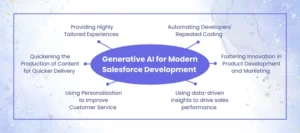
Quickening the Production of Content for Quicker Delivery

Businesses may now produce high-quality content at previously unheard-of speeds thanks to generative AI. AI can produce precise drafts of marketing campaigns, sales presentations, and product documentation in a matter of minutes. This translates to quicker go-to-market plans and better responsiveness to changing customer demands for Salesforce teams. Teams can concentrate on growth-promoting strategic initiatives by automating repetitive content development.

Using Personalization to Improve Customer Service

More than ever, customers expect prompt resolutions and individualized attention. Teams may create precise, contextualized answers using generative AI tools for Salesforce that draw from a variety of information sources. This entails producing thorough post-call reports, proactive suggestions, and predictive solutions—all of which improve client happiness and free up agents to concentrate on developing sincere connections.

Providing Highly Tailored Experiences

Success now depends on hyper-personalization, which is scalable thanks to generative AI. It generates customized offers, recommendations, and communications for every stage of the customer journey by examining consumer data and behavioral trends. AI-enabled Salesforce development services guarantee that each interaction is timely, pertinent, and significant.

Using data-driven insights to drive sales performance

By automating processes like pipeline projections, follow-up emails, and meeting notes, generative AI revolutionizes sales operations. It offers useful information on sales success indicators such as pipeline advancement, conversion rates, and average transaction value. After that, sales teams can concentrate on closing high-value deals rather than handling paperwork.

Fostering Innovation in Product Development and Marketing

Generative AI is a creative collaborator for product designers and marketing teams. It speeds up time to market and boosts creativity in everything from AI-generated design concepts to campaign brainstorming. Product launches and marketing effect are accelerated by this collaboration between AI-powered content and human innovation.

Automating Developers’ Repeated Coding

With generative AI, the role of Salesforce developers is also changing. With the automation of mundane coding, script authoring, and setup tasks, developers can now concentrate on high-value architecture and integrations. Even non-technical teams may create workable solutions thanks to low-code and no-code tools, which further democratize application development. 

Organizations implementing generative AI development services need to combine innovation with a well-defined plan, taking into account scalable use cases, operational integration, and cost considerations. Early adoption of this change will position businesses for long-term success and faster expansion. 

Exploring Salesforce GPT Innovations: Next Era of AI-Powered Salesforce Development 

A new phase in the development of generative AI in Salesforce has begun with the release of Salesforce GPT solutions. Salesforce has developed an ecosystem where automation, personalization, and predictive analytics combine to revolutionize how companies interact with their clientele by integrating generative AI into its core platforms. These developments give Salesforce developers, consultants, and businesses access to Generative AI capabilities that improve productivity, optimize processes, and create memorable customer experiences. 

Salesforce Sales GPT: Revolutionizing Sales Operations  

Sales GPT uses unified data platforms and AI-powered Salesforce development to transform sales processes. 

  • Tailored Sales Emails: Based on consumer behavior, automatically generate personalized outreach emails, plan follow-ups, and emphasize the advantages of your products. 
  • Automated call transcriptions improve follow-up activities and sales productivity by recording, transcribing, and analyzing calls to extract important points. 
  • Predictive Sales Insights: Prioritize leads with the highest conversion potential and forecast prospects using past data and market trends. 

Sales GPT enables sales teams to spend more time closing high-value deals and less time on administrative duties by automating these operations. 

Improving Customer Support Services: Salesforce Service GPT  

Through generative AI solutions for Salesforce that expedite case management and offer immediate, tailored responses, GPT improves the customer service experience. 

  • Responses from Service: AI-generated answers increase accuracy and resolution speed. 
  • Work Summaries: Provide a concise synopsis of instances to speed up decision-making. 
  • Create and update knowledge bases with the newest fixes and industry best practices by creating knowledge articles. 
  • Mobile Work Briefings: Give workers who are constantly on the go vital client information to improve customer support. 

The efficiency and responsiveness of service operations are increased by this innovation, which eventually raises client satisfaction. 

GPT for Salesforce Commerce: Automating Customization 

Creating highly customized purchasing experiences throughout the client journey is the main goal of Commerce GPT. 

  • Serves as a personal shopper, making product recommendations based on the tastes of the client. 
  • Automates repetitive processes such as checkout help, promotional offers, and product descriptions. 
  • Lowers operating expenses for retail and e-commerce companies while increasing customer engagement.  

Salesforce Marketing GPT 

With AI-powered content creation, marketers can design and implement campaigns at scale with Salesforce Marketing GPT’s Intelligent Creative Assistant. 

  • Email Content Creation: Create distinctive email campaigns tailored to individual customers. 
  • Data Cloud Segment Intelligence: Effectively analyze and target client segments. 
  • Engagement & Identity Resolution: Arrange audiences and convey the appropriate message at the appropriate moment. 
  • AI-driven Data Integration: Improve targeting by integrating customer data from various sources in a seamless manner.  

Smarter Analytics for Better Decisions with Salesforce Tableau GPT 

Through the automation of analytics and reporting procedures, Tableau GPT improves business intelligence. 

  • Tableau Pulse, an automated analytics tool, Provides campaign performance data in real time to facilitate prompt decision-making. 
  • Customized Metrics: Create financial dashboards that monitor KPIs in line with corporate objectives. 
  • Data Security & Compliance: Make sure that client and company information is safe and complies with legal requirements. 

Conclusion 

A tremendous leap in the redefinition of business intelligence, customer engagement, and operational effectiveness has been achieved with the deployment of GPT technology across Salesforce’s platform. Customized sales emails, AI-based customer service, and advanced marketing segmentation are only some of the ways that these solutions make it possible for businesses to forecast patterns, streamline mundane tasks, and deliver tailored interactions across all points of contact. 

Companies can remain ahead of the curve, reduce operational costs, and develop a deeper connection with their customers by strategically leveraging these developments. Collaborating with experienced Salesforce experts such as AnavClouds Software Solutions ensures you not only deploy these future-proof solutions but also pair them with your business strategy to maximize their impact. 

Salesforce Winter ’26 Release

The Salesforce Winter ’26 Release is set to strengthen trust, scale automation, and prepare orgs for agentic AI at the enterprise level. Anticipate significant advancements in Salesforce Service Cloud, Experience Cloud, and Data Cloud, a unified AI Data Platform vision, a solid push on security and governance, a realistic runway for Agentforce 3 features, and verified permission enforcements. What matters, why it matters, and how to get ready are all covered in detail below. 

Salesforce Winter ’26 Release: Key Innovations to Watch 

Security, Compliance, and Governance Built for AI at Scale 

Security is the foundation for any credible AI solutions program. Winter ’26 is expected to advance this foundation so teams can move faster without sacrificing control. 

What’s likely coming 

  • Granular access controls and encryption by default. Expect more precise permission scoping, stronger at-rest and in-transit protections, and cleaner propagation of access policies across records, objects, and data services inside Salesforce.
  • Identity hardening with modern patterns. Deeper MFA options, step-up authentication for sensitive actions, and improved session management reduce lateral movement and privilege misuse.
  • Threat detection that understands context. Behavior-aware detections catch anomalies across flows, Apex calls, and API usage, strengthening the defensive posture for agentic AI workloads.
  • Compliance tooling aligned to AI governance. Controls and dashboards that help admins map processes to GDPR, CCPA, and emerging AI risk frameworks, without duct-tape spreadsheets or manual audits.  

Zero Trust, applied 

Zero Trust is not a slogan here. It means every request is authenticated, authorized, and evaluated for risk, every time. That extends to Flow, Apex, APIs, and Agentforce 3 orchestrations. Expect clearer audit trails, tighter token lifetimes, and stronger guardrails where agents read or act on customer data. 

How to prepare 

  • Run a permissions gap analysis on critical objects and flows. Fix broad grants, and convert public access into named permissions.
  • Standardize profile + permission set strategy. Avoid custom snowflakes; adopt modular permission sets for cleaner governance.
  • Document data lineage for sensitive attributes. Know who can see, update, export, and feed that data into any AI Data Platform process. 

Stay ahead of the curve with Salesforce Winter ’26 updates tailored for your business.


Agentforce 3: A Practical Runway to Autonomous Agents 

There is a lot of excitement around Agentforce 3—and for good reason. The rollout across mid-2025 lays the groundwork for teams to hit Winter ’26 with fully configured, measurable, and safe agent workflows. 

Where things stand 

  • Available now: Core Agentforce 3 features, adoption analytics, Testing Center enhancements, and 100+ pre-built industry actions available on AgentExchange.
  • July track: Anthropic Claude model integrations, MuleSoft MCP and A2A support, Heroku AppLink, and Agentforce native MCP support.
  • August track: Session Tracing Data Model, agent health monitoring, Agentforce Command Center, and the Agentforce Studio app for building, testing, and governing agents.  

With this foundation in place by the end of August 2025, Winter ’26 becomes the moment to scale: connect domain-specific skills, wire in governed data, and push agents from pilot to production with real SLOs. 

What this unlocks in Winter ’26 

  • Deeper Einstein infusions for context and decision support inside agent workflows.
  • Cross-cloud orchestration where agents span Service Cloud, Experience Cloud, Data Cloud, and integrated apps via MuleSoft.
  • Safer flow executions with better permission awareness, reducing brittle automation and unexpected failures.  

How to prepare 

  • Catalog your top agentic AI use cases by value, feasibility, and data readiness.
  • Use Agentforce Command Center to define KPIs, guardrails, and rollback paths.
  • Source pre-built actions from AgentExchange to speed time to value and avoid bespoke code where a proven asset exists. 

Confirmed for Winter ’26: Permission and User Access Enforcements 

This is the part you should plan for now. These changes are confirmed for Winter ’26 and may impact production flows, Field Service schedules, and user access patterns. 

I. Permission requirements for built-in Apex classes 

Previously targeted for Spring ’25, this enforcement ensures Apex actions with file-based classes respect explicit permission requirements. Flows will run in the component’s current context, preventing silent failures where underlying permissions were missing. 

Action checklist 

  • Inventory flows calling custom or packaged Apex actions.
  • Map each to required permissions and update profiles/permission sets.
  • Add runtime checks and admin alerts where high-risk failures are unacceptable.  

II. Migration from Maintenance Plan Frequency fields to Work Rules 

After multiple deferrals since Winter ’22, Maintenance Plan Frequency and Frequency Type are retiring. You must migrate to maintenance work rules, which govern scheduling more consistently and are easier to audit. 

Action checklist 

  • Export existing plan frequencies and build a mapping to work rules.
  • Validate rules for edge cases: seasonal loads, blackout windows, and SLAs.
  • Run a shadow schedule in a sandbox for two full cycles before cutover.  

III. Restricted user access to run flows 

The broad FlowSites org permission is deprecated. Users will need explicit profile or permission set grants to execute flows. This closes a major gap where anyone could trigger critical automations. 

Action checklist 

  • Identify flows previously exposed through FlowSites.
  • Define least-privilege execution groups and assign targeted permissions.
  • Add usage telemetry and error routing to triage missed grants quickly. 

Service Cloud and Experience Cloud: Smarter Content, Faster Resolution 

Expect meaningful upgrades across Salesforce Service Cloud and Experience Cloud that turn knowledge into action. The headline capability to watch is Einstein Article Recommendations, designed to surface the best content at the exact moment of need—for both agents and customers. 

Why this matters 

  • Lower handle times. Agents receive context-aware article suggestions based on case type, past resolutions, and similar customer journeys.
  • Self-service that actually works. Customers see relevant guidance in portals without wading through outdated or generic content.  
  • Personalization without heavy lifting. New Experience Cloud templates and components help teams compose personalized digital experiences with fewer custom builds.  

How to prepare 

  • Audit your knowledge base. Consolidate duplicates, retire stale content, and tag by intent, audience, and lifecycle stage.
  • Structure article metadata to fuel recommendations. Clear titles, crisp summaries, and consistent fields drive better AI matches.
  • Wire behavioral signals. Feed search queries, click paths, and failed deflections back into content strategy. 

Toward a Unified AI Data Platform: Salesforce + Informatica 

A major storyline shaping Winter ’26 readiness is Salesforce’s announced acquisition of Informatica (May 2025, ~$8B equity). The vision is a trusted, explainable, and scalable AI Data Platform, combining Salesforce Einstein with Informatica’s CLAIRE to power governed, end-to-end AI solutions. 

What this means in practice 

  • Data Transparency. Rich lineage and cataloging show where data originated, how it transformed, and who touched it—vital for audits and model accountability.
  • Data Understanding. Metadata and a unified model allow agents to interpret data with business context, not just column names.  
  • Data Governance. Embedded MDM, quality rules, and policy controls standardize data so agents act on the right, current, and compliant information.  

Ecosystem impact 

  • Data Cloud enhancement. Stronger identity resolution, cleaner unification, and more actionable segments to drive personalization and analytics.
  • Agentforce improvement. Agents gain safe access to complex enterprise data with confidence scores, lineage cues, and quality indicators.
  • MuleSoft governance. APIs inherit standards for quality and cataloging, reducing downstream drift and brittle integrations.
  • Tableau insights. Analysts see context-rich dimensions and measures, improving trust in dashboards and decisions.  

Rollout expectations 

While the full transaction targets early Salesforce fiscal year 2027, you can expect data-level readiness steps in Winter ’26 to prepare orgs for the integration layer. Think reference connectors, governance templates, and metadata conventions that help teams “snap in” once the deeper fusion lands. 

How to prepare 

  • Classify systems of record and systems of engagement; map truth sources for each entity.
  • Define golden records and survivorship rules now, not later.
  • Establish a data contract for any dataset feeding Agentforce 3 or Einstein models: schema, freshness, lineage, and owner.  

What Are the Best Steps to Get Ready for the Salesforce Winter ’26 Release? 

Salesforce Winter ’26

With the help of a more secure AI Data Platform, the Salesforce Winter ’26 Release brings significant improvements to Agentforce 3, Data Cloud, Experience Cloud, and Salesforce Service Cloud. These technologies only provide value, though, if your company is prepared to implement them successfully. Being well-prepared guarantees that you will not only maintain compliance but also take full use of the AI-powered features and Salesforce development services available with the release. 

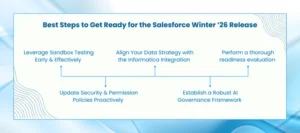
Perform a thorough readiness evaluation 

Examine your present Salesforce setup carefully before releasing the new functionalities. Draw out user permissions, AI agents, integrations, and modifications. Custom code, third-party apps, and flow automations should receive special attention because they will be the most impacted by the new permission and security changes that will be implemented with Winter ’26. 

  • Document existing data governance practices to identify gaps where the release can add immediate value.
  • Highlight critical dependencies on deprecated permissions or old maintenance rules.
  • Assess readiness for Agentforce 3 features and their potential impact on cross-cloud workflows.  

This assessment becomes your blueprint, helping you decide which features to prioritize once the release is live. 

Leverage Sandbox Testing Early and Effectively 

Once Salesforce provides sandbox access for Winter ’26, begin rigorous testing. Focus not only on functional validation but also on real-world scenarios that stress-test AI agents and Agentforce 3 workflows.

  • Use synthetic or anonymized customer data to evaluate AI behavior without compromising compliance.
  • Test AgentExchange assets and pre-built agent actions to accelerate adoption without reinventing the wheel.  
  • Simulate cross-cloud orchestration between Service Cloud, Experience Cloud, and Data Cloud to ensure seamless transitions when features go live.  

Remember, the quality of AI outputs is only as good as the quality of your underlying data. 

Update Security and Permission Policies Proactively 

Winter ’26 emphasizes data security, Zero Trust principles, and granular permission enforcement. Review your organization’s security policies now, rather than scrambling post-release. 

  • Map existing permission sets and profiles against the new enforcements for Apex classes, flows, and maintenance plans.
  • Align your identity management strategy with upcoming multi-factor authentication (MFA) and session management enhancements.
  • Conduct targeted training sessions for admins, developers, and business users to ensure everyone understands new access models.

This proactive approach minimizes disruptions and accelerates compliance once the release is deployed. 

Align Your Data Strategy with the Informatica Integration 

Salesforce’s acquisition of Informatica signals a major shift toward a unified AI Data Platform. If you’re currently using fragmented integration tools, now is the time to evaluate whether consolidating under this new architecture will simplify your data ecosystem. 

  • Audit your current data workflows and integration points.
  • Identify how Informatica’s metadata-driven governance, lineage tracking, and MDM features can improve your Data Cloud strategy.
  • Plan a phased migration where possible to avoid business disruptions during Winter ’26 upgrades.  

By aligning your strategy now, you position your organization to fully leverage AI-powered Salesforce development services and cross-cloud intelligence when the new platform matures. 

Establish a Robust AI Governance Framework 

With Agentforce updates rolling out every few months, your organization needs a clear framework for responsible AI usage. This framework ensures your agents operate within defined ethical, legal, and operational boundaries. 

  • Set policies for AI decision-making, escalation workflows, and quality assurance checks.
  • Include key stakeholders from IT, legal, operations, and customer service teams to ensure a well-rounded policy.
  • Define clear metrics for agent performance, data access, and compliance across your Salesforce ecosystem.  

Strong AI governance ensures that the benefits of agentic AI and AI solutions are realized without exposing your organization to unnecessary risks. 

Are You Ready to Unlock the Full Potential of the Salesforce Winter ’26 Release? 

The Salesforce Winter ’26 Release is more than an upgrade—it’s your chance to reimagine how your business operates. With Agentforce 3 features, a smarter AI Data Platform, enhanced Data Cloud, and deeper Salesforce Service Cloud capabilities, this release sets the stage for intelligent automation and exceptional customer experiences. 

However, success isn’t about adopting new features blindly—it’s about strategic preparation. From assessing your current Salesforce environment to aligning your teams and testing in a sandbox early, every step matters to ensure a seamless rollout. 

This is where AnavClouds Software Solutions can help. As a certified Salesforce Consulting Partner, we specialize in helping businesses make the most of every release. Whether you want to explore Agentforce 3 or implement robust AI solutions, our team ensures smooth adoption, faster ROI, and minimal disruptions. 

Ready to prepare your Salesforce for Winter ’26? Get in touch with us today, and let’s make this release a turning point for your business. 

Agentic AI in Retail

As customer needs evolve faster than ever before, the retail industry is undergoing tremendous change. Customers currently require customized, frictionless, and instant experiences instead of standard offers or delayed reactions. Agentic AI in retail is making a huge difference in this space. AI agents allow retailers to predict customer needs, streamline processes, and produce fantastically engaging shopping experiences by combining automation with intelligence. Companies that leverage AI agents for customer experience, drive inventory management, and personalize shopping experiences are standing out in a saturated business environment. This blog will discuss the retail digital transformation by agentic, the obstacles to adoption, and the actions that companies may take to be successful. 

Why Agentic AI Is the New Driving Force in Retail 

In the retail sector, smart autonomous systems that can make and act on decisions without ongoing human oversight are agentic AI. Such artificial intelligence (AI) agents perceive, reason, and respond in real time as a human agent. Moreover, agentic AI in retail also helps with price optimization, inventory management, targeted marketing campaigns, and even product suggestions based on customer preferences. 

Why, therefore, is the retail industry now accepting this change? Several important variables are propelling adoption: 

  • Growing Retail Complexity: Manual procedures are no longer able to keep up with the demands of multichannel shopping, dynamic pricing, and a wide range of client requests. 
  • Slow insights and data overload: Despite having a lot of data, retailers frequently find it difficult to take swift action. The time between data and judgments is shortened by agentic AI. 
  • Mature AI Technology: AI is becoming more dependable and scalable because to developments in intelligent store assistants, reinforcement learning, and massive language models.

Alongside these changes, consumer behavior is changing as well. Nearly one-third of consumers currently use AI-powered tools for online purchases, according to a recent survey that showed a sharp increase in retail traffic in the UK. This demonstrates how rapidly consumers are adjusting to AI-powered tailored buying. 

Collectively, these patterns demonstrate how agentic AI in retail is about more than just automation; it’s about boosting customer satisfaction, increasing productivity, and opening up new business prospects. 

Transform your retail strategy with Agentic AI-driven engagement.


Beyond Automation: How Agentic AI Brings Retail to Life 

Consider the following scenario: A consumer walks into a store after work, and their phone immediately displays business wear that has been carefully chosen for an impending trip, including alternatives that are appropriate for the weather. Those clothes are waiting for them when they arrive at the changing room. This isn’t just science fiction; it’s the potential of agentic AI in retail, which can offer hyper-personalized shopping by seamlessly integrating weather predictions, purchase history, inventory data, and even calendar information. 

An AI agent for customer experience is more advanced than standard AI, which mostly analyzes data and makes recommendations. Without awaiting human approval, these smart shop assistants may automatically reorder inventory, modify prices, and handle customer service concerns. This liberty can make the difference between stores staying relevant and falling behind in the face of tight margins and growing competition. 

This demonstrates a noteworthy digital change in retail, as preemptive measures are developed from predictive insights. Imagine having a digital worker who never sleeps, keeps track of every conversation, and consistently improves the client experience. 

Five key capabilities define agentic AI in retail at its core: 

  • Goal Orientation: Complies with retail goals such as increasing sales or enhancing consumer happiness. 
  • Adaptive planning modifies plans in real time when circumstances shift. 
  • Autonomy: Makes decisions on their own while adhering to company policies. 
  • Tool Access: Easily integrates with databases, APIs, and systems. 
  • Execution Continuity: Retains uniformity even in the face of interruptions.

Think about the difference in client engagement: an AI agent for customer experience may detect issues, access inventory, provide refunds, provide alternatives, and proactively send tailored offers, whereas a normal chatbot can just respond to inquiries. Agentic AI in retail is a real game-changer for improving the customer experience because of this change, from reactive support to proactive action. However, enhancing retail CX with AI can be easily done with the help of Salesforce development services. 

Inside the Engine: The Operation of Agentic AI in Retail 

Agentic AI in retail is a radical change in the way technology informs decision-making, not just a more intelligent form of conventional AI. Retail digital transformation through agentic AI is designed to detect, reason, decide, and act on its own, in contrast to traditional systems that only forecast or categorize results. Retailers can now proactively create better customer experiences rather than just responding to issues, thanks to this purpose-driven design. 

Real-Time Viewing of Everything 

Sensing and contextual awareness are the main goals of the initial layer of agentic AI. Transaction systems, inventory databases, client interactions, rival pricing, social media, and even weather signals are some of the sources from which it gathers data. The technology generates a real-time representation of the retail environment by evaluating these inputs, allowing for seamless and pertinent AI-powered tailored purchasing. 

Improved Decision-Making through Smarter Thinking 

The reasoning engine is the central component of this architecture. To assess potential courses of action, this layer uses consumer segmentation, demand forecasting models, and business rules. It considers trade-offs and selects the best course of action in line with retail goals rather than merely flagging insights. This enables merchants to use agentic AI in retail to make judgments quickly and accurately to improve the consumer experience. 

Gaining Knowledge and Improving With Time 

The learning capacity is one of the most potent characteristics of intelligent retail assistants. All actions, results, and feedback are recorded by the memory module. This ongoing learning process enables Agentic AI to enhance efficiency and optimize strategies over time, guaranteeing a retail digital transformation that only improves with scale. 

Acting Without Postponement 

The action layer puts decisions into immediate effect once made. These solutions work in unison with ERP, CRM, and eCommerce. It does everything from introducing promotions and repricing products to restocking inventory and customizing communications with customers. This guarantees that, rather than merely evaluating data, AI agents for customer experience produce tangible commercial results. 

Maintaining AI Aligned and Ethical  

Autonomy requires accountability. Strict guidelines and governance regulations restrict the use of agentic AI in retail. These uphold vendor agreement compliance, safeguard consumer data protection, and guarantee moral business practices, including reasonable pricing. In order to keep the system in line with corporate principles, guardrails also establish limits to stop excessive discounting or dangerous choices. 

Working Together with Individuals 

Agentic AI is not a secret, even though it is autonomous. Through a feedback loop, business groups can monitor decisions, establish new objectives, and take appropriate action. This human-in-the-loop makes sure AI acts as a collaborator, promoting productivity and personalization while retaining the power to make decisions when necessary. 

Using Agentic AI in Retail to Transform Obstacles into Opportunities 

AI agents for customer experience

While it is exciting to deliver through agentic AI in retail, its adoption is not without challenges. Legacy systems, data handling, and extending AI across operations are challenges facing most shops. Tapping into the full capability of AI agents to enhance customer experience requires clear strategies that find a balance between individuals, technology, and governance. 

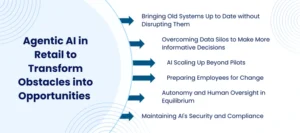
Bringing Old Systems Up to Date without Disrupting Them 

Legacy infrastructure is one of the greatest challenges. Numerous merchants still utilize old technologies that were not written with automation in mind. Firms can blend newer intelligent retail assistants into existing systems with the help of middleware technologies, cloud-based adapters, and API layers instead of ripping everything out at once. Routine operations are preserved while seamless conversion is enabled by this gradual process. 

Overcoming Data Silos to Make More Informative Decisions 

The integrity of AI relies on the information it is working with. Retailers often struggle with fragmented systems where sales, stock, and customer data are locked in silos. Companies must create unified data architectures with automated cleansing and real-time validation to counter this. Agentic AI in retail ensures AI-driven personalized buying is underpinned by the right and reliable data, leading to better decision-making and higher consumer confidence. 

AI Scaling Up Beyond Pilots 

Most stores find it difficult to scale up their early small-scale AI projects. There must be a scalable machine learning infrastructure and robust cloud or edge computing capacity for an actual retail digital transformation. Companies can achieve a competitive advantage along supply chains, stores, and digital channels by scaling up from small pilots to enterprise-wide deployment of AI models that are performance- and cost-optimized. 

Autonomy and Human Oversight in Equilibrium 

Though agentic AI in retail is independent, retailers must still exercise governance. Threshold-defining decision frameworks ensure that humans remain involved in important work. Transparency is heightened by employing features such as role-based access controls, explainability reports, and real-time dashboards. Enhancing retail CX with AI is done responsibly while ensuring human intervention. 

Preparing Employees for Change 

Adoption of AI is a cultural shift as well as a technological one. Even though customer experience AI agents are designed to augment human knowledge and not supplant it, employees often fear automation. By initiating AI training programs, offering hands-on experience, and making it clear how automation allows staff to focus on activities of greater value, retailers can ease the transition. This builds long-term readiness and confidence. 

Maintaining AI’s Security and Compliance 

In contemporary retail, security and compliance are non-negotiable. Retailers are required to employ robust encryption, anomaly detection, and AI-specific security mechanisms to comply with data protection rules such as the CCPA and GDPR. Frequent compliance audits guarantee that agentic AI in retail keeps providing value while safeguarding consumer information and abiding by moral principles. 

The Unspoken Difficulties of Using Agentic AI in Retail 

Although implementing agentic AI in retail is revolutionary, there are significant obstacles to overcome. To fully reap the benefits of AI agents for customer experience, retailers need to overcome a number of operational and technological challenges, ranging from staff readiness to antiquated technologies. A closer look at the most typical obstacles is provided here. 

Antiquated Mechanisms Impeding Innovation 

Numerous retailers continue to rely on antiquated systems that were never intended to be automated. Intelligent retail assistants are unable to obtain the data they require in the absence of contemporary APIs or cloud-based integration. While it is expensive to upgrade everything at once, AI adoption becomes fragmented and delayed in the absence of modernization. 

Data Stuck in Silos 

Retailers produce enormous volumes of data about supplier chains, sales, inventory, and customer interactions. The issue? A lot of it is dispersed across silos. The accuracy of insights is decreased in retail when agentic AI is unable to obtain the complete picture or when the data is inconsistent. AI-powered tailored buying requires clean, linked, and trustworthy data. 

Having Trouble Scaling AI 

It is simple to launch small AI pilots, but it is more difficult to scale them across operations. Many companies struggle with bandwidth constraints, infrastructure expenses, or cloud migration. Retail digital transformation stops in the absence of scalable solutions, which keeps AI adoption in experimental stages rather than propelling enterprise-wide change. 

Striking the Correct Balance with Human Supervision 

Although the autonomy of agentic AI in retail is positive, retailers cannot totally cut people out of the process. Pricing and promotion decisions must be in line with consumer expectations and brand values. Strong governance structures guarantee that using AI to improve customer experience is done ethically and without expensive mistakes. 

Teams Getting Ready for the AI Era 

Implementing automation alters how workers operate. Adoption may be slowed by a lack of technical expertise, fear of losing one’s career, and resistance to change. For this reason, funding AI literacy initiatives and effective communication are essential. AI agents for customer experience must be viewed by staff members as tools that complement them rather than take their place. 

Maintaining Compliance and Safeguarding Data 

Tremendous responsibility accompanies tremendous ingenuity. Retail AI systems are a potential target for cyber threats because they handle sensitive client data. Strong cybersecurity measures, along with adherence to data protection regulations like the CCPA and GDPR, guarantee that agentic AI in retail adds value without putting companies at risk of legal trouble or damage to their reputation. 

Conclusion 

Agentic AI in retail is a turning point for businesses. Retailers are well-positioned to prosper in the modern, digital-first economy if they use AI agents to automate procedures, aggregate data, and customize encounters. However, current systems, competent teams, robust governance, and a dedication to customer trust are all necessary for success; technology alone is not enough. Retailers can realize the full potential of AI-powered retail digital transformation and provide experiences that entice customers to return by tackling these issues. 

AnavClouds Software Solutions can assist you in creating scalable, intelligent, and smooth AI-driven solutions that are customized to meet the demands of your retail company if you want to expedite your Salesforce development journey. 

Agentic AI vacation planning

Experiences have always been the focus of travel, but modern tourists demand more than just convenience—they want trips tailored to their tastes. Agentic AI in travel planning is revolutionizing the travel business in this regard. Autonomous AI agents think, decide, and act with intent, which makes every trip smarter and more personalized than traditional apps that adhere to strict rules. Agentic AI vacation planning is opening new possibilities for travel and hospitality firms, from real-time itinerary modifications and booking assistance to predictive customer support and loyalty benefits. The potential of agentic AI trip planning services, implementation best practices, and the reasons why companies need to take immediate action to remain competitive will all be covered in this blog. 

What Is Agentic AI Vacation Planning? 

Let’s first examine what agentic AI vacation planning entails before delving into how it will change travel. 

Agentic AI vacation planners are powered by autonomous AI agents that can make decisions, learn from feedback, and adapt in real-time, unlike common AI devices that merely respond to prompts. Such systems are ideal for the fast-changing travel business as they work proactively towards achieving pre-determined goals as opposed to responding passively. 

Think of them as your personal AI travel buddies. They can plan your itinerary, suggest destinations to visit, and even adjust your travel itinerary based on last-minute revisions, local happenings, or weather forecasts. This degree of flexibility gives intelligent vacation planning with AI agents a new meaning. 

Transform Travel Experiences with Agentic AI & Salesforce Development Services. Let’s build the future together.


Why Agentic AI Vacation Planning Is Transforming Travel 

Consider the hours you spent researching ticket costs, reading many hotel reviews, examining cancellation conditions, and locating local experiences the last time you organized a trip. Imagine now giving all of that to a travel planner powered by an agentic AI that not only helps but also fully comprehends your intentions and takes command. Agentic AI vacation planning holds that promise. 

This reform is revolutionary for businesses and passengers alike for the following reasons: 

Changing Expectations of Travelers

Sixty-three percent of travelers want brands to swiftly adjust to their specific demands, per a Salesforce survey. This is made possible by agentic AI travel planning services. In order to provide timely, relevant, and personalized travel recommendations, agenctic AI vacation planning solutions examine historical preferences, behavioral patterns, and contextual cues.

Making Operational Complexity Simpler

Behind the scenes, hospitality companies deal with issues like personnel shortages, volatile pricing, and disjointed technology. By integrating data from revenue management, staffing, and guest services, intelligent vacation planning with AI agents is made easier. Decisions are made more quickly and intelligently without overtaxing human teams.

Proactive Guest Personalization

Generic recommendations are no longer the only kind of personalization. Travelers can receive customized offers from personalized AI holiday assistants, such as flexible check-in options based on previous stays or spa bonuses for regular wellness visitors. Instantaneous system adaptation results in genuinely one-to-one experiences.

Navigating Uncertainty in Travel with Ease

Travel can be disturbed by cancellations, weather conditions, or global disruptions, as travel is ever-unpredictable. With monitoring of real-time indicators and self-organizing route adjustments, accommodation bookings, or alerts being sent within time, agentic AI trip planners shine here. With smart vacation planning with AI agents, companies maintain faith as travelers stay stress-free. 

10 Ways Agentic AI Vacation Planning Is Revolutionizing Travel 

The objective of agentic AI vacation planning is to deliver more intelligent, resilient, and personalized travel experiences instead of merely booking a trip. Companies can expect customer needs, respond immediately to disruptions, and deliver loyalty-driven services by utilizing self-sufficient AI agents that learn, adapt, and operate in real-time. Agentic AI holiday planners and customized AI holiday attendants are transforming the travel and hospitality industry in the following 10 real-world ways:

Active Management of Disruptions

Holidays don’t need to be sabotaged by sudden weather conditions, flight cancellations, or delays. Real-time disruption alerts, flight rebooking, rapid updates, and even hotel vouchers are all made available by agentic AI vacation planning systems, which ease stress and build trust.

Extremely Tailored Travel Arrangement

Smart vacation planning with AI agents customizes plans to each traveler’s specific preferences, whether those be luxury getaways or low-cost excursions, rather than making general recommendations. Because of the system’s constant adaptation, planning is simple.

Adaptive Pricing to Increase Revenue

Static price is no longer relevant. Hotels and airlines can use autonomous AI agents to dynamically modify prices in response to demand, rival rates, or booking patterns. This maximizes revenue prospects and guarantees competitive offerings.

More Astute Engagement with Loyalty

Conventional point systems frequently fall short in establishing an emotional bond with passengers. AI vacation assistants that are tailored to each consumer can anticipate disengagement, provide benefits that increase brand loyalty, and prod clients with pertinent offers.

Immediate AI-Assisted Customer Service

Today’s travelers demand answers. Agentic AI trip planners allow virtual assistants to serve as round-the-clock concierges, offering smooth, real-time assistance with anything from restaurant recommendations to hotel rebooking.

Simplified Hotel Management

Using AI agents to plan vacations intelligently helps improve tasks like housekeeping, maintenance, and scheduling. AI makes sure resources are allocated effectively by evaluating demand signals, which raises visitor happiness and lowers operating expenses.

Automated Checks for Safety and Compliance

In terms of guest service, health, and food safety, compliance is essential. Real-time system monitoring by autonomous AI agents helps brands stay out of trouble and preserve consumer trust. Smart vacation planning with AI agents helps in identifying infractions and initiating remedial measures before problems worsen.

Management of Predictive Inventory

Agentic AI vacation planning guarantees that the proper stock is always accessible for everything from hotel minibars to aircraft amenities. By anticipating consumption patterns, waste and shortages can be avoided, increasing sustainability and efficiency.

Opportunities for Contextual Upselling

When done correctly, upselling no longer feels forced. Travelers can receive timely, relevant offers from personalized AI holiday assistants, such as lounge access before a delayed flight or a spa discount during check-in. This improves the journey and increases income.

Effective Cross-Channel Marketing

Through the analysis of consumer behavior across email, SMS, and push notifications, agentic AI trip planning services optimize marketing campaigns. It increases engagement and lessens marketing fatigue by guaranteeing timing and relevance. 

The Real Advantages of Agentic AI Vacation Planning 

Advantages of Agentic AI Vacation Planning

Travel brands may move from merely serving clients to anticipating their requirements and taking proactive measures since agentic AI vacation planning systems have goals, evolve constantly, and make decisions on their own. Travelers will find these encounters effortless, and businesses will find them effective. 

Here are some real-world examples of how agentic AI travel planning services function:

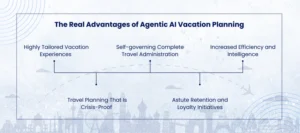
Highly Tailored Vacation Experiences

Personalized AI holiday helpers generate distinct micro-profiles in real time, in contrast to rule-based segmentation that divides visitors into “business” and “leisure” travelers. For instance, a person may value Wi-Fi and quick check-ins when traveling for work, but prefer boutique accommodations when on vacation. Agentic AI trip planners instantly adjust to these preferences.

Self-governing Complete Travel Administration

Consider a self-governing artificial intelligence (AI) agent that arranges your travel, verifies your visa needs, tracks delays, and even recommends travel insurance without your request. This enhances customer satisfaction, boosts upsell prospects, and lessens reliance on human employees for firms.

Increased Efficiency and Intelligence

In the hospitality industry, manual input is often used in tasks including staff scheduling, inventory forecasting, and housekeeping. Through intelligent agentic AI vacation planning, hotels may evaluate local events, demand signals, and weather updates in real-time to optimize operations before issues arise.

Travel Planning That Is Crisis-Proof

Travel is prone to delays, ranging from pandemics to last-minute cancellations. Agentic AI vacation planning speeds up and improves the empathy of crisis management. It can manage cancellations, recommend different hotels, and redirect visitors during storms, keeping both businesses and travelers stress-free.

Astute Retention and Loyalty Initiatives

Loyalty is no longer increased by generic incentives. Offers can be highly customized using Agentic AI travel planning services, such as spa benefits for wellness travelers, surprise birthday upgrades, or early check-ins for regular travelers. These encounters convert one-time clients into ardent supporters. 

Best Practices for Agentic AI Vacation Planning: Do’s and Don’ts 

Both how businesses provide services and how travelers plan their trips are being revolutionized by agentic AI vacation planning. Autonomous AI agents provide intelligence and personalization to every aspect of the travel experience by making decisions, learning continuously, and adapting in real time. Organizations must, however, properly adopt these systems if they hope to have a significant influence. Strong data foundations, fair supervision, and constant improvement are essential for success. 

The following are crucial dos and don’ts for successfully adopting agentic AI trip planning services: 

Dos for Successful Implementation 

Begin with Use Cases That Provide Explicit Benefits 

Start with examples that offer advantages right away. Customer satisfaction is directly increased, and manual workloads are decreased when an agentic AI trip planner is used to handle interruptions. Starting with high-impact use cases generates internal momentum and aids with ROI demonstration. 

Assure Smooth Integration and High-Quality Data 

Clean, real-time data from several systems, including booking platforms, CRM platforms, hotel databases, and support channels. It is necessary for intelligent agentic AI vacation planning to be successful. The system is guaranteed to offer precise, context-aware recommendations when it has high-quality integrated data. The passenger experience is weakened, and trust is diminished by inaccurate or compartmentalized facts. 

Continue to Monitor Human Oversight 

The majority of activities can be completed by individualized AI vacation assistants, but in certain situations, human judgment is needed. For example, human inspections are necessary to prevent mistakes like booking unavailable rooms or processing cancellations incorrectly. This equilibrium protects consumer confidence and guarantees a more seamless integration of AI-powered procedures. 

Give explainability and transparency top priority

The rationale for specific enhancements or recommendations must be made clear to travelers. By giving concise justifications for its choices, an open Agentic AI vacation planning system increases trust. This guarantees regulatory compliance, lowers escalations, and boosts consumer confidence. 

Continuously Pilot, Measure, and Iterate 

Risks might arise from extensive rollouts without testing. Organizations can get feedback, improve workflows, and adjust decision-making logic by testing Agentic AI trip planning services in controlled circumstances. Customer satisfaction and long-term efficiency are guaranteed by iterative improvement. 

Don’ts to Avoid with Agentic AI 

Avoid Demanding Full Autonomy Too Early 

It may have adverse effects to grant full autonomy to AI systems before thorough testing. For example, making whole itineraries over again in case of bad weather without human checks can lead to errors, inconvenience passengers, and damage a brand’s reputation. 

Be Vigilant About Compliance and Data Privacy 

Protecting client data is necessary in the hospitality and travel sectors. When relying on autonomous AI agents, violating privacy regulations such as the CCPA or GDPR will attract costly fines and erode consumer trust. Compliance must be built into the system from the outset. 

Agentic AI should not be configured once

With every interaction, holiday-planning agentic AI technologies evolve. Left untamed, the decisions will potentially drift away and yield outcomes that are not aligned with customer needs or business goals. Accuracy and justice need to be upheld by incessant observation and adaptation. 

Avoid Relying on Just One Data Source 

Personalization is diminished when AI is restricted to internal booking history. A variety of data sources are taken into account by efficient agentic AI trip planners, such as rival prices, local events, weather forecasts, and even real-time traveler behavior. This wide viewpoint guarantees that suggestions stay accurate, current, and dynamic. 

Conclusion 

Anticipating client requirements before they ever materialize is key to the future of travel. Travel and hospitality companies may now offer flexible, individualized, and effective experiences at scale thanks to agentic AI vacation planning. In order to accomplish this, businesses require the proper framework, where Salesforce development services are essential for integrating customer data, streamlining processes, and enabling sophisticated AI-powered systems. By fusing Salesforce with innovative agentic AI, we at AnavClouds Software Solutions assist companies in realizing this promise. Are you prepared to improve customer loyalty, optimize processes, and develop cutting-edge travel experiences? Together, let’s shape the travel industry of the future. 

Salesforce Architect

As companies are rapidly transforming their business models into digital transformations, the Salesforce architect role is more important than ever. In the Salesforce Architect Landscape 2025, architects will bring together leadership, strategy, and automation skills to build scalable and future-ready Salesforce solutions, beyond being just subject-matter experts. The rise of AI, automation, and cross-cloud features in Salesforce will create demand for architects who can leverage platform innovation against business initiatives. This article examines the critical, underappreciated, and forward-thinking abilities that every Salesforce Architect will require in order to succeed in 2025. 

Important Skills Influencing the Salesforce Architect Market in 2025 

Positioning as a Salesforce Architect has become one of the most strategic roles of this digital era. These experts are shaping the architecture landscape in Salesforce by 2025 and enabling organizations to leverage Salesforce solutions through the combination of business and technical knowledge.  

Their responsibilities span far more than platform knowledge, as they are visionaries, engineers, and implementers of scalable systems, ability to automate processes, and a guiding force for organizations to go through change. Salesforce Architects must develop a diverse skill set to meet future demand, with a balance of technology and innovation, collaboration, and leadership. 

Build smarter Salesforce solutions with expert architects by your side. Let’s shape your success today!


The following is a summary of the critical skills that will influence the Salesforce Architect role in 2025

Creating Integrations and Systems That Are Future-Ready

For any Salesforce Architect, having a solid understanding of system architecture and integration is a must. These experts make that Salesforce is designed for sustainability, security, and size in addition to implementation. They create automated procedures, link Salesforce to external systems, and create clever frameworks that enable companies to run smoothly.

Salesforce Solutions’ Strategic Business Acumen

The contemporary Salesforce Architect is a strategist in addition to a tech specialist.  In order to match Salesforce solutions with business priorities, they need to be aware of an organization’s vision, operational model, and long-term objectives. Process mapping, business analysis, and strategy alignment abilities guarantee that each implementation yields quantifiable results and a competitive edge.

Technologically savvy and Salesforce automation-savvy

Technical expertise remains a crucial aspect of a Salesforce Architect candidate. Architects need to have an in-depth understanding of technology trends, from current Salesforce updates to their expertise in Salesforce Architect automation. Architects are mighty drivers of efficiency and innovation for organizations, fault-finding, process streamlining, and AI-powered automation integration.

Stakeholder Communication and Collaboration

The value of Salesforce Architects working together will grow in 2025. Architects play an unusual role in being a bridge between highly technical teams and business stakeholders, making sense of hard technical terminology, and ensuring stakeholder alignment. Architects can use their excellent communication, empathy, and active listening skills to build clarity and trust along a project.

Intelligent Management and Data Architecture

Decision-making now relies heavily on data; thus, Salesforce architects need to create data structures that optimize its usefulness. Data expertise is crucial for everything from managing migration strategies and guaranteeing compliance to modeling safe, scalable databases. This guarantees that businesses may use their data to develop tailored customer journeys and well-informed plans.

Encouraging Change and Leadership

Major organizational changes are frequently a part of Salesforce deployments. For Salesforce Architects, leadership and change management are therefore essential competencies.  Successful adoption requires leading teams, fostering creativity, and overcoming opposition.  Successful architects make sure that Salesforce solutions are adopted by the entire company in addition to being executed. 

Must-Have Salesforce Architect Skills Shaping 2025 

In 2025, the Salesforce Architect Landscape will be much more dynamic than it has ever been.  The position calls for more than simply technical expertise because companies are requesting scalable, secure, and intelligent solutions. To create solutions that genuinely add value, a great Salesforce Architect blends product experience, enterprise design knowledge, and a strong customer-first mentality. 

Let’s examine the key competencies that will distinguish Salesforce Architects in 2025. 

Enterprise Architecture for Salesforce Solutions That Are Scalable 

Creating future-ready Salesforce solutions is one of the most important abilities. Architects need to think beyond today’s specifications and develop adaptable system designs that can change as a company expands. Long-term scalability and robustness are guaranteed by enterprise-level design, whether it is enabling automation across various clouds or connecting Salesforce with ERP platforms. 

Knowledge of the Salesforce Ecosystem and Products 

Salesforce Architects can’t afford to only explore the platform in 2025. To unleash creativity, they require a thorough understanding of MuleSoft, Salesforce Clouds, Industries, and Einstein AI. The real game changers in digital transformation will be architects who customize solutions to meet industry-specific demands as Salesforce’s capabilities grow. 

Constructing Architectures Focused on Customers 

Every architect should prioritize the client, much like the top Salesforce development services do. The ability to create end-user-pleasing experiences is essential for everything from user behavior analysis to customer journey optimization. Architects will guarantee greater acceptance and better commercial results if they incorporate customer-centric thinking into their designs. 

Knowledge of DevOps and Agile Techniques 

Adaptability and speed are now essential. Architects who are skilled in DevOps pipelines, CI/CD processes, and Agile frameworks may complete projects faster without compromising quality. This not only shortens time-to-market but also ensures that Salesforce solutions consistently adjust to business needs. 

Critical Thinking and Solving Complicated Issues 

As business requirements become more complex, Salesforce Architects must possess advanced analytical and problem-solving skills. Whether they are fixing problems with data transfer or optimizing automation procedures, architects are crucial due to their ability to assess problems and offer practical solutions. 

Interaction That Brings Stakeholders Together 

Only when great architecture is recognized and embraced can it have an impact. In order to keep IT teams in sync and demystify technical designs for business executives, architects need to be effective communicators. They serve as the link between strategy and technology in many respects, and by 2025, their significance will only increase. 

Data Governance and Security Knowledge 

Data protection is important to organizations, and therefore, governance and security cannot be overlooked. Architects’ role is significant while implementing Salesforce; they need to develop an ecosystem as per regulations like CCPA and GDPR. This ensures secure access to sensitive information, ensuring organizational assets are safe when security and compliance remain in harmony. 

Promoting Adoption and Change 

Without acceptance, even the most advanced architecture fails. Salesforce Architects are therefore essential to change management. They guarantee that Salesforce products are adopted by users and yield the most return on investment by assisting firms with training, communication, and onboarding tactics. 

Overlooked Yet Vital Skills in the Salesforce Architect Landscape in 2025 

Skills in the Salesforce Architect

Although technical proficiency frequently takes center stage, a Salesforce architect’s success is subtly defined by a number of underappreciated abilities.  Although these features might not often garner much attention, they are crucial for creating robust structures and guaranteeing that Salesforce solutions have a real economic impact. 

Cohesive Architectures with the Use of Systems Thinking 

A forward-thinking Salesforce architect needs to consider the wider picture in addition to specific features. Architects can assess each component’s interactions within the larger Salesforce ecosystem by using systems thinking. This all-encompassing strategy avoids compartmentalized solutions, encourages scalability, and guarantees that the Salesforce Architect Landscape in 2025 is prepared for the future. 

The Business Intelligence Behind Salesforce Solutions 

Business savvy makes you stand out from the competition, even in highly technical positions.  Salesforce skills can be matched with long-term company objectives by architects who are aware of organizational priorities and financial targets. By connecting strategy and technology, they guarantee that Salesforce solutions not only address issues but also spur expansion. 

The Role of Change Management in Accelerating Growth 

Adoption of technology frequently involves more people than systems. Architects with strong change management skills guide companies through changes with ease and make sure staff members accept new systems and procedures. A Salesforce setup becomes a company-wide success story thanks to this underappreciated talent. 

Salesforce Architect Skills Across Career Stages in 2025 

A Salesforce Architect’s path is one of constant development. Professionals’ abilities change as they progress through different stages of their careers, from driving enterprise-wide Salesforce strategy to mastering essential platform functionalities. Knowing these benchmarks in the Salesforce Architect Landscape of 2025 aids architects in staying ready and companies in appreciating the need for knowledge at all levels. 

Early Career: Building Firm Foundations 

Learning the basics is the path for junior Salesforce Architects. A solid grasp of declarative technologies such as Flow and Sales and Service Cloud is necessary. They can now design valuable Salesforce solutions from their experience in hands-on configuration and minimal coding knowledge of Apex and Visualforce. Analytical thought and stakeholder communication are also the path to take to make sure that what they deploy equates to real business needs. 

Mid-Level Development: Translating Knowledge into Capability

As architects reach mid-level, the expectations are greater. At this level, data architecture, intricate integrations, and enterprise design are the concerns. Having experience in the middleware, APIs, and data transfer mechanisms, they are better able to tackle more intricate projects. By sponsoring junior team members, conducting impact analyses, and making new Salesforce installations align with business objectives, they also begin assuming leadership roles. 

Senior Level: Driving Strategy and Enterprise Innovation 

Senior Salesforce Architects turn into visionaries. They lead long-term digital transformation, design at the enterprise level, and provide system-wide strategy. They shift from implementation to strategic alignment of Salesforce solutions with business goals. One needs to become an expert at high-level communication, change leadership, and stakeholder management. Next-generation Salesforce ecosystems will be powered by the cutting-edge trends and Salesforce Architect automation, power senior architectsto  continue to develop, as well as driving innovation. 

Developing Future Skills: Succeeding as a Salesforce Architect in 2025 

Salesforce architects today require more than technical skills. The Salesforce Architect Landscape in 2025 will require one to learn, evolve, and innovate on an ongoing basis. One will need to acquire new technologies, develop business acumen, and leadership skills to remain relevant. Upskilling, and not a choice anymore, is what will distinguish an implementer from a strategic partner. 

How do Salesforce Architects prep for the future of their career, then? Let’s break it down.

Becoming Proficient in New Salesforce Technologies

With the advent of automation, AI-based analytics, and cross-cloud, the Salesforce platform is transforming significantly. Architects can adequately design Salesforce solutions to address the business needs of the modern era if they take an active effort to find these breakthroughs.

Increasing Certifications and Credentials

Achieving senior-level designations like Application Architect or Certified Technical Architect (CTA) is more than just a certification; it’s a statement of capability and stature. Certifications guarantee the capability to lead complex, large-scale projects in the age of Salesforce Architect automation expertise.

Developing Stronger Community Bonds

Salesforce is not a platform but a world ecosystem. New architecture is possible through networking, peer-to-peer sharing, and exposure to best practices by attending conferences like Dreamforce, TrailblazerDX, or virtual webinars.

Building Data and Cross-Cloud Proficiency

Sales, Marketing, and Commerce are just a few of the Salesforce Clouds that a well-rounded architect needs to be familiar with. Scalable, safe, and insights-driven solutions are guaranteed when this is combined with an in-depth understanding of data architecture and administration.

Developing Outside of Technology

Real Salesforce architecture leaders are not just technical experts. They master change management, improve communication, and bolster business acumen. They transform Salesforce investments into growth engines by coordinating technology with company objectives. 

Conclusion 

There will be a more vibrant Salesforce Architect community by 2025 that requires a balanced blend of technical abilities, automation skills, and business acumen. Salesforce Architects are responsible for empowering businesses to build high-performance, future-proof solutions, from guiding strategic decisions to acquiring knowledge in system integration. To be viable in the future, companies will have to sync up with professionals knowledgeable about such requirements. AnavClouds Salesforce Development Services can help you build rock-solid frameworks for your business workflows and leverage Salesforce solutions for measurable impact. 


Frequently Asked Questions 

What is a Salesforce Architect? 

A Salesforce Architect designs and delivers solutions that enable businesses to thrive in a rapidly evolving market. They are the technical delivery lead for the delivery teams and stakeholders. Although most architects have a development background, it’s not a must; what is most important is that they can design scalable and efficient systems. 

How is a Salesforce Developer different from a Salesforce Architect? 

A Salesforce Developer is concerned with coding, setting up features, and keeping Salesforce applications running. In contrast, a Salesforce Architect has a larger role, making sure the overall design and organization of Salesforce solutions fit business objectives. To put it simply, developers construct the parts, and architects create the plan. 

What are the main Salesforce Architecture concepts? 

Salesforce Architecture is composed of several fundamental building blocks that collaborate: 

  • Data Model – specifies the way information is organized. 
  • User Interface (UI) – controls the way users interact with Salesforce. 
  • Business Logic – makes processes and rules operate seamlessly. 
  • APIs – integrate Salesforce with other applications and systems. 

It also has data services, artificial intelligence capabilities, and solid APIs that make Salesforce flexible and strong. 

What is the three-tier architecture in Salesforce? 

The three-tier architecture in Salesforce explains how the platform classifies its core services: 

  • Database Layer – controls data storage and business logic. 
  • Application/Controller Layer – controls processing, rules, and coordination. 
  • Presentation Layer (View) – delivers the graphical user interface for end users. 

All these layers collectively make Salesforce perform efficiently, providing speed, scalability, and a user-friendly experience. 

AI Agents & Agentic Workflows

Imagine a Salesforce workflow that makes decisions, solves issues, and optimizes procedures in real time—all while thinking, adapting, and acting independently. This is the capability of AI agents & agentic workflows. With this, businesses can turn repetitive tasks into automated operations by integrating autonomous AI agents. This enables them to stay ahead in the competitive ecosystem by improving productivity and making data-driven decisions. Organizations can easily realize the potential of these intelligent workflows and provide improved user experiences. These results can be achieved with the help of an experienced Salesforce development service providers.  

In this blog, we will take a look at how these intelligent AI integrations in Salesforce automation can help businesses streamline their operations and improve productivity. 

Core Pillars of Agentic Workflows 

AI agents & agentic workflows in Salesforce automation are built on three essential pillars. Workflows are made possible by these pillars to operate independently, adjust wisely, and produce outcomes that complement corporate objectives. Let’s examine each’s role in more intelligent Salesforce automation solutions. 

AI Agents – The Driving Force of Automation

The foundation of agentic processes is AI agents. They make decisions on their own, engage with data, assess their surroundings, and carry out activities without assistance from humans. They can react to goals, context, and real-time inputs because of their flexibility. Through the integration of AI agents into Salesforce workflow automation, companies can develop dynamic processes that remain intelligent, adaptable, and effective. 

Prompt Engineering – Guiding Intelligent Responses

Accuracy and relevance are ensured via prompt engineering in autonomous AI agents. Businesses can direct AI activity and customize answers to meet particular objectives by using structured inputs. Prompt engineering improves workflow precision in Salesforce automation solutions, guaranteeing AI agents maintain efficiency while aligning with company goals. 

Large Language Models (LLMs) – Powering Generative Intelligence

AI Agents & Agentic workflows rely on Large Language Models (LLMs) as their intelligence engine. Natural language processing is used by LLMs, which have been pre-trained on large datasets, to comprehend queries, decipher context, and produce insightful results. LLMs enable autonomous AI agents to produce incredibly precise and context-driven results, whether they are creating content, evaluating customer interactions, or helping with Salesforce AI integration. 

Smarter Workflows Start Here – Automate with AI Agents Today.


Exploring the Different Types of AI Agents in Salesforce Workflows 

Because of their versatility, AI agents & agentic workflows allow Salesforce automation solutions to manage a variety of jobs, from straightforward, instantaneous actions to intricate problem-solving and teamwork procedures. The most popular kinds of AI agents utilized in agentic workflows are examined in further detail below. 

Autonomous AI Agents – Independent Decision-Makers

Autonomous AI bots make decisions on their own without assistance from humans. These agents evaluate data, adjust to novel situations, and enhance workflow efficiency by utilizing sophisticated machine learning models and algorithms. Examples of Salesforce workflow automation include automated systems that carry out procedures without human supervision and AI chatbots that handle customer requests. 

Reactive AI Agents – Immediate Responders

Reactive AI agents prioritize immediate inputs over long-term planning and react instantly to changes in their environment. They perform exceptionally well in jobs requiring quick adjustments to changing circumstances. Salesforce’s recommendation engines, for example, dynamically modify product or content recommendations in response to user behavior, demonstrating the effectiveness of AI agents in reactive workflows. 

Proactive AI Agents – Anticipating Future Needs

In order to improve results, proactive AI agents anticipate patterns and take preventative measures. These agents streamline processes before problems occur by anticipating possible obstacles and formulating plans of action. One real-world example of proactive AI agents boosting productivity is predictive maintenance systems in businesses, which examine data from machinery to avoid malfunctions. 

Collaborative AI Agents – Team Players for Complex Workflows

In order to address interdependent problems, collaborative AI agents cooperate by exchanging information and organizing tasks. These agents interact, assign tasks, and improve workflow efficiency as a group in multi-agent systems. Intelligent supply chain systems that optimize distribution and inventory, as well as robotic swarms in warehouse management, are two examples. 

Understanding the Two Faces of AI Agents in Salesforce Workflows 

AI Agents & Agentic Workflows in Salesforce can be classified into two primary modalities, each designed to meet different operational needs and enhance user experiences.

Back-End AI Agents – The Hidden Workhorses

Without interacting directly with users, back-end AI agents operate in the background, automating procedures, making judgments, and streamlining workflows. These “headless” systems, which handle complicated operations with little assistance from humans, are essential to Salesforce automation solutions. 

AI agents that automatically optimize supply chain operations, classify and route customer support queries, or expedite manual procedures like proposal identification are a few examples. Businesses can increase operational accuracy and efficiency by utilizing back-end AI agents. 

Front-End AI Agents – Interactive Partners

Front-end AI agents interact with users directly, providing interactive or conversational interfaces that make everyday chores easier.  By offering practical support and real-time guidance, these agentic AI systems in Salesforce AI integration boost user productivity. 

Examples include chatbots that communicate with consumers, AI assistants who guide sales teams through CRMs, and embedded agents in Salesforce systems that provide recommendations and contextual information.  Front-end AI agents produce actionable results while improving workflows’ usability. 

In order to maximize Salesforce workflow automation, back-end and front-end AI agents work together to show off the adaptability of AI agents & agentic workflows, supporting both engaging user experiences and automated processes with ease. 

Salesforce workflow automation

Single-Agent vs. Multi-Agent AI Systems in Salesforce Workflows 

It is necessary to differentiate between single-agent and multi-agent systems to comprehend AI agents & agentic workflows. Depending on the intricacy and extent of the activities, either strategy can be used, and each offers distinct benefits in Salesforce automation solutions. 

Single-Agent Systems – Focused and Specialized 

A single-agent system is made to handle particular tasks within a predetermined scope on its own. These autonomous AI agents are perfect for processes that don’t require a lot of decision-making. 

A single-agent AI system might, for instance, use several recommendation models to assess circumstances and provide a user with customized recommendations. By integrating these AI agents with Salesforce workflow automation, businesses can accomplish targeted, accurate, and efficient job management. 

Multi-Agent Systems – Collaborative Intelligence 

When a single AI agent is unable to do the entire range of necessary functions, multi-agent systems are perfect.  In these configurations, several specialized AI agents collaborate to resolve challenging issues and coordinate their activities in order to accomplish a common objective. 

Examples include handling extremely complicated procedures or browsing various material categories with specific prompts. Multi-agent AI systems can increase efficiency, simplify troubleshooting, and boost modularity in Salesforce automation.  This is best demonstrated by the example of a self-driving automobile, where distinct agents manage navigation, object detection, and decision-making while working together to guarantee seamless operations. 

Businesses can improve autonomous and collaborative capabilities in Salesforce automation solutions by optimizing AI agents & agentic workflows through the use of single-agent or multi-agent frameworks. 

Essential Capabilities of AI Agents & Agentic Workflows for Salesforce Automation 

AI Agents & Agentic Workflows bring intelligence and efficiency to Salesforce automation solutions through a set of core capabilities. These functions empower workflows to be adaptive, autonomous, and highly effective. 

Perception and Data Gathering – Understanding the Environment

In order to make wise decisions, AI agents constantly gather and examine facts from their environment. They track circumstances and derive useful insights through the use of sensors, APIs, and real-time data feeds. For instance, agentic workflows can react proactively when temperature, pressure, or movement is tracked by IoT-enabled industrial automation systems. 

Decision-Making and Reasoning – Intelligent Insights for Action

AI agents & agentic workflows use learned experiences and predetermined goals to analyze collected data and decide on the best course of action. This feature drives fraud detection systems in Salesforce automation solutions, where AI agents spot questionable transaction patterns and effectively reduce risks. 

Task Execution and Problem-Solving – Automating Complex Workflows

AI bots are capable of carrying out activities and solving challenging issues on their own. They guarantee seamless operations, optimize workflows, and streamline procedures. Examples include intelligent workforce scheduling solutions that adapt to changing circumstances without the need for human interaction or AI-powered order fulfillment in e-commerce. 

Communication and Collaboration – Coordinating for Maximum Efficiency

To improve workflow performance, AI agents cooperate with linked systems, other AI agents, and human users. By exchanging ideas and coordinating activities, they increase productivity. AI supply chain management, which guarantees smooth real-time coordination between manufacturers, distributors, and suppliers, is a prime example. 

Important Benefits of AI Agents & Agentic Flows in Salesforce Automation 

AI agents & agentic workflows introduce revolutionary advantages to organizations leveraging Salesforce automation solutions. From enhanced efficiency to enabling wiser decision-making, these workflows introduce measurable value to the processes. 

Enhanced Productivity Through Automation

By automating repetitive tasks, agentic processes reduce errors, expedite corporate processes, and eliminate flaws. For example, chatbots for customer service are examples of artificial intelligence agents that autonomously complete routine tasks, allowing employees to focus on strategic, high-value work. 

Adaptable and Expandable Processes

Agentic workflows scale and develop effectively as the business expands. By adjusting inventory levels, AI agents used by Salesforce automation can enhance demand-based forecasts. This keeps the procedures adaptable and handy as per the developments in the market. 

Data-Driven Decision Making

These strategies enable businesses to make informed decisions. These Salesforce automation solutions use dynamic pricing to identify market trends and vary product prices to increase profitability and responsiveness as per the customer behaviour. 

Improved Coordination of Multiple Agents

Cooperative AI bots may carry out complex, interconnected tasks. Multi-agent logistics or supply chain management systems optimize workflow efficiency by coordinating distribution, inventory, and deliveries. 

Improved User Experiences

Agentic processes increase user happiness and personalize interactions. By creating personalized recommendations, optimizing content, or personalizing customer journeys, AI agents in Salesforce may increase engagement and improve the user experience in general. 

Conclusion 

Businesses’ approach to automating Salesforce workflows is being redefined by AI agents & agentic workflows. Organizations may increase productivity, scalability, and user experiences by integrating intelligent decision-making, collaborative systems, and autonomous AI agents.  Businesses may streamline processes, cut down on manual labor, and make more informed decisions by utilizing these capabilities. Join up with AnavClouds, your reliable Salesforce AI integration partner, to fully utilize the potential of Salesforce automation solutions under the guidance of an expert. 


Frequently Asked Questions 

What’s the difference between AI agents and agentic workflows? 

AI agents are like individual problem-solvers — they can handle specific tasks on their own. Agentic workflows, on the other hand, bring multiple agents together to work as a team. When combined, these agents can manage bigger, more complex goals from start to finish, making workflows smarter and more efficient. 

How is agentic AI different from agentive AI? 

Agentive AI remains dependent on humans for decision-making and oversight, so it’s appropriate for industries where regulations and rules are very rigid. Agentic AI can be more autonomous — making quicker, big-batch decisions without direct human interaction. It’s ideal for companies that require automation at scale, such as customer service or financial trading. 

How does workflow automation compare to AI agents? 

Automation of workflow is wonderful for easy, repetitive steps — such as sending reminders or copying files. AI workflows go one step beyond, processing more dynamic, data-based processes. AI agents go even further, learning on the fly, adjusting to new situations, and solving problems more flexibly. 

How do agentic workflows differ from non-agentic workflows? 

Agentic workflows run on autonomy — they can think, adapt, and act without waiting for human instructions. A good example would be self-driving cars that make decisions on the go. Non-agentic workflows, on the other hand, always need explicit instructions and can only operate within fixed rules. 

Salesforce Glossary

Both new users and seasoned professionals may find the Salesforce ecosystem’s number of specialized terms, capabilities, and concepts intimidating. Knowing these concepts is crucial to working effectively, whether you’re integrating third-party systems, modifying the platform, or investigating automation solutions. 

From fundamental objects and workflows to sophisticated development tools and APIs, this Salesforce Glossary compiles concise, understandable definitions of important terms. With this resource at your disposal, you can maximize Salesforce’s potent features, expedite onboarding, and improve communication. 

A 

Account 

An account is the basis of your client database and is much more than a record, according to the Salesforce description. It can represent a company, a person, a partner, or even a competitor. Each account contains essential information to aid in relationship management and provide a tailored customer experience, such as contact information, history of interactions, and transaction history.  

Action 

Every interaction you have with your customers (e.g., calls, meetings, tasks, and emails) is logged as an activity in Salesforce. Activities create a collective history of engagement when associated with other records such as Accounts, Leads, or Opportunities. This mention of activities is necessary in any Salesforce introduction for a business audience because they facilitate relationship building and tracking communication among teams.  

Apex 

Salesforce has its own proprietary object-oriented programming language named Apex. The majority of use cases can be achieved by using one of the numerous out-of-the-box tools; however, Apex affords developers the flexibility to automate complex workflows, integrate Salesforce with other systems, and build custom business logic. Any search of the Salesforce glossary 2025 will require this term if one is trying to understand advanced customization. 

AppExchange 

Salesforce’s official marketplace, the AppExchange, offers thousands of pre-made apps, parts, and solutions. It is a useful tool for expanding your Salesforce capabilities without raising development costs because many of them are free, especially for people who are new to the platform and are searching for beginner Salesforce definitions. 

AppExchange Publishing Organization (APO) 

The primary location for Salesforce partners to publish their apps and solutions is an AppExchange Publishing Organization (APO). It unifies all listings into a single, consistent brand identity by connecting development organizations under a single profile. 

Approval 

Approval Steps specify the steps a record takes in Salesforce’s approval process. They assist businesses in maintaining consistent and effective processes by deciding who gets approval requests, what happens if a request is denied, and the criteria for advancement. 

Archived article 

An Archived Article is a piece of knowledge base material that can still be accessed, modified, and managed internally but is no longer accessible to customers. Only the most recent information is kept available to the public by either manually or automatically archiving articles when they expire. 

Auto-Response Rule 

In Salesforce, an Auto-Response Rule is a collection of criteria that triggers automated email responses to leads or cases. For instance, a consumer who asks a question through a Web-to-Lead form or an Email-to-Case form is promptly acknowledged, ensuring prompt and reliable contact. 

B 

Bulk API (Batch) 

According to the Salesforce terminology, a batch is a collection of records processed collectively via the Bulk API, usually in CSV, XML, or JSON format. Salesforce processes each batch independently when you create a job with one or more batches. For companies handling massive amounts of data, this method saves time by decreasing manual labor and increasing productivity. 

Best Answer 

In Salesforce community forums, a Best Answer is the response marked as the most helpful and accurate for a posted question. It appears at the top, making it easy for others to find reliable solutions quickly. For Salesforce definitions for beginners, this term is particularly useful for understanding how community knowledge is shared and validated. 

Best Case Amount 

The Best Case Amount in Salesforce forecasting represents the highest possible revenue you or your team could generate in a set period, such as a month or quarter. It’s an optimistic figure used in planning to estimate maximum potential earnings under favorable conditions. 

Boolean Operators 

Boolean Operators like AND and OR are used in Salesforce reports to refine filters and search criteria. For example, AND ensures all conditions are met, while OR includes results that meet at least one condition. In this business-friendly Salesforce guide, Boolean Operators are key to mastering precise data analysis. 

Bulk API 2.0 

Bulk API 2.0 is Salesforce’s REST-based API built for processing massive datasets quickly. It can insert, update, delete, or query millions of records in the background without slowing down everyday operations. As part of the Salesforce glossary 2025, this is a vital term for organizations handling high-volume data tasks. 

C 

Case 

Similar to a customer care ticket, a case in Salesforce records the specifics of a client’s problem, comment, or inquiry. It can be generated automatically by web forms, email, or social media, or manually by agents, and it keeps track of each stage of the resolution process. This guarantees that client issues are noted and effectively fixed. 

Chatter 

Chatter is an enterprise collaboration platform from Salesforce that works similarly to a private social network within your company. Without depending only on email or meetings, it enables teams to track records, communicate updates, trade files, and form groups, keeping everyone in sync. 

Contact 

According to the business-friendly Salesforce guide, a Contact is a person who is associated with an Account, like a partner, customer, or lead. Essential information such as job title, phone number, and email address is stored in each contact record, facilitating teams’ access to correct information as needed. 

Campaign ROI (Return on Investment) 

Campaign ROI measures the profitability of a marketing campaign in Salesforce. It’s calculated by subtracting campaign costs from the total value of closed opportunities, then dividing by the cost. This percentage shows whether your marketing efforts are generating a worthwhile return. 

Category (Solutions) 

A Solution Category is a label used to organize related solutions in Salesforce. It helps support teams locate answers quickly and allows customers to browse solutions in a self-service portal without unnecessary searching. 

Chat Window 

The Chat Window is a real-time messaging interface where customers can connect instantly with support agents. Accessible through a simple click on your website, it speeds up resolutions and offers a more convenient experience than phone or email. 

Chatlet 

Chatlets are small, specialized applications embedded in the Salesforce chat console. They can display visitor information, integrate with Salesforce Knowledge, or offer quick-reference tools to help agents deliver faster, more personalized support. 

D 

Dashboard 

A Salesforce dashboard is a visual command center for your company. It draws information from reports and displays it in tables, charts, and graphs to provide decision-makers with an accurate view of performance. It allows you to track goals, identify trends, and do something about fixing issues before they become issues, all of which are key terms in the Salesforce Lexicon 2025 for anyone who is monitoring their business health. 

Data Loader 

Large quantities of Salesforce data can be exported, imported, updated, or deleted using the powerful client application Data Loader. It is faster than the Data Import Wizard in importing from CSV files and is best suited for operations like migrations, cleanups, and backups. 

Developer 

A Salesforce developer is responsible for creating custom features, apps, and connectors. They create the user interface and backend logic using tools for Salesforce like Apex, Visualforce, and Lightning Web Components to allow the application to be appropriate for specific business requirements. 

Dynamic Forms 

Dynamic forms provide flexibility on Salesforce record pages to show or hide fields and sections based on predefined conditions. It makes layouts more organized, improves the user experience, and allows users to see only information pertinent to their job roles. 

Data Encryption 

Salesforce secures sensitive information through robust encryption policies that encrypt such information into ciphertext, for instance. AES 256-bit encrypts data at rest and in transit, completely securing it in motion for security-and-compliance-focused organizations. 

Data Encryption Keys 

Data Encryption Keys are at the heart of Salesforce Shield Platform Encryption. They combine Salesforce’s master secrets with an organization’s unique tenant secrets, creating a layered security approach for encrypting and decrypting confidential data. 

Demote 

In Salesforce Ideas, the Demote action lets you lower the score of a suggestion you don’t support. This keeps the most relevant and valuable ideas prioritized while filtering out less useful ones. 

Dependency 

A Dependency in Salesforce refers to a relationship where one object or component relies on another. This could involve required fields, parent-child relationships, or even deployment order when moving configurations between environments. 

E 

Email Approval Response 

Email Approval Response lets users approve or reject requests simply by replying to an email notification. This means important business decisions don’t have to wait—you can respond directly from your inbox without logging into Salesforce. 

Email Notification 

When specific things happen in Salesforce, such as updates in Chatter, an email notification is issued. By adjusting which actions result in notifications, you can make sure you’re always informed about the most important occurrences. 

Email Template 

A pre-made message used for efficiency and consistency is called an email template. Templates save time while maintaining professional communication, whether it’s for a customer service request acknowledgement or a welcome letter to new hires. They can be made in HTML, text, or custom formats and customized with merge fields.  

Encrypted Data at Rest 

Your data is secure even when it is saved on disk if it is encrypted while it is at rest. This helps to uphold security and compliance standards in Salesforce and applies to database fields, documents, files, attachments, and archived data. 

Encryption Key 

Salesforce can lock and unlock your encrypted data using an encryption key. Salesforce makes sure sensitive data is safe by using AES 256-bit encryption to prevent unwanted access. 

Entitlement 

An Entitlement defines the level of support your customers are eligible to receive. This could be based on their account, a purchased product, or a service contract. Entitlements ensure that cases are handled according to the customer’s specific service agreement. 

Entitlement Contact 

An Entitlement Contact is a designated individual—often a named caller—who can receive customer support. They’re linked to specific entitlements and can be found in the Entitlements related list on their contact record. 

Entitlement Process 

An organized timeline that outlines the stages (or milestones) your team must accomplish to resolve a case is called an entitlement process. It guarantees that your support staff delivers a consistent client experience by meeting the promised service levels. 

F

Field  

Similar to a box on a form, a field in Salesforce is a single piece of data kept in a record. Data, including names, addresses, dates, and status updates, is recorded in fields. They can be standard or tailored to your company’s requirements. Each Salesforce object, including Contacts, Accounts, and Opportunities, has a unique collection of fields that hold pertinent information about that record. 

Flow 

Salesforce’s Flow is a potent point-and-click automation tool that lets you create and manage intricate business procedures without knowing any code. You may automate repetitive activities, send notifications, update information, and interface with other systems with Flows. Flows are a key component of any Salesforce automation lexicon since they allow even non-developers to design complex workflows. 

Feed Tracking (Chatter) 

The records and fields that can be followed in Chatter feeds are determined by Salesforce Feed Tracking. When enabled, users can view updates on records they follow whenever tracked fields change. Teams can keep informed about significant changes without having to constantly check by using this tool. 

Field-Level Help 

Field-Level Help enables Salesforce administrators to provide personalized help text to any standard or custom field. By hovering over the help icon, users can obtain this assistance, which makes it simpler to comprehend how to use a specific field. 

Field-Level Security 

Determines whether a Salesforce field is read-only, editable, hidden, or visible to particular users. It permits users to access only the information they require while guaranteeing the protection of sensitive data. 

Field Dependency 

A filter known as a “field dependency” modifies the values that are available in one picklist according to the value that has been selected in another field. Users are guaranteed to view only legitimate options thanks to this dynamic filtering, which keeps data relevant.  

Field Sets 

A grouping of fields that can be utilized in Visualforce pages is called a Field Set. For instance, a Contact’s first name, middle name, last name, and work title could all be included in the field set. Administrators can quickly change the fields displayed on a page by updating field sets without modifying the code. 

G 

Generate Orders 

Generate Orders in Salesforce refers to a set of flow templates that help sales teams automatically create orders from opportunities or quotes. These templates can also generate contracts and link orders to those contracts. By automating order creation, businesses can streamline their sales process and reduce manual work. 

Get Request 

A Get Request occurs when a user opens a Visualforce page by entering a URL, clicking a link, or pressing a button. It’s essentially the first step in retrieving a page’s content from Salesforce’s servers. 

Getter Methods 

Getter Methods in Salesforce are functions that return specific values, often used by developers to display database records or calculated results in Visualforce pages. They work alongside Setter Methods to manage and present data effectively. 

Global Search 

Global Search is the main search feature in Salesforce, accessible from the header. It allows users to search across multiple records, objects, and fields. Salesforce automatically prioritizes results based on which objects you use most frequently, ensuring faster access to relevant data. 

Global Variable 

A Global Variable in Salesforce is a special merge field used to reference data across your organization. In Apex, it can also refer to a method access modifier, allowing that method to be accessed outside the application, either through the SOAP API or other Apex code. 

H 

Half-life 

In Salesforce, the Half-life setting controls how quickly older ideas drop in ranking on the Popular Ideas subtab. This ensures that fresh ideas with recent votes get more visibility. A shorter half-life moves older ideas down faster, while a longer half-life keeps them visible for more time. The setting applies to all zones in your organization. 

Hardware Security Module (HSM) 

A Hardware Security Module (HSM) is a specialized device that handles cryptography processes and key management for authentication. In Salesforce Shield Platform Encryption, HSMs generate and store secret material, and run the functions that create encryption keys. These keys are used to encrypt and decrypt your organization’s sensitive data. 

Hierarchy Custom Settings 

Hierarchy Custom Settings in Salesforce allow you to personalize configurations for specific profiles or users through built-in hierarchical logic. The system checks organization-level, profile-level, and user-level settings, always returning the most specific value. User settings override profile settings, which override organization settings. 

Highlights Panel 

The Highlights Panel is a customizable section, up to four columns and two rows, that appears at the top of every primary tab in the Salesforce console. It gives users a quick view of the most important record details without scrolling through the entire page. 

Home Organization 

A Home Organization in Salesforce is the primary org used when retrieving components to your local file system. For Salesforce extensions in Visual Studio Code, it’s the org used to create a project. For the Ant Migration Tool, it’s the server specified in the build.properties file when retrieving components. 

I 

Idea 

In Salesforce, an Idea is a suggestion shared by members of an Ideas community, organized into specific zones. For example, a zone called “Ideas for car features” might include a submission titled “Insulated cup holders that keep your beverage hot or cold.” Another zone, like “Ideas for employee benefits,” could feature ideas such as “On-site daycare for staff.” 

IdeaExchange 

The Salesforce IdeaExchange is the always-on feedback platform where the Trailblazer Community connects directly with Salesforce product managers. It’s the central hub for posting ideas, voting on others’ suggestions, and shaping the future of Salesforce products and experiences. 

Integration Testing 

Integration Testing in Salesforce is the software testing phase where individual components, applications, or customizations are combined and tested as a unified group. This step follows unit testing and comes before system testing, ensuring that integrated features work together as intended. 

Integration User 

An Integration User is a Salesforce user profile that is solely focused on system integrations or client applications. This account facilitates the management and security of automatic data transfers between Salesforce and external systems and is frequently utilized in SOAP API scenarios. 

Interaction Log 

Without leaving Salesforce or visiting new tabs, users may immediately take note of important facts about the record they’re working on in the Interaction Log, a workspace within the console. Administrators can add particular task fields to these logs, which are kept in the Activity History related list. 

K 

Knowledge 

Knowledge is a robust feature of Salesforce that enables companies to generate, arrange, and distribute knowledge to clients or internal teams. It makes it possible to create a searchable knowledge base with articles, frequently asked questions, and troubleshooting instructions. Customers and support teams may obtain precise answers and solutions more quickly with the use of these resources, which can be disseminated via a variety of platforms. Because of this, Salesforce Knowledge is a crucial tool for raising customer happiness and service effectiveness. 

Key Tenant Secret Rotation

Key Tenant Secret Rotation refers to the process of generating a new tenant secret and archiving the previously active one. The active secret is used for both encryption and decryption, while archived secrets are kept only for decryption until all data is re-encrypted with the new key. This process is critical for maintaining Salesforce data security. 

Knowledge Agent 

A Knowledge Agent is a specific type of Salesforce user who consumes articles within the internal Salesforce Knowledge app. While they can search for and view content in the Articles tab, they do not have permissions to create, edit, or manage articles. This role ensures controlled access while enabling efficient information retrieval. 

Knowledge Sidebar 

The Knowledge Sidebar is a feature in the Salesforce console that displays relevant article titles from your knowledge base while working on a case. It automatically matches keywords from the case’s Subject field with available articles, helping users find solutions faster. This tool appears only for Salesforce Knowledge users and must be configured by an administrator. 

L 

Lead 

A lead in Salesforce is a prospective client or customer who has expressed interest in your offering. Marketing efforts, website queries, events, and other engagement activities are common ways to create leads. Leads stores information, including contact details, firm name, and lead source, just like Accounts does. The sales process is still in its early phases for a lead, though. After qualifying, it can be moved into the active sales pipeline and transformed into an Account, Contact, and Opportunity. 

List View 

In Salesforce, displaying records that fit particular criteria can be customized using a List View. It enables users to examine, sort, and filter only the records that are most pertinent to their job. A sales team might, for example, design a list view that only displays open opportunities or active accounts. List views can be customized to give users easy access to commonly used data, increasing productivity and concentration. 

License Management Application (LMA) 

Every user who downloads your managed package can track sales leads and accounts using the License Management Application (LMA), a free Salesforce AppExchange service. It makes managing client relationships and product licensing simpler by giving you real-time information into who is using your application. 

License Management Organization (LMO) 

The Salesforce organization used to keep an eye on every user who installs your program is called a License Management Organization (LMO). It tracks installs, uninstalls, and upgrades in tandem with the License Management Application (LMA). Notifications of these events are automatically sent to the LMO, enabling you to efficiently manage licenses and inform clients. An LMO might be an Enterprise, Unlimited, Performance, or Developer Edition organization. 

M 

Mail Merge 

In Salesforce, Mail Merge is the process of creating personalized Microsoft® Word documents—such as letters or proposals—by pulling data directly from your records. The content is based on a predefined template that contains merge fields, which automatically insert information like a contact’s name, company, or address. This feature is often used for reaching out to Leads or Contacts in a consistent yet personalized way. 

Major Release 

A Major Release in Salesforce refers to a significant version update of a managed package. These releases involve increasing both the major and minor version numbers, introducing new features, enhancements, or changes to existing functionality. 

Managed Package Extension 

An add-on that increases the functionality of an already-existing managed package is called a managed package extension. It cannot be installed until the original managed package is already installed because it depends on the core package to work. 

Manifest File 

The Manifest File, also referred to as package.xml, is used in Salesforce development to list the metadata components that need to be retrieved or deployed when utilizing the Metadata API. Tools like the Ant Migration Tool and Salesforce Extensions for Visual Studio Code also leverage it to make sure that only the designated components are transferred between environments. 

Manual Sharing 

A record owner can provide some people read or modify access to a record that they otherwise wouldn’t be able to see by using manual sharing. Making deviations to current sharing guidelines without altering the organization-wide settings is made possible by this record-level access control. 

N 

Named Credential 

In Salesforce, a named credential is a streamlined method of managing and storing a callout endpoint’s URL and necessary authentication information. To ensure consistency and security, you can define authentication once in a named credential and then refer to it anytime you make authenticated callouts, eliminating the need to handle authentication for every callout manually. 

Native App 

Using metadata settings, a native application is developed wholly within the Salesforce Lightning Platform. It is simpler to administer, scale, and protect because it only uses Salesforce’s infrastructure and doesn’t require any outside services to function. 

Navigation Tab 

In Salesforce Classic console, a Navigation Tab is a tab with a dropdown menu that allows users to quickly access and view different object home pages. This feature helps users navigate efficiently between various parts of the console without leaving the current workspace. 

New Business Quote 

A proposal made for a new client—typically one who is utilizing a trial version of Salesforce and wishes to buy seats or associated products—is known as a “new business quote.” It describes the costs, conditions, and information unique to onboarding a new customer. 

O 

Object 

Like a table in a database, an object in Salesforce is just a container for data storage. Every object is composed of fields and records that record data pertinent to your company. By default, Salesforce offers Standard Objects like Accounts and Contacts, but it is also possible to construct Custom Objects to meet specific business requirements. 

Opportunities 

From the initial contact until the last closing phase, an opportunity to monitor a possible sale or transaction. It contains information about the negotiating period, projected close date, deal value, and winning likelihood. Sales teams have a comprehensive picture of revenue streams since opportunities are frequently connected to accounts and contacts. 

Object-Level Security 

The ability of a user to access, create, edit, or remove a complete object in Salesforce is governed by object-level security. In order to protect sensitive data, administrators utilize these rights to conceal items from unauthorized users. 

OData Producer 

An OData Producer is a remote data provider that makes externally stored data accessible via the Open Data Protocol (OData). Organizations can define external objects to map and use that data within Salesforce and link to OData producers via Salesforce Connect. 

Omni-Channel 

A Salesforce service routing tool called Omni-Channel routes incoming work items, including cases, leads, or chats, to the most available and qualified agent. It guarantees quicker reaction times and effective job distribution. 

On-Demand Document 

An application service provider-hosted file that can be viewed online is called a “on-demand document.” Examples of services that provide real-time accessibility without saving files locally are Google Docs. 

P 

Page Layout 

The arrangement of fields, linked lists, buttons, and other elements on a record detail page in Salesforce is specified by the Page Layout. It regulates how the user sees the data, making sure that only the information that is most pertinent to their role or procedure is shown. Workflows are streamlined and efficiency is increased by this customisation. 

Permission Set 

A set of settings and permissions that grant users access outside their profile is called a permission set. It is a versatile tool for handling exceptions or short-term access requirements since it is perfect for granting special rights without changing a user’s primary profile. 

Partner Accounts 

Partner Accounts in Salesforce are accounts managed by channel managers to oversee partner organizations, partner users, and their activities. They’re essential for managing relationships in a partner community or partner portal. 

Partner Portal 

The Partner Portal is a secure web-based gateway that allows partner users to log into Salesforce without accessing the full internal system. It supports collaboration, deal registration, and lead sharing. 

Partner Role 

A Partner Role defines the specific role a partner account plays in a sales deal. This designation appears on the Partners related list for an account or opportunity, helping teams understand responsibilities in joint selling efforts. 

Partner User 

A Partner User is an external Salesforce user tied to a specific partner account. They have limited data access and work through a Partner Portal to sell products or services via indirect channels. 

Q 

Quantity Schedule 

A Quantity Schedule in Salesforce specifies the dates, number of units, and installments for billing or shipping a product. Organizations can tailor schedules to their needs, making them useful for subscription products or staged deliveries. This feature is available in Enterprise, Unlimited, Performance, and Developer Editions. 

Quantity Forecasting 

Quantity Forecasting involves predicting future sales based on the projected number of units sold. It’s a valuable tool for sales teams aiming to plan inventory, production, and revenue expectations accurately. 

Quantity Without Adjustments 

In Salesforce forecasting, Quantity Without Adjustments is the sum of a person’s owned quantity opportunities plus their subordinates’ opportunities, without any manual changes. It reflects a raw, unaltered forecast value. 

R 

Record 

A Record is a single instance of a Salesforce object, such as a specific contact, account, or opportunity. For example, “John Jones” could be a contact record in the system. 

Record Detail Page 

A Salesforce record’s ownership, contact information, and business facts are all displayed in depth on the Record depth Page. It gives users a thorough picture so they can effectively access and manage records. 

Record-Level Security 

The records that a user can access or alter within an object are determined by record-level security. This enables businesses to safeguard private data while still allowing authorized individuals the access they require. 

Record Locking 

Regardless of field-level security or sharing settings, Record Locking stops a Salesforce record from being modified. Only administrators can make changes to records that are automatically locked while they are awaiting approval. 

Record Name 

Every Salesforce object has a standard field called Record Name. It serves as a clickable link to the record’s detail view and can be either text or an autonumber. It facilitates users’ ability to locate and retrieve records quickly, although it need not be unique. 

Record Type 

A Record Type controls the available picklist values and page layouts for certain records. Admins can associate record types with specific profiles to display only relevant options for different user roles. 

S 

Salesforce Connect 

Salesforce Connect allows you to work with data stored outside your Salesforce org, such as records from an ERP system or another Salesforce org. It represents this external data as external objects and retrieves it in real time through web service callouts. This enables seamless integration without the need for complex data migrations. 

Salesforce Console 

The Salesforce Console is built for high-speed, high-volume work environments. It helps users quickly find, update, and create records, with all relevant data and related items displayed as tabs in a single screen. This design boosts efficiency and streamlines workflows. 

Salesforce Console Integration Toolkit 

The Salesforce Console Integration Toolkit is an API that enables developers to extend the Salesforce Classic console’s capabilities. Using browsers as clients, it lets administrators display pages as tabs and integrate custom business processes directly into the console. 

Salesforce Office Toolkit 

Developers can utilize the SOAP API straight from Microsoft Office programs with the Salesforce Office Toolkit plug-in. It makes Office-based solutions and establishing integrations easier, allowing data access and updates without requiring users to abandon their accustomed Office tools. 

Sandbox 

For training, testing, and development purposes, a sandbox is a duplicate of your Salesforce production environment. Teams may safely experiment without harming live data thanks to its content and capacity, which vary depending on the type of sandbox and production edition. 

T 

Tab 

According to the Salesforce Glossary, a tab is a feature that facilitates user movement within an application. Every tab acts as the starting point for examining, modifying, or adding details about a particular object. When a tab is clicked, its home page is displayed, which may show information from a Visualforce page, a web page, or a Salesforce object. To efficiently organize and retrieve information, tabs are essential. 

Test Method 

A Test Method in Apex is designed to verify whether specific code works as intended. These methods take no arguments, don’t commit data to the database, and can be executed through the runTests() system method—either via command line or in an IDE like Salesforce extensions for Visual Studio Code. Testing is a crucial part of Salesforce development best practices. 

Time-Dependent Workflow Action 

A Time-Dependent Workflow Action runs when a workflow rule’s criteria are met and a set time trigger is reached. This allows Salesforce automation to execute specific tasks—like sending follow-up emails—based on defined time intervals. 

Time Trigger 

According to the Salesforce Glossary, a time trigger is an event that begins at a predetermined time, like seven days prior to the closing date of an opportunity. Before a milestone deadline, for instance, it can send the account manager an automated email reminder. 

Transaction (Checkout) 

A Transaction in Salesforce refers to a financial adjustment to an account, recorded through invoices or credit memos. In the context of Salesforce Billing or e-commerce integrations, transactions track purchases, refunds, and other account activities. 

U 

Unit Test 

A unit test, according to the Salesforce Glossary, is the smallest tested component of an application, usually a single method, meant to confirm that a particular piece of code functions as intended. Developers may maintain excellent code quality and make sure that changes don’t cause new problems by using unit tests. 

Unlimited Edition 

Unlimited Edition is Salesforce’s most comprehensive offering, built on the Lightning Platform to maximize success across the entire enterprise. It provides advanced customization, expanded storage, and premium support to meet complex business needs. 

Unmanaged Package 

An Unmanaged Package in Salesforce is a package that the developer cannot upgrade or control after distribution. These packages are often used for sharing open-source or sample code that recipients can customize freely. 

Upgrade (Checkout) 

An Upgrade refers to a quote for Salesforce customers who want to move to a higher Salesforce Edition—unlocking more features, scalability, and support. 

Upgrading 

Upgrading a package means installing a newer version of a managed package (non-beta). This allows organizations to gain new features, improvements, and bug fixes while keeping existing configurations intact. 

Uploading 

In the Salesforce Glossary, Uploading a package is the process of creating an installation URL so that other Salesforce users can install it. Once uploaded, the package can also be published on AppExchange for broader distribution. 

V 

Validation Rule 

According to the Salesforce Glossary, a validation rule is used to guarantee data integrity by blocking the saving of a record if it does not satisfy specified criteria. These guidelines support the preservation of high-quality, accurate, and consistent data throughout the Salesforce platform. 

Version 

A version is a number that indicates when a Salesforce item—such as Visualforce pages, Apex classes, triggers, fields, or API objects—was released. Version management facilitates compatibility maintenance, change tracking, and seamless upgrades. 

Visualforce Lifecycle 

The phases that a Visualforce page goes through during execution—from creation and rendering to destruction in a user session—are specified by the Visualforce Lifecycle. It is essential to comprehend this lifecycle to maximize user experience and performance. 

Visualforce Page 

A custom web page in Salesforce made with Visualforce markup is called a Visualforce Page. It can be produced as HTML, PDF, or email attachments and can show, edit, or record data. For effective processing, these pages frequently adhere to particular Visualforce Lifecycle stages. 

W 

Web Direct Leads 

In the Salesforce Glossary, Web Direct Leads describe leads generated when a user directly types or bookmarks your website’s URL and submits a Web-to-Lead form with Salesforce tracking enabled. This helps businesses measure direct engagement from their site visitors. 

Web Service 

Even though two programs utilize different platforms or programming languages, they can nonetheless share data over the Internet thanks to Web Services. Web services are supported by Salesforce to provide smooth system-to-system communication. 

WebService Method 

A WebService Method is an Apex method or variable defined in a global class that can be accessed by external systems, enabling integrations and data sharing with third-party applications. 

Web Services API 

Salesforce’s original application programming interface (API) for accessing organizational data is called Web Services. Salesforce can be integrated with other systems by developers via SOAP, REST, or Bulk APIs. 

Workflow Action 

In the Salesforce Glossary, a Workflow Action is a task automatically triggered when the conditions of a workflow rule are met. Examples include sending an email alert, updating a field, creating a task, or sending an outbound message. 

Conclusion 

The navigation of Salesforce is greatly aided by an understanding of its vocabulary. This Salesforce Glossary is a handy reference, helping to decipher unfamiliar words, define technical parlance, and find the appropriate resources to meet business needs. 

With Salesforce growing, knowing its jargon helps one make the best use of new features. After one is ready to move from learning to doing, professional Salesforce development services can be utilized to customize, automate, and optimize the platform to maximize its usage. 

At AnavClouds Software Solutions, we offer tailored Salesforce solutions that dileliver measurable results. You might need development, integration, or maintenance support, and our certified experts are at your service to assist you in maximizing your Salesforce investment. Get in touch with us today to take your Salesforce to the next level. 

Agentic AI Experiences

The way we connect with technology is radically changing. We’re transitioning from the era of traditional apps and interfaces to one in which AI agents are at the heart of every user experience. Intelligent agents are rapidly replacing displays, clicks, and manual chores with conversational, context-aware automation, whether at work or at home. 

This shift heralds the advent of the agentic AI user experience—a concept in which the interface is not something you see but something that knows you. Instead of traversing complex tools, users just express their goal, and AI agents manage the implementation behind the scenes, coordinating across data, platforms, and workflows. 

In this blog, we will look at how AI-powered user experiences are replacing apps as the major way people interact with digital systems, what this implies for enterprise software, and how businesses should prepare for the new era in which AI is the new UI. 

Meet AI Agents: The Brains Behind Modern Digital Experiences 

Do you believe AI is solely about chatbots? Think again. The best online experiences of the day are driven by invisible smart systems called AI agents. These intelligent systems are not something that is in the future but are already contributing to daily experiences in the background. From making customer requests simple to handling intricate operations, Enterprise agentic AI user experience are becoming the stars in delivering frictionless, simple, and personalized services. 

Then, what is an AI agent, anyway? 

An AI agent literally means a smart computer program that can sense its surroundings, make decisions, and act to satisfy a list of objectives. Imagine having a quiet assistant, which is always watching and responding to information, whether through voice query, typed query, or real-time API stream. 

Here’s how they work: 

  • Perceive: They receive input through APIs, user commands, or data streams.
  • Decide: They use rule-based logic or machine learning algorithms to make informed choices.
  • Act: They take real-world actions, like updating systems, sending alerts, or placing orders.

This transition from manual to machine-driven decision-making underpins the developing agentic AI user experience. Tasks that formerly required human attention, such as checking order statuses or managing inventory, are now managed automatically. This provides consumers with greater mental space to focus on strategic thinking, creativity, and invention. 

Discover how the agentic AI user experience is transforming business workflows and making apps a thing of the past.


Rethinking Usability in the Age of AI Agents: From Screens to Intelligent Conversations 

People’s interactions with technology are changing in a quiet revolution as agentic AI user experience becoming more complex and contextually aware. With their buttons, dashboards, and drop-down menus, traditional user interfaces are beginning to seem antiquated. AI-powered user experiences that are dynamic, conversational, and highly customized are replacing them. 

The user’s intent now takes precedence over the user interface in this evolving world. 

This is the essence of the agentic AI user experience: effortless, natural, and intuitive. You no longer interact with tools—you interact with intelligent outcomes. 

Here’s how the shift is already unfolding: 

  • Invisible Interfaces: The best UI becomes no UI. Users engage through natural language, voice, or even gestures, without touching a screen.
  • Proactive AI Agents: Enterprise agentic AI user experience don’t wait for instructions. They suggest, remind, and even act in advance, based on patterns and context.
  • Hyper-Personalization: Interfaces adapt to each user’s role, behavior, and needs—no more one-size-fits-all dashboards.
  • Cross-Platform Intelligence: agentic AI user experience move fluidly across systems and apps, delivering a unified, seamless experience.

This isn’t just UX evolution—it’s a full reimagination. AI is the new UI, and it’s built around people, not processes. 

In the coming years, digital interaction won’t revolve around how users navigate systems—it’ll be about how effortlessly Enterprise AI Agents navigate for them. This shift unlocks not just productivity but an entirely new standard for digital simplicity and user satisfaction. 

Agentic AI User Experience: The Future Beyond Apps and Interfaces 

We’re at the edge of a massive transformation—one where apps no longer sit at the center of digital interaction. Instead, agentic AI user experience are emerging as a new layer of human-technology interaction. In the future, users will not need to browse complex software or switch between platforms to complete tasks. Instead, they’ll merely explain their requirements, and an AI-powered agent will handle the rest—quickly, smartly, and independently. 

This isn’t just a UI upgrade. It’s a complete redesign of how people interact with software. And it’s ushering in what many are calling the agentic AI user experience—an environment where software becomes invisible and intelligence becomes the interface. 

Why Apps Are Fading—and Agents Are Rising 

For years, software design revolved around the app. Need to manage sales? Use your CRM app. Want to analyze data? Open the BI dashboard. Employees spent hours navigating between the many departments’ systems, searching for information, processing assignments, and piecing together insights by hand. 

Take this example: if a user asks an AI agent to “Prepare a briefing for my 3 PM client meeting,” it will instantly retrieve CRM data, read past messages, analyze relevant metrics, and create a summary—all without the user ever opening an app. 

That is AI’s power as the new user interface. The agent becomes the interface, and apps shift into the background as secure, structured sources of logic, data, and automation. This isn’t about replacing software; it’s about making technology operate for users rather than through them. 

This also solves the well-known “swivel chair” problem, in which employees waste time switching between computers to do simple tasks. agentic AI user experience simplify these efforts by accepting suggestions in a single environment (such as Slack or Teams) and operating behind the scenes across platforms—retrieving information, making choices, and even performing activities without human participation. 

What Agent-Driven Interfaces Actually Look Like 

So, how does this transformation manifest in real life? Consider a sales representative as an example. Instead of logging onto numerous platforms to prepare for a meeting, an AI agent implanted in their workstation takes over. It enters the CRM, reviews recent emails, analyzes customer data, and generates specific talking points—all proactively. 

Similarly, agentic AI user experience may handle all aspects of a customer service inquiry. When a user makes a request, the agent ecosystem goes into action. It diagnoses the problem, retrieves pertinent order or contract data, recommends next steps, and can even connect directly with the consumer if necessary. Instead of doing each activity manually, the support representative oversees or approves it. 

In short, the agentic AI user experience is one where human intent drives the action, and AI handles the execution—quietly, efficiently, and in real time. 

The Multi-Agent Architecture Powering the Future

To provide this level of intelligence and automation, enterprises are implementing a multi-tiered AI agent paradigm. However, to leverage these multi-agent Salesforce development services can greatly help. This architecture contains three types of agents, each with unique tasks that interact flawlessly together:

Primary Agents (User-facing)

They are leveraged by the users, who interact with them in many applications of the communication technology like Slack, Microsoft Teams, and mobile apps. They bring conversation to life, making it natural and responsive. They attempt to understand the intent of the user and trigger the appropriate workflow.

Orchestration Agents

Orchestration agents run in the background to schedule tasks between different systems and departments. They’re tasked with sending commands, placing orders for requests, and scheduling actions depending on context, urgency, and logic. This function is sometimes done by a master agent.

Specialized Agents

These are the doers. They establish direct connections to APIs from CRMs, ERPs, customer platforms, and other systems. They collect data, process it, validate inputs, and perform real actions, such as filing for a refund, sending a quote, or updating a record. 

Such agents exist together to support a modular, API-oriented platform that can be integrated into current enterprise systems without needing to reshape the underlying applications. This allows enterprises to integrate and scale AI-based processes incrementally with little disruption. 

Designing for Intelligence, Not Interfaces 

Designing for Intelligence

This agent-first approach turns the traditional software design on its head. Instead of focusing on how a user will navigate displays, designers and developers must now consider how their system will provide the appropriate data, APIs, and logic for an AI agent to use efficiently. 

Modern enterprise software needs to be built in a way that: 

  • Exposes structured and unstructured data securely
  • Allows access to metadata and business rules
  • Provides standardized APIs for interaction
  • Ensures auditability, compliance, and user control

Agents can only be as effective as the systems they’re built upon. That’s why companies must rethink not just their UI, but their entire digital foundation, enabling agents to interpret and act on data across departments and workflows. 

Why a Unified Platform Is Key to AI Agent Success 

For agentic AI user experience to operate efficiently and deliver enterprise-grade performance, they need more than intelligence—they need a deeply unified platform. 

This platform must bring together three critical components: 

  • Centralized data foundation – All business data, structured and unstructured, must be accessible and interoperable.
  • Workflow integration – Agents must understand how processes operate across departments, from HR to finance to support.
  • AI execution layer – The ability to act intelligently, securely, and contextually, without breaking compliance or trust.

Salesforce has already established the norm with its combination of Agentforce, Data Cloud, and Customer 360. With MuleSoft, agents may interface with third-party systems, enabling full business interoperability. This means that agents do more than just automate jobs; they orchestrate complete business results across several platforms. 

Conclusion 

The future of user interaction isn’t app-based, but agent-based. As agentic AI user experience become increasingly autonomous, proactive, and integrated deeply into workplace systems, they’re revolutionizing the very fabric of how people work and interact with technology. The emergence of agentic AI user experiences is more than a technological leap; it’s a shift toward more human-centric, outcome-oriented digital engagement. 

Success in this new world belongs to companies that build for intelligence, not interfaces. Organizations can minimize friction, enhance productivity, and create smooth, intuitive experiences that feel effortless to users by implementing a unified, API-first design and leveraging the power of Enterprise AI Agents. 

At AnavClouds Software Solutions, we assist forward-thinking enterprises in leading this change by developing, integrating, and optimizing AI agent ecosystems that are tailored to your objectives. If you’re ready to see how AI as the new UI can benefit your business, we’re here to help.