Gaurav AnavClouds Software Solutions +1 917 266 9985 info@anavcloudsoftwares.com
admin – Page 3
Salesforce Heroku AppLink

The Salesforce ecosystem is changing fast, and it is more modular, intelligent, and integration-oriented. The current business environment requires direct integration between Salesforce and other applications, complex logic engines, and artificial intelligence services. Salesforce Heroku AppLink was developed such that it meets these requirements in a secure, scalable, and efficient manner. Introducing Heroku applications as Salesforce managed services eliminates the barrier to traditional integration and streamlines convoluted workflows with AppLink. It serves as a safe cross-over, where Salesforce can call Heroku services as Native actions in Flow, Apex, and Data Cloud, and AI agents. This also provides the developers with the ability to increase Salesforce functionality without overloading the main platform and still ensures flexibility, performance, and enterprise-grade security. 

Understanding the Heroku AppLink Platform in Simple Terms 

Heroku AppLink is an up-to-date integration layer, which is aimed at making Salesforce easier to integrate with external applications. With Salesforce Heroku AppLink, businesses can connect Heroku apps to Salesforce without any middleware or complex API management. AppLink provides a protected, privileged connection with Heroku services being opened up within Salesforce as secure external services. Such services act as native Salesforce and can be applied in Flow, Apex, and automation tools. 

The Salesforce Heroku AppLink operates on the principle that Heroku endpoint applications are contained within a level of security and authentication framework. These services do not require Salesforce administrators or developers to operate manually with credentials. This will help to minimize the complexity of integration, enhance security mechanisms, and enhance governance within enterprise environments. In the case of teams providing Salesforce development services, the Heroku AppLink platform provides a future-proof and scalable means of creating a reliable Salesforce Heroku integration. 

Build Scalable Salesforce Integrations with Salesforce Hero


Why Salesforce Heroku AppLink Is Important for Modern Enterprises 

Contemporary businesses anticipate Salesforce to accommodate sophisticated logic, smart automation, and scalable integration. The traditional Salesforce architecture is usually constrained in terms of processing capability, execution constraints, and development flexibility. Salesforce Heroku AppLink is a solution to these issues as it expands Salesforce, enabling Heroku. It enables businesses to move the convoluted logic to Heroku and leave Salesforce concentrated on coordinating and user experience. 

Key Reasons Enterprises Choose Salesforce Heroku AppLink 

Overcoming Salesforce Platform Limits 

Salesforce Heroku AppLink helps businesses to execute their compute-intensive workloads on Heroku. This will eliminate reliance on Salesforce performance thresholds and enhance system performance. 

Supporting Scalable Salesforce Heroku Integration 

The Heroku AppLink enables a standardized system to have Salesforce integration with custom apps. This is done to make integrations scalable, manageable, and safe over time. 

Enabling AI and Intelligent Workflows 

AppLink supports Salesforce Heroku AI and Heroku AI Platform as a Service, which enables businesses to embed high-level AI services on Salesforce workflows. 

Improving Development Flexibility 

Salesforce Heroku AppLink for developers has several programming languages and frameworks. This flexibility enables teams to create better solutions to be made in less time, but with governance. 

Aligning with Composable Enterprise Architecture 

Salesforce Heroku AppLink is in line with Salesforce’s composable architecture strategy. It allows businesses to come up with modular systems that can easily change with changing business requirements. 

In the case of organizations that invest in long-term Salesforce services, Salesforce Heroku AppLink offers a flexible and enterprise-level platform of modern digital solutions. 

Key Capabilities of Salesforce Heroku AppLink 

Salesforce Heroku AppLink provides a robust collection of services that assist enterprises in extending Salesforce in an environmentally safe, scalable, and easy-to-develop manner. The Heroku AppLink platform is created to ease the Salesforce Heroku integration with the flexibility of current application structures. The features of Salesforce Heroku AppLink make it the option of choice among architects, developers, and teams providing Salesforce services. 

Exposing Heroku Apps as Managed Services 

Salesforce Heroku AppLink allows Heroku applications to be published as External Services. They are services that are seen right within Salesforce. They may be triggered by an action of Flow, Apex, Agentforce, or Data Cloud. 

Built-In Security and Authentication 

The Heroku AppLink platform handles automatic authentication. It involves short-term tokens and scopes. This method eliminates the credential storage in a code or configuration file. 

Support for Multiple Invocation Contexts 

Heroku AppLink Salesforce Heroku AppLink is a system and user-based execution model. This is to uphold Salesforce permission models. The developers are able to manage the execution of services on a user-to-user or process-to-process basis. 

Language and Framework Flexibility 

The Heroku AppLink for developers is free of language barriers. Any supported runtimes that the developers can use are Node.js, Python, Java, or others. The output can then be fed to Salesforce, without being concerned with how to implement it. 

How Salesforce Heroku Integration Works Using AppLink 

Integration Salesforce Heroku integration with Salesforce Heroku AppLink takes an organized but adaptable procedure that aims to ensure Heroku services act as Salesforce native. Heroku AppLink platform eliminates the awkwardness of a standard integration and allows a secure and controlled layer between Salesforce and Heroku. The methodology guarantees scalability, security, and long-term maintenance with regard to enterprise applications. 

Step 1: AppLink Provisioning on Heroku 

The integration process will start with the installation of Salesforce Heroku AppLink to a Heroku application. Such a step will create the central layer of integration and will enroll the Heroku app into the AppLink system. When provisioned, the Heroku application is made qualified to give services that Salesforce can use without threats. This configuration forms the basis of the integration of Salesforce Heroku without any problems. 

Step 2: Trusted Salesforce Connection Setup 

A reliable connection is then established between Salesforce and the Heroku application. This relationship establishes rules of authentication, scope of access, and context of execution. The identity and trust are automatically handled by the Heroku AppLink platform, such that only authorized users and processes of Salesforce are allowed to call Heroku services. The step is important in implementing enterprise-grade security. 

Step 3: Publishing Heroku Services to Salesforce 

Once the connection is made, the Heroku application opens its APIs through Open API specifications. The APIs are imported into Salesforce as External Services through Salesforce Heroku AppLink. It is a consistent and easy-to-manage way to integrate these services in Salesforce automation tools and reuse them across them. 

Step 4: Invoking Heroku Services from Salesforce 

Heroku services can now be invoked directly via Salesforce users or automated processes as an action in Flow, Apex, Agentforce, or Data Cloud actions. Salesforce Heroku AppLink provides a guarantee that all the requests will be performed safely and keep the logs to undergo an audit. This execution model enables Salesforce to manage workflows and Heroku to run complicated logic and processing. 

Salesforce Heroku AppLink for Developers: Why It Changes Everything 

The Salesforce Heroku AppLink to developers gives them freedom without compromising governance. Developers are able to create sophisticated logic in its appropriate place, beyond the execution boundaries of Salesforce. Salesforce is turned into the coordination layer and not the processing engine. 

Key Benefits of Salesforce Heroku AppLink for Developers 

  • Run Heavy Computations on Heroku: Intensive processes and resource-heavy calculations can also run in Heroku without affecting the performance of Salesforce or the capacity of the platform. 
  • Centralized and Reusable Integrations: Services deployed on Heroku with Salesforce Heroku AppLink are made reusable External Services, eliminating duplication and making it much easier to maintain. 
  • Faster Development Cycles: Developers are able to cycle faster with Heroku applications, being able to add new features without waiting on Salesforce release schedules. 
  • Independent Testing and Deployment: Salesforce Heroku AppLink gives the option to independently develop, test, and deploy Heroku services, which guarantees agility and low risk to Salesforce orgs. 
  • Enhanced AI and Automation Integration: Teams can create clever workflows by utilizing Salesforce Heroku AI or Heroku AI Platform as a Service, with direct calls to Heroku services in Salesforce automation. 

In the case of teams offering Salesforce development services, Salesforce Heroku AppLink can be used to transform the design of solutions. It helps developers to build scalable, secure, and smart applications that work perfectly with Salesforce and optimize flexibility and performance. 

Benefits of Heroku AppLink for Salesforce-Centric Teams 

In the case of teams providing Salesforce services, Salesforce Heroku AppLink can be used to change the approach to solution design and delivery. It enables developers to develop scalable, secure, and intelligent applications that are compatible with Salesforce and optimize flexibility and performance. These are the main advantages that can be separated as follows:

Run Heavy Computations Without Salesforce Limits

Using Salesforce Heroku AppLink, developers can run tasks that consume a lot of resources and complicated business logic on Heroku. This offloading helps to avoid performance bottlenecks in Salesforce and guarantees faster processing of the critical workflows.

Centralized and Reusable Integrations

Heroku services that are hosted on Salesforce Heroku AppLink are reusable External Services. This enables teams to standardise integrations, minimise redundant developmental work, and ease long-term support.

Accelerated Development Cycles

The developers are able to develop Heroku applications quickly, without having to wait until Salesforce releases. Salesforce Heroku AppLink for developers lets features be provided more rapidly, experimented with, and innovated in the enterprise.

Independent Testing and Deployment

The Salesforce Heroku AppLink enables the development, testing, and deployment of Heroku services without Salesforce orgs. This means that the risk is minimized, rollouts are less difficult, and applications are more responsive.

Enhanced AI and Automation Capabilities

The Salesforce Heroku AI or the Heroku AI Platform as a Service can be used to integrate advanced AI workflows in teams. AppLink allows Salesforce automation solutions, such as Flow or Agentforce, to call Heroku-based AI services in a secure manner.

Flexible Language and Framework Support

The Heroku AppLink to developers has eliminated the programming restrictions, with a wide range of supporting languages, such as Node.js, Python, and Java. These services can be directly consumed by Salesforce, and it is up to the teams to select the appropriate tools. 

Using these features, Salesforce Heroku AppLink allows companies providing Salesforce services to develop resilient, scalable, and future-proof solutions that address the modern enterprise requirements. 

Best Practices for Using the Salesforce Heroku AppLink Platform 

Development teams and organizations are supposed to adhere to the industry best practices to maximize the value of Salesforce Heroku AppLink. These strategies will result in secure, scalable, and high-performing Salesforce Heroku integration, allowing teams to provide reliable Salesforce services.

Design APIs with Reusability in Mind

In the construction of Heroku services for Salesforce, make sure that APIs are reusable and modular. These services can be published as External Services using Salesforce Heroku AppLink so that they can be available to workflows in different workflows and minimize duplication of development.

Keep Business Logic Decoupled from Salesforce UI

The fact that business logic and Salesforce interface are separated guarantees flexibility. Complex processes can also be performed using Heroku AppLink, a developer tool, to have complex processes executed in Heroku and Salesforce as the orchestration layer, which is more maintainable and enhances performance.

Use Clear Permission Models for Execution Contexts

Set the user and system execution model. Salesforce Heroku AppLink honors Salesforce permissions, which means that operations are secure and do not violate enterprise governance policies. Well-established rights ensure unauthorized access and mismanagement of data.

Monitor Service Performance and Error Handling

Heroku services need to be monitored continuously. To ensure reliability, track performance of execution, API response time and errors. Salesforce Heroku AppLink helps teams to log and audit service calls to guarantee effective troubleshooting and stability of the system.

Align Deployments with CI/CD Pipelines

Normalize Salesforce Heroku AppLink deployments into constant integration and delivery systems. This provides the smooth updates, version management and the consistent deployment of Heroku services with Salesforce workflows to support agile development practices. 

Conclusion 

Salesforce Heroku AppLink is a revolutionary platform that enables businesses to enhance Salesforce with secure, scalable and smart Heroku applications. AppLink enables developers to execute complicated logic, heavy computations, and AI-driven processes without affecting Salesforce performance by exposing Heroku services as manageable External Services. It is flexible, has strong security, and has been integrated with ease, thus being a perfect solution for enterprises interested in modern and future-ready architectures. In case organizations need to take advantage of professional Salesforce development services, AnavClouds Software Solutions guarantees an excellent Salesforce Heroku integration, enabling the teams to fully utilize efficiency, scalability, and innovation, and apply best practices to their Heroku and Salesforce contexts. 
Salesforce Heroku

The businesses of the modern era require dynamic platforms in which to develop and expand applications in a short time. Salesforce Heroku allows a team to develop applications based on the cloud and infrastructure, free of complexity. It is a strong Heroku PaaS working in the Salesforce ecosystem. The platform takes care of performance and security, allowing developers to be concerned with innovation. Coupled with the Salesforce integration of Heroku, there is no limit to the capabilities that a business can build on CRM. Heroku cloud network helps in deploying, scaling, and supporting current development practices. With the rising need for intelligent applications, Heroku AI introduces new features to real-life applications. This guide describes the functionality of Heroku, its features, and its business value. 

What Is Salesforce Heroku? 

Salesforce Heroku is an operating cloud application platform that aims to make application development and deployment easier. It is an effective Heroku PaaS that enables the developer to create, deploy, and scale applications without server management. The platform accepts all the responsibility of infrastructure, security patches, operating environments, and reliability of the systems. This helps development teams to work 100 percent on creating high-quality code and providing business value at a faster rate. 

Heroku is based on dynamically isolated lightweight containers called dynos. These dynos execute programs in all environments and automatically start and stop depending on real-time demand. Dynos are automatically scaled up as traffic goes up. This renders the Heroku cloud platform as the appropriate one in startups, growing businesses, and even big businesses. The performance and stability algorithms allow developers to deploy applications in various programming languages and frameworks. 

In addition to simple app hosting, Salesforce Heroku provides more advanced features such as add-ons, continuous delivery, and intelligent automation. As more companies are now supporting Heroku AI, it is also possible to add intelligent functionality to applications at scale with security. Through this flexibility, teams can produce customer-facing applications, internal applications, and data-driven platforms effortlessly. 

Turn Salesforce data into scalable, cloud-native applications without infrastructure complexity.


Core Purpose of Salesforce Heroku 

Salesforce Heroku intends to offer a cloud-native application based on Salesforce capabilities and to be scalable. It assists businesses in developing personalized solutions that will integrate well with the CRM data. 

Key purposes of Salesforce Heroku include: 

  • Allow Heroku to be integrated with custom applications and external systems without any problems. 
  • Enable developers to develop Salesforce with flexible and open-language development environments. 
  • Support real-time data synchronization with Salesforce and the cloud applications. 
  • Assist companies in developing front office applications other than normal Salesforce applications. 
  • Limit infrastructure management by a dependable Heroku PaaS model. 
  • Increase the speed of innovation through modern tools, automation, and the Heroku AI service. 
  • Develop teams on Salesforce with services to empower and create scalable digital experiences. 

Heroku assists organisations in becoming innovative quickly by integrating cloud flexibility with CRM knowledge. It guarantees bespoke applications to be interconnected, secure, and capable of further development. 

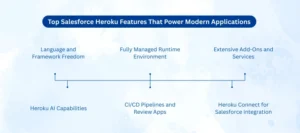
Top Salesforce Heroku Features That Power Modern Applications 

Salesforce Heroku Features

Salesforce Heroku provides an extensive environment with features that make the development, deployment, and scaling of applications easier. These are the Heroku features that are aimed at serving modern development teams with the consideration of performance, security, and flexibility. The platform is a major Heroku PaaS that eliminates the complexity of infrastructure and enables faster development. 

These are the most essential Heroku features that every business and developer must be familiar with.

Language and Framework Freedom

Salesforce Heroku will take several programming languages and well-known frameworks. Applications may be developed in Node.js, Python, Java, Ruby, Go, and PHP, among others. This flexibility enables the teams to leverage on skills that they have at hand instead of having to learn new stacks. The Heroku cloud service is easy to scale to various development requirements.

Fully Managed Runtime Environment

A Heroku-managed runtime environment is one of the largest Heroku benefits. Heroku does automated maintenance of servers, operating systems, patches, and security updates. Infrastructure management is removed, and developers can concentrate on application logic. This strategy accelerates the development cycles and lowers the operational risk.

Extensive Add-Ons and Services

There are over 200 add-ons that are available in Salesforce Heroku. These are databases, caching tools, logging, monitoring, messaging, analytics, and email services. Teams do not require the construction of integrations when they need to extend applications at a rapid pace. This component ecosystem enhances the experience of the Heroku cloud platform.

Heroku Connect for Salesforce Integration

One of the great features is Heroku Connect, which allows Salesforce integration, which is secure. It synchronizes Salesforce with Heroku Postgres almost in real time. This gets rid of the expensive, complex custom APIs and minimizes development. Live CRM information can be used by businesses to create data-driven applications.

CI/CD Pipelines and Review Apps

Salesforce Heroku enables the application of modern DevOps with default CI/CD pipelines. There is a GitHub integration that allows automated testing and deployments. Review applications enable teams to review changes before production release. They enable teamwork and accelerated and secure deployments.

Heroku AI Capabilities

In Heroku AI, developers are able to integrate intelligence into applications. The platform can be used to support AI frameworks, vector databases, and up-to-date AI workflows. The Salesforce Heroku AI allows companies to create smarter applications with predictive understanding and automation. This renders the platform AI-ready to be innovative in the future. 

Coupled with the above Heroku capabilities, Salesforce Heroku is an excellent option when it comes to scalable, connected, and smart development of applications. It encourages quick innovation and also integrates fully in Salesforce ecosystems. 

Why Salesforce Heroku Is the Platform Businesses Trust to Scale 

Salesforce Heroku is quite popular among companies that are interested in speed, flexibility, and reliability when applying to application development. It assists organizations to innovate at a quicker pace, and the operational and technical risks are minimized. Being a reliable Heroku PaaS, the system eases the complicated development cycles and offers long-term scalability. The above advantages render Heroku an option of choice in the context of digital transformation in the modern world. 

The following are the top Heroku benefits that contribute to improving the performance of the development team and business team in order to come up with better applications.

Faster App Development

Salesforce Heroku eliminates the aspect of infrastructure management in the development procedure. Teams cease to be concerned about servers, patches, or run-time problems. This enables developers to work on feature development and enhance the user interactions. Reduced development cycles mean shorter time to the market.

Built-In Scalability

The Heroku cloud platform programs automatically increase or decrease application demands according to the needs of the traffic. Dynos are either raised or lowered automatically. This is to give a steady performance even at peak usage times. Applications do not need to be re-architected to give business confidence in growing a business.

Security and Compliance

Salesforce Heroku offers isolated and secure runtime environments to all applications. The system facilitates the industry security standards and compliance. Frequent maintenance and monitoring minimize the vulnerabilities and operational risks. This causes it to be appropriate for enterprise-level applications.

Efficient Data Integration

Through smooth Salesforce Heroku integration, companies will be able to tie their own applications to Salesforce CRM data. Live information synchronization enhances the automation of workflow and decision-making. CRM data is available in customer-facing and internal applications. Complex custom development is removed through this integration.

Reduced Total Cost of Ownership

Salesforce Heroku reduces the maintenance costs by including infrastructure and operations. Companies do not need to spend on server administration and physical scaling. There is efficiency in development, which brings more ROI in the long run. This is one of the greatest reasons why companies prefer the platform due to this cost advantage. 

Real-World Business Value 

Enterprises today are using Salesforce Heroku to create customer portals and digital commerce platforms, analytics dashboards, and Salesforce Heroku AI solutions. The platform complements Salesforce applications such as Sales Cloud and Service Cloud. Companies that employ an organization that has a Heroku consulting partner or Salesforce development services are able to provide interrelated and high-performance applications at a quicker rate. 

Salesforce Heroku is a service that helps businesses to build future-ready digital experiences with agility, security, and CRM intelligence at scale. 

How Salesforce Heroku Works Seamlessly with Salesforce 

The Salesforce Heroku is developed in order to closely integrate with Salesforce. With Salesforce Heroku integration, which is very powerful, businesses can have additional CRM functionality through application-based extensions that are cloud-native. The connection enables developers to integrate Salesforce data with adaptable application logic on the Heroku cloud platform. 

The following are the most significant Salesforce Heroku collaborations with Salesforce to develop joined and clever solutions. 

Key Integration Capabilities of Salesforce Heroku 

  • Real-Time CRM Data Access 

The Salesforce Heroku integration enables applications to retrieve Salesforce CRM data safely. This provides smarter and data-driven application experiences. 

  • Heroku Connect for Data Synchronization 

Heroku Connect maintains Salesforce and Heroku Postgres data in sync with each other. It is updated almost instantly with no sophisticated custom code. This saves time and maintenance expenses on development. 

  • Heroku AppLink for API-Based Integration 

Heroku AppLink makes the applications in Heroku accessible as Salesforce APIs. The interaction between Salesforce users with Heroku logic is possible in the Salesforce interface. This eases platform cross-integration. 

  • Low-Code and Pro-Code Compatibility 

Salesforce Flows and automation tools can be used by admins to invoke Heroku logic. Apex and custom code can invoke Heroku services that developers may construct. This latitude favors both technical and non-technical teams. 

  • Event-Driven Architecture Support 

Salesforce Heroku is associated with Salesforce Data Cloud and event-based workflows. CRM updates and business events can be instantly responded to using applications. 

  • Secure and Scalable Integration Layer 

The PaaS model of Heroku ensures a secure run-time environment and scalable integration services. Integrations do not need to be redesigned to facilitate business expansion. 

Having CRM intelligence and cloud-native flexibility, Salesforce Heroku can help organizations develop smarter applications. The Salesforce development services and teams that collaborate with a consulting partner of Heroku can also provide integrated and scalable solutions at a quicker pace. This is a smooth integration that makes Salesforce Heroku an extension of the Salesforce platform. 

Conclusion 

Salesforce Heroku has remained a reliable platform to develop scalable and interconnecting applications. It integrates cloud flexibility and intensive Salesforce interconnection. The benefits of faster development, built-in scalability, and safe operations are in favour of businesses. With robust Salesforce Heroku connectivity, customer data drives more intelligent workflows and customer experiences. The intelligent applications are future-ready as the platform is supported by Heroku AI. A business that has a trusted Heroku consultancy partner will achieve maximum outcomes more quickly. Using specialized Salesforce development solutions, such as AnavClouds Software Solutions, companies can realize the potential of Salesforce Heroku fully and expand with ease. Call us today and find out more! 

Salesforce Trends in AI, Automation & Data

The pace of evolution within Salesforce is unprecedented, and the CRM platforms will be very intelligent, autonomous, and data-driven by the year 2026. Salesforce will exploit Salesforce AI agents, Salesforce workflow automation, and Salesforce intelligent automation to optimize business operations, decrease the amount of manual work, and improve decision-making. The Salesforce 2026 trends will indeed reshape the way organizations operate sales, service, and marketing processes. Those companies that embrace such tools early enough will experience insights faster, more efficient operations, and more favorable customer experiences. These trends are now a requirement rather than an option, especially when businesses aim at achieving sustainable development, competitiveness, and businesses that ensure operations remain sustainable. 

Key Salesforce 2026 Trends 

The Salesforce 2026 trends indicate the trend towards the increasing CRM platforms being smarter, more autonomous, and more data-driven. To enhance the speed and quality of execution and decision-making, Salesforce is integrating artificial intelligence throughout the workflows. The companies that will match these trends will be more efficient in their work and react to the market changes more quickly. 

Stay ahead with Salesforce trends and boost efficiency with AI and automation.


Agentic AI and Salesforce AI Agents 

Behavioral signals and the history of previously engaged leads will be managed by Salesforce AI agents. With Salesforce artificial intelligence, the agents can rank the opportunities before human involvement. This enhances better conversion and lessens the response delays. 

Customer interaction in digital platforms will also be done by Salesforce AI agents. They will provide customized answers with reference to real-time and historical information. This guarantees customer uniform experiences on scale. 

With the Salesforce 2026 trends, the workflow updates will be provided by AI agents. They will delegate tasks, refresh records, and dynamically cause actions. This saves on manual labor and operational tension. 

Salesforce Autonomous Workflows 

Traditional rule-based automation is going to be substituted with Salesforce autonomous workflows. Such workflows will analyze conditions not based on fixed triggers but based on AI. Manual approvals will not be necessary to move processes on. 

Salesforce workflow will automate processes and adjust execution paths according to the changes in live data. This flexibility guarantees that processes are efficient when there is a fluctuation in business. Independent working processes decrease sales, service, and operational delays. 

In Salesforce 2026 trends, autonomous workflows will process entire process lifecycles. They will manage approvals, escalations, as well as data synchronizations. There will be a reduction in the turnaround time and level of errors in businesses. 

Salesforce Intelligent Automation 

Salesforce intelligent automation involves AI reasoning together with workflow orchestration. This gives automation an opportunity to execute complex decision-driven tasks. Businesses can automate more than repetitive moves. 

Using Salesforce intelligent automation, processes adjust automatically depending on the volume of transactions. Automation is also consistent even when there is high demand. This makes it stable in its operations in case of growth. 

Salesforce artificial intelligence increases the accuracy of automation via continuous learning. Systems enhance execution excellence with time. This brings about long-term efficiency and uniformity among the departments. 

Unified Data with Salesforce Data Cloud 

Salesforce Data Cloud will centralize customer data in various systems on a real-time basis. This forms one correct view of the customer. The Salesforce 2026 trends revolve around unified data. 

Salesforce artificial intelligence applies Data Cloud to produce predictive knowledge. These are insights that inform sales strategies, service actions, as well as marketing decisions. Companies obtain real-time intelligence. 

Salesforce Agentforce statistics have shown that AI agents are dependent on the Data Cloud to understand the context. Correct data can be used to do smart automation and customization. This eliminates the mistakes that are occasioned by incomplete information. 

Cost-Effective Salesforce Solutions for SMBs 

Salesforce is increasing accessibility to smaller organizations. Salesforce SMB solutions are cost-effective and enable highly advanced CRM adoption with not too high investments. AI and automation can be effectively used by SMBs. 

Salesforce workflow automation assists small groups in minimizing manual undertakings. Automation enhances output without the need to expand the number of staff. This promotes long-term business development. 

Salesforce development services will help SMBs to develop solutions strategically. Businesses can introduce only the necessary features. This guarantees flexibility and control of the budget. 

Hyper-Automation Driving Business Growth 

One of the most important Salesforce 2026 trends is hyper-automation. It incorporates AI agents, workflows, analytics, and data into a single system. This gets rid of operational silos. 

Salesforce autonomous workflows accelerate the decision-to-action processes. Corporations are quicker to react to client demands and business shifts. This enhances general agility. 

The use of Salesforce intelligent automation increases consistency in customer experience. Predictive analytics facilitates a proactive approach to engagement. Hyper-automation leads to quantitative business improvement. 

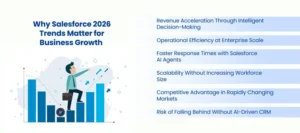
Why Salesforce 2026 Trends Matter for Business Growth 

Salesforce 2026 Trends

Salesforce 2026 trends should be understood in a bid to grow businesses sustainably. These trends reinvent the manner in which organizations make revenue, retain customers, and operate effectively, extending their operations. Salesforce is transforming into an intelligent growth platform as opposed to being a transactional CRM. Early adaptability and operational resilience over the long term are enjoyed by businesses that adapt early. 

Revenue Acceleration Through Intelligent Decision-Making 

The Salesforce artificial intelligence facilitates decision-making in sales operations that is fast and insight-based. With the assistance of AI, teams can detect high-value opportunities more accurately. Predictive analytics enhances the transparency of pipelines and reliability in forecasting. Companies that are aligned with Salesforce 2026 trends transform data insights into revenue more quickly than others. 

The Salesforce AI agents facilitate decision-making by prioritizing deals and recommending actions to be taken next. This minimizes guesses and enhances sales stability. Income teams obtain transparency and trust at any point. 

Operational Efficiency at Enterprise Scale 

With Salesforce 2026 trends, the consistency of processes within the different departments and regions can be guaranteed. Automatic processes stop redundant manual operations and minimize mistakes in operations. The processes do not change with the growing volumes of data and contacts with customers. 

Salesforce workflow automation is capable of large-scale execution without putting any operational pressure. This performance reduces operational expenses but does not affect performance. Companies enhance profits but do not compromise on service delivery. 

Faster Response Times with Salesforce AI Agents 

The response speed among sales and service functions is significantly enhanced by Salesforce AI agents. These agents do follow-ups, inquisitions, and the execution of tasks independently. The customers are responded to immediately without having to wait when humans are available. 

Salesforce artificial intelligence makes sure that the Salesforce agents operate based on real-time context and history. Better interaction enhances satisfaction and confidence amongst customers. This sensitivity enhances customer retention in the long term. 

Scalability Without Increasing Workforce Size 

The Salesforce 2026 trends allow companies to increase their operations effectively. Salesforce autonomous workflow deals with approvals, updates, and escalation independently. Growth is no longer a matter of manual interventions through teams. 

Salesforce autonomous workflows has allowed the company to handle additional workload without commensurate recruiting. Companies increase capacity and manage the costs of operations. Scalability is made foreseeable and controllable. 

Competitive Advantage in Rapidly Changing Markets 

Markets require speed, individualization, and precision. Firms that embrace Salesforce 2026 trends are quick to meet customer behavior change. Artificial intelligence-based systems react immediately to changes in data and patterns of engagement. 

Companies that use manual processes find it difficult to stay in line. Intelligent automation in Salesforce allows fast optimization and experimentation. First mover benefits allow an early adopter a sustainable competitive advantage. 

Risk of Falling Behind Without AI-Driven CRM 

Those organizations that do not focus on Salesforce 2026 trends are increasingly becoming inefficient. Delays in decision-making affect the customer experience and revenue potential. Paper-based operations raise the risks of operation and delays. 

The Salesforce artificial intelligence provides speed and accuracy to competitors. Late adoption makes transformation complex in the long run. The businesses will lose their relevancy in more and more automated markets. 

Affordable and Scalable Salesforce Solutions Empowering SMB Growth in 2026 

Salesforce is now much more affordable to small and medium-sized companies. By 2026, cost-effective Salesforce solutions for SMB will allow enterprise-level automation without breaking budgets. Large businesses are no longer able to monopolize on advanced CRM capabilities, which can now be acquired by SMBs. Salesforce is trying to establish itself as an enabler of growth and not a cost-addition. 

Enterprise-Grade Capabilities Without Enterprise Costs 

Salesforce artificial intelligence does not require significant investments in small businesses. The Salesforce AI agents assist with sales, service, and operations. These features assist SMBs in competing with bigger institutions in smarter automation. 

Workflow Automation Designed for Lean Teams 

Salesforce workflow automation decreases the use of manual processes. Automation is done for approvals, follow-ups, and data updates. The lean teams can work at an increased pace with reduced resources. 

Modular Adoption Supporting Business Growth Stages 

Cost-effective Salesforce solutions for SMB allow modular implementation. Companies can begin with the core features and grow as time goes by. The development of Salesforce assists in aligning CRM capabilities with changing business requirements. 

Customization Through Salesforce Development Services 

The development services of Salesforce allow customized workflows and integrations. The SMBs do not have to complicate the system since they do not have to include features that are not necessary. Customization will guarantee improved ROI and flexibility in the long run. 

Predictable Costs and Sustainable ROI 

Sales force automation minimizes the operational costs in the long term. Scalable licensing and automation provide businesses with reliable expenses. This will contribute to sustainable development without a financial burden. 

How Salesforce Development Services Enable Future-Ready Businesses 

The Salesforce 2026 trends are changing the way business operations and growth are taking place. The use of intelligent automation, autonomous workflows, and AI agents can be effectively applied with the help of expert Salesforce development services. However, when the CRM capabilities are integrated with the business objectives, the companies guarantee future-ready, scalable, and data-driven operations. 

  • The Salesforce 2026 trends will demand custom implementations beyond the standard CRM setups. 
  • Salesforce development services program, Salesforce AI agents in accordance with actual business processes. 
  • Proper development will guarantee that Salesforce’s artificial intelligence provides correct, reliable results. 
  • Salesforce Autonomous workflows help to execute end-to-end processes automatically without the need for a manual. 
  • Workflow automation at Salesforce does not raise the number of people working on the system. 
  • The Salesforce Data Cloud integrations help to consolidate data into real-time insights and AI-powered actions. 
  • Salesforce smart automation enhances uniformity, effectiveness, and operational management. 
  • Professional Salesforce development solutions maximize the Salesforce automation investment. 

Conclusion 

The Salesforce 2026 trends show that business success in the future is powered by AI, intelligent automation, and single data systems. Firms that embrace Salesforce AI agents, Salesforce autonomous workflows, and Salesforce workflow automation will make and execute decisions more quickly, operate on par, and deliver better customer experiences. These innovations are accessible to small and medium businesses by using cost-effective Salesforce solutions designed to meet their SMB needs, as well as Salesforce development services designed to meet their growth needs. Today, it is possible to prepare and move into a smarter, more automated 2026. Collaborate with AnavClouds Software Solutions to realize such trends effectively, achieve the best ROI, and get the full potential of Salesforce in your business. 

Salesforce Agentforce Statistics

Salesforce Agentforce is changing how business processes are automated by combining the use of autonomous AI agents with CRM processes. It assists organizations in streamlining operations, enhancing productivity, and gaining actionable insights. Through this blog, we will learn about Salesforce Agentforce statistics, applications, AI trends, pricing, advantages, and its exploitation of Salesforce Data Cloud to create smarter operations. Small and medium businesses are starting to use Agentforce to save time, minimize errors, and efficiently scale their operations. 

What is Salesforce Agentforce? 

Salesforce Agentforce offers the possibility of implementing autonomous AI agents in Salesforce. Such agents carry out the work with minimum human intervention, such as complicated processes in sales, service, and marketing. Intelligent to use real-time data, unlike conventional chatbots, Agentforce applies intelligent automation processes. The tools, such as Agent Builder, enable non-technical teams to build agents in a very brief time without necessarily having to write a lot of code. The Salesforce Agentforce statistics show that the platform is compatible with different clouds and applications. Moreover, the agents can access rich and unified datasets to make smarter decisions. 

Unlock the power of Salesforce Agentforce and accelerate your business growth with AI-driven automation.


Key Salesforce Agentforce Statistics 

The usage of Salesforce Agentforce has been phenomenal, and it demonstrates the increasing influence of the solution on both large and small companies. These Salesforce Agentforce statistics indicate adoption and efficiency, and revenue increase: 

  • The use of AI agents in the enterprise grew by more than 233% in six months, which is a sign of trust in autonomous workflows. 
  • In the time Salesforce Agentforce has been in operation, more than 8,000 customers have already been in active use, and the customers are spread across media, retail, and financial industries. 
  • The team productivity has been increased with 70% of the administration chat tasks being resolved automatically by Agentforce, thus decreasing the amount of work by hand. 
  • Grupo Globo increased subscriber retention rates by 22% with the help of AI agents that personalized the engagement and predicted churn. 
  • Companies that adopt Salesforce Agentforce say that case handling in customer service is up to 30% quicker. 
  • The average productivity improvement of 25-35% in both sales and support teams was observed in companies that utilised AI agents. 
  • The AI and data products provided by Salesforce, such as Salesforce Agentforce AI agents, are now playing a large role in the total growth in revenue. 
  • The initial users of Agentforce have reported that it has lowered the operational costs by 15% due to the automation of work processes. 
  • The connection with Salesforce Data Cloud and Agentforce has allowed the businesses to make smarter and data-driven decisions on a real-time basis. 

These Salesforce Agentforce statistics clearly show that the application provides quantifiable gains, including operational effectiveness and revenue increase, also it is an essential resource in the contemporary enterprise. 

Salesforce Agentforce Use Cases 

Salesforce Agentforce statistics provide quantifiable benefits across industries and assist companies in automating their workflows, driving efficiency, and utilizing AI intelligence. The following Salesforce Agentforce use cases illustrate the ways businesses are changing their business processes with AI agents: 

  • Customer Service Automation: Salesforce Agentforce AI agents address inquiries, support tickets, and respond to frequently asked questions in different channels. Respond times are reported to be 70% faster, and the workload to human agents decreases as businesses report that the teams are now able to concentrate on high-value work. 
  • Sales Task Automation: Agents are automatically able to record calls, follow-ups, leads, and write personalized emails and schedule follow-ups. Firms that have used Salesforce Agentforce to automate their sales processes have experienced an increase in their productivity by 25-35% cutting the time it takes to close their deals and enhancing their sales pipelines. 
  • Personalized Retention Strategies: AI agents identify the risk of churn and suggest specific retention plans to subscribers. These capabilities have been applied by media companies and subscription-based companies to increase the retention rates by 15-22% to increase revenue and customer loyalty. 
  • Predictive Insights and Analytics: Combined with Salesforce Data Cloud, agents process massive amounts of data to support predictions, trend analysis, and useful suggestions. Businesses can use data-driven information to enhance marketing practices, optimise sales processes, and make smarter decisions. 
  • Operational Efficiency Across Teams: In addition to sales and support, Agentforce does the back-office automation of repetitive work, approval processes, and reporting. According to the reports made by organizations, a reduction in the cost of operations and acceleration of the speed of process execution up to 30% is reported. 
  • Industry-Specific Applications: Salesforce Agentforce is used in the Retail sector, finance sector, healthcare sector, and media sector to support specialized workflows, customized experiences, and automation of compliance. 

These Salesforce Agentforce use cases illustrate well how the time-saving, cost-reduction, customer satisfaction, and empowerment of business through intelligent automation can be applied to the platform. 

Maximizing Efficiency with Salesforce Data Cloud and Agentforce Integration 

Salesforce Data Cloud is paired with Agentforce to unleash automation and data-driven insights. Data Cloud combines both structured and unstructured CRM systems, email, file, and external data. This provides Salesforce Agentforce AI agents with the correct context, thus allowing accurate action and wiser decision-making. This integration can help businesses to: 

  • Standardize complex work processes using stable, data-intensive agents. 
  • Predictive sales, service, and marketing performance analytics. 
  • Get actionable insights to achieve better customer interactions and operational effectiveness. 
  • Enhance the speed at which you make informed decisions by linking data in two or more systems in the business. 

Combining Salesforce Data Cloud and Agentforce will allow AI agents to work with reliable and up-to-date data, which will increase efficiency, productivity, and business performance. 

Seamless Salesforce Agentforce Implementation for Businesses 

Salesforce Agentforce Implementation

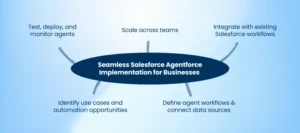
The low-code and no-code solutions make Salesforce Agentforce easier to implement than traditional AI systems. AI agents can be deployed within a short period and controlled by businesses in a scalable manner. Salesforce Agentforce implementation steps will include: 

  • Identify use cases and automation opportunities – determine tasks that AI agents can save time on. 
  • Define agent workflows and connect data sources – integrate Salesforce Data Cloud with other systems to easily automate. 
  • Test, deploy, and monitor agents – monitor workflow using built-in dashboards to track performance and optimize it. 
  • Scale across teams – scale agent deployment with little complexity, and maximize ROI. 
  • Integrate with existing Salesforce workflows – Agentforce is compatible with Service Cloud, Sales Cloud, and Salesforce. 

When Salesforce Agentforce is properly implemented, the business will be able to automate its repetitive processes, become more productive, and use AI agents to make its operations smarter. 

Salesforce Agentforce Pricing and Benefits: Flexible Plans for Maximum ROI

The Salesforce Agentforce is priced flexibly, and therefore, AI automation is affordable to both small and large businesses. Pricing will be optimized to increase as usage optimizes so that both small teams and large enterprises can be able to take advantage. 

  • User License: Begins with $5 monthly per user with core AI agent functionality. 
  • Flex Credits: Actions consume flex credits, which are different depending on the usage and the number of tasks, and enable a business to pay only what is used. 
  • Scalable Plans: As the automation needs of companies increase, they can upgrade and keep costs effective and efficient. 

Key Benefits of Salesforce Agentforce Implementation:

  • Faster Task Completion: The tedious task can be automated, and the manual workload is eliminated, or the work can be completed even faster by the team. 
  • Lower Operational Costs: Companies will reduce operational costs up to 15-30% through the use of AI agents to perform routine activities. 
  • Enhanced Customer Experience: The agents can respond promptly to customers and address their concerns with speed and better scores. 
  • Scalable Automation Across Departments: AI agents can be used in sales and service, marketing, and support, among others. 
  • Improved Sales and Service Performance: Automated follow-ups on leads, case management, and predictive insights will speed up business performance. 
  • Higher ROI on Salesforce Services for Small Business: Small and medium enterprises will acquire enterprise-level AI resolutions without substantial initial investment. 
  • Seamless Integration: Compatible with Salesforce Data Cloud and other Salesforce solutions to provide intelligent, data-driven automation. 

Through the integration of Salesforce Agentforce pricing and benefits, businesses will be able to realize quantifiable efficiency improvements, cost reduction, and customer and employee experience. The use of Agentforce enables the company to grow smartly and keep ahead in the competition. 

Salesforce Services for Small Businesses: Empowering Growth with AI Agents 

Salesforce services for small businesses, such as consulting, customization, implementation support, and many others, can provide great benefits to small and medium businesses. These services enable organizations to utilize Salesforce Agentforce AI agents to automate routine activities, improve workflows, and enhance productivity. The main advantages of small businesses are: 

  • Task Automation: AI agents will work on repetitive tasks such as lead follow-ups, case handling, and email responses. 
  • Enhanced Productivity: Small units will be able to work on an enterprise level without adding more staff. 
  • Data-Driven Decisions: Salesforce Data Cloud and Agentforce Integration make sure that business actions are based on real-time insights. 
  • Scalable Solutions: Scalable services increase with the company’s requirements, and advanced AI automation can be comfortably adopted. 

Through the implementation of Salesforce services for small businesses, even small organizations can experience the benefits of cost savings, improved customer experiences, and competitive advantages. 

Salesforce Development Services for Agentforce: Custom Solutions for Maximum ROI

Businesses can create a tailor-made Agentforce to fit the specific operational needs with the help of professional Salesforce development services. The senior developers and consultants make sure that AI agents are specialized to a particular workflow, are seamlessly integrated with the current systems, and achieve optimal performance. Key advantages include: 

  • Custom Agent Design: Develop AI agents that are industry-specific and business-oriented. 
  • Seamless Integration: Integrate Agentforce with Salesforce environments such as Sales Cloud, Service Cloud, and Data Cloud. 
  • Workflow Optimization: Make sure that AI agents can work with human teams efficiently and supplement them with robots to compare the performance of the two. 
  • Maximized ROI: Custom development will increase complexity, accelerate implementation, and enhance cross-departmental efficiency. 
  • Scalable Automation: Development services enable companies to increase the use of AI agents as the business requirements change. 

Using Salesforce development services, as done with Agentforce, guarantees businesses will reap the greatest benefits of AI-driven automation and will be able to measure business results. 

Salesforce Agentforce AI Agents and Emerging AI Trends 

The next movement in autonomous AI in CRM is Salesforce Agentforce AI agents. These smart agents minimize redundant tasks, enhance precision, offer foresight, and help companies to grow business activities effectively. The important trends and capabilities are: 

  • Enhanced Natural Language Understanding: AI agents are smarter, context-aware, and provide human-like interactions. 
  • Predictive Analytics Integration: Agents consume data in Salesforce Data Cloud to make predictions, trend forecasts, and recommendations. 
  • Cross-Department Automation: Customer service and sales to marketing. In these three areas, AI-generated agents automate processes and improve productivity. 
  • Continuous Learning: Agents learn and refine their workflows and increase the accuracy of their decisions with time. 
  • Strategic AI Adoption: Agentforce now serves as a significant part of digital transformation programs by businesses of all sizes. 

Through such trends, firms will be able to use Salesforce Agentforce AI agents to facilitate innovation, operational efficiency, and competitiveness in the market. 

Conclusion 

Salesforce Agentforce is an AI-based solution that uses automation and Salesforce Data Cloud to provide real business results. Firms that embrace Agentforce enjoy quicker work processes, lower expenses, and enhanced customer experiences. Having served small firms that use AI agents to large companies that are growing their operations, Agentforce is changing the face of CRM automation. Through the professional Salesforce development services, businesses are able to apply customized solutions, streamline agent processes, and lead in AI-driven automation. Discover Salesforce Agentforce and simplify the way things are done in various teams to improve productivity. 

Salesforce Hybrid Cloud Strategy for SMBs

Salesforce hybrid cloud strategy is becoming more popular among small and medium-sized businesses in 2026 to drive efficiency, flexibility, and cost savings. Integrating the private and public clouds enables the SMBs to streamline their resources, expand their operations without any hitches, and enhance the security of their data. Multi-cloud Salesforce for SMBs makes cloud migration easier in SMB Salesforce cloud migration and allows advanced Salesforce integrations in 2026. Using the most recent Salesforce development trends 2026, as well as implementing the structured Salesforce CRM implementation 2026, businesses will have the chance to remain competitive, increase the quality of decisions, and create more positive customer experiences. The collaboration with such experts as AnavClouds Software Solutions will help to have a seamless, strategic, and future-resistant hybrid cloud deployment. 

Why SMBs Need a Salesforce Hybrid Cloud Strategy 

The small and medium-sized businesses have their own set of problems, such as the budget constraints on IT, the limitation of resources, as well as the need to grow at an alarming rate. A Salesforce hybrid cloud strategy will enable SMBs to maximize both cost and technology and ensure that the business operations are running well. Through the use of the multi-cloud Salesforce for SMBs, organizations will be able to safely operate their mission-critical applications on the private clouds and then use the public clouds to provide flexible and scalable computing power. It is a hybrid methodology that develops an agile and resilient environment that can respond to the evolving business demands. 

In addition to that, the cost-effective Salesforce hybrid cloud strategy will promote data security, Salesforce integrations 2026, and facilitate SMB Salesforce cloud migrations. It lets the companies scale effectively, adopt newer solutions, and remain competitive without the need to overstretch their resources. Flexibility, cost-efficiency, and high-performance cloud operations are offered as one package in 2026, and the businesses that implement such a strategy will have a strategic advantage. 

Unlock Your SMB’s Potential with a Tailored Salesforce Hybrid Cloud Strategy


Key Benefits of a Salesforce Hybrid Cloud Strategy 

Cost-Effective Operations 

An efficient Salesforce hybrid cloud strategy will enable SMBs to reduce infrastructure expenses and retain optimal performance of the system. Through the workload distribution between the private and the public clouds, the business will not pay for newly unused resources and will have improved ROI. This strategy makes the Salesforce cloud migration more cost-effective and sustainable for expanding organizations. 

Enhanced Flexibility and Scalability 

Salesforce hybrid cloud strategy enables organizations to easily expand their operations to suit the dynamic business requirements. The workloads can be transferred between public and private clouds, and in this way, the growth will not affect the efficiency. This scalability helps multi-cloud Salesforce for SMBs, allowing them to adapt to the transformations in the market easily without cloud operations becoming disrupted. 

Improved Security and Compliance 

The hybrid cloud Salesforce deployment enables data to be stored in private clouds, where sensitive data is stored, whereas less important applications are placed in the public clouds. This segregation makes sure that the industry standards are met and the data security is enhanced in general. Companies that apply this strategy are enjoying a solid, safe, and cost-effective Salesforce hybrid cloud infrastructure. 

Seamless Salesforce Integrations 

A hybrid model simplifies and makes Salesforce integrations 2026 more efficient. Businesses are able to integrate various applications, automate business processes, and continue to perform highly without compromising the level of security. By taking advantage of Salesforce hybrid cloud strategy, SMBs can receive the optimal value of their Salesforce development services and build an integrated and flexible system. 

Enhanced Performance and Reliability 

There is an overall performance due to the fact that hybrid cloud Salesforce systems ensure that there is a balance in workloads across the environments. Priority of operation lies in critical operations of the cloud in the private clouds, whereas the public clouds deal with changeable workloads. This will guarantee that Salesforce CRM implementation 2026 provides high-performance and reliable outcomes to SMBs. 

Future-Proof Technology Adoption 

A Salesforce hybrid cloud strategy enables SMBs to embrace newer technologies without distorting the current workflow. Salesforce development trends 2026 can help businesses to combine AI, analytics, and automation, allowing them to grow and innovate over the long term. 

Simplified Disaster Recovery 

The hybrid models enhance the strength and control of disaster recovery. Storing the crucial information in both the private and public clouds, SMBs decrease the risks of downtime and continue their businesses. This reinforces the worth of a cost-effective Salesforce hybrid cloud deployment, besides offering tranquility. 

Planning the Best Cloud Strategy for Salesforce in 2026 

The development of the best cloud strategy for Salesforce 2026 would demand SMBs to critically consider their existing IT infrastructure, business objectives, and budgetary limitations. A carefully laid Salesforce hybrid cloud strategy will result in the best performance, cost-efficient and scalability. Utilization of Salesforce development services experts makes the process of planning, implementation, and continued management easy. 

A strategic approach not only makes it easy to move SMB Salesforce to the cloud but it also provides a chance for the business to embrace the emerging technologies and remain competitive. Thoughtful integration of both the private and public clouds can provide organizations with a flexible, secure, and cost-effective environment, which is in line with their specific requirements. 

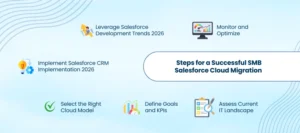
Steps for a Successful SMB Salesforce Cloud Migration

Salesforce Cloud Migration

Assess Current IT Landscape

Assess current systems, applications, and workflows in order to find the workloads that can best be moved to the cloud. A detailed examination assists in shaping an economical Salesforce hybrid cloud configuration and cannot disrupt the very important functions.

Define Goals and KPIs

Definitely state what the hybrid cloud Salesforce implementation should accomplish, such as better performance, less expenditure, and greater scalability. The measurement of KPIs will enable SMBs to monitor the effectiveness of their Salesforce CRM implementation 2026.

Select the Right Cloud Model

Select the best combination of both private and public clouds based on business priorities and workload demands. Multi-cloud Salesforce for SMBs’ balancing approach ensures smooth operations because of the balance between security, flexibility, and efficiency.

Implement Salesforce CRM Implementation 2026

Implement the Salesforce CRM 2026 in phases in order to reduce disruptions. A well-thought-out process, proper integration with the existing systems will make Salesforce integrations in 2026 easier.

Leverage Salesforce Development Trends 2026

The Salesforce development trends on automation, AI, predictive analytics, and other areas would also be incorporated to ensure the company is ahead of its rivals in 2026. Such innovations optimise the value of Salesforce hybrid cloud strategy and make the business grow in the long term.

Monitor and Optimize

Monitor cloud usage, performance, and cost in real time so that the hybrid cloud environment can be efficient. Constant optimization ensures that the SMBs receive the maximum advantages of cost-effective Salesforce hybrid cloud operation and the reliability of the systems. 

Future Outlook of Hybrid Cloud Salesforce for SMBs 

SMBs are likely to move towards a Salesforce hybrid cloud strategy at an accelerated pace, since they are more focused on flexibility, security, and cost effectiveness. The Salesforce development trends 2026 reveal that AI-based insights, predictive analytics, automation, and the use of advanced automation will significantly influence the development of hybrid cloud strategies. 

There will be an increased adoption of multi-cloud Salesforce for SMBs, which will enable businesses to evenly distribute the workloads between privately and publicly provided clouds. Those companies that can harness these innovations earlier are able to optimize their SMB Salesforce cloud migration, enhance their operational efficiencies, as well as have a considerable competitive edge. 

Furthermore, the adoption of the new technologies into a cost-effective Salesforce hybrid cloud environment will help SMBs to apply smarter Salesforce CRM implementation 2026 and advanced Salesforce integrations 2026. Those businesses that embrace such trends will not only have their operations future-proofed but will equally have their ROI optimized as well as be agile in a rapidly changing market. 

Conclusion 

A strategic Salesforce hybrid cloud strategy equips the SMBs with cost-effective, secure, and scalable cloud solutions. The use of multi-cloud Salesforce by SMBs assists in simplifying SMB Salesforce cloud migration, simplifying Salesforce integrations 2026, and capitalizing on advanced Salesforce development trends 2026. A well-planned Salesforce CRM implementation in 2026 will enable businesses to streamline processes, enhance performance, and become leaders in the market. The collaboration with AnavClouds Software Solutions offers valuable advice on implementing a cost-efficient Salesforce hybrid cloud model, to smoothly deploy it, guarantee future expansion, and demonstrate ROI to the SMBs adapting to the dynamic world of the digital environment. 


FAQs 

What is a Salesforce hybrid cloud strategy? 

Salesforce hybrid cloud strategy is the integration of both a private and a public cloud to maximize its performance, security, and cost. It enables SMBs to operate with ease and be flexible at the same time. 

Why should SMBs adopt a hybrid cloud Salesforce model? 

The SMBs are flexible, scalable, and enhanced with a minimum of data security. It also makes Salesforce integrations 2026 simpler and minimizes the total infrastructure expenses. 

How does SMB Salesforce cloud migration work? 

The SMB Salesforce migration moves applications to a hybrid environment. Critical workloads remain in the private clouds, whereas the operations that can be scaled are effectively done in the public clouds. 

What are the key benefits of a multi-cloud Salesforce approach?  

MultiCloud Salesforce solution will guarantee the use of cost-effective operations, Salesforce CRM implementation 2026 without hassles, improved security, and scalability to the growing SMBs. 

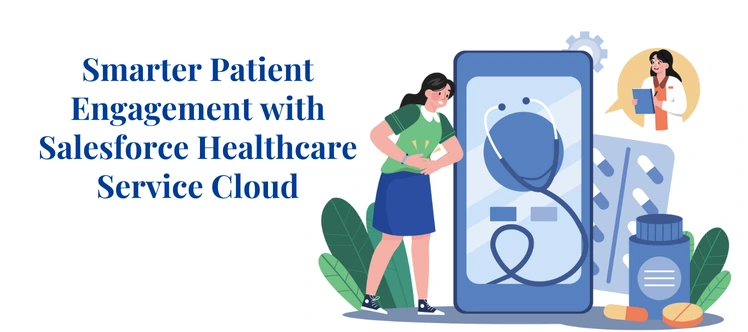
Salesforce Healthcare Service Cloud

Healthcare organizations now rely on digital-first service channels to manage patient engagement, information requests, and critical follow-ups. Traditional support systems create delays, communication gaps, and fragmented care records. Salesforce Healthcare Service Cloud solves these challenges with an integrated support ecosystem designed specifically for medical institutions. 

By centralizing communication, maintaining secure data, and automating service workflows, Salesforce Healthcare Service Cloud enables hospitals, clinics, and diagnostic networks to operate more efficiently. In 2026, the shift toward Agentforce-based automation and HIPAA-compliant Salesforce Data Cloud further strengthens operational resilience. 

Why Salesforce Healthcare Service Cloud Is Crucial for Modern Medical Operations 

Healthcare organizations manage patients across multiple touchpoints—appointments, test approvals, insurance documents, discharge clarifications, and prescription assistance. These interactions cannot depend on fragmented systems or manual coordination. Salesforce Healthcare Service Cloud enables a connected response framework, where every patient request moves through a structured lifecycle with visibility, compliance, and accuracy. 

Transform patient care with Salesforce Healthcare Service Cloud for smarter, faster, and secure healthcare support.


Service Workflows Designed for Medical Regulations 

Modern care environments run on strict governance standards. Salesforce Healthcare Service Cloud enables workflows that align with healthcare compliance rules, insurance policies, and approval cycles. Hospitals can configure data visibility, track consent, record service histories, and maintain audit-ready documentation. AI risk management follows predefined flows, which helps reduce errors and assures medical accountability. 

Real-Time Access to Relevant Patient Information 

Support teams often struggle when information exists across reports, emails, and internal systems. Salesforce Healthcare Service Cloud centralizes patient histories, documentation notes, appointment timelines, and pending requests. This enables immediate filtering, faster decision-making, and minimal back-and-forth communication. Care units get accurate context without searching across systems. 

Intelligent Routing for Medical-Specific Queries 

Different request types require specialized expertise. Salesforce Healthcare Service Cloud intelligently routes service cases to correct hospital units based on category, priority, and specialty. For example, discharge-related clarifications reach care coordinators, insurance queries reach financial staff, and medication-related questions reach clinical teams. This reduces hand-offs and improves patient confidence. 

Unified Communication Timeline for Shared Visibility 

A major service challenge occurs when multiple teams handle a single patient in isolation. Salesforce Healthcare Service Cloud provides a unified communication record that tracks every interaction. Hospitals monitor status changes, support escalations, document submissions, and updates in one synchronized timeline. This removes duplicated responses and keeps teams aligned. 

Personalized Support Based on Patient-Level Context 

Healthcare support is not transactional. Patients expect communication based on their medical stage, documentation needs, or recovery cycle. Agentforce patient support automation enables personalized engagement, such as targeted reminders, follow-up notices, resolution updates, or hospital guidance messages. Agents see full history before responding, which results in precise, relevant communication. 

How Salesforce Healthcare Service Cloud Supports Care Coordination and Hospital Workflow Optimization 

Hospitals operate under continuous volume pressure, multiple departmental handoffs, and tightly monitored regulatory procedures. Salesforce Healthcare Service Cloud supports this environment by offering a connected system where patient records, care activities, billing interactions, and support requests move through a structured workflow. This significantly enhances care coordination and improves hospital workflow optimization without relying on scattered tools or manual communication loops. 

Healthcare professionals across emergency units, labs, nursing teams, insurance desks, and discharge departments can efficiently: 

  • Assign tasks based on specialization instead of generic job queues
  • Track case updates without manual follow-ups or repeated escalations  
  • Standardize resolution procedures to comply with internal policies
  • Ensure time-bound patient responses across service requests  

The platform ensures that every patient case flows through a defined stage—intake, triaging, documentation review, and resolution tracking. Because all activities remain linked to a unified patient profile, service teams gain contextual visibility before responding. No department needs to repeat data collection or verify previous interactions. 

Agentforce Healthcare Support Guide: Driving Predictive Patient Engagement 

Agentforce adds a predictive engagement layer to Salesforce Healthcare Service Cloud, enabling hospitals to shift from reactive support to proactive healthcare service delivery. With automation, intelligent workflows, and medical context routing, Agentforce patient support automation ensures that patients receive timely responses without waiting for manual assistance. When combined with HIPAA-compliant Salesforce Data Cloud, hospitals maintain structured records, secure access paths, and regulatory-aligned service outcomes. 

Automated Intake Screening With Medical Context 

Agentforce patient support automation automatically manages pre-visit intake activities, including eligibility checks, appointment categorization, treatment-based documentation, and risk-based prioritization. Salesforce Healthcare Service Cloud processes these requests through rule-based workflows, ensuring that patients reach the right service pathways faster. Hospitals eliminate redundant verification cycles, reduce desk-level congestion, and provide immediate clarity on required documentation. 

Automated FAQ Resolution for High-Volume Medical Queries 

Common issues—like scheduling follow-up visits, understanding discharge plans, accessing lab reports, or tracking prescription timelines—no longer wait for human involvement. Agentforce patient support automation retrieves answers from structured hospital knowledge libraries and presents responses through messaging channels or portals. With Salesforce Healthcare Service Cloud, every automated interaction is recorded against the patient case, maintaining compliant audit visibility. 

Intelligent Routing Based on Clinical or Administrative Requirements 

Instead of general-level routing, Salesforce Healthcare Service Cloud routes cases based on physicians, department specialization, insurance verification teams, or diagnostic experts. Agentforce evaluates urgency levels, treatment type, and dependency requirements, ensuring faster access to specialists. This structured routing prevents service backlog, reduces unnecessary escalations, and protects response time KPIs across care units. 

Tracking Unresolved Requests Across Multiple Service Paths 

Healthcare CRM with Agentforce continuously monitors pending actions—whether it is unapproved insurance claims, incomplete diagnostic submissions, missing post-treatment documentation, or pending specialist reviews. Salesforce Healthcare Service Cloud displays these items within supervisor dashboards, enabling earlier intervention and reducing risk exposure. This strengthens compliance timelines and reduces accidental patient neglect. 

Post-Treatment Support Follow-ups and Guided Recovery 

Agentforce automation sends reminders for physiotherapy cycles, medication schedules, clinical dressing appointments, online consultations, or insurance reimbursement steps. Healthcare CRM with Agentforce transforms the experience from short-term interaction to long-term structured recovery support. With Salesforce Healthcare Service Cloud managing case progress, hospitals improve recovery predictability, satisfaction scores, and re-engagement confidence. 

Using AI Risk Management for Healthcare Service Accuracy 

AI risk management has become a critical capability for hospitals aiming to deliver consistent and accurate support. Within Salesforce Healthcare Service Cloud, AI models analyze behavioral patterns, resolution gaps, and patient satisfaction trends to detect operational risk before it escalates. This allows healthcare teams to act early and maintain precise service delivery aligned with compliance standards and HIPAA-compliant Salesforce Data Cloud rules.
Insights include: 

  • Repeated service delays
  • High cancellation frequency
  • Missing documentation trends
  • Patient dissatisfaction probability

Using these insights, hospitals build prevention workflows instead of depending on reactive communication. For instance: 

  • When patient records lack insurance authorization, systems auto-trigger reminders to reduce claim rejection risks.  
  • If lab reports require manual upload, intelligent notifications push status confirmation and close documentation loops.
  • When communication intervals exceed tolerance thresholds, escalation triggers activate to protect response SLAs.  

With AI-enabled risk detection inside Salesforce Healthcare Service Cloud, healthcare teams shift from reaction to prevention, ensuring accurate response cycles, stronger patient trust, and reduced service bottlenecks. 

The Future Outlook: Personalized Healthcare Journeys at Scale 

Personalization becomes a core expectation in 2026 as patients demand contextual engagement throughout their care cycle. Salesforce Healthcare Service Cloud supports dynamic, treatment-specific communication where every patient journey follows a template aligned with medical needs and service intensity. Chronic-care patients need frequent guidance, while one-time visit patients require shorter, outcome-focused interactions.

Healthcare CRM with Agentforce use structured workflows such as: 

  • Treatment-aligned communication plans
  • Education messages for care continuation
  • Follow-up visits tied to case conclusion
  • Patient readiness support during surgery cycles

When these workflows operate through Salesforce Healthcare Service Cloud and HIPAA-compliant Salesforce Data Cloud, hospitals deliver consistent, personalized journeys across all touchpoints. Automation ensures compliance with internal healthcare governance, while Agentforce Healthcare Support Guide capabilities add proactive reminders and context-based communication. This creates scalable, predictable, and human-centered care journeys for every patient. 

Why Choosing the Right Salesforce Development Services Matters 

Selecting the right Salesforce development services is crucial because hospitals depend on system accuracy, compliance alignment, and automation depth while delivering care. Salesforce Healthcare Service Cloud becomes powerful only when configurations, security controls, and data exchange models are implemented with precision. This is especially important for hospitals implementing HIPAA-compliant Salesforce Data Cloud, where access pathways, identity rules, and storage policies must support regulatory expectations. 

Secure User Access Controls With Role-Driven Permissions 

Healthcare environments involve multiple specialists—doctors, nurses, operational staff, billing teams, and administrative coordinators. Expert Salesforce development services define user profiles, access rights, and permission boundaries so that sensitive patient records remain visible only to the people involved in treatment. This model prevents data leakage and ensures compliance within Salesforce Healthcare Service Cloud. 

Intelligent Routing Flows for High-Volume Medical Queries 

Hospitals experience sudden request spikes, especially during morning outpatient cycles, insurance claim submissions, and post-procedure query windows. Development consultants design intelligent routing flows that evaluate urgency, department type, and dependency factors. This ensures that queries are automatically distributed to relevant specialists, minimizing delays, backlogs, and manual triaging efforts. 

Automated Ticket-Generation Sequences for Patient Requests 

Manual ticket creation increases data gaps and resolution errors. With structured workflows designed by experienced Salesforce development services, new tickets auto-generate based on inbound calls, chatbot interactions, lab updates, portal submissions, and missed treatment deadlines. This reduces administrative load and ensures every request enters a closed-loop resolution cycle within Salesforce Healthcare Service Cloud. 

Data Encryption Logic Across Medical Records and Reports 

A HIPAA-compliant Salesforce Data Cloud implementation requires encryption for stored and transmitted information. Skilled development teams create encryption standards aligned with medical compliance rules, eliminating exposure during patient lookup, inter-department exchange, or API-based integrations. Hospitals maintain audit-ready transparency while preventing unauthorized visibility. 

System Performance Tracking Through Operational Dashboards 

Healthcare support quality depends on response patterns, case durations, and patient-level behavioral trends. Salesforce development services configure performance dashboards that track staff workload, SLA achievements, abandonment rates, and escalations. Leadership teams gain measurable intelligence to refine nursing assignment strategies, case prioritization rules, and routing behavior. 

Conclusion 

Salesforce Healthcare Service Cloud has become central to modern patient service operations. Healthcare providers improve response quality, maintain secure data structures, and accelerate engagement outcomes across diverse medical scenarios, while HIPAA-compliant Salesforce Data Cloud ensures governance over sensitive information and traceable access flows. Agentforce adds predictive automation that improves continuity, prevents service breakdown, and elevates patient experience through proactive engagement. 

As healthcare ecosystems continue expanding, Salesforce Healthcare Service Cloud remains the most strategic foundation for hospitals seeking scalable, compliant, and personalized patient service models, and partnering with AnavClouds Software Solutions enables organizations to implement these solutions effectively with customized workflows, secure integrations, and healthcare-ready automation that support long-term digital transformation. 

Top Salesforce customization challenges

Salesforce customization has advanced rapidly in 2026, especially with AI adoption and workflow automation becoming central to enterprise operations. However, organizations still struggle to handle execution risks, complex governance, and multi-layer automation failures. The Top Salesforce customization challenges today involve system reliability, orchestration visibility, deployment risks, and decision accuracy. These issues intensify when workflows cross traditional automation boundaries and when organizations push applications beyond Salesforce Agentforce limits. 

Teams planning automation upgrades must understand these risk points to reduce operational losses, secure compliance, increase transparency, and scale execution frameworks safely. This guide highlights the Top Salesforce customization challenges enterprises face today, along with proven strategies aligned with modern automation environments. 

Top Salesforce Customization Complexity in 2026 

The Top Salesforce customization challenges often emerge when organizations implement deeper automation patterns, AI-generated execution routing, and interconnected process sequencing. Many businesses bypass validation, introduce duplicated automation, or integrate event-based triggers without structured mapping. When systems operate this way, visibility drops, processing windows shrink, and Salesforce Agentforce limits surface more frequently. 

The most visible symptoms include: 

Rapid AI integration pressure without risk alignment 

Businesses adopt predictive execution faster than their validation process. As a result, automated decisions run on unverified data models, triggering errors, incorrect routing, and elevated review cycles. 

Workflow sequencing conflicts that force execution collisions 

Multiple flows often run parallel, processing the same records using different rules. This generates conflicting updates, repeated triggers, and unresolved processing states. 

Limited operational monitoring leading to invisible failures 

Teams deploy flows without real-time tracking. When errors occur in background execution, users cannot trace event origin, causing delays, escalations, and extended root-cause cycles. 

Agent-based execution pathways without prioritization logic 

AI-driven agents manage routing, classification, and approvals. Without structured hierarchies, these decision chains overlap, creating unpredictable outcomes and limit-based execution failures. 

Platform boundary saturation caused by excessive workflow density 

Too many flows on the same object reduce memory windows and shrink process-execution time. This directly elevates the risk of failure points associated with Salesforce Agentforce limits. 

Overcome Top Salesforce customization challenges with expert solutions.


Top Salesforce Customization Challenges in 2026 

Scaling Salesforce workflows comes with several structural hurdles. The Top Salesforce customization challenges often impact efficiency, execution accuracy, and adoption rates. Many of these challenges directly involve Salesforce Agentforce limits, AI integration issues, and workflow orchestration conflicts. Addressing them proactively ensures smoother deployments, reliable automation, and predictable business outcomes. 

Automation Scaling Triggering Limit-Based Shutdowns

A common Top Salesforce customization challenge occurs when enterprises expand automation without structured load distribution. Overlapping execution cycles trigger Salesforce Agentforce limits, causing halted processes and incomplete records. High concurrency without phased evaluation leads to inconsistent outputs and failed automation goals. 

Solution
Segment automation into controlled stages. Introduce phased evaluation windows, layered checkpoints, and time-based throttling to prevent system overload. 

Flow Dependencies Without End-to-End Visibility

Complex flow chains remain one of the biggest Top Salesforce customization challenges. Without end-to-end visibility, execution becomes circular, incomplete, or untraceable. Dependencies can collide, triggering workflow errors, repeated triggers, or blocked automation, impacting business efficiency. 

Solution
Design a layered flow architecture. Use structured sequencing guides and maintain version logs for every rule-level decision. Visualize execution paths for easier monitoring. 

Inconsistent Adoption of AI-Driven Transactions

AI adoption and workflow automation often start without validation. This creates inaccurate record mapping, failed approvals, and unpredictable outcomes. These issues are among the Top Salesforce customization challenges and increase the risk of hitting Salesforce Agentforce limits during high-volume processing. 

Solution
Trigger AI-based routing only after full input validation. Standardize prediction confirmation cycles and ensure workflows execute with verified data. 

Weak Governance Around AI Risk Management

Insufficient governance is a critical Top Salesforce customization challenge. AI-driven decision-making, conflict routing, and score-based allocations often occur without accountability tracking, increasing operational risk. 

Solution
Implement clear rule visibility. Track model decisions and document scoring criteria. Use governance checkpoints to prevent failures and reduce AI risk management for Salesforce concerns. 

Execution-Level Challenges in Agentforce-Based Flow Orchestration

Agentforce flows add intelligence but introduce complexity. Without a structured layout, multi-branch outcomes fail, processing accuracy drops, and workflows underperform. This is a top challenge for businesses pushing limits on Salesforce Agentforce limits. 

Solution
Create layered execution maps. Maintain centralized logic references and implement accessible documentation to guide agent-driven flows efficiently. 

Deployment Fragility Between Sandbox and Production

Deployment failures remain one of the Top Salesforce customization challenges. Workflows that succeed in testing often fail in production due to environmental differences, triggering delays and operational errors. 

Solution
Run identical simulation cycles across environments. Deploy staged policies, monitor execution gaps, and record discrepancies before full activation. 

Over-Automation and Lateral Workflow Competition

Multiple overlapping workflows performing similar tasks create execution collisions. Over-automation stresses system resources, increases Salesforce Agentforce limits, breaches, and reduces workflow reliability. 

Solution
Merge redundant workflows. Prioritize execution paths, anchor decision policies, and limit multi-path processing to prevent collisions and failures. 

User Adoption Challenges Due to Minimal Path Visibility

When execution pathways are opaque, users struggle with adoption. Lack of visibility increases support requests and delays corrective actions, a key Top Salesforce customization challenge. 

Solution
Deploy workflow visualization dashboards. Provide traceable confirmation layers, prompts, and branch summaries to enhance adoption and operational clarity. 

Error Queues Managed Without Lifecycle Conditioning

Recurring errors are a major Top Salesforce customization challenge. Without proper classification and retry sequencing, execution loops persist, memory cycles degrade, and automated processes fail repeatedly. 

Solution
Classify error origins. Automate retry cycles. Create rule-specific reprocessing logic to ensure efficient error recovery and reduce Salesforce Agentforce limits triggers. 

Limit-Driven Failures Under Integrated Execution Models

High-volume triggers, parallel API calls, and multiple automation flows often hit Salesforce Agentforce limits, causing routing failures and delayed event processing. This is one of the most critical Top Salesforce customization challenges. 

Solution
Throttle inbound triggers. Assign dedicated integration windows. Separate synchronous and asynchronous runs to stabilize execution and prevent system overload. 

Data Quality & Integration Risks — Core Causes of Automation Breakdowns 

Core Causes of Automation Breakdowns

Poorly indexed fields, inconsistent attributes, and fragmented system relationships remain a major contributor to the Top Salesforce customization challenges. When data integrity is low, advanced workflows repeatedly re-evaluate the same records, increasing processing load and causing unexpected failures. This frequently triggers Salesforce Agentforce limits, slowing automation and reducing execution reliability. 

A robust optimization strategy involves:

Normalizing attributes for consistent data structure

Standardizing field formats across objects prevents conflicts in workflow evaluation and ensures AI-driven automation executes accurately. 

Eliminating record duplication to reduce processing strain 

Duplicate records trigger repeated workflow runs, inflate evaluation cycles, and increase the likelihood of hitting Salesforce Agentforce limits.

Creating cross-system classification policies

Unified classification rules across integrated platforms prevent mismatched records and support seamless automation across multiple environments.

Validating timestamp consistency for accurate event sequencing 

Ensuring all records follow consistent date and time formats avoids delays, failed triggers, and misaligned agent-based workflow routing.

Running transformation pipelines for structured data preparation

Pre-processing data before workflows execute enhances system efficiency, reduces errors, and improves traceability for AI-driven tasks. 

High-integrity data strengthens automation frameworks, reduces escalation cycles, and ensures workflows scale effectively without exceeding Salesforce Agentforce limits. Addressing these data and integration risks is essential to overcoming the Top Salesforce customization challenges and achieving reliable, agent-driven execution. 

When Workflow Density Breaks Structural Stability 

One of the most persistent Top Salesforce customization challenges is excessive workflow density per object. When multiple policies, triggers, flows, and event handlers execute simultaneously, decision windows shrink, processing delays increase, and escalation frequency rises. High workflow density not only strains system performance but also triggers Salesforce Agentforce limits, causing interruptions and reducing automation reliability. 

Organizations can regain structural stability and improve execution performance by applying the following strategies:

Reduce parallel decision paths

Minimizing overlapping workflows prevents execution collisions and reduces unnecessary resource consumption. This ensures smoother automation and fewer failures related to Salesforce Agentforce limits. 

Consolidate redundant logic 

Merging duplicate flows and repeated rules eliminates conflicting actions and simplifies orchestration. Streamlined logic enhances operational clarity and supports scalable automation.

Apply controlled concurrency throttles

Throttling concurrent executions prevents overloading evaluation queues. It balances load distribution across workflows and mitigates the risk of limit-driven failures.

Segment execution groups

Dividing workflows into dedicated execution lanes ensures that high-priority tasks run independently of less critical processes. This approach maintains stability, reduces delays, and supports agent-based orchestration. 

Implementing these strategies strengthens workflow architecture, increases system responsiveness, and mitigates the Top Salesforce customization challenges associated with high-density automation. It also reduces the likelihood of hitting Salesforce Agentforce limits, allowing organizations to scale automation safely and reliably. 

Final Thoughts 

The Top Salesforce customization challenges in 2026 are deeply rooted in execution intensity, fragmented orchestration logic, unstable deployment pathways, and unvalidated data inputs. As automation accelerates, organizations must adopt structured validation cycles, stronger governance, and purposeful sequencing strategies to reduce limit-based failures. 

Enterprises operating beyond standard workflow boundaries require stable execution planning, controlled load allocation, and clear visibility across end-to-end decision points. When businesses need long-term support, trusted Salesforce development services help standardize automation policies, design limit-safe structures, and maintain full execution transparency. 

AnavClouds Software Solutions enables organizations to overcome customization gaps, streamline execution, and scale automation frameworks responsibly—ensuring accuracy, compliance, and sustained operational clarity. 


Frequently Asked Questions  

What are the top Salesforce customization challenges in 2026?

Challenges include automation scaling, complex flows, data quality issues, over-automation, and deployment failures. They impact efficiency and workflow reliability. 

How do Salesforce Agentforce limits affect workflows?

Agentforce limits restrict concurrent automations and execution cycles. Exceeding these limits can cause workflow failures, delays, or incomplete processes. 

How can data quality issues be fixed in Salesforce workflows?

Normalize attributes, remove duplicates, enforce classification rules, and validate timestamps. Clean data ensures reliable automation and reduces errors. 

How can companies prevent automation from breaking system stability?

Reduce overlapping workflows, consolidate logic, throttle concurrent executions, and segment execution lanes. This keeps automation stable and efficient. 

Salesforce CPQ

Salesforce CPQ is changing the way in which enterprises handle the quotes, prices, and approvals. It also makes the complicated sales processes simple and enhances accuracy and efficiency. Having added Einstein pricing guidance to Salesforce CPQ and Agentforce Automation, now companies can use intelligent automation to make smarter deals in less time. In the case of SMBs, the tools aid in error elimination, facilitate workflow, and increase revenue without having to work on them manually. This guide presents Salesforce CPQ to novices and describes how predictive pricing and automation are useful in improving business productivity. 

What is Salesforce CPQ? 

Functioning as a potent tool, Salesforce CPQ, or Configure, Price, Quote, is an automated tool that complies with quoting, pricing, and approving businesses. It minimizes mistakes, time savings, and uniform operations in revenue generation. Salesforce CPQ makes sales teams, large or small, more efficient and makes the decision-making process simpler by automating complicated sales processes. 

Key features of Salesforce CPQ include: 

  • Automated product configuration: Salesforce CPQ enables salespeople to rapidly build compatible products and services with each quote to avoid manual errors and to ensure each custom is built according to company guidelines. 
  • Pricing and discount policy: The site will automatically use the general price, quantity discounts, and promotional prices, which are always consistent and eliminate the issue of over- or under-pricing in any quote. 
  • Approval workflows: Quotes are automatically forwarded to the appropriate managers or teams for approvals to speed up the sales process or minimize bottlenecks in the decision-making process. 
  • Connection with Salesforce CRM: Salesforce CPQ is connected to Salesforce CRM through which it receives updated customer and account data in real-time, and the generated quote will be accurate and customized to each customer. 
  • Reporting and analytics: Sales teams can see the performance of quotes, price trends, and other revenue insights, and make decisions based on the data to optimize their sales strategy. 

Although Salesforce CPQ can still be used in the current implementation, agent-based businesses can consider Agentforce Automation and Revenue Cloud to scale their quoting, pricing, and workflow automation using AI. By utilizing Salesforce development services, it is possible to achieve smooth customization, integration, and performance. 

Boost sales efficiency with Salesforce CPQ and Agentforce Automation today!


Einstein Predictive Pricing: Making Smart Decisions 

Einstein pricing guidance for Salesforce CPQ allows companies to make smart and informed pricing choices that drive sales and expedite the deal-making process. Einstein pricing suggests the right pricing strategies in any quote to be provided by analyzing historical sales, market trends, and customer behavior. Using AI in Salesforce CPQ, price can become a competitive edge instead of manual work, which enables companies to drive smarter, faster results that are more profitable. 

Data-Driven Recommendations 

Through Salesforce CPQ, Einstein pricing is formed to examine past data, customer buying behaviors, and trends in the industry to suggest the best prices. This will make quotes profitable and competitive. The sales teams are confident in their pricing decisions, and this reduces the guesswork, and they sales teams are in line with the revenue goals of the company. The Einstein pricing guidance for Salesforce CPQ, allows companies to make good decisions on all dealings. 

Dynamic Discounting 

Discounts must be automatically altered in order to preserve profit margins, as well as to be competitive. Einstein pricing advice examines the context of the deal, the history of the customer, and the value of products to propose accurate levels of discounts. In Salesforce CPQ, teams will not run the risk of over-discounting or underpricing. Dynamic discounting enables SMBs and enterprises to balance profitability and competitive level, simplifying the process of managing revenues in the entire sales pipeline. 

Enhanced Deal Success 

Precise pricing results in expedited approvals and satisfaction among customers. With Einstein predictive pricing, Salesforce CPQ will allow sales representatives to present persuasive, data-driven quotes with quicker rates of closures. Through the insights of AI, teams will win matches, deepen relationships with clients, and boost overall sales. Predictive pricing guarantees that all quotes are set to be successful. 

Reduced Manual Errors 

Calculations that are made manually are subject to errors, time loss, or missed earnings. Salesforce CPQ is a solution that is used to automate price recommendations and enforce company rules and compliance criteria. This minimizes human error, maintains uniformity in quoting, and creates a sense of trust amongst internal teams and clients. The companies do not have to spend time on rectifying mistakes in pricing and can instead engage in strategic processes. 

Real-Time Insights 

Einstein pricing is actionable and offers a comprehensive understanding of the market in Salesforce CPQ, which allows sales teams to respond to market fluctuations. Decision-making involves the real-time disposition of data on teams quickly to evaluate product bundles, customer segments, or competitive scenarios. These insights enhance the accuracy of the forecast and predictability of revenue and make the businesses act proactively instead of reactively. 

Using Einstein pricing guidance for Salesforce CPQ makes the pricing process an error-prone manual affair to become a strategic business advantage and enable organizations to hasten the speed with which they close deals, defend their margins, as well as manage their sales processes in an efficient and efficient manner. 

Agentforce Automation: Streamlining CPQ Processes 

The Salesforce CPQ is automated by Agentforce Automation to automate repetitive sales functions and streamline a complicated workflow. It gives SMBs and businesses more power to act as they wish, minimize errors, and speed up dealings. Using AI-based automation and the Agentforce CPQ automation guide, companies can boost their productivity, increase their revenue performance, and provide a more streamlined sales process. 

Automated Quote Generation 

Salesforce CPQ is also capable of producing compliant and accurate quotes within seconds with Agentforce Automation. The sales teams do not have to spend hours calculating product prices manually or setting up product bundles. Through the Agentforce CPQ automation guide, a business guarantees that each quote is based on all the existing pricing regulations, discount policy, and product compatibility. This accelerates the process of sale, increases accuracy, and serves to make sales reps react quicker to customer needs. 

Approval Workflow Automation 

Sales are usually slowed down, and bottlenecks are created in manual approval processes. The quotes are automatically directed by Agentforce Automation and passed through the right managers, and they have to comply with the internal policies of prices and discounts. Such an efficient workflow speeds up approval, minimizes errors, and enhances efficiency. SMBs and enterprises will have the ability to finalize deals in less time, but with governance and compliance. 

CRM Integration 

The Salesforce CPQ, in conjunction with Agentforce Automation, will retrieve customer and product data in real-time by utilizing CRM. Such integration will also remove instances of data silos, duplications, and ensure that the quotes can be customized and precise to each client. Companies have more visibility through the sales channel, which allows them to make smart predictions and make decisions. 

Time and Resource Savings 

Salesforce automation for SMB enables the sales staff to concentrate on value-added activities such as the development of leads, relationships with clients, and growth opportunities because a lot of repetitive work is automated, and Salesforce can now focus on value-added activities. Such a change decreases the workload of the administration, increases the efficiency of teams, and enables businesses to expand operations without any additional human resources. 

Error Reduction and Compliance 

The automation will greatly minimize human mistakes in pricing, product configuration, and approvals. The Requirement Agentforce CPQ automation guide is used to ensure that all quotes adhere to the company standards and discounting policies. Businesses enjoy the predictability and reliability of their quotes, which would increase customer confidence and regulatory compliance. 

Real-World Impact 

Application of Salesforce CPQs powered by Agentforce Automation results in quantifiable business performance: the number of deals closed increases, the win rate decreases, the revenue grows, and the satisfaction levels of customers are elevated. Companies also enjoy an increased cohesion between the sales, finance, and operations teams, and thus, end revenue management is smooth. Using Salesforce development services to implement and customize the platform takes advantage of all the potential further. 

As Salesforce CPQ turns out to be more than just a quoting system with the help of Agentforce Automation, it is a strategic enabler of efficient, precise, and scalable sales operations. 

How to Get Started: Salesforce CPQ Beginner Guide 

Salesforce CPQ Beginner Guide

The first time of implementing Salesforce CPQ can be simple when it is done methodically. This Salesforce CPQ beginner guide assists enterprises and small businesses in successfully implementing CPQ and using Agentforce Automation and Einstein pricing advice to the best of their ability. The implementation and high adoption will be smooth when one follows these six steps.

Define Products and Pricing Rules

Start by determining every product and service that your business sells. Configure volumes, price breaks, promotions, and special discount models within Salesforce CPQ. These rules should be well defined to make sure that each quote is focused on business goals, minimization of errors, and to bring uniformity among the sales teams. Successful CPQ automation is based on an accurate definition of product and pricing.

Set Up Automated Workflows

Tom, generate automated workflows for approvals, quote generation, and pricing validation with the use of the Agentforce CPQ automation guide. An automated system will save on the effort of manual work and shorten the deal cycle, and ensure that internal pricing policies are adhered to. The Salesforce CPQ enables the sales team to work on strategic functions instead of manual operations due to smooth work processes.

Enable Einstein Pricing Guidance

Apply Einstein pricing guidance for Salesforce CPQ to streamline price and discount suggestions with the help of AI. Through historical data, customer behavior, as well as market trends, Einstein offers predictive pricing information. This enhances the accuracy of quotes, guards the profit margin, and increases the chances of sealing deals within a shorter time. Artificial intelligence-based pricing will keep Salesforce CPQ a strategic revenue tool.

Train Your Sales Team

Give thorough onboarding and training so that your group gets accustomed to Salesforce CPQ and Salesforce automation for SMB. Make them familiar with workflows, approval, AI suggestions, and reporting. Training leads to adoption, minimizes errors, and enables the employees to make maximum use of the capabilities of CPQ in order to sell more products.

Monitor and Optimize

Report and monitor quote performance, pricing effectiveness, and workflow efficiency on Salesforce CPQ reports and dashboards regularly. Data analysis to optimize pricing policy, pricing structure, and workflows. The constant feedback will make your CPQ system respond to new market conditions and business needs, thus enhancing the sales performance in the long term.

Leverage Salesforce Development Services

Professional Salesforce development services are required in case of more complex automation requirements, integrations, and other advanced customization requests. Salesforce CPQ can be customized to match specific business operations by experts and can also be linked with ERP or CRM systems and other automation with Agentforce Automation. Collaboration with experts provides a seamless implementation, significant adoption, and scalability. 

Based on this Salesforce CPQ beginner guide it deals with an efficient, reliable, and scalable implementation of CPQ. Automation and AI-driven insights can help businesses to speed up quoting, streamline pricing, minimize mistakes, and enhance revenue performance. 

Conclusion 

Salesforce CPQ, Einstein pricing direction, and Agentforce Automation enable companies to automate, enhance precision, and increase revenue. Intelligent automation and predictive insights can be used to help both SMBs and enterprises make smarter decisions in a shorter time. Professional Salesforce development services will provide the best implementation and customization, which will open the potential of Salesforce CPQ. Use of these tools will assist firms in remaining competitive in addition to realising a steady growth in an ever-more-complicated sales environment. 

Salesforce Data Migration on Hyperforce

With the increased size of business in 2026, customer data management is a key growth and competitive factor. Smooth Salesforce data migration 2026 allows companies to migrate to Salesforce Data Cloud with Hyperforce and enables them to access advanced analytics, AI-based workflow, and scalable infrastructure. This migration will guarantee safe, real-time access to consolidated customer data, besides reducing downtime and operational interruption. In this guide, we discuss effective techniques, best practices, and economical methods of business to migrate successfully, streamline the processes, and accordingly prepare their CRM systems to be future-proof. 

Why Migrating to Salesforce Data Cloud Matters in 2026 

Old CRM systems and the infrastructures on the cloud may slow down analytics and reduce performance, and increase compliance risks. An effective Salesforce data migration 2026 enables companies to endure these difficulties and open the modern capabilities. 

Organizations that decide to migrate to Salesforce Data Cloud can: 

  • Unify customer information in sales, marketing, service, and operations to get one source of truth. 
  • Get real-time analytics and insights that aid in making smarter, faster, and data-driven decisions. 
  • Allow AI workflow and automation, improving the efficiency and predictive business processes. 
  • Scalability, reliability, and globalization of data infrastructure: Future-proof your data infrastructure. 
  • Enhance protection and conformity to sophisticated encryption, management, and role-based access addicts. 
  • Enhance cross-team work through the availability of a single data source, which is used by all concerned departments. 
  • Integrate easily with other solutions, including ERP, marketing automation, and analytics solutions. 
  • Trigger cost reduction through consolidation of the systems and elimination of manual processes. 
  • Improve the customer experience through personalized engagement fueled by integration and quality data. 

The utilization of a well-developed Salesforce Data Cloud migration guide is the key to successful data transfer, limited delay, and stable system functioning. Adoption of Hyperforce migration best practices will also enable the enterprise to realize zero downtime, at the same time ensuring that business operations are not interrupted. 

An effective Salesforce data migration 2026 makes your company ready to meet the increased data volumes, international business, the changing expectations of customers, and innovative AI-based CRM technologies of the future. 

Move to Salesforce Data Cloud with Zero Downtime — Start Your 2026 Migration Today


Planning Your Salesforce Data Cloud Migration 

An effective Salesforce data migration 2026 will be based on careful planning. Effective planning lowers costs, facilitates a smooth flow of information, and enhances business effectiveness. To successfully migrate to Salesforce Data Cloud, it is necessary to follow the following key steps:

Audit Your Existing Data

Start by appraising all CRM information among departments. Get rid of old, duplicate, or unfinished records. Good data quality minimizes errors in the migration process and ensures that the new system provides the right information. Add data verification mechanisms to ensure uniformity of sales, marketing, and service modules.

Map Data Flows and Dependencies

Record all data sources, integrations, and processes related to your CRM. Add third-party applications, ERP software, marketing automation solutions, and analytics. Dependency mapping makes sure that there are no critical processes that can be broken during migration. This is an essential step to a successful Salesforce CRM implementation and the avoidance of post-migration problems.

Choose the Right Migration Strategy

Choose a strategy of migration, depending on the size, complexity, and risk tolerance of the organization. Options include: 

  • Phased Migration: Catch data in phases to minimize risks. 
  • Parallel Migration: Migrate old and new systems at the same time. 
  • Full Switchover: Migrate all information at a time to move quickly. 

The advisable steps of a reliable Salesforce Data Cloud migration guide will allow choosing the most optimal way and guarantee the lowest downtime and the highest efficiency.

Prepare for Compliance and Data Residency

Consider the regulatory requirements of your organization, e.g., GDPR or domestic data residency requirements. Hyperforce enhances the deployment worldwide, and data can be stored in preferred areas of preference. This will guarantee your Salesforce data migration 2026 is compliant and does not cause any disturbance in operations.

Run Tests in Sandbox or Staging Environments

Conducting extensive testing of live data before migrating it to a sandbox or staging environment is a good practice for Salesforce data migration 2026. Authenticate procedures, data integrity, performance, and security measures. Testing assists in the detection of errors in time and a stress-free, zero-downtime Hyperforce migration.

Schedule Migrations Strategically

Migrate the plan when there is low traffic or off-peak to have minimal effect on the operations. In case of large datasets, incremental migration should be considered to avoid a drop in productivity. The ability of Hyperforce to scale makes this business continuity and efficiency certain through the combination of smart scheduling and the scalable infrastructure.

Monitor, Optimize, and Train Post-Migration

Once migrated, keep checking system performance, user adoption, and data quality. The workflow should be optimized, any problems should be resolved, and teams should be trained on it to maximize adoption. Making sure that your organization makes the most of Data Cloud capabilities means a successful Salesforce CRM implementation after the migration process.

Leverage Advanced Features After Migration

After the migration is done, embrace Salesforce Data Cloud capabilities like artificial intelligence and predictive business flows, as well as automated reporting. The capabilities allow businesses to make informed decisions using data, be more efficient, and gain a competitive advantage. 

Best Practices for Zero‑Downtime Hyperforce Migration 

Zero‑Downtime Hyperforce Migration

Downtime is a significant issue for businesses in CRM transition. The successful Salesforce data migration 2026 with Hyperforce will help to avoid disruptions and facilitate smooth operations. Key best practices include:

Use Incremental or Parallel Migration

Transfer information in blocks and not as one block. By doing this in a staged or parallel run fashion, the risk is mitigated, and the vital business operations are not disrupted. Incremental migration enables the teams to test small data sets and reduce errors, and keep the productivity steady along the way. 

Validate Data After Each Phase 

Once all the migration batches are completed, check the data integrity, workflows, and system performance. Regular reviews assist in the detection of errors and in avoiding the domino effect. This will make sure that your Salesforce Data Cloud migration guide has adhered to the latter in ensuring that the results are precise and dependable. 

Maintain Backups and Rollback Plans

For Salesforce data migration 2026, maintain current backups and RBA plans. This is so as to make sure that in case of any unforeseen problems in the migration, it is possible to rectify them fast without loss of data. These are some of the precautions that are essential to a zero-downtime Hyperforce migration strategy.

Monitor System Performance Continuously

Monitor migrated system performance, activity, and response time. The cloud-native system of Hyperforce enables real-time monitoring and seamless functionality. Salesforce CRM implementation is also secure due to the ability to make changes easily and, consequently, almost immediately, with the help of continuous monitoring.

Engage Users and Communicate Changes

Provide teams with information regarding migration, possible short-term changes, and workflow changes. Effective communication will eliminate confusion, create user confidence, and ensure that teams can adopt the new system in a short period. An educated workforce will work towards a successful Salesforce Data migration 2026. 

Cost‑Effective Salesforce Solutions for SMBs and Enterprises 

No more large enterprises can exclude migrating to Salesforce Data Cloud. Cost-effective Salesforce solutions for SMB are offered even to SMBs and provide benefits at the level of enterprise. Key advantages include:

Reduce Infrastructure Costs

Hyperforce relies on the infrastructure of the public clouds and reduces hardware, maintenance, and IT overheads. It allows businesses to scale without excessive initial investments, which makes Salesforce data migration 2026 more affordable to SMBs.

Flexible Pay-As-You-Go Scaling

You only pay as much as you require. This eliminates unnecessary over-provisioning and is consistent with costs and actual usage. The flexibility of paying as you go also enables businesses to scale fast to fluctuating workloads in the process of migrating to Salesforce Data Cloud.

Phased Migration for Budget Control

The phased migration enables the cost of migration to be distributed over a period and Salesforce data migration 2026 becomes affordable to SMBs without losing business. This strategy minimizes the financial risk and eases the transition without interference in the operations.

Increased Efficiency Through Unified Data

Automated processes and centralized data minimize the amount of manual labor, enhance decision-making, and streamline the business process. Harmonized information between sales, service, and marketing enhances efficiency, thus aiding businesses to maximize the features of Salesforce CRM implementation.

Access Enterprise-Level Features

For Salesforce data migration 2026, advanced analytics, AI-driven processes, and built-in dashboards can be used by small and medium businesses. This has not been the case before, as these opportunities were historically limited to huge companies. This is because it enables the SMBs to compete at broader levels by applying the Salesforce Data Cloud migration guide practices. 

Post-Migration: Implementation, Integration & Adoption 

After your data has been stored in Salesforce Data Cloud through Hyperforce, the transformation will be actual. An adequate Salesforce data migration 2026 will not only take care of data but also put it to good use. Key steps include:

Ensure CRM Implementation Supports Workflows

Ensure that your Salesforce CRM deployment is in line with sales, service, marketing, and analytics workflows. Effective execution would mean that teams could effectively utilize data to achieve improved business outcomes.

Integrate Existing Tools Seamlessly

Integrate Salesforce Data Cloud with ERP systems, marketing automation systems, data warehouses, and BI dashboards. Integration makes the various business applications integrated so that they can be used in a unified manner. Salesforce data migration 2026 increases operational efficiency and allows making smarter insights.

Train Users and Teams

Train teams on the new data model, new workflows, and system features. Adoption will improve with proper training, reduce errors, and ensure that employees are maximally benefiting when the Salesforce Data Cloud migration guide is adopted.

Leverage Advanced Analytics and AI Tools

Create predictive insights, automate routine processes, and improve customer engagement using AI-powered analytics tools on Salesforce. High-tech analytics assists companies in making quicker, smarter, and better-informed choices after migration.

Monitor Data Integrity, Security, and User Experience

Knowingly monitor data accuracy, security measures, and performance of the system. Delays in the initial phases will be tracked, and compliance will be upheld to achieve maximum ROI on your Salesforce data migration 2026 program. 

The appropriate execution of the post-migration process guarantees that your business does not simply transfer data; it changes the way operations are conducted, improves the quality of decision-making, and finalizes long-term strategic benefits. 

Future-Ready Advantages of Salesforce Data Cloud 

The adoption of Salesforce data migration 2026 helps your business to operate on a modern and scalable platform that can meet the changing needs of the market and its customers. Key advantages include:

Scalable, Global CRM Backbone

Hyperforce offers cloud-based and scalable infrastructure to businesses all over the world. Organizations are able to grow in new markets and, at the same time, ensure high levels of performance and reliability.

Strong Data Governance and Compliance

Salesforce Data Cloud is highly secure, role-based, and compliant with local laws. Good governance goes hand in hand with guarding business and customer information, which is sensitive.

Real-Time Analytics, AI, and Automation

Standardized data can enable real-time reporting, artificial intelligence predictions, and automatic processes. Such functions speed up the decision-making and business optimization.

Lower Infrastructure Overhead and Predictable Costs

Under Hyperforce, using a public-cloud architecture and pay-as-you-go model allows businesses to scale effectively at a lower IT cost. This offers both cost-effective Salesforce solutions for SMBs and big enterprises.

Unified Customer View for Smarter Decisions

The sales, service, and marketing of customers give a complete picture of customer behavior with centralized customer data. This is facilitated by individual engagement, enhanced experiences, and data-driven strategies. 

Through an appropriate Salesforce Data cloud migration that is well planned, adhering to best practices as well as post migration, businesses are ready to grow in the future, competitive, and can utilize the best of CRM to grow their business in the long run. 

Conclusion 

Salesforce data migration 2026 is not a mere data transfer but a strategic step in enhancing business processes. Organizations can achieve a smooth transition without affecting productivity by adhering to Hyperforce best practices and zero-downtime migration plans. The opportunities of the Salesforce Data Cloud can be optimized by post-migration integration, training the user, and using AI-driven insights to transform the business. To both SMBs and large enterprises, Salesforce data migration 2026 will provide cost-effective solutions, increased data protection, real-time analytics, and a single perspective of the customer. The collaboration with the AnavClouds Software Solutions will guarantee professional guidance, seamless progression, and successful CRM in the future. A well-thought-out migration nowadays puts your business at the forefront of growth, invention, and efficiency in the long run. 

Lightning Web Components for Next-Gen Salesforce

Businesses today want faster applications, cleaner interfaces, and flexible tools that scale easily. Salesforce helps them achieve this, but companies need modern frameworks that simplify custom app development. Lightning Web Components plays a central role here. It offers a powerful way to build apps that feel fast, responsive, and lightweight. Developers choose it because it uses core web standards, supports reusable designs, and delivers excellent performance for today’s complex needs. 

This blog explains how Lightning Web Components helps teams build custom Salesforce apps with greater speed and flexibility. You will also understand how it works with Salesforce tools like Agentforce and Salesforce CLI. The goal is to help beginners and experts understand LWC better with a clear explanation and structured guidance. You will learn how to get started, how to set up your development environment, and how to design components suited for real business use. 

What Makes Lightning Web Components So Powerful? 

Lightning Web Components is a current framework that is implemented on native browser technologies. It is not bulky, and developers can learn it more easily since it makes use of the known standards such as JavaScript, HTML, and CSS. Salesforce Lightning Web Components are designed in a way that facilitates modular development. One component provides a solution to one task and can be used in numerous applications by teams. 

The framework allows high performance since it is based on the browser capabilities rather than on custom layers. This builds speedy applications at a lower load time. Lightning Web Components are favored by companies since they are easier to maintain. Changing needs make developers change only one component rather than changing the whole application. 

Build powerful custom apps faster with our expert Lightning Web Components developers.


How Salesforce Lightning Web Components Improve Custom App Development 

Businesses in the modern world demand clean-looking and smooth-behaved apps. Lightning Web Components assists teams in providing this in reusable blocks of UI and rapid rendering. The pages are contemporary, and logic is easier to manage. 

LWC alters the process of development in the following way:

Cleaner, Modular Architecture

Each one of the parts in the Salesforce LWC developer guide serves a specific purpose. These components can be combined by the developers to create the complex workflows that minimize errors and enhance the flexibility in the long term. In cases where teams need updates, they can customize they would like only the affected parts.

Better Performance Across the Platform

Salesforce Lightning Web Components relies on new capabilities of browsers. This saves time and decreases overhead. The Salesforce applications are loaded more quickly, are more responsive, and smoother. This advantage in performance is relevant to applications on the enterprise level and the large volume of data.

Strong Compatibility with Salesforce Ecosystem

Lightning Web Components works seamlessly with Salesforce data models, security features, and platform services. Developers can call Apex, use LDS, and manage data without complexity. It works with the Lightning App Builder, making it easy to assemble pages.

Improved Developer Experience

The framework matches modern JavaScript standards. Developers who understand ES6 or web development adapt quickly. This reduces training time and improves productivity across large development teams. Moreover, the Agentforce Salesforce tutorial also helps in enhancing the developers experience. 

Getting Started: A Simple Lightning Web Components Tutorial 

Beginners often start with a basic Lightning Web Components tutorial that covers folder structure and component setup. Every LWC follows a simple structure with HTML, JavaScript, and metadata configurations. This structure helps developers separate logic from layout. It also improves readability and helps teams work collaboratively. These are also becoming a Salesforce development trend 2026 because it streamlines the process. 

Developers use Salesforce CLI to create, test, and deploy each component. This process creates discipline and makes the development cycle consistent. When developers follow these standards, they build custom Salesforce applications faster. 

Setting Up Your Environment: Salesforce CLI Setup Tutorial 

A Salesforce CLI setup tutorial is essential for anyone starting with LWC. Salesforce CLI helps developers create scratch orgs, deploy components, and run tests. This tool also supports version control, which is important for stable teamwork. 

Here are the simple steps involved: 

  1. Install Salesforce CLI from the official site.
     
  2. Authenticate with your Salesforce org.
     
  3. Create a project with the standard template.
  4. Build your first LWC component.
     
  5. Push it to your scratch org and test the results.

Salesforce CLI setup tutorial ensures that every developer works in an isolated environment. It also supports clean deployments and reduces production risks. 

Building Custom Salesforce Apps with LWC 

Businesses often need tailored features. They want dashboards, forms, workflows, and unique data interactions. Salesforce Lightning Web Components helps teams build these features without heavy coding. Developers can create visual components, connect them to data, and use Apex for complex logic. 

Key advantages when you build custom apps using the Salesforce LWC developer guide include: 

  • Faster development speed
  • Reusable components
  • Reduced maintenance
  • Better alignment with Salesforce platform changes
  • Improved testing and debugging
  • Lightweight structure for scaling apps  

This flexibility helps companies deliver solutions faster. 

Integrating LWC with Agentforce 

Agentforce is gaining attention because of its powerful automation capabilities. Developers now combine Lightning Web Components with Agentforce to design smarter user experiences. An Agentforce Salesforce tutorial often explains how LWC interacts with prompts, actions, and agent-driven workflows. 

When teams combine LWC and Agentforce custom app development, they unlock powerful features: 

  • Automated responses
  • Intelligent data handling
  • Dynamic UI changes based on agent output  
  • Personalized suggestions within the UI  

This combination offers advanced capabilities suited for modern digital teams. 

Using Salesforce Development Services for Enterprise Projects 

Not every business has a team trained in Salesforce LWC. Many rely on the Salesforce LWC developer guide to speed up their projects. These teams help companies build scalable applications using LWC. They offer design planning, component development, and end-to-end deployment support. 

Working with experienced Salesforce developers ensures consistent coding patterns. It also increases the reliability of each application. Companies receive components that perform well and follow Salesforce standards. 

Best Practices for Building Lightning Web Components 

Building Lightning Web Components

Developers rely on several proven methods to create stable and efficient LWC. These practices ensure better performance, cleaner code, and smoother collaboration across teams. They also help developers build custom Salesforce apps that scale confidently.

Keep Components Focused on One Purpose

Each Lightning Web Components unit should handle one specific function. This keeps your design simple and reduces confusion. Focused components are easier to test and maintain. Teams can update or replace them without disturbing the entire system. This clarity supports long-term stability across complex Salesforce environments.

Use Apex Only When Absolutely Required

Salesforce LWC developer guide supports strong data handling through Lightning Data Service. LDS handles simple operations without server calls. Use Apex only for advanced logic or heavy data processing. This approach reduces load on your org and improves overall performance. It also keeps your components lightweight and easier to manage. 

Maintain a Clean and Standard Folder Structure 

A standard folder structure helps every developer understand the project layout. Organized files reduce duplication and prevent errors. Teams collaborate faster when components follow consistent patterns. This structure becomes important as your codebase grows. It also helps with onboarding new developers with minimal effort.

Test Components Early and Test Them Often

Testing is essential for reliable Lightning Web Components development. Small tests help teams identify issues before deployment. Salesforce CLI supports automated testing for faster feedback. Regular testing prevents failures during release cycles. It also improves confidence when working with multiple components across large projects. 

Optimize Rendering for Better Performance 

Rendering plays a major role in user experience. Lightning Web Components supports conditional rendering to minimize unnecessary updates. Use this feature to keep the DOM clean and efficient. Fewer updates improve speed on all device types. This step becomes important when building dashboards or interactive components.

Use Reusable Patterns and Shared Utilities

Create shared utilities when multiple components need similar functions. Reusable services reduce code repetition and improve quality. These shared pieces also simplify debugging and version control. Standard patterns help your team deliver consistent results across every project.

Keep Styling Lightweight and Scoped

Use minimal CSS inside Lightning Web Components. Scoped styles ensure designs remain isolated and predictable. Lightweight styling improves load times and reduces conflicts. This practice also helps maintain a clean design system across your application. 

Conclusion 

Lightning Web Components has changed how developers build custom Salesforce applications. It blends modern Web standards with the power of the Salesforce ecosystem. Businesses now enjoy faster apps, modular designs, and cleaner user experiences. Developers also gain flexibility and simplicity because they work with familiar languages. 

Companies that adopt Lightning Web Components build applications that perform better and scale easily. They create solutions that support complex workflows and integrate smoothly with Salesforce capabilities. If your business wants to modernize, this framework is an excellent starting point. 

AnavClouds Software Solutions helps companies build reliable applications using Lightning Web Components. Our experts design custom solutions, optimize performance, and support full-scale Salesforce development services. You can partner with us to speed up your project and improve your app experience. 


FAQs 

What are Salesforce Lightning Web Components? 

The Lightning Web Components are contemporary user interface components that are created using the core web standards. They can assist developers to create Salesforce applications that are fast, flexible, with better performance, and less polluted architecture. 

Is Lightning Web Components hard to learn for beginners? 

No, Lightning Web Components are not difficult to learn since they are written in HTML, CSS, and modern JavaScript. With structured practice, developers with the knowledge of basic web development can learned in a short period. 

How do I start building LWC? 

You can begin by installing Salesforce CLI, creating a project, and creating your first component. Salesforce offers tools, templates, and scratch orgs that assist a beginner to learn the framework step by step. 

Why should businesses choose LWC for custom apps? 

Some of the reasons why businesses opt to use Lightning Web Components are their high performance, reuse capability, scalable design, and improved compatibility with Salesforce functionality. It assists teams in developing secure and efficient programs at a rapid pace.