Salesforce for Nonprofits Implementation: Do It Right
Running a nonprofit is about people, mission, and impact — not spreadsheets, siloed data, and manual donor outreach. Yet for many organizations, that’s exactly the daily reality. Salesforce for nonprofits implementation has become one of the most transformative steps a mission-driven organization can take, bringing fundraising, donor management, program tracking, and volunteer coordination onto one unified platform. According to Salesforce’s 2025 Success Metrics data, nonprofit customers report a positive return on investment, faster decision-making, and improved team collaboration after going live. But getting there requires more than buying licenses. This guide walks you through everything — from NPSP vs. Nonprofit Cloud to choosing the right Salesforce nonprofit implementation partners.
What Is Salesforce for Nonprofits, and Why Does It Matter?
Before jumping into the how, it’s worth understanding the what. Salesforce for nonprofits implementation isn’t just about adopting a CRM — it’s about fundamentally changing how your organization operates. The platform has been purposefully tailored for nonprofit needs, offering tools that go well beyond basic contact management.
At its core, a nonprofit CRM implementation on Salesforce allows you to:
- Centralize all donor, volunteer, and constituent data in one place
- Automate repetitive communications and workflows
- Track program outcomes and report on mission impact
- Run targeted fundraising campaigns with data-driven segmentation
- Manage grants, events, and volunteer schedules seamlessly
More than 54,000 nonprofits and education organizations have received free or discounted Salesforce products through the Power of Us Program — a clear indicator of how widely trusted this platform has become in the social sector.
NPSP vs. Salesforce Nonprofit Cloud: Which One Is Right for You?
One of the first decisions you’ll face when planning Salesforce for nonprofits implementation is choosing between two primary product paths: the Nonprofit Success Pack (NPSP) and the newer Salesforce Nonprofit Cloud.
Salesforce NPSP Implementation
Salesforce NPSP implementation has been the go-to choice for nonprofits since 2016. It’s a managed package — a layer of nonprofit-specific tools built on top of the core Salesforce platform. NPSP offers robust tools for household account management, donation tracking, relationship mapping, and recurring giving. Thousands of organizations still run on it today.
Key characteristics of NPSP:
- Established, well-documented platform with a large support community
- Free and open-source, installed on top of the Salesforce core
- Strong ecosystem of AppExchange integrations
- Ideal for organizations that want a proven, stable foundation
Salesforce Nonprofit Cloud
Salesforce Nonprofit Cloud is a newer, reimagined product built directly into Salesforce’s core architecture — not as a layer on top. Launched with full focus from March 2023 onward, it combines fundraising, program management, volunteer coordination, and outcomes tracking into one unified data model.
Key characteristics of Nonprofit Cloud:
- A single, unified solution designed from the ground up for nonprofits
- Faster performance and a more consistent data structure
- Deeper AI capabilities, including Agentforce for Nonprofits
- Better suited for organizations planning for long-term scalability
Which should you choose? If you’re a smaller nonprofit with simpler needs, Salesforce NPSP implementation remains a strong, cost-effective path. If you’re planning for growth, want deeper AI-driven capabilities, or are starting fresh, Nonprofit Cloud is the forward-looking option. Either way, involve a qualified Salesforce nonprofit consulting partner before making this decision — the implications extend to data migration, configuration, and long-term support costs.
Salesforce NPSP Pricing and the Power of Us Program
Cost is often the first concern nonprofits raise, and rightfully so. Here’s a straightforward look at Salesforce NPSP pricing and what the Power of Us Program actually means in practice.
The Power of Us Program provides eligible 501(c)(3) organizations with:
- 10 free licenses of Nonprofit Cloud or Sales/Service Cloud
- Significant discounts on additional licenses
- Access to nonprofit-specific apps and training resources
To put that in perspective, a standard Salesforce Enterprise License can cost more than $150 per user per month. For nonprofits, those first 10 licenses are completely waived. Beyond that, discounted tiers are available depending on the plan you choose.
Additional costs to factor into your Salesforce for nonprofits implementation budget:
- Configuration and consulting fees — Varies based on complexity and whether you work with a partner
- Data migration — Moving data from legacy systems requires careful planning and expertise
- App integrations — Third-party AppExchange apps may carry their own licensing fees
- Training and onboarding — A cost that is frequently underestimated
- Ongoing support — Post-launch maintenance, especially in the first year, requires dedicated resources
The ROI is real, but only when implementation is done right. That brings us to one of the most important decisions in this process.
The Benefits of Salesforce for Nonprofit Organizations
When done well, Salesforce for nonprofits implementation can have an impact on all departments. What organizations have reported they have achieved:
A 360-Degree View of Every Constituent
All donors, volunteers, program participants, and grant-makers are in the same system. They will be able to view when they gave, how they interacted, what programmes they were involved in, and what communication they have received — without having to switch between platforms.
Smarter, More Personalized Fundraising
Built-in segmentation allows you to send donors the right message at the right time. For nonprofit organizations, the benefits of Salesforce for fundraising are even more pronounced; groups that are actively using Salesforce’s campaign and analytics features generally report that there is measurable improvement in donor retention and online giving.
Streamlined Program and Volunteer Management
Salesforce Nonprofit Cloud comes with specially designed program delivery, outcomes tracking, and volunteer management modules. You can organize, schedule, and report on volunteer projects without needing to use separate tools.
Powerful Reporting and Impact Dashboards
Funders are looking for impact proof. Salesforce’s custom reporting feature enables you to create dashboards that display precisely how your systems are doing, ranging from the number of beneficiaries served to outcome percentages associated with strategic objectives.
Automation That Frees Up Your Team
Routine tasks are automated — thank you messages sent after a donation, reminders to staff for grant renewal, etc., new volunteers routed to the appropriate coordinator. The fewer hand jobs, the more missions.
The Salesforce for Nonprofits Implementation Process: Step by Step
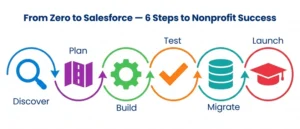
A full Salesforce nonprofit implementation guide explains more than just software installation; it’s a tailored, step-by-step process. Let’s look at the typical evolution of a Salesforce for nonprofits implementation.
Step 1: Discovery and Needs Assessment
Alignment before any configuration is key for your team and your implementation partner. This is the stage where you plan your existing workflows, look for pain points, set goals, and choose the best solution.
Questions to work through here:
- Where does your current donor management process break down?
- What reporting do you need, and who needs access to it?
- What third-party tools need to be integrated?
- What does success look like in 12 months?
The period can last from two to six weeks. Take your time; this clarity has a direct impact on all that follows.
Step 2: Building the Implementation Roadmap
You and your Salesforce nonprofit partner develop a comprehensive plan for implementation based on discovery. Every step, each responsibility, timeframes, costs, and milestones are provided in this roadmap. With a robust roadmap, scope creep and accountability can be avoided between both teams during the Salesforce for nonprofits implementation process.
Step 3: Configuration and Customization
This is when the platform is built to match your organization’s unique needs. Your Salesforce implementation services team will:
- Set up the base platform — NPSP or Nonprofit Cloud
- Create custom objects, fields, and automation workflows
- Configure relevant AppExchange apps
- Integrate Salesforce with your existing tools (email platforms, payment gateways, accounting software)
This step can be the most time-consuming and is usually the longest, from several months, depending on the complexity of your operations.
Step 4: Testing and Quality Assurance
All is tested thoroughly before going live. Workflows, Integrations, Data Entry processes, and Reports are validated several times. Your partner should conduct tests in a sandbox and do key end-user testing (user acceptance testing – UAT). Problems identified here are much more easily solvable than after launch.
Step 5: Data Migration
It is the area that most organizations are under the most pressure — and it should be. It’s difficult to move years of donor and program data, with donor histories and gift information from legacy systems. A legitimate Salesforce nonprofit CRM implementation partner will:
- Prepare your current data for audit and clean up before migration.
- Create connections between the existing system and Salesforce’s data model
- Do test migrations before final go-live.
- Ensure that data integrity is maintained after migration.
Inconsistent data transfers result in duplicate contacts, a lack of donation history, and fractured constituent relationships. This step should be given a timeline and a budget. A good Salesforce for nonprofits implementation doesn’t consider data migration as an afterthought but as a workstream.
Step 6: Training and Go-Live
You have your system set up; now, your team needs to be too. Individual training is provided according to the role to make sure that the development team, program managers, volunteer coordinators, and executives have a good understanding of how to utilize the platform in their day-to-day work. Salesforce’s own Trailhead platform is a great free learning tool to use. Where possible, go-live should be staged (for example, a smaller group first, followed by roll-out across the entire organisation).
How to Choose the Right Salesforce Nonprofit Implementation Partners
Most nonprofits don’t realize this decision holds more weight. The wrong Salesforce for nonprofits implementation partner can cause projects to be delayed, data to be incomplete or of low quality, not be used by users, and waste your budget.
When considering Salesforce nonprofit implementation partners, here are a few things to keep in mind:
- Experience in the nonprofit sector: Technical Salesforce skills are table stakes. You need a partner who really has a grasp of nonprofit operations, the fundraising cycle, grant management, and program delivery.
- Relevant certifications: Identify Salesforce consultants who are certified and have relevant nonprofit credentials, especially if they are listed as a Salesforce partner on the AppExchange.
- Real case studies: Request to see actual systems in place at organizations of a comparable size and in the same industry and/or complexity.
- End-to-end support: Best Salesforce consulting for nonprofits don’t end after go-live. They provide continuous managed services, optimization, and advice as your organization expands.
- Cultural fit: You’ll be collaborating with this team on a month-by-month basis. Check for their methods of communication, responsiveness, and values, and ensure that they match your organization’s.
Choosing the right Salesforce nonprofit partner is a decision that impacts more than just the purchase of a tool or Salesforce; it’s a decision that can impact your strategy. Best partners are a part of your team, not simply a vendor finishing a project.
Common Mistakes That Derail Salesforce for Nonprofits Implementation
Well-intentioned projects get themselves in trouble. Here are some of the most frequent mistakes that make Salesforce for nonprofits implementation difficult:
- Skipping or rushing the discovery phase: This means that the process results in a system that appears to be working, but is not the way your team operates
- Underestimating data migration complexity: If data goes in, it goes in dirty, and unreliable data comes out.
- Over-customizing in the early stages: Start simple and add complexity once the team has mastered the basics
- Neglecting user training: An effective platform without instruction being provided is not worth your money!
- No internal champion: Every successful Salesforce for nonprofits implementation has at least one internal power user who drives adoption and advocates for the platform internally
- Treating go-live as the finish line: The real work of optimization and adoption begins after launch, not before it
Post-Implementation: Making Salesforce Work Long-Term
Going live is not the end goal. The organizations that reap the most benefits from Salesforce for nonprofits implementation are the ones that put time and effort into the work following launch.
Here is an example of long-term success:
Regular system audits: Periodic reviews are useful for identifying unused features, outdated workflows, and new configuration opportunities in the system.
Ongoing training: Staff turnover necessitates training new employees, and platform changes require new learning for current users.
Feedback loops: establish a formal mechanism for staff to report problems and/or make suggestions
Leveraging new features: Salesforce has three platform updates each year. Being up-to-date ensures that you are using the latest tools.
Managed services: Many nonprofits keep their Salesforce nonprofit consulting partner as part of a retainer agreement to help them continuously optimize
The difference between nonprofits that get the most from their CRM and those that do not lies in the way that they treat it. The key to getting the most out of a CRM is to use it as a living system – one that grows with the organization.
Conclusion
When done properly, Salesforce for nonprofits implementation can be one of the most transformative technology choices that a mission-driven organization can make — but only when it’s done the right way, with the right partner, and with realistic expectations. Selecting Salesforce NPSP implementation versus Nonprofit Cloud, making sure to get your data in and out, and getting your team comfortable using Salesforce, is all a critical process. The ones that succeed see Salesforce for nonprofits implementation as an investment in, and integral part of, their mission rather than a mere IT project. You’re new to exploring your solutions, or you’re ready to get started. AnavClouds Software Solutions can help you through the entire process — from pre-implementation consultation to Salesforce nonprofit CRM implementation, configuration, training, and long-term assistance.
FAQs
What is the difference between Salesforce NPSP and Nonprofit Cloud?
NPSP is a managed package that can be built on top of Salesforce for existing workflows. Nonprofit Cloud is a newer, more consolidated offering that has a more sophisticated data model and greater AI functionality.
How much does Salesforce for nonprofits cost?
The Power of Us Program will provide 10 free licenses to eligible nonprofits. Other expenses can be configuration costs, data migration, integrations, training, and support, which depend on organization size and complexity.
How long does a Salesforce nonprofit implementation take?
The time frame needed will depend on the complexity. Small nonprofits can deploy in two to four months, and larger organizations with custom configurations and data migrations can expect six months to a year.
Do nonprofits need a Salesforce implementation partner?
Yes. A certified Salesforce nonprofit partner provides the expertise, experience, and methodology needed to help organizations implement more quickly and successfully without wasting valuable resources, and with greater user adoption.
Search Posts
Popular Posts
Author profile: Saransh Maurya, Content Writer at AnavClouds Software Solutions
Saransh
Maurya
About the author
Saransh Maurya is a dynamic and results-driven professional with a passion for innovation and problem-solving. Known for his analytical mindset and attention to detail, he excels at delivering high-quality solutions that drive business growth and operational efficiency. With strong communication skills and a collaborative approach, Saransh effectively bridges ideas and execution, contributing to successful projects and meaningful outcomes across diverse domains.
Recent Posts