With the increased size of business in 2026, customer data management is a key growth and competitive factor. Smooth Salesforce data migration 2026 allows companies to migrate to Salesforce Data Cloud with Hyperforce and enables them to access advanced analytics, AI-based workflow, and scalable infrastructure. This migration will guarantee safe, real-time access to consolidated customer data, besides reducing downtime and operational interruption. In this guide, we discuss effective techniques, best practices, and economical methods of business to migrate successfully, streamline the processes, and accordingly prepare their CRM systems to be future-proof.
Why Migrating to Salesforce Data Cloud Matters in 2026
Old CRM systems and the infrastructures on the cloud may slow down analytics and reduce performance, and increase compliance risks. An effective Salesforce data migration 2026 enables companies to endure these difficulties and open the modern capabilities.
Organizations that decide to migrate to Salesforce Data Cloud can:
- Unify customer information in sales, marketing, service, and operations to get one source of truth.
- Get real-time analytics and insights that aid in making smarter, faster, and data-driven decisions.
- Allow AI workflow and automation, improving the efficiency and predictive business processes.
- Scalability, reliability, and globalization of data infrastructure: Future-proof your data infrastructure.
- Enhance protection and conformity to sophisticated encryption, management, and role-based access addicts.
- Enhance cross-team work through the availability of a single data source, which is used by all concerned departments.
- Integrate easily with other solutions, including ERP, marketing automation, and analytics solutions.
- Trigger cost reduction through consolidation of the systems and elimination of manual processes.
- Improve the customer experience through personalized engagement fueled by integration and quality data.
The utilization of a well-developed Salesforce Data Cloud migration guide is the key to successful data transfer, limited delay, and stable system functioning. Adoption of Hyperforce migration best practices will also enable the enterprise to realize zero downtime, at the same time ensuring that business operations are not interrupted.
An effective Salesforce data migration 2026 makes your company ready to meet the increased data volumes, international business, the changing expectations of customers, and innovative AI-based CRM technologies of the future.
Planning Your Salesforce Data Cloud Migration
An effective Salesforce data migration 2026 will be based on careful planning. Effective planning lowers costs, facilitates a smooth flow of information, and enhances business effectiveness. To successfully migrate to Salesforce Data Cloud, it is necessary to follow the following key steps:
Audit Your Existing Data
Start by appraising all CRM information among departments. Get rid of old, duplicate, or unfinished records. Good data quality minimizes errors in the migration process and ensures that the new system provides the right information. Add data verification mechanisms to ensure uniformity of sales, marketing, and service modules.
Map Data Flows and Dependencies
Record all data sources, integrations, and processes related to your CRM. Add third-party applications, ERP software, marketing automation solutions, and analytics. Dependency mapping makes sure that there are no critical processes that can be broken during migration. This is an essential step to a successful Salesforce CRM implementation and the avoidance of post-migration problems.
Choose the Right Migration Strategy
Choose a strategy of migration, depending on the size, complexity, and risk tolerance of the organization. Options include:
- Phased Migration: Catch data in phases to minimize risks.
- Parallel Migration: Migrate old and new systems at the same time.
- Full Switchover: Migrate all information at a time to move quickly.
The advisable steps of a reliable Salesforce Data Cloud migration guide will allow choosing the most optimal way and guarantee the lowest downtime and the highest efficiency.
Prepare for Compliance and Data Residency
Consider the regulatory requirements of your organization, e.g., GDPR or domestic data residency requirements. Hyperforce enhances the deployment worldwide, and data can be stored in preferred areas of preference. This will guarantee your Salesforce data migration 2026 is compliant and does not cause any disturbance in operations.
Run Tests in Sandbox or Staging Environments
Conducting extensive testing of live data before migrating it to a sandbox or staging environment is a good practice for Salesforce data migration 2026. Authenticate procedures, data integrity, performance, and security measures. Testing assists in the detection of errors in time and a stress-free, zero-downtime Hyperforce migration.
Schedule Migrations Strategically
Migrate the plan when there is low traffic or off-peak to have minimal effect on the operations. In case of large datasets, incremental migration should be considered to avoid a drop in productivity. The ability of Hyperforce to scale makes this business continuity and efficiency certain through the combination of smart scheduling and the scalable infrastructure.
Monitor, Optimize, and Train Post-Migration
Once migrated, keep checking system performance, user adoption, and data quality. The workflow should be optimized, any problems should be resolved, and teams should be trained on it to maximize adoption. Making sure that your organization makes the most of Data Cloud capabilities means a successful Salesforce CRM implementation after the migration process.
Leverage Advanced Features After Migration
After the migration is done, embrace Salesforce Data Cloud capabilities like artificial intelligence and predictive business flows, as well as automated reporting. The capabilities allow businesses to make informed decisions using data, be more efficient, and gain a competitive advantage.
Best Practices for Zero‑Downtime Hyperforce Migration
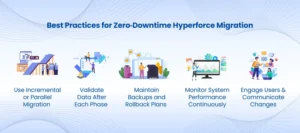
Downtime is a significant issue for businesses in CRM transition. The successful Salesforce data migration 2026 with Hyperforce will help to avoid disruptions and facilitate smooth operations. Key best practices include:
Use Incremental or Parallel Migration
Transfer information in blocks and not as one block. By doing this in a staged or parallel run fashion, the risk is mitigated, and the vital business operations are not disrupted. Incremental migration enables the teams to test small data sets and reduce errors, and keep the productivity steady along the way.
Validate Data After Each Phase
Once all the migration batches are completed, check the data integrity, workflows, and system performance. Regular reviews assist in the detection of errors and in avoiding the domino effect. This will make sure that your Salesforce Data Cloud migration guide has adhered to the latter in ensuring that the results are precise and dependable.
Maintain Backups and Rollback Plans
For Salesforce data migration 2026, maintain current backups and RBA plans. This is so as to make sure that in case of any unforeseen problems in the migration, it is possible to rectify them fast without loss of data. These are some of the precautions that are essential to a zero-downtime Hyperforce migration strategy.
Monitor System Performance Continuously
Monitor migrated system performance, activity, and response time. The cloud-native system of Hyperforce enables real-time monitoring and seamless functionality. Salesforce CRM implementation is also secure due to the ability to make changes easily and, consequently, almost immediately, with the help of continuous monitoring.
Engage Users and Communicate Changes
Provide teams with information regarding migration, possible short-term changes, and workflow changes. Effective communication will eliminate confusion, create user confidence, and ensure that teams can adopt the new system in a short period. An educated workforce will work towards a successful Salesforce Data migration 2026.
Cost‑Effective Salesforce Solutions for SMBs and Enterprises
No more large enterprises can exclude migrating to Salesforce Data Cloud. Cost-effective Salesforce solutions for SMB are offered even to SMBs and provide benefits at the level of enterprise. Key advantages include:
Reduce Infrastructure Costs
Hyperforce relies on the infrastructure of the public clouds and reduces hardware, maintenance, and IT overheads. It allows businesses to scale without excessive initial investments, which makes Salesforce data migration 2026 more affordable to SMBs.
Flexible Pay-As-You-Go Scaling
You only pay as much as you require. This eliminates unnecessary over-provisioning and is consistent with costs and actual usage. The flexibility of paying as you go also enables businesses to scale fast to fluctuating workloads in the process of migrating to Salesforce Data Cloud.
Phased Migration for Budget Control
The phased migration enables the cost of migration to be distributed over a period and Salesforce data migration 2026 becomes affordable to SMBs without losing business. This strategy minimizes the financial risk and eases the transition without interference in the operations.
Increased Efficiency Through Unified Data
Automated processes and centralized data minimize the amount of manual labor, enhance decision-making, and streamline the business process. Harmonized information between sales, service, and marketing enhances efficiency, thus aiding businesses to maximize the features of Salesforce CRM implementation.
Access Enterprise-Level Features
For Salesforce data migration 2026, advanced analytics, AI-driven processes, and built-in dashboards can be used by small and medium businesses. This has not been the case before, as these opportunities were historically limited to huge companies. This is because it enables the SMBs to compete at broader levels by applying the Salesforce Data Cloud migration guide practices.
Post-Migration: Implementation, Integration & Adoption
After your data has been stored in Salesforce Data Cloud through Hyperforce, the transformation will be actual. An adequate Salesforce data migration 2026 will not only take care of data but also put it to good use. Key steps include:
Ensure CRM Implementation Supports Workflows
Ensure that your Salesforce CRM deployment is in line with sales, service, marketing, and analytics workflows. Effective execution would mean that teams could effectively utilize data to achieve improved business outcomes.
Integrate Existing Tools Seamlessly
Integrate Salesforce Data Cloud with ERP systems, marketing automation systems, data warehouses, and BI dashboards. Integration makes the various business applications integrated so that they can be used in a unified manner. Salesforce data migration 2026 increases operational efficiency and allows making smarter insights.
Train Users and Teams
Train teams on the new data model, new workflows, and system features. Adoption will improve with proper training, reduce errors, and ensure that employees are maximally benefiting when the Salesforce Data Cloud migration guide is adopted.
Leverage Advanced Analytics and AI Tools
Create predictive insights, automate routine processes, and improve customer engagement using AI-powered analytics tools on Salesforce. High-tech analytics assists companies in making quicker, smarter, and better-informed choices after migration.
Monitor Data Integrity, Security, and User Experience
Knowingly monitor data accuracy, security measures, and performance of the system. Delays in the initial phases will be tracked, and compliance will be upheld to achieve maximum ROI on your Salesforce data migration 2026 program.
The appropriate execution of the post-migration process guarantees that your business does not simply transfer data; it changes the way operations are conducted, improves the quality of decision-making, and finalizes long-term strategic benefits.
Future-Ready Advantages of Salesforce Data Cloud
The adoption of Salesforce data migration 2026 helps your business to operate on a modern and scalable platform that can meet the changing needs of the market and its customers. Key advantages include:
Scalable, Global CRM Backbone
Hyperforce offers cloud-based and scalable infrastructure to businesses all over the world. Organizations are able to grow in new markets and, at the same time, ensure high levels of performance and reliability.
Strong Data Governance and Compliance
Salesforce Data Cloud is highly secure, role-based, and compliant with local laws. Good governance goes hand in hand with guarding business and customer information, which is sensitive.
Real-Time Analytics, AI, and Automation
Standardized data can enable real-time reporting, artificial intelligence predictions, and automatic processes. Such functions speed up the decision-making and business optimization.
Lower Infrastructure Overhead and Predictable Costs
Under Hyperforce, using a public-cloud architecture and pay-as-you-go model allows businesses to scale effectively at a lower IT cost. This offers both cost-effective Salesforce solutions for SMBs and big enterprises.
Unified Customer View for Smarter Decisions
The sales, service, and marketing of customers give a complete picture of customer behavior with centralized customer data. This is facilitated by individual engagement, enhanced experiences, and data-driven strategies.
Through an appropriate Salesforce Data cloud migration that is well planned, adhering to best practices as well as post migration, businesses are ready to grow in the future, competitive, and can utilize the best of CRM to grow their business in the long run.
Conclusion
Salesforce data migration 2026 is not a mere data transfer but a strategic step in enhancing business processes. Organizations can achieve a smooth transition without affecting productivity by adhering to Hyperforce best practices and zero-downtime migration plans. The opportunities of the Salesforce Data Cloud can be optimized by post-migration integration, training the user, and using AI-driven insights to transform the business. To both SMBs and large enterprises, Salesforce data migration 2026 will provide cost-effective solutions, increased data protection, real-time analytics, and a single perspective of the customer. The collaboration with the AnavClouds Software Solutions will guarantee professional guidance, seamless progression, and successful CRM in the future. A well-thought-out migration nowadays puts your business at the forefront of growth, invention, and efficiency in the long run.

