Gaurav AnavClouds Software Solutions +1 917 266 9985 info@anavcloudsoftwares.com
admin – Page 4

For fast-growing SMBs, choosing the right CRM platform can directly influence revenue, customer retention, and long-term scalability. That’s why the debate around Salesforce vs Custom Development is no longer just a technical decision — it’s a business growth decision. While Salesforce delivers a proven, cloud-based platform with automation and AI capabilities out of the box, custom CRM development for SMBs offers total flexibility for businesses with unique operational models. The real challenge? Identifying which path aligns better with your current agility needs, future expansion plans, and ownership expectations. 

In this blog, we’ll compare both approaches across critical decision factors like implementation speed, scalability, data ownership, cost structure, customization depth, and AI future-readiness, helping you determine which CRM path truly supports your growth stage and ambition. 

What Is Custom CRM Development for SMBs? 

In Salesforce vs Custom Development, custom CRM development is the concept of creating a fully customised CRM development, the process of creating a CRM that is fully customised to fit a specific process, data flow, and long-term growth objectives of a business. Rather than extending the pre-existing system,s such as Salesforce, companies establish a CRM that reflects their operational culture. SMBs prefer this method because they require full control over the features, scalability, UI/UX, integrations, and data ownership that might not be fully offered by off-the-shelf platforms. 

Ready to choose the best CRM path for your SMB? Get expert Salesforce guidance with a tailored consultation.


Key Advantages of Custom CRM Development for SMBs 

Although the Salesforce vs Custom Development argument usually boils down to flexibility vs speed, custom CRM development offers long-term ownership, greater adaptability, and no platform dependency, which is better suited to SMBs with multifaceted or changing business models.

100% Tailored to Your Business Processes

Unlike Salesforce, where you adapt to its framework, custom development gives you a CRM that is built around your existing workflows — not the other way around. Every module, approval logic, and UI element is purpose-built, resulting in higher adoption and zero operational compromise.

Maximizes Efficiency and Team Productivity

SMB-specific CRM programming automates common activities such as lead assignment, follow-ups, contract approvals, and reporting in, it does just as your business functions. This eliminates the pressured changes and makes decisions quicker based on real-time and business-specific data.

Seamless Scalability and Future-Readiness

The comparison between Salesforce vs Custom Development, the custom development carries the day, in terms of long-term platform freedom. Your CRM keeps up with your business, as you can add new features, modules, and workflows as your business grows, or you can even add industry-specific functionality without being restricted by pre-built platform limitations.

Full Control Over Data Security and Compliance

If you compare Salesforce vs custom development, having a custom CRM solutions allow SMBs to decide exactly how and where their customer data is stored, with compliance frameworks built natively around their industry standards. For businesses in finance, real estate, healthcare, or legal sectors, this offers a level of security and ownership that managed platforms cannot always match. 

What Is Salesforce and Why Is It Relied on by SMBs? 

Salesforce is a cloud-based CRM system that is trusted all over the world and helps SMBs in simplifying their sales, marketing, and customer service processes with one integrated system. Businesses need to deal with siloed tools less because they can centralize customer data, automate lead nurturing, monitor pipeline health in real time, and improve customer engagement easily. Between Salesforce vs custom development, Salesforce provides SMBs with the power to run their businesses more effectively, make sales faster, and provide customers with highly personalized experiences, without having to maintain a massive infrastructure or extensive IT resources. 

Why SMBs Prefer Salesforce Over Custom Development 
Salesforce Over Custom Development

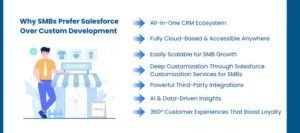
In the Salesforce vs Custom Development comparison, Salesforce is an all-inclusive and deployable CRM ecosystem enabling growing businesses to use the same platform to handle all phases of the customer lifecycle – such as marketing, sales, onboarding, and post-sales support – in the same environment. It serves as a single truth-bearer, allowing SMBs to free themselves of fragmented tools and open the doors to greater efficiency, quicker decision-making, and better customer visibility.

All-in-One CRM Ecosystem

In the Salesforce vs custom development debate, Salesforce prevails in the discussion with its full package of sales, marketing, service, and analytics, all interlinked. SMBs do not need to put up with disconnected tools anymore or have to perform complex integrations by hand, which creates less operational friction and allows data to be synchronized between teams seamlessly.

Fully Cloud-Based and Accessible Anywhere

The Salesforce platform is a 100% cloud-based solution that allows real-time access on any device, unlike the traditional systems under Salesforce custom development services. It is best suited to SMBs that have a hybrid or remote workforce and no need to maintain any IT infrastructure to access customer data on the fly.

Easily Scalable for SMB Growth

Salesforce SMB growth is future-proof and enables expansion in size to 500 plus users, with ease. The features, modules, and workflow can be upgraded in real-time, without the system rebuilds or project delays common to the custom CRM development by SMBs.

Deep Customization Through Salesforce Customization Services for SMBs

With future-ready Salesforce Development Services, the SMBs can model the CRM to suit their precise workflows, approval processes, and reporting frameworks. In contrast to inflexible traditional systems, Salesforce customization services to SMBs mean that the platform changes to fit your process, rather than the opposite.

Powerful Third-Party Integrations

Salesforce enables strong third-party integrations with ERP, accounting solutions, messaging applications, and Salesforce Marketing Automation systems – providing a complete, digital infrastructure. This will eradicate data silos, minimize redundant work, and facilitate cross-business unit collaboration.

AI and Data-Driven Insights

Salesforce Einstein offers AI automation and predictive analytics to enable SMBs to prioritize leads and personalize engagement, and predict revenue. This provides a competitive advantage in the Salesforce vs custom development environment – internal AI engineers are not required.

360° Customer Experiences That Boost Loyalty

Salesforce gathers all customer touchpoints: email, web, chat, WhatsApp, and puts them in one place. This allows the SMBs to provide hyper-personalized experiences, faster response, and long-term retention, which is an essential rationale why they prefer Salesforce to custom development to the SMBs. 

Salesforce vs Custom Development: A Comparative Analysis 

When SMBs evaluate Salesforce vs Custom Development, the decision often comes down to flexibility, cost, scalability, and long-term ROI. Both approaches have strong advantages — but their impact on growth, agility, and total ownership varies significantly based on business vision, IT readiness, and expansion plans. Below is a strategic breakdown to help SMBs make an informed choice.

Out-of-the-Box vs. Fully Tailored Solutions

Salesforce offers a ready-to-use CRM framework, allowing SMBs to start quickly with pre-built features for sales, support, and Salesforce Marketing Automation. It’s ideal for businesses that want speed and stability from day one.
On the other hand, Custom CRM development for SMBs gives complete freedom to build workflows, dashboards, and data architectures from scratch. This is highly beneficial for businesses with unique industry requirements — but requires more time and technical ownership.

Implementation Time and Speed of Deployment

Salesforce vs Custom Development for SMBs is a clear win for Salesforce when speed matters. Salesforce can be deployed within weeks thanks to pre-configured modules and Salesforce Development Services offered by partners.
In contrast, custom development demands extensive planning, testing, and iteration, making deployment significantly longer — well-suited only for SMBs that can afford longer go-to-market timelines for total control and ownership.

Cost Structure and Long-Term Investment

Salesforce operates on a subscription-based model, making the initial cost lower and predictable — especially with support from Salesforce customization services for SMBs.
However, custom development involves a higher upfront investment, including UI design, architecture, integrations, and security. While expensive initially, it may offer long-term savings if businesses want complete IP ownership and no recurring license costs.

Flexibility and Future Scalability

When comparing Salesforce vs custom development, Salesforce is highly scalable and allows SMBs to upgrade users, add modules, and expand capabilities without rebuilding the system. This makes Salesforce for SMB growth a low-risk option.
Meanwhile, custom-built platforms offer absolute flexibility, but scalability depends largely on how well the solution is engineered during the foundation stage — requiring strong technical leadership and future-proof architecture.

Integration Capabilities and Ecosystem Connectivity

Salesforce dominates here, offering thousands of effortless integrations with tools like WhatsApp, Slack, ERPs, and marketing platforms — thanks to Salesforce custom development services and AppExchange marketplace.
With custom CRM development, integrations must be built manually, resulting in higher cost, dependency on developers, and potential delays — especially as the tech stack evolves.

Maintenance, Security & Ongoing Updates

Salesforce automatically manages platform updates, security patches, and compliance — allowing SMBs to focus on business instead of IT maintenance. Salesforce vs Custom Development strongly favors Salesforce here for non-technical teams.
Custom CRM solutions, however, require continuous maintenance, dedicated security handling, and manual upgrades — which can become costly unless the SMB has long-term in-house engineering capabilities.

Training, Adoption & Skill Dependency

While comparing Salesforce vs custom development, Salesforce offers a low learning curve with Trailhead, certifications, and platform familiarity — making onboarding easier, especially when supported by the role of Salesforce Development Partners.
Whereas custom development, however, requires technical expertise, making training heavily dependent on documentation quality and internal development teams, which can delay adoption if not managed strategically. 

Conclusion  

The question Salesforce vs Custom Development is not about which one is better, but which one fits better into the stage and ambition of your SMB. When speed, scalability, AI-enhanced automation, and low IT maintenance are the most important, Salesforce is the smarter and less-risky option, with the help of expert Salesforce customization services in the case of SMBs. Nevertheless, when your business model requires total control, distinctive architecture, and extended IP ownership, a brief CRM development of SMBs can still be a strong rival.  

We also provide you with the chance to consider both alternatives, both with the openness of a book at AnavClouds Software Solutions, as you decide between Salesforce and need to design a CRM to precisely match your business needs, to get your business booming at the point of CRM investment.  

FAQs  

Does Salesforce outperform a custom-built CRM with SMBs?  

Salesforce fits best with SMBs, which require quicker implementation, built-in automation, and scalability without extensive technical engagements. Nonetheless, companies whose processes are fairly unique or those whose long-term ownership ambition is a concern might find it more appropriate to develop their own CRM.  

Comparison Salesforce vs custom CRM: How many days to implementation?  

The implementation of Salesforce can be completed in weeks, particularly with the assistance of certified partners. Depending on the complexity, integrations and trials, and errors, custom CRM development might take several months.  

Is Salesforce or a custom CRM more cost-effective?  

Salesforce adheres to the subscription-based pricing scheme, which is economical in the short run. Custom CRM has a greater initial cost but can prove less expensive in the long term to businesses that desire complete control and no recurring licensing charges.  

Are they both AI and automation-friendly?  

Yes, Salesforce offers AI and automation as an in-the-box feature, such as Einstein AI. AI and automation may also be supported using custom CRMs, although they take more development effort and technical knowledge.  
Salesforce Customization vs. Configuration for SMBs

In the case of SMBs, Salesforce customization vs. Salesforce configuration of SMBs is a decision that may have a great difference in the efficiency and ROI of the operations. Although Salesforce has pre-built features, it is important to know when to impose settings and when to use custom solutions to maximize the benefits of the platform. With customization, SMBs can adapt workflows, dashboards, and automation to their business requirements and might need to develop Salesforce or have a Salesforce developer consult with them. Configuration, however, takes advantage of Salesforce’s native capabilities to automate processes within a very short period without a heavy investment in technical aspects. We examine the differences, advantages, and best practices of both methods in this blog in order to assist SMBs in making informed decisions and maximizing Salesforce CRM ROI in SMBs. 

Salesforce Customization vs. Configuration for SMBs — What’s the Real Difference? 

Although both customization and configuration are intended to make Salesforce fit your business requirements, the fundamental distinction is the extent to which the modification is undertaken. Configuration is the customization of pre-existing settings in Salesforce, whereas customization is developed by making code-level additions to either extend or rebuild the platform itself. 

Salesforce Customization: What SMBs Need to Know 

Salesforce customization services for SMBs is the profound alteration of your Salesforce org to create capabilities, workflows, and interfaces that are completely compatible with the unique operational requirements of your business. Although Salesforce does provide standard in-the-box applications, customization is one step more advanced – it uses code and development skills to improve or expand the platform, beyond the default limitations. 

Customization is usually implemented by technical experts, like when you contract a Salesforce developer or a custom Salesforce development team. These professionals employ Apex, Lightning Components, Salesforce Code Builder, and other sophisticated solutions to design custom features that are highly specific to business needs and long-term scalability aspirations. 

Typical Salesforce Areas of Customization Include: 

  • Personalization of User Interface – Design layout, navigation, and branding to have a personalized User Interface. 
  • Further Functionality Development – Create business-specific processes such as claims management, partner onboarding, automation of compliance, etc. 
  • Custom Integrations – Build new integrations with ERP, eCommerce, ITSM, accounting solutions, etc. 

Examples of popular customizations: 

  • Development of own objects, Apex classes, and triggers. 
  • Building code-based workflows of automation. 
  • Allowing high-volume data to be processed in batches. 
  • Creating bespoke Visualforce pages or Lightning pages. 
  • Developing low-code business applications. 
  • To send data outside of the system, the Reports & Dashboards REST API can be used. 

Maximize ROI for your SMB with expert Salesforce customization and configuration services.


What is Salesforce Configuration in Small Business? 

Salesforce configuration refers to non-coding customization of the current Salesforce environment so that it suits your business processes using built-in drag and drop features and settings. In contrast to customization, configuration does not modify the underlying platform code, which makes it a less expensive and easily scalable solution to SMBs. 

This strategy is best used when companies desire to enhance Salesforce CRM ROI optimization and do not require intensive development. The configurations can be easily managed by users with little technical skills, which means Salesforce can be maintained, upgraded, and modified over time. 

Salesforce Benefits in Configuration for Small Business: What Can Be Customized? 

The following are the typical elements that can be set up within Salesforce to maximize both usability and performance – without any custom code: 

  • User Set-up and Roles – designate roles, hierarchies, access, and permissions. 
  • Security settings – Manage data visibility, access to fields, and guaranteed access to log-ins, to increase the level of security. 
  • User Interface (UI) Layouts – Reposition fields, sections, and record view to develop role-based UIs. 
  • Workflow Rules & Automation – Initiate activities such as email notifications, creation of tasks, or updating of a field when a record is modified. 
  • Email Configuration – Configure templates that can be used again and email deliverability. 
  • Custom Settings reusable configuration data can be stored by using of leverage list or hierarchy settings. 
  • Integration Preferences – Network third-party applications to automate operations without writing code. 

Salesforce Customization vs. Configuration for SMBs — A Comprehensive Comparison 

Level of Personalization 

Comparisons between Salesforce customization vs. configuration for SMBs show a vast difference in the level of personalization. The Salesforce SMBs customization services enable organizations to design highly specific workflows, advanced automation, and customized user interfaces to fit operationally specific needs. As an example, a business can create specific pricing algorithms, approval flow, or departmental dashboard. Salesforce setup of small business, on the other hand, offers customization on Salesforce, which is suitable for small businesses with simple processes. Configuration provides flexibility, but customization provides full alignment with the business model and provides maximum Salesforce CRM ROI optimization in the long run. 

Implementation Approach 

Implementation complexity is one of the most important aspects when considering Salesforce customization vs. configuration for SMBs. Code-driven development is a part of customization, so it requires knowledge of Apex, Lightning Components, and Salesforce development services, as well as testing in Apex sandbox environments, before implementation. There are fewer configuration requirements, which are based on declarative models such as Flow Builder and Process Builder, which enable admins to perform real-time modifications. This implies that SMBs can swiftly apply Salesforce configuration advantages to small businesses without employing a full-time developer. However, customization might require you to hire a Salesforce developer or consulting service. 

Time-to-Value 

The schedule for getting ROI in Salesforce customization vs. configuration for SMBs differs greatly. A complex or custom Salesforce development project might need weeks or months of development, testing, and deployment, particularly when the project is fundamentally customized. However, configuration is faster, and SMBs can make adjustments to workflows, reports, dashboards, and automation in real-time, which is suitable when they need an immediate impact and optimization of Salesforce CRM returns. Such a pace enables smaller organizations to embrace changes without interruption of day-to-day activities. 

Maintenance & Adaptability 

Salesforce customization services for SMBs must be taken seriously because customized code may require revision during Salesforce seasonal releases (Spring, Summer, Winter). The lack of proper customization may affect the stability of systems and their effectiveness. However, the configuration is in line with the Salesforce native environment that demands low maintenance. With Salesforce configuration applied to small businesses, the SMBs can concentrate on growing their business and enhancing CRM ROI, without fearing code dependencies and version incompatibilities. 

Skills and Resource Requirement 

The resource requirements also vary in terms of Salesforce customization vs. configuration for SMBs. Personalization demands technical expertise and familiarity with Apex, SOQL, Lightning, and Salesforce development solutions. To succeed in the long term, SMBs might have to employ a Salesforce developer or use Salesforce CRM consulting services. Nevertheless, configuration can be handled by administrators who possess basic Salesforce knowledge and use such instruments as Flow Builder, Process Builder, and custom report types. This renders configuration an affordable and viable option to SMBs, who pursue functional enhancements but do not want to spend a lot of money. 

Cost & Budget Considerations 

Development of custom Salesforce costs, complex testing, and related maintenance make customization relatively more costly. Nonetheless, it is a strategic investment for SMBs that require highly detailed workflows or integrations that can optimize Salesforce ROI to SMBs. Configuration is cheaper, leveraging the existing administrators or Salesforce CRM consulting partners, providing Salesforce configuration advantages to small businesses with no significant upfront costs. In the case of SMBs, it is essential to balance cost against ROI, and knowing what customization is and what configuration is assists in making decisions. 

Risk & System Stability 

The risk profile differs between Salesforce customization vs. configuration for SMBs. Code-level modifications are to be called customization, and they may impact system stability in case they are not made according to best practices. Excessive customization can demand further support and management to ensure the Salesforce CRM ROI maximization. Configuration is not as risky because it works with native Salesforce tools, although when not controlled, excessive configuration or automation may result in conflicts and operational misunderstandings. SMBs should ensure a critical reflection between the two methods to get the best ROI without compromising on the system reliability. 

Best Practices for Salesforce Customization vs. Configuration for SMBs 

Salesforce customization services for SMBs

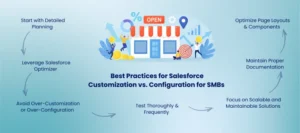
The effective implementation of Salesforce customization vs. configuration for SMBs will necessitate some combination of strategy, appropriate implementation, and best practices. Adhering to these recommendations will make Salesforce ROI a maximum in SMBs, and make your CRM scalable, maintainable, and on course for the business. 

Start with Detailed Planning

To have successful Salesforce customization vs. configuration for SMBs, you must start with a clear plan of how you want to accomplish this. Find the workflows, features, or automations that you would like to implement and decide whether you need to employ a Salesforce developer or use internal admins. Interact with the business teams to learn what they need and hold your plan accountable on the way changes will make their organization more efficient and optimize Salesforce CRM ROI. Detailed planning will be used to smoothly implement the custom Salesforce development or configuration operation with minimum risk. 

Leverage Salesforce Optimizer

Analyze your org with Salesforce Optimizer and receive recommendations on what to do to improve. With this tool, Salesforce SMBs can perform field and layout optimization, automation, reports, and dashboards, as well as code optimization through Salesforce customization instead of Salesforce configuration. It works out where Salesforce configuration benefits to small businesses can be implemented and measures Salesforce customization services for SMBs that is consistent with best practices. This will ensure the maximum CRM performance and increase Salesforce ROI of SMBs. 

Avoid Over-Customization or Over-Configuration

Although Salesforce customization vs. configuration for SMBs allows flexibility, either can make the system less stable and make upgrades more tricky. Only the features and workflow you need to achieve business objectives. No conflicting approaches and complicated custom code. Salesforce configuration between small businesses and custom Salesforce application development should be balanced to maintain, reduce technical debt, and ensure that Salesforce CRM return on investment can be sustained. 

Test Thoroughly and Frequently

In any Salesforce customization vs. configuration for SMBs initiative, testing is required. SMBs must also make sure that all the workflows, automation, and integrations are operating properly without interfering with operations. The frequent testing confirms the latest modifications in Salesforce development or configuration to prevent mistakes and wastage. This mechanism guarantees a seamless performance of platforms and maximization of Salesforce ROI among SMBs, which gives an assurance that the newly developed features bring quantifiable business value. 

Optimize Page Layouts and Components

Design pages efficiently when organizing various elements on the page, such as fields, related lists, and custom components. The most important information should be placed on the first tabs, whereas the minor components should be relegated to the secondary ones. The Salesforce customization and Salesforce configuration applied by SMBs to SMBs can help to increase usability, streamline processes, and increase adoption. Tailored Salesforce customization services for SMBs are to be achieved by proper page layouts, which will provide Salesforce configuration benefits to small businesses. 

Maintain Proper Documentation

Documenting all customizations, configurations, and workflows is crucial for SMBs implementing Salesforce customization vs. configuration for SMBs. Custom Salesforce development can be supported by proper documentation, troubleshooting, and continuity in case of updating or scaling the platform. It also increases knowledge sharing, ease of maintenance, and optimization of Salesforce CRM ROI through clear guidance of changes in the future. 

Focus on Scalable and Maintainable Solutions

Design your Salesforce customization vs. configuration for SMBs with scalability. It should not use very complicated solutions that are difficult to maintain or upgrade. Consider Salesforce configuration with small business capabilities alongside custom Salesforce development as a way of long-term flexibility. Scalable solutions ensure efficiency of the platform, enhanced adoption, and high Salesforce ROI to SMBs as your business expands. 

Conclusion 

The decision between Salesforce customization vs. configuration for SMBs is dependent on your business objectives, budget, and technical capabilities. Customization provides better functionality and personalization, and configuration provides more expedited implementation and less complex maintenance of standard processes. Using best practices such as thorough planning, capitalizing on Salesforce configuration advantages in the small business segment, and documentation are some of the reasons why your CRM is going to give you the most. 

Are you ready to unleash the potential of Salesforce on your SMB? Work with AnavClouds Software Solutions to receive professional support, Salesforce application development, and business-specific configurations. 


Salesforce Cost Optimization

Small businesses may find it difficult to control Salesforce costs, but through the proper strategies, it is possible to minimize costs that maximize efficiency. Several SMBs spend a lot of money on licenses, integrations, and customizations, and fail to make the most of the platform. Companies can maximize productivity and minimize unnecessary spending on technology. Aiming to maximize ROI by making smart Salesforce customization services for SMBs, optimizing processes, and aligning technology with business goals. This blog discusses the best practices through which small businesses can maximize Salesforce cost optimization small business, efficiency, and ensure they have all the benefits of every dollar invested. 

The importance of Salesforce Cost Optimization to Small Businesses 

For small and medium-sized businesses (SMBs), Salesforce cost optimization is not just cost reduction, but sustainable growth. Any business owner would wish to utilize the maximum of their investment, and Salesforce Cost Optimization is one of the tools that can help to see that all features, licenses, and integrations have a direct impact on business results. 

Salesforce, at its strategic management, can also be used to improve operations, productivity, and boost returns without having to raise overhead. Collaborating with companies offering Salesforce customization services for SMBs enables small businesses to build workflows that best suit their specific requirements – without redundant add-ons and with optimal performance. SMBs can access long-term value by prioritizing smarter configurations, process automation, and strategic cost management, and staying on track with budgets. 

Unlock Salesforce potential, cut costs, and boost efficiency with expert strategies for small businesses.


12 Proven Strategies to Salesforce Cost Optimization for SMBs 

Here are the most effective ways to reduce costs, improve efficiency, and get the best ROI from your Salesforce platform. 

Automate Routine Workflows with Salesforce Customization

Small businesses can waste hundreds of hours on paperwork, typing in customer information, recording contacts, or manually sending follow-up messages. Not only do such processes reduce productivity, but the cost of using Salesforce also increases over time. 

Salesforce customization services for SMBs allow you to automate all of these repetitive tasks and spend employee hours in more productive ways. This is because, with automation, the follow-ups, lead scoring, and customer responses occur immediately, without a human being to intervene. Having their own features, such as Salesforce Flow and Einstein Automation, allows businesses to optimize their routine processes and cut the reliance on human effort. 

The outcome? Greater precision, accelerated operations, and high cost reductions. When employees are not busy with routine work, but are on strategic initiatives. Your Salesforce cost optimization investment will begin to produce results, measurable results, in terms of efficiency and ROI. 

Use Cloud-Based Salesforce Solutions for Scalability

Using cloud-based tools is one of the best methods through which Salesforce cost optimization small business can be enhanced. Cloud infrastructure at Salesforce does not require expensive servers, regular upkeep, and IT personnel, which can cripple the resources of a small business. 

When Salesforce cost optimization services are configured for your business, you can tailor cloud functionality as per the size of your business and the position of growth. Regardless of whether you are building your customer base or acquiring new tools, Salesforce allows you to scale easily without adding more infrastructure expenses. 

Moreover, Salesforce makes sure you are always on the latest version, eliminating the hassle of maintenance and license renewals. The Salesforce configuration services for small businesses allow you to pay only for what they consume, and they can minimize extraneous expenses. Cloud scalability also boosts teamwork, since your teams will be able to access real-time data from any place, which makes your operations agile and cost-efficient. 

Empower Teams with Flexible Collaboration Tools

Physical offices and conventional arrangements are costly; rent, utilities, maintenance, and equipment may eat up a significant part of your annual budget. The CRM offered by Salesforce is a cloud-based solution that gives a small business the capability to adopt the remote or hybrid model without sacrificing the productivity of the team. 

With the Salesforce-Slack and Salesforce-Teams integration, businesses can also be confident of communicating and managing projects everywhere. The sales representatives will be able to update opportunities, track leads, or share progress in real-time, which makes working remotely as effective as working in a team. 

Such a flexible arrangement not only helps in Salesforce cost optimization for small business but also reduces the operational cost and boosts employee satisfaction and retention. When workers can work effectively in a hybrid model, organizations have a reduced number of disruptions, enhanced response time to customers, and greater overall performance. The outcome is a more cost-effective and productive organization. 

Optimize Your Marketing Spend with Salesforce ROI Optimization

Otherwise, marketing is a drain on money when it is not planned. In traditional advertising, one can not always get clear outcomes, and it is difficult to measure ROI. The Salesforce Marketing Cloud transformation is different in that it provides a data-driven strategy in which the effectiveness of every campaign is quantifiable. 

Through Salesforce cost optimization for SMBs, the business can determine which marketing efforts yield the highest number of conversions and will redirect its efforts. Salesforce enables the optimization of ads and efficiency by automating custom campaigns, segmenting audiences by purchasing behavior, and so on. 

Salesforce already has AI-driven functions, including Einstein Analytics, which enable SMBs to anticipate customer interests and tailor their campaigns to better align with those interests. This accuracy is both cost-saving in terms of marketing dollars and also ensures that each outreach effort provides a tangible value. There is no need to elaborate on the result, smarter marketing choices, greater engagement, and quantifiable revenue increase. 

Streamline Your Online Operations with Salesforce Commerce Cloud

Your online store is the virtual entrance to your brand, and its optimization directly affects your bottom line. Under Salesforce development services, small enterprises can develop quicker, dependable, and client-focused online businesses. 

Salesforce Commerce Cloud supports personalization that is driven by AI, efficient inventory management, and personalized product suggestions in a single platform. With control over product listings, payments, and so on, you can save on third-party software expenses without going through multiple locations. 

Moreover, an SEO-optimized webpage guarantees greater publicity without extreme advertising costs. Such characteristics as in-built analytics, A/B testing, and automated campaigns enable SMBs to improve their online performance. The outcome is a scalable online store that is cost-effective and leads to steady conversions. 

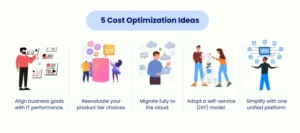
5 Cost Optimization Ideas

Lower Administrative Costs with Smart Salesforce Configuration

The administrative overhead can creep up without your noticing; subscription renewals, paperwork, or a series of approvals can destroy your budget unbeknownst to you. You can automate and centralize these processes with Salesforce configuration services for small businesses to kill waste. 

Such tools as Salesforce Flow and Einstein Activity Capture make it easy to complete such routine management tasks as data entry, document tracking, and workflow approvals. It is also possible to add e-signature applications such as DocuSign to Salesforce, saving time and paper expenses. 

Salesforce cost optimization helps in live expense monitoring dashboards, offers insight into expenditure trends, and allows managers can make proactive cost reduction decisions. With a Salesforce instance that is well configured, all the departments work more effectively – cutting down on overheads without compromising productivity. 

Negotiate and Manage Vendor Costs with Salesforce

The costs of vendors and partners are usually ignored, yet they can have a great impact on your operational budget. The Salesforce customization services for SMBs assist them in monitoring their supplier contracts, renewals, and expenditure patterns in a single dashboard. 

Using the services of a Salesforce partner, companies can create workflows that will prompt the teams to update on impending contract renewals or price changes. This avoids renewals at a high cost at the last minute and promotes renegotiations that are strategic. 

Also, when you put vendor data in Salesforce, it gives you better insight into the performance and cost details so that you can see where you can save. Salesforce cost optimization can be achieved through simple bargaining or vendor modification, supported by Salesforce data, and do not consider that your supplier relationships can be enhanced. 

Use AI-Powered Forecasting to Plan and Save

AI forecasting offers one of the best approaches towards Salesforce Cost Optimization. Most small businesses do their financial planning intuitively, but Salesforce has the power to plan with accuracy with the help of predictive tools. 

Salesforce has AI models like Einstein Forecasting that help predict future sales, cash flow, and resource requirements based on past data and market trends. This will assist SMBs in utilizing budgets effectively, preventing excessive stock purchases, and loss of resources. 

A more data-driven and strategic system will save your organization time, money, and resources by incorporating predictive insights into making decisions, reducing the cost of Salesforce implementation. To make sure that these insights are specific to your business objectives, a Salesforce partner can be consulted to make your CRM become a profit-driving instrument instead of a liability. 

AI prediction does not merely maximize costs but enables a smarter business expansion since your investments will be used in the long term. This is a great way for Salesforce cost optimization for small businesses. 

Align Business and IT KPIs for Smarter Salesforce Spending

Most small enterprises invest in Salesforce tools but do not standardize their performance to the bigger business goals. For Salesforce cost optimization, you should ensure that the IT KPIs are aligned with the business objectives, like retention of customers, cost of acquisition, or revenue. Assess the contribution of your Salesforce environment to such crucial measures as customer satisfaction (NPS), churn rate, or sales conversion. Where some integrations or tools are not producing quantifiable results, they may be put on hold or substituted with more effective options. This strategy will make sure that all Salesforce dollars are invested toward business results, and the ROI will be long-term. 

Reassess Your Salesforce Licensing and Product Tier

Salesforce has different levels of products, starting with simple and the high-level enterprise ones, and they all have different needs to satisfy the business requirements. Most of the SMBs purchase more advanced licenses prematurely, which translates to unwarranted expenses. For Salesforce cost optimization, check that you are actually using the features of your Salesforce licenses. There are also other options that you might be interested in trying that offer a lower-level or more personalized Salesforce configuration service at a fraction of the price. Not only does optimizing your use of licenses help lower the ongoing costs, but it also helps optimize your efficiency by maintaining your Salesforce environment lean and focused. 

Shift from Buying to Building with Low-Code Salesforce Solutions

Small businesses can use Salesforce’s low-code and no-code development to develop bespoke applications instead of fully relying on third-party tools. This paradigm makes it less expensive to buy outside solutions and increases their customization. The Salesforce customization service for SMBs will allow the marketing, sales, or customer service teams to build the apps and automate the processes without having detailed technical knowledge. With low-code-based team empowerment, businesses can develop scalable, cost-effective solutions, depending on their specific workflows. 
Consolidate and Simplify Using a Unified Salesforce Platform

As time progresses, companies tend to have several disrelated tools, which increase their expenditure and inefficiency. A single trusted Salesforce platform, such as Customer 360, can remove redundancies and reduce the cost of IT by consolidating your operations. Salesforce is a single point of view that allows a customer overview, eases integration, and saves on expenses in terms of upkeep. Consulting a Salesforce partner can also streamline this change and help ensure your Salesforce custom development services are aligned with your business objectives. This merger not only lowers the Salesforce licensing fees but also improves teamwork and scalability. 

Conclusion 

Salesforce cost optimization does not necessarily need to be complex and daunting for small businesses. Automating the work processes, reevaluating the licensing levels, balancing IT investments with business KPIs, and transferring systems to a single Salesforce platform. With Salesforce ROI optimization for SMBs can cut down the spending without a reason and enhance it. The use of Salesforce configuration services for small businesses and consulting with a Salesforce partner guarantees that each solution is customized, scalable, and affordable. These strategies not only save money but also enable teams to be smarter, innovate quickly, and promote sustained growth within a competitive environment. 

By enlisting the assistance of a Salesforce development service such as AnavClouds Software Solutions, it would definitely be possible to optimize the cost of your Salesforce solution. They offer affordable solutions that can assist your company in optimizing operations and maximizing ROI. Book a complimentary demonstration with us now and get to know more! 


FAQs 

What does Salesforce Cost Optimization mean? 

Salesforce Cost Optimization concerns saving on unnecessary costs and achieving maximum value out of your platform. In the case of small businesses, it makes sure each license, feature, and integration is working towards growth. Effective cost optimization enhances productivity, efficiency of workflow, and ROI. 

What would Salesforce customization save? 

The Salesforce customization of your SMB automates routine work, eliminates unproductive functionality, and simplifies processes. This saves on labor and operational expenses and streamlines operations. Custom solutions guarantee your Salesforce platform directly contributes to business objectives. 

What can SMBs do to reduce Salesforce licensing? 

The SMBs can reduce the cost of licensing by reviewing the usage, choosing the appropriate product levels, and canceling unnecessary subscriptions. Collaboration with a Salesforce consultant will make sure that the licenses are in line with the real business requirements. This strategy will save wasted costs without losing key functionality. 

Why would I put my systems under Salesforce? 

Having all the tools in one Salesforce platform lowers expenses in maintenance and subscription to IT. It offers a unified perspective of customer data, enhances teamwork, and streamlines the procedures. It also enables businesses to be more scalable and efficient, and makes doing business more cost-effective. 

Salesforce Analytics

What would happen if your business could recognize opportunities, rectify inefficiencies, and reduce costs long before issues may emerge? This is precisely what Salesforce Analytics helps to do. The transformation of raw data into actionable insights allows companies to streamline operations, enhance customer experiences, and achieve significant savings. By using tools such as Salesforce CRM optimization, Salesforce Einstein Analytics, and interactive Salesforce dashboards and reports, teams will be able to monitor performance in real time, spot bottlenecks, and make smarter decisions faster. Within this blog, we will present real-life examples of strategies and applications in which Salesforce Analytics can be used to save your company thousands of dollars every year, as it also enables your organization to achieve operational excellence. 

Harnessing Salesforce Analytics to Business Real-Time Insights 

Think of what it would be like to make business decisions with all the clarity, knowing what your customers want, and what your operations are doing, before a problem even occurs. This is the strength of Salesforce Analytics. Through the integration of Salesforce data analytics with Salesforce dashboards and Salesforce reports, businesses can gain insights into market trends, client behavior, and operational efficiency in real-time. This allows businesses to: 

  • Get up-to-date customer behavior. 
  • Be proactive to prevent delays at a high cost. 
  • Enhance processes by generating actionable, accurate insights. 

Once Salesforce CRM optimization and Salesforce Einstein Analytics are integrated into your processes, decision-makers may move quickly, minimize inefficiencies, and save a considerable amount of costs throughout the organization. 

Unlock actionable insights, reduce costs, and maximize ROI with Salesforce Analytics tailored for your business.


Unlocking Maximum Value with Salesforce Analytics and CRM Optimization 

Salesforce Analytics is not only a technical installation, but also a strategic step that can change the way your business makes decisions, engages with customers, and achieves efficiency. To derive maximum value out of Salesforce, companies should concentrate on the following potent strategies: 

Match Configurations to Strategic Goals 

In business, one-size-fits-all does not work. By customizing Salesforce CRM to the goals of your company, all the workflows, dashboards, and functionality are bound to produce measurable outcomes. For instance: 

  • Lead generation and conversions can be improved through the modification of Salesforce dashboards and reports to track the high-value prospects by medical device companies. 
  • Dashboards of retail brands can facilitate the retention of customers, which enables the loyalty programs to provide real and practical outcomes. 

Break Down Data Silos with Fluid Integration 

Isolated information may hide information. Salesforce data analytics allows organizations to have a 360 view of operations by integrating various sources, including marketing platforms, ERP systems, and CRM data. This transparency gives smarter, quicker decisions that lower costs of operations and boost customer satisfaction. 

Turn Insights into Action using AI-powered Analytics 

Salesforce Einstein Analytics does not just report, but predicts trends, suggests actions, and automates routine operations. Examples include: 

  • AI-based lead scoring indicates the most promising opportunities that have the greatest chance to become a customer and save the time and effort of sales personnel. 
  • Predictive insights model what a customer needs to expect, and the business responds proactively to customize and enhance retention. 

Power Teams by Training and Improving 

Even the best Salesforce configuration does not work without talented users. Training Salesforce development services will help to invest in the development of teams so that they can learn how to use the platform to their advantage. Ongoing performance evaluation helps determine the areas to improve upon; a culture of improvement will result in actual ROI. 

Make Change Management a Priority 

Even the best Salesforce CRM optimization plans can collapse because of adoption hurdles. Stakeholder engagement can be proactively undertaken, and the benefits must be communicated effectively, and departmental champions are assigned, which can result in a smoother adoption. The presence of feedback loops guarantees constant improvement and continued success. 

Embrace Agile Solutions to Flexible Implementation 

Business requirements keep changing, and Salesforce must change accordingly. Agile deployments enable organizations to test, refine, and scale solutions in an efficient way by being iterative. As an example, completing CRM functionality department by department will make the process of integration less painful and will have the least disruption, and the Salesforce automation benefits will be maximized. 

Powerful Features of Salesforce Analytics That Drive Smarter Decisions 

Salesforce Analytics is not just another reporting tool- it provides businesses with a high-tech set of tools to visualize, analyze, and take action on data with certainty. The following are the best attributes that drive Salesforce CRM optimization and Salesforce data analytics to be indeed transformational:

Dynamic Dashboards and Interactive Dashboards

Included Salesforce dashboards and reports enable users to investigate sample datasets as well as pre-configured dashboards in real time. These dashboards are interactive and can give teams quick insights, trends, and make real-time decisions.

Fluid Interconnectedness between Data Sources

CRM Analytics is compatible with other third-party providers such as Google BigQuery, SAP, and AWS. This feature will centralize non-Salesforce data, providing a single perspective of the customer and allowing easier Salesforce data visualization and decision-making.

The Smart Case Routing to Better Service

Using AI, Salesforce can automate case routing processes in order to pair agents with the appropriate skills, availability, and success rates. This Salesforce automation advantage increases the efficiency of services, lowers the time of resolution, and increases general customer satisfaction.

Recommended articles are smart

Customers or agents do not have to sort through thousands of knowledge articles. Salesforce Analytics finds the most useful information for a query, simplifying problem-solving and providing quicker and precise support.

Discovery AI Predictions with Einstein Discovery

CRM Analytics will deliver predictive insights and data-driven recommendations by incorporating Salesforce Einstein Analytics. Automated discovery assists teams with identifying new opportunities, predicting trends, and making decisions based on actual data.

Next-Best Action Recommendations

The platform instructs customers on the best possible actions to be taken when making a call to the service center or when making a purchase. Be it in the form of recommending cross-sells, upsells, or support solutions, these artificial intelligence-driven recommendations will help maximize the value of each customer interaction.

Granular User Activity Monitoring

Admins can have visibility into user behavior in Salesforce with detailed tracking. This is a protective feature that ensures the safety of data, detects the transformation of usage, and provides secure and real-time access and streamlining the performance of teams. 

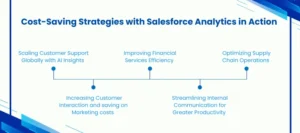
Cost-Saving Strategies with Salesforce Analytics in Action 

Cost-Saving with Salesforce Analytics

Salesforce Analytics is not just a reporting tool; it is a business strategy solution that brings about actual cost savings in business. With the help of Salesforce CRM optimization, Salesforce automation benefits, and Salesforce data analytics, organizations will be able to minimize inefficiencies, enhance decision-making, and increase ROI. Here’s how:

Increasing Customer Interaction and saving on Marketing costs

Using customer data that is integrated across departments, channels, and geographies gives a full understanding of every customer experience. This enables the marketing teams to create very personalized campaigns that will appeal to their audience to get them more engaged and reduce the amount of wasted funds. Businesses can track the performance of campaigns in real time, modify strategies dynamically, and prevent unwarranted marketing expenses using Salesforce dashboards and Salesforce reports.

Improving Financial Services Efficiency

Workflow automation in the financial services industry removes redundant activities, minimizes mistakes, and simplifies approvals. Automated sales processes shorten process times, reduce processing time, and liberate staff to do more valuable work. Using Salesforce data analytics, teams are able to determine process bottlenecks, allocate resources more effectively, and eventually end up saving costs of operation and enhancing client satisfaction.

Streamlining Internal Communication for Greater Productivity

Making internal communications and task assignment central will help employees to spend less time searching for information or communicating between teams. Salesforce data visualization and real-time dashboards allow managers to keep track of progress, allocate tasks efficiently, and measure team performance. This not only enhances productivity but also lowers the costs of labor as workers can work on strategic and revenue-generating tasks.

Optimizing Supply Chain Operations

When suppliers, warehouses, and transportation partners combine their data, companies will be able to have complete visibility of the supply chain. Salesforce Analytics can maximize inventory, better predict demand, and enhance delivery timelines. Such insights save inventory holding costs, avoid stockouts, and save avoidable logistics costs, bringing physical savings to different operations.

Scaling Customer Support Globally with AI Insights

Through Salesforce Einstein Analytics, companies can automatically rank support tickets with high impact and also optimize the workflow of support teams worldwide. Recommendations made by AI also inform agents of the next-best action so they can resolve quickly and maintain the same level of service quality. This enhances the satisfaction of the customers, besides minimizing the labor costs of support, allowing the team to manage greater volumes with fewer resources. 

Conclusion 

The adoption of Salesforce Analytics is no longer a choice but a strategic requirement as the business aims to cut down on its costs, increase productivity, and make more intelligent decisions. Salesforce allows organizations to transform data into quantifiable returns, whether in improving marketing campaigns and financial processes, improving supply chain operations, and customer support globally. With the added value of Salesforce data analytics, Salesforce CRM optimization, and Salesforce automation, businesses can optimize their processes, enable teams, and identify opportunities of growth with accuracy. By collaborating with specialists such as AnavClouds Software Solutions, you will have an implementation of Salesforce that meets your specific requirements to ensure the best ROI and provides you with actionable knowledge that can lead to long-term success. 

FAQs 

What is Salesforce Analytics, and what does it provide my business to save money? 

Salesforce Analytics is an effective tool that can be used to convert raw business data into useful data. Through Salesforce dashboards and reports, CRM optimization, and Einstein Analytics, businesses receive the chance to identify inefficiencies, automate their workflows, reduce the costs that are not necessary, and save thousands of dollars annually. 

How efficient is Salesforce CRM optimization? 

It streamlines Salesforce CRM to ensure that your workflows, dashboards, and processes are aligned to your business goals. It streamlines the daily processes, combines customer data and provides real-time information, and allows the teams to make quick decisions and reduce errors and reduce the operational cost. 

Does Salesforce Einstein Analytics happen to predict business trends and opportunities? 

Yes. Salesforce Einstein Analytics is an artificial intelligence predictive insight technology that delivers predictions of future trends, high-value leads, and the most suitable next steps. These insights enable organizations to make proactive decisions, increase customer engagement, and maximize the ROI. 

Which cost-saving benefits of Salesforce Analytics are the most important? 

With Salesforce Analytics, businesses will be in a position to simplify their market operations, automate manual operations, create awareness within their supply chains, and be more effective in customer service. These will improve the cost of operation, time savings, and augment financial organization-wide savings in a quantifiable manner. 

Salesforce Custom Development

Technology investments may either break or make growth plans of small and mid-sized enterprises (SMBs). Salesforce is a platform that is utilized by many organizations in order to handle customers, automate processes, and simplify operations. However, the bigger question is – will you develop a custom application on Salesforce custom development services or purchase a marketplace application? 

There is no one-size-fits-all solution. Although ready-made software is fast to implement and inexpensive to start with, it might not be as in-depth and flexible as expanding corporations require. Conversely, Salesforce custom app development will help you create new features that align with your business processes, automate complex tasks, and remove redundant software dependencies – which in many cases will save up to 10k dollars in long-term costs. 

This blog is designed to discuss the built vs. bought dilemma in greater detail to make sure that you select the most economical and scalable strategy when doing business. 

Salesforce Custom Development vs. Pre-built Solutions 

The biggest dilemma that businesses face when choosing software is whether to develop their own software or purchase an off-the-shelf product. This question is the same when it comes to planning Salesforce implementations: should you invest in Salesforce custom development services, or settle on ready-made solutions? 

We can separate the two approaches and observe how the small and mid-sized businesses (SMBs) can make a smarter investment. 

Save thousands a Year with Salesforce Custom Development Services — Build Smarter, Scale Faster.


Introduction to Salesforce Custom Development Services 

Salesforce custom application development is concerned with the development of solutions that are specific to the requirements of your business. With Salesforce custom application development, you are in complete control of workflows, integrations, and features, in contrast to pre-built tools, which means your CRM will accommodate your business operations. 

Under Salesforce custom app development, all features are aligned with your business model. It is possible to automate niche processes, customize dashboards, and even build special modules not offered in regular Salesforce versions. This freedom empowers your business to innovate quickly and scale smarter. 

Yes, Salesforce custom development services might appear quite costly at first in comparison to off-the-shelf offerings. Nonetheless, the payback period is usually long-term rewarding. By removing various third-party licenses and manual inefficiencies, Businesses can save thousands of dollars a year. And because the app itself is entirely yours, subscription restrictions do not repeat. 

This is normally done by planning, designing, developing, testing, and deploying. However, low-code and fast Salesforce development services have made the roadmap to idea-to-implementation shorter and cheaper. You have the best of both worlds: a solution that is totally customized without protracted schedules and huge budgets. 

After deployment, your Salesforce software developer is very certain of the minimum changes to be made since all features are tailored to your company’s workflows. 

Ready-Made Salesforce Solutions: Rapid and Small 

When you need a fast fix, then off-the-shelf applications appear to be enticing than Salesforce custom development services. These ready-made products have instant configurations, standardized features, and low costs. It could be SaaS solutions such as QuickBooks, Shopify, or Salesforce itself, but these solutions allow businesses to go live in no time with no complicated development cycles. 

Mass use: such software is not specific to your tasks, but addresses the general business problems. Although these solutions have updates, maintenance, and vendor support, they may fail miserably in terms of customization or custom Salesforce integration with other systems. 

The greatest weakness of off-the-shelf software is its inflexibility. You cannot always make it fit particular business requirements, and there are compatibility problems or lock-in by the vendor. It means that you can gain speed at the cost of flexibility and control, particularly when your business develops and requires a higher level of customization. 

Pros and Cons of Salesforce Custom Development vs. Pre-Built Tools 

Choosing between Salesforce custom development services and pre-built software isn’t just a cost decision — it’s a strategic one. Each approach has its own advantages and drawbacks depending on your business model, goals, and scalability needs. Here’s how both options compare. 

Pros of the Salesforce Custom Development 

Unparalleled Customization and Scale 

The largest benefit of Salesforce custom development services is that it suits your business much like a glove. All features, dashboards, and processes may be created to meet your specific operational requirements. Using Salesforce to build a custom application, you can have a system that scales with the development of your business, from prototype to full enterprise. 

In addition, feedback can influence functionality directly, so that your CRM can work across teams. This renders Salesforce custom application development suitable for organizations that desire to have perfect alignment of technology and operations. 

Full Ownership and Control 

When the Salesforce custom development services are involved, you acquire complete ownership of the product. You determine the information management, access by users, and the implementation of updates. This control will even enable you to repackage your solution to resell or deploy it internally as SaaS, should you wish. 

In contrast to the off-the-shelf tools, which have constrained configurations, Salesforce development services are flexible, controllable, and autonomous at all life cycle stages of the product. 

A Sustainable Competitive Advantage 

Salesforce custom development services are used to provide your business with a sustainable competitive advantage. Automation, analytics, and smart integrations will allow you to stay ahead of competitors who are still using generic CRMs. The specially designed Salesforce solution is capable of enhancing productivity, strengthening client interactions, and positively defining yourself as a technologically-oriented leader. 

Frictionless Custom Salesforce Integration 

Starting fresh implies that your platform integrates flawlessly with your entire existing systems – ERP, marketing automation, analytics, or third-party applications. Using custom Salesforce integration, you do not have to sacrifice compatibility and rely on external plug-ins that might fail to support your growth. 

Problems with Salesforce custom development services 

Higher Initial Investment 

It cannot be denied that Salesforce custom development services demand more initial funds compared to pre-built tools. However, off-the-shelf solutions may appear less expensive at the start-up stage, but they may be more expensive in the long run. Inefficiencies and high costs can be caused by the inability to scale, the lack of integrations, and repeated payments in the form of subscriptions. 

Bespoke software, on the contrary, is a long-term investment that enhances productivity, profitability, and operational control. 

Longer Development Time 

Salesforce custom development services involve intricate process mapping, workflow analysis, and testing. It is long before you can come up with something that really suits your purposes. However, with the accelerated Salesforce platform development services and low-code capabilities, the development process has been shortened, enabling the business to gain results without any delays. 

Benefits of Ready-to-Use Salesforce Solutions

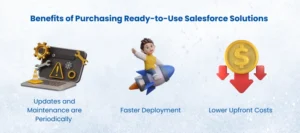
Benefits of Purchasing Ready-to-Use Salesforce Solutions 

Lower Upfront Costs 

When you have a small amount of capital available or have to move fast, it may be feasible to acquire ready-made Salesforce tools. Numerous ready-to-use applications are also subscription-based based meaning that they are cheaper to get started with than a custom build. 

Faster Deployment 

Ready-made applications are generally plug-and-play. You can apply them nearly immediately and begin to use the important features immediately. This is an effective option in businesses whose needs are simple. 

Updates and Maintenance are Periodically 

Vendors offering off-the-shelf solutions are involved with maintenance, updates, and additions of new features. It is to say that it would reduce the amount of pressure on your own IT department and allow you to concentrate on your business. 

Disadvantages of Relying on Pre-Built Solutions 

Limited Customization 

Off-the-shelf products might have rudimentary customization, but they cannot offer the customizability of Salesforce custom application development. Eventually, you might experience the lack of operational efficiency where your software cannot match the changing requirements. 

Lack of Control 

Given that vendors are the owners and runners of the platform, you do not have much control over updates, system capacity, or roadmap decisions. This may induce addiction and limit flexibility, particularly when you grow in business. This disadvantage is eliminated if you use Salesforce custom development services. 

Integration and Compatibility Issues 

Existing software usually fails in integrating with Salesforce customization. With an increasing tech stack, compatibility between your CRM, marketing tools, and analytics platforms opens up, decreasing overall efficiency. 

Hidden Long-Term Costs 

Although off-the-shelf solutions are cheaper in terms of initial costs, the recurring subscription, licensing renewal, and additional costs may pile up soon. Your overall cost of ownership increases with your company size, and it is frequently more expensive than Salesforce custom development services. 

Conclusion 

The decision to develop or purchase an application should rest on your objectives, but in most cases, Salesforce custom development services offer the best trade-off between flexibility, scalability, and long-term cost savings to most growing SMBs. With a custom solution, you can have full control over your CRM ecosystem, smooth Salesforce integration, and a competitive edge that can only be found in off-the-shelf tools. 

We are AnavClouds Software Solutions, where we focus on creating and implementing programmed Salesforce applications that make businesses grow smarter and save thousands of dollars annually. Whether Salesforce custom applications development, integration, and automation, our professionals will make sure that your CRM is the right fit for your business, not the reverse. 

Willing to save more and develop more rapidly? 

Connect with AnavClouds Software Solutions today to find out how our Salesforce-certified team can assist you in creating a customized, future-ready Salesforce solution capable of producing measurable outcomes. 


FAQs 

What are Salesforce custom development services? 

The Salesforce custom development services entail the development of applications or features of Salesforce, which are specific to the needs of your business. These services will enable you to create your own workflows, automate complex workflows, and combine Salesforce with other business systems to be more efficient and in control. 

What would Salesforce custom app development save SMBs? 

Although the initial price of Salesforce custom app development might appear to be more expensive, it assists small and medium-sized companies to save thousands of dollars in the long term. You do away with optional third-party applications, lessen handwork, and obtain a system that grows with your expansion, typically to the tune of saving up to 10,000 dollars annually in enhanced productivity and lowering the software licensing expenses. 

What is the distinction between Salesforce off-the-shelf and custom development? 

Off-the-shelf software is standard and requires less time to install, although it is not designed to meet your unique requirements. On the contrary, Salesforce custom development provides ownership, control, and flexibility. You are also able to build features, dashboards, and integrations that are specific to your business, and make sure that your CRM changes with your strategy instead of constraining it. 

What do I do to identify the appropriate custom Salesforce software developer? 

The appropriate custom Salesforce software developer is an end-to-end certified Salesforce partner who has experience in developing, integrating, and automating. Find a vendor that knows your business, has clear rates, and offers responsive service, such as AnavClouds Software Solutions, which has been recognized as offering custom Salesforce solutions with response times of 5 hours. 

Dreamforce 2025

AI & CRM Innovations October 14-16, San Francisco


The World’s Biggest AI & CRM Event Is Back — Dreamforce 2025
 

Each year, Dreamforce brings the entire Salesforce community together in a remarkable event of innovation, education, and bonding. Dreamforce 2025 is set to be more vibrant than ever this year – with a line up of business leaders, developers and partners who are driving the next generation of AI and CRM. 

With the recent advancements of the newest breakthrough in Agentforce to the development of AI-powered enterprise solutions, Dreamforce 2025 heads to the convergence of human intelligence and digital transformation. It is the intersection point of technology and empathy, as well as humans and AI working together to reinvent the way organizations create remarkable customer experiences (CX). 

In the case of AnavClouds Software Solutions, it is not just about participation in this global movement, but demonstrating our drive towards Salesforce innovation and discussing the ways in which AI can help businesses become smarter and faster.  

Dreamforce 2025: Where Innovation Meets the Salesforce Ecosystem 

Dreamforce 2025 is the final destination of the Salesforce ecosystem, where innovators, developers, and decision-makers meet worldwide. This is not just a technology conference, it is a global innovation venue where ideas, experiences and solutions will converge to define the future of AI and CRM. 

The dimensions of Dreamforce 2025 is unparalleled. It features thousands of participants and hundreds of expert presentations and demonstrates how Salesforce is further working to enable businesses to create intelligent, connected, and AI-driven businesses. Since product introduction to practical learning opportunities, each of the sessions underlines innovative methods of changing customer relationships with the help of technology. 

The most impressive challenge about Dreamforce 2025 is that it aims to establish a human-AI synergy. It makes real how smart automation, data-guided insights, and Salesforce innovation can enable smooth customer experiences (CX) throughout the business life cycle. In the case of companies such as AnavClouds Software Solutions, it is the best place to introduce new opportunities, get to know the industry leaders and evolve the world of AI and CRM which is changing so fast. 

Let’s talk about how AI and Salesforce can redefine your business growth.


What Salesforce Consulting Partners Can Expect from Dreamforce 2025 

Dreamforce 2025 is not just a world-renowned Salesforce event but an actionable platform of innovation, collaboration, and expansion in the Salesforce ecosystem. This is what Salesforce consulting partners can expect at the event of this year:

Availability of the Recent Salesforce Innovations

Partners will have access to the latest product innovations at Salesforce, such as Agentforce, Einstein AI innovations, and AI-powered enterprise redefining tools.

Greater Intelligence of AI and CRM Integration

Live demos and sessions will illustrate the collocation of AI and CRM to establish smarter processes, predictive intelligence, and increasingly personalized customer experiences (CX).

Practical Learning and Masterclass

Dreamforce 2025 includes interactive labs and certification programs and expert-led discussions that assist partners to enhance their technical and strategic Salesforce skills.

The Global Salesforce Leader Networking

It is the most perfect spot to have relationships with industry pioneers, clients, and other partners as well – exchange ideas and real-life implementation of Salesforce innovation.

Working together in a Human + AI Future

In Dreamforce 2025, the focus is on balancing humanity and AI, which motivates such partners as AnavClouds to create the solutions that would provide more business performance and human innovativeness. 

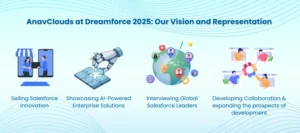
AnavClouds at Dreamforce 2025: Our Vision and Representation 

AnavClouds at Dreamforce 2025

At Dreamforce 2025, AnavClouds Software Solutions will be glad to present its experience as a Salesforce Certified Consulting Partner, and explain to us how innovative solutions can change the businesses in the AI and CRM field. This is the way we intend to make a difference:

Selling Salesforce Innovation

AnavClouds will emphasize its innovative services, such as tailored Salesforce development, artificial intelligence-based automation, and Agentforce integrations, which will allow companies to become more efficient and provide their customers with outstanding experiences (CX).

Interviewing Global Salesforce Leaders

We will also take an active interest in the sessions, workshops, and networking activities to engage with industry pioneers, exchange ideas, and seek opportunities to develop innovative solutions jointly within the Salesforce environment.

Showcasing AI-Powered Enterprise Solutions

We will be providing real-life case studies in which AI agents and intelligent automation have been applied to improve business operations, showing how human beings and AI can collaborate to achieve quantifiable results.

Developing Collaboration and expanding the prospects of development

Through reaching out to potential customers and business partners during Dreamforce 2025, AnavClouds wants to promote the collaboration that can help the business achieve its transformation faster and its status as a reliable Salesforce innovations partner in the whole world. 

Why Dreamforce 2025 Is More Than an Event 

Dreamforce 2025 is not only a conference, but also a venue of innovation, learning and collaboration in the Salesforce ecosystem. Whether as a developer, marketer or executive, this is an occasion that will show how Salesforce can facilitate the transforming of the business way of doing things and deliver unbelievable customer experiences (CX). 

Dreamforce 2025 you can expect to:

Get to know Salesforce Innovation at State-of-the-art

Get acquainted with the latest tools and solutions, including AI-oriented automation, and learn how companies are building AI-oriented businesses to perform smarter and faster.

Learn from Industry Leaders

Visit keynotes, workshops and hands-on sessions to understand Salesforce innovation best practices, new trends and live examples.

Connect with Global Leaders

Communicate with the workforce, managers and Salesforce experts, exchange ideas and develop strategic partnerships that potentially spur growth and launch new opportunities.

Video: The Future of Humans + AI

See what AI will be like next time, and understand how to make human beings and AI collaborate to become more creative, efficient, and effective decision-makers. 

Join the Future of Salesforce at Dreamforce 2025 

Dreamforce 2025 is not just an event, it is a world-renowned Salesforce innovation, AI and CRM, and the new partnership between humans and AI. Coming together with leaders in the Salesforce ecosystem, the event presents unprecedented opportunities to learn, develop and transform customer experiences (CX). 

In order to remain ahead in the ever-changing digital environment, Dreamforce 2025 is an ideal place to learn, explore new technologies, and see how the next generation of AI agents works. 

Without trying, do not miss this transformational journey. Meet AnavClouds Software Solutions at Dreamforce 2025 to see how innovative Salesforce solutions can make growth faster, operations more efficient, and every part of your business strategy easier. 

Salesforce Automation Tools

The manual processes may become a drag in a rapidly changing business environment. Activities such as data entry, approvals, and follow-ups frequently eat hours that would otherwise be used to drive growth. That is where Salesforce automation tools come in – converting manual processes that drain time to streamlined and smart processes that provide quantifiable value. 

Automation using Salesforce is not only about saving time but also building scalable systems which are working smarter each day. Salesforce Flow Builder and Process Builder to automate approvals and lead routing are some of the tools that enable teams to work effectively in sales, marketing, service, and finance. The result? Better productivity and deal closures, as well as up to $10K of savings, by having technology do the repetitive work. 

This blog will look at the most influential cases of Salesforce workflow automation, its business advantage, and the way enterprises are leveraging automation to increase ROI and performance throughout. 

Unleashing Salesforce Automation Tools with Enterprise Efficiency 

The world of modern business is based on speed, accuracy, and efficiency, and the Salesforce automation tools are exactly where the enterprises would redefine the way they do their work. Salesforce is not merely a CRM solution, but an entire ecosystem that is designed to automate, optimize, and scale operations across departments. Salesforce workflow automation eliminates the manual inefficiency that can slow down teams and make them expensive, across marketing and sales, finance, and service. 

See how Salesforce automation saves time and costs across your workflows.


Learning Salesforce Process Automation 

Salesforce process automation is the process of automating Salesforce business workflows to substitute manual operations with smart automation. These applications make complicated tasks easier, enhance teamwork, and enable companies to grow without increasing overhead. The main automation features are: 

  • Salesforce Flores Builder: An easy-to-use, drag-and-drop tool enabling teams to create multi-step workflows amongst different departments – no code writing is needed. 
  • Salesforce Process Builder: It is most appropriate for straightforward rule-based activities like updating the records, sending alerts, or initiating follow-ups. 
  • Salesforce Approval Processes: This allows the multilevel, criteria-driven approvals to be put in place to approve contracts, quotes, or pricing discounts. 
  • Case Escalation Rules (Service Cloud): Unresolved support cases are automatically given priority and rerouted to be resolved faster. 
  • Lead Assignment Rules & Territory Models: The rules allocate leads to the right salesperson based on logic or geography. 
  • Apex Triggers & Scheduled Jobs: Provides more advanced automation to businesses that require more customization. 

All these Salesforce automation tools assist in developing scalable workflows that can be reliable, decrease human intervention, and increase business adaptability. 

The Unseen Price of Manual Processes 

Automation will fast-track growth, but manual work processes silently eat productivity and profit. An eye-opening finding for the Salesforce State of Sales Report was that among the sales teams, one out of every four spends less time selling and more on administrative tasks, such as data entry, approval, and scheduling. 

As you automate your workflows in Salesforce, your teams will be able to prioritize strategic work over repetitive work, which includes lead nurturing, customer retention, and innovation. Automation is also associated with minimized human error, accelerated decision-making, and compliance, which are considered to generate quantifiable financial benefits. 

The Strategic Necessity of Salesforce Automation Tools 

In the current competitive business world, leaders need to accomplish much less using less. This is the point where Salesforce process automation is strategic, rather than an upgrade to operations. 

The discrepancy between the one-month sales cycle and the one that handles within days is usually the implementation of automated workflows that support the generation of documents, work approvals, and follow-ups in the background. 

To most companies evaluating ServiceNow vs Salesforce in terms of automation features, Salesforce boasts of CRM-based architecture, native extensibility, and a rich ecosystem of integrations. The result? Quicker turnaround, smoother operations, and major savings – usually more than $10K a year in lower manual labor and process expenses. 

7 Game-Changing Salesforce Automation Tools That Save Enterprises Millions 

7 Salesforce Automation

Automation does not have the same effect. Others are time-savers; others are game changers in the way teams sell, serve and work together. Proper Salesforce automation tools will be able to remove repetitive tasks, accelerate decision-making, and unlock hidden ROI within departments. The following 7 real-life examples of Salesforce workflow automation are those that continue to power quantifiable value delivery to companies.  

Intelligent Lead Routing Which is Faster

One of the largest bottlenecks of growing businesses is the manual assignment. You can also use Salesforce process automation to automatically allocate incoming leads to the appropriate reps depending on location, deal size, or product interest.  

The tools that I used are Lead Assignment Rules, Salesforce Flow Builder, and Territory Models.  

Key Benefits:  

  • None of the errors in lead allocation.  
  • Fair workload between sales teams.  
  • Better speed-to-lead in 10 minutes – the golden window of conversions.  

Pro Tip: Router logic should be customized to treat high-value accounts, meaning that the best-performing reps should be called first. 

Automated Approval Workflows That Close Deals Quicker

Approvals shouldn’t slow down your sales cycle. Salesforce approval processes automate multi-level reviews for quotes, discounts, or contracts, ensuring compliance without endless email threads. 

Tools Used: Approval Process, Flow Builder, and Email Alerts. 

Key Benefits: 

  • Shorter approval cycles and improved deal velocity.
  • Transparent audit trails for pricing compliance.  
  • Seamless collaboration between sales and management.  

Pro Tip: Use criteria-based logic to skip approvals for pre-approved pricing, freeing up leadership time. 

Case Escalation Rules That Protect Customer Trust

When customers report issues, delayed responses can hurt brand loyalty. Salesforce workflow automation in Service Cloud helps identify and escalate unresolved high-priority cases before they spiral. 

Tools Used: Case Escalation Rules, Case Assignment Rules, and Omni-Channel Routing. 

Key Benefits: 

  • Enhanced SLA compliance.
  • Faster issue resolution.
  • Reduced churn through proactive service management.

Pro Tip: Use keyword-based triggers (“cancel,” “angry,” “urgent”) to escalate emotionally charged cases instantly. 

Auto-Task Creation from Web Forms

Your website and campaigns generate leads every day. Salesforce automation tools allow task creation to ensure no potential customer slips through the cracks. 

Tools Used: Process Builder or Flow Builder, Web-to-Lead, and Task Object Configuration. 

Key Benefits: 

  • No missed follow-ups or manual data entry.
  • Faster response to high-intent prospects.
  • Streamlined coordination between marketing and sales.

Pro Tip: Set dynamic due dates — 4 hours for urgent support requests, 24 hours for demo follow-ups. 

Lifecycle Triggers that spur Customer Retention

The relations with customers are based on prompt interaction. Onboarding, renewals, and upsells can be automated using Salesforce Flow Builder, contingent on the stage of the customer journey.  

These tools will include Flow Builder, Email Alerts, and Time-Based Actions.  

  • Day 1: Welcome email + CSM introduction.  
  • Day 30: Automated survey.  
  • Day 90: QBR reminder task.  

Outcome: Churn was reduced by 12 percent, and the upsell revenue increased by 8 percent.  

Key Benefits:  

  • Enhanced boarding process.  
  • Early interaction during the customer journey.  
  • Increased retention and lifetime value.  

Pro Tip: Branching logic to workflows of the SMBs and enterprise clients.  

Opportunity Stage Team Alignment Notifications

Bargains are quick, and teams require immediate updates. The process automation in Salesforce keeps everyone on track with sending notifications when the opportunity passes a stage.  

Tools: Flow Builder, Notification Builder, and Slack/Teams Integration.  

Key Benefits:  

  • None of the manual check-ins between departments.  
  • Enhanced accuracy in forecasting.  
  • Shorter and more open sales cycles.  

Pro Tip: Slack or Teams integration is used to receive instant notifications about high-value deals. 

Subscription and Billing Alerts That Prevent Revenue Leaks

Missed renewals or failed payments can cost thousands. With Salesforce automation tools, finance teams can receive instant alerts before revenue slips away. 

Tools Used: Flow Builder, Time-Based Workflows, and Third-Party Integrations (Stripe, Zuora). 

Key Benefits: 

  • Timely renewals and proactive payment follow-ups.  
  • Improved cash flow predictability.  
  • Reduced manual coordination between sales and finance.  

Pro Tip: Integrate payment gateways through Salesforce API for real-time alerts and unified visibility. 

Conclusion 

Moving manual-to-automated workflows is not merely a digital upgrade but a strategic action to achieve increased efficiency and smarter working. Enterprises can automate their tasks by using Salesforce automation tools to reduce redundant costs, complemented by faster outcomes without compromising quality and compliance. It can be automating lead management, approvals, or even customer engagement: Salesforce offers a single automation platform to build on and easily scale as your business expands. 

Salesforce development services focus on designing tailored workflow automation solutions, which make it easier to operate and increase productivity. AnavClouds Software Solutions provides certified professionals to assist companies in leveraging the full potential of automation. Now is the time to go manual to magic with automation that will provide quantifiable growth and long-term value. Book a demo with us today! 


FAQ 

What are Salesforce automation tools? 

Salesforce automation tools consist of in-built applications such as Flow Builder, Process Builder, and Approval Processes, which are used to automate menial functions, workflow, and manual processes within the various departments. 

What are the productivity benefits of Salesforce automation tools? 

Salesforce workflow automation can free up time spent selling, planning, and creating improved customer experiences by automating data entry, approvals, lead assignments, and customer communications. 

What is the distinction between Process Builder and Flows on Salesforce? 

The complexity of Flows and Process Builder in Salesforce is different. Process Builder can be used in automation processes that are not complex, and Flow Builder can be used to do multi-step processes that are dynamic and provide more freedom with regard to enterprise-level processes. 

What is the role of AnavClouds Software Solutions with Salesforce automation? 

AnavClouds Software Solutions assists businesses in designing, deploying, and optimizing Salesforce process automation to achieve maximum ROI. Our team provides everything to make sure that your Salesforce environment functions smoothly and grows with you: custom workflows, AI-powered automation, etc. 

Salesforce License Optimization

The Salesforce license management is one of the primary challenges for many SMBs. Excess spending on licenses that are not used and a lack of alignment of access can also create a very fast increase in the operational costs, where businesses pay thousands of dollars annually that they do not need. With proper Salesforce license management and optimization strategies, companies can streamline their license allocation, reduce costs, and improve overall efficiency. This blog addresses the real-world actions to ensure that licensing meets the real business requirements and how AnavClouds Software Solutions can assist SMBs in saving hundreds of dollars a year in license fees by intelligently managing licenses. 

How Salesforce Optimizes Salesforce Licenses: Why SMBs Can’t Afford to Ignore it 

Effective Salesforce license management ensures your organization uses the most suitable and cost-efficient Salesforce licenses for your team’s needs. This process, known as Salesforce license optimization, involves understanding different Salesforce license types, auditing license usage regularly, managing inactive or unused licenses, and negotiating contracts strategically. 

According to research by Gartner, companies can reduce software expenses by up to 30% with the right Salesforce license management approach. In the case of SMBs on Salesforce, it could often be converted into significant savings per year, with the efficiency of their operations preserved. 

Optimizing licenses means assigning the right Salesforce user licenses to employees based on their role, ensuring they have access to all necessary Salesforce functionalities without overpaying for unused features. Additionally, as roles and responsibilities evolve within your business, Salesforce license optimization ensures your team’s access remains aligned with current operational needs. 

Some Salesforce licenses offer sensitive information and administrative controls. By giving users only the access they require, you not only lower the risk of data breaches but also remain compliant with data protection regulations–a critical factor for any SMB leveraging Salesforce CRM. 

Moreover, conducting regular system security audits in conjunction with Salesforce license management strengthens compliance and protects your organization. To be more specific, you can read our Salesforce security assessment best practices blog. 

In short, Salesforce license optimization is far more than a cost-saving exercise is a strategic approach that boosts operational efficiency, enhances security, and increases your return on investment. Engaging with expert Salesforce Consulting partners and leveraging Salesforce Agentforce services can help SMBs implement these practices seamlessly. 

Want to reduce your Salesforce license costs this year?


Cutting Salesforce License Costs: Strategies for SMBs 

Reducing Salesforce license costs can feel challenging, especially with contract terms that often commit organizations to annual renewals and full license volumes. However, with effective Salesforce license management, SMBs can rationalize their subscription costs while ensuring every user has the right access. This is how to do it strategically: 

Establish Realistic Salesforce License Benchmarks 

Before subscribing to Salesforce CRM, define clear pricing expectations based on your business size, deal volumes, industry, and budget limits. Understanding the needs of your team and the data they access will help you select the most suitable Salesforce license types and determine the exact number of Salesforce user licenses required. 

For a precise cost evaluation, consulting with experienced Salesforce Consulting partners can provide insights into the most cost-effective licenses for your SMB, helping you negotiate pricing successfully. 

Adjust Licenses to Real Business Requirement 

 Such tempting packages as Customer 360 might be appealing to the SMBs, but they should concentrate on urgent needs. Tailor Salesforce license optimization to current operational needs, keeping room for future upgrades or expansions. It is all about flexibility; do not be afraid to renegotiate licenses when your business changes. 

Anticipate Future Growth 

It is important to estimate software requirements to develop evolving businesses. Excessive estimation will create some unused licenses and wasted money, whereas underestimation may result in last-minute buying. Thoughtful forecasting helps maintain efficient Salesforce license management and reduces overall expenditure. 

Frequently Review License Usage 

Undertake regular audits to determine licenses that are underutilized. Use tools such as: 

  • Free Salesforce reporting tools. 
  • Salesforce Optimizer add-ons. 

AppExchange third-party license management solution 

Revise accounts with inactive users (not logged in during 45-60 days). This guarantees that licenses are reallocated efficiently, and this is efficient and does not lead to unnecessary expenditure. 

Discover Economical Salesforce licenses 

Sort users according to the type of license, frequency of use, and functionality requirements. Consider switching some users to community licenses, connectors, or AppExchange solutions if they don’t require full Salesforce CRM access. This approach can significantly reduce Salesforce licensing costs. 

Think about Multi-Year Contracts  

The long-term contracts usually have reduced per-user license rates and allow your operations to be stable. This approach is a way of ensuring predictable costs and long-term savings without sacrificing access to the Salesforce platform. 

Keep abreast with Releases and License Change 

Track Salesforce’s new features to maximize new licenses and improvements. Proactivity enables you to redistribute licenses effectively to ensure that you make maximum use of each user. 

Optimize Data Storage 

Unnecessary data storage may raise expenses. Periodically store old records or delete the outdated records to maintain storage capacity. For guidance, professional Salesforce Consulting partners and Salesforce Agentforce services can help implement cost-effective data management strategies. 

Obtain Favourable Pricing and Contract Negotiation 

Renewal caps and add-on pricing have to be negotiated in order to achieve cost efficiency in the long term. Use insights from Salesforce license optimization efforts to secure predictable and lower costs for future contracts. 

Train Users Effectively 

The educated users are the ones who utilize the capability of the platform to the fullest so that they do not have to get extra licenses. Invest in video tutorials, guides, and workshops to ensure your team leverages Salesforce fully, complementing your Salesforce license management strategy. 

By implementing these strategies, SMBs can significantly reduce Salesforce licensing costs while ensuring operational efficiency and strategic agility. Partnering with expert Salesforce Consulting partners and leveraging Salesforce Agentforce services makes the process smoother, more effective, and highly scalable. 

Aligning Salesforce Licenses With Business Needs for Maximum Savings 

Effectively managing Salesforce user licenses starts with assessing your organization’s business needs and current license usage. For SMBs, this is a critical step in Salesforce license optimization that prevents overspending and ensures every user has the right tools to perform efficiently. 

Periodically review the use of licenses 

Periodic audits are used to determine licenses that are not in use or are idle. There are applications like Salesforce Optimizer, the License Management App (LMA), or third-party applications such as Zluri that can give details on user activity and the usage of the licenses. Decommissioning idle users or redistributing idle Salesforce licenses makes it cost-effective and efficient. 

Match Licenses to User Roles 

It is important to know user roles and responsibilities. Aligning Salesforce license types with actual job functions prevents over-licensing and ensures employees have access to the features they need. Role-based access and permissions streamline operations while maximizing the value of your Salesforce CRM investment. 

Select the Choice of the Right Licenses and Products 

Choose licenses based on the current business needs and avoid paying an unjustified amount of money. SMBs have options like community licenses, connectors, or user-based AppExchange solutions that are less expensive than alternative options. Consulting with Salesforce Consulting partners and leveraging Salesforce Agentforce services can guide the selection process for optimal cost savings. 

Plan for Future Growth 

Projecting the future license requirements can prevent expensive last-minute upgrades or unused licenses. Consider scalability when selecting Salesforce user licenses to accommodate business expansion while maintaining efficient Salesforce license management. 

Strategize on Making Contracts 

Earlier negotiation of contracts may help to reduce the per-user cost and ensure good conditions on renewals. The leverage in the discussions is provided based on historical data of usage and industry standards. A long-term contract or multi-year agreement can also stabilize costs, further guaranteeing predictable budgeting and long-term savings. 

Train Users Effectively 

When the user is educated, he or she makes the most out of the platform and minimizes the need to acquire extra licenses. Implement training programs, workshops, and guides to empower teams, complementing your Salesforce license optimization strategy and improving ROI. 

Edit Data and Track Changes 

Effective Salesforce data storage management helps to save additional fees. By archiving unneeded data, compressing files, and tracking Salesforce changes, it will guarantee that licenses are being used to their full extent, and the costs are reduced. 

By assessing business needs, aligning licenses with roles, and leveraging expert guidance from Salesforce Consulting partners and Salesforce Agentforce services, SMBs can optimize Salesforce license management, reduce unnecessary spending, and maximize the value of their Salesforce investment. 

How AnavClouds Can Help SMBs Reduce Salesforce Costs 

Reduce Salesforce Costs

To most SMBs, it may be daunting to efficiently manage Salesforce licenses at an affordable cost. That is where the AnavClouds Software Solutions comes with our Salesforce plan, which is priced at $500 and is specifically tailored to assist small and mid-sized businesses have the ability to maximize their Salesforce investment without straining the bank. 

General License Auditing and Optimization 

Our plan begins with a detailed assessment of your current Salesforce user licenses and usage patterns. A detailed audit will help us find out the licenses that are not used, unnecessary features, and cost-cutting options. This ensures your Salesforce license management is aligned with your team’s actual needs, eliminating unnecessary expenses. 

Individualized Role and Access Alignment 

We help you assign the right Salesforce license types to each user based on their role and responsibilities. The ability to match access levels with business needs will help SMBs save money and also provide employees with the means to do their job effectively. 

Supporting Integration and Development 

The $500 plan also includes expert guidance for Salesforce integration services and Salesforce development services, ensuring your CRM setup works seamlessly with your existing tools. This enhances productivity, minimizes redundancy of licenses, and maximizes ROI. 

Anticipating Cost-Reduction Measures 

With Salesforce Agentforce services, we continuously monitor license usage and recommend optimizations, keeping your Salesforce license costs as low as possible. We also offer recommendations on contracting across multiple years, management of data storage, and planning of future licenses, which means that your investment will be inexpensive in the long term. 

Operational Insights and Reporting 

Our task force provides simple, practical information on the ways to streamline your Salesforce environment. From trimming unused licenses to recommending the right license mix for new users, our Salesforce license optimization strategies help SMBs save up to $10K annually without compromising functionality. 

With the AnavClouds $500 plan, SMBs gain a practical, affordable solution to reduce Salesforce licensing costs, streamline operations, and get the most out of their Salesforce CRM. Partnering with expert Salesforce Consulting partners like AnavClouds ensures your business is set up for efficiency, compliance, and long-term savings. 

Conclusion 

Optimizing Salesforce user licenses is no longer just a cost-saving measure–it’s a strategic necessity for SMBs aiming to maximize efficiency, security, and ROI. By auditing licenses, aligning access with user roles, and leveraging expert Salesforce Consulting partners, businesses can significantly reduce Salesforce license costs while ensuring employees have the tools they need. With the AnavClouds $500 Salesforce plan, SMBs gain a practical solution for Salesforce license management, helping them right-size licenses, optimize usage, and achieve meaningful savings every year. AnavClouds can help you manage your Salesforce expenditures today and change the manner in which your SMB utilizes Salesforce. 

AI Agents in Marketing Salesforce

Salesforce AI agents are changing how businesses plan, execute, and optimize campaigns. These advanced systems are more autonomous, unlike the more traditional marketing automation, since insights are transformed into action, which makes the difference between featuring hyper-personalized customer experiences. Since predictive AI marketing, Salesforce upgrades to AI-powered marketing agents in Agentforce Salesforce and Marketing Cloud Einstein, businesses can now stream workflows, content creation, and multichannel campaign optimization in real time. Since Salesforce is AI in digital marketing, it is more advanced, and it is important to learn how to utilize these tools to remain in the 2025 trends as a marketer. 

Understanding AI Agents in Marketing Salesforce 

AI agents in marketing Salesforce are smart software systems that are intended to automate, optimize, and personalize customer engagement. These agents, unlike the conventional tools, do not perform their standard functions only; they modify, learn, and respond to real-time information. Salesforce AI agents can automate various processes in the marketing sphere, starting with their work with customer dialogue using chatbots and creating individualized campaign content. 

In contrast to simple marketing automation systems, AI-based marketing agents think logically, make decisions based on facts, and perform with minimum human involvement. This makes them not mere assistants; they are rather independent marketing agents who can devise campaign strategies, execute multichannel campaigns, and perfect approaches in real-time as a result of customer behavior. 

Generative AI, predictive AI, and agent-based AI are important to distinguish in marketing. While generative AI focuses on content creation and predictive AI highlights future trends, Agentforce Salesforce and Marketing Cloud Einstein use AI agents in marketing Salesforce to transform insights directly into action — delivering a smarter, more adaptive marketing experience. 

Unlock the full potential of AI agents in marketing Salesforce for smarter, personalized campaigns today.


Why Salesforce AI Agents Go Beyond Traditional Marketing Automation 

Conventional Salesforce marketing automation relies on hard-wired, rule-based processes such as when a customer performs a certain action, the automation system will react with an established response. Although helpful, this method can be strict and needs continuous upkeep, and places the possibility of human mistakes. 

AI agents in marketing Salesforce change this dynamic entirely. Salesforce AI agents do not adhere to pre-defined rules but constantly adjust to new information, customer behavior, and real-time feedback. Moreover, hiring a Salesforce development service provider can help in better understanding and implementation of Salesforce AI agents. These AI-driven marketing agents assess the state of affairs in a situational manner and adjust campaigns in real-time, keeping strategies up to date and effective. 

With tools like Agentforce Salesforce, and Marketing Cloud Einstein, businesses gain predictive AI marketing Salesforce capabilities that allow campaigns to evolve automatically. The change gives rise to a more responsive and intelligent system whereby autonomous marketing agents make sure that implementation remains in line with customer expectations and market trends. 

Ultimately, success with AI for digital marketing Salesforce depends on having structured, high-quality data. When systems are mature enough, Salesforce AI agents can unlock smarter, faster, and more accurate campaign delivery compared to traditional automation methods. 

How AI Agents in Marketing Salesforce Revolutionize Campaigns and Content 

From Prompt to Campaign

The introduction of AI agents in marketing Salesforce is transforming the entire marketing process, from strategy design to content execution. As the trailblazers of AI-driven marketing solutions, Salesforce Agentforce and the Marketing Cloud Einstein have made their way to the market, marketers are now equipped with marketing agents that automate all phases of the customer journey. This is the way in which these independent marketing agents are transforming the success of campaigns: 

Faster Campaign Briefing 

Rather than waste several hours drafting campaign outlines, Salesforce AI agents can write full briefs within a few seconds. The marketer just enters the campaign objectives or brand parameters, and the AI will create a blueprint, including direction of messaging, which channels to use, and what content to include. This not only speeds up approval processes but also makes sure there is alignment with predictive AI marketing Salesforce strategies, providing businesses with a faster way to get things done. 

Smarter Audience Segmentation 

Advanced segmentation is one of the strongest benefits of Salesforce marketing automation using AI. AI-based marketing bots respond to natural language queries, such as targeting high-value customers interested in new product launches in the form of detailed audience segments based on behavior data, demographic data, and purchase data. This does away with manual data science and guarantees that brands find the right people with fine-tuned targeting. 

Individually Produced Content 

Any campaign is centered on content, and AI agents in marketing Salesforce are good at generating contextual material that adheres to brand requirements. It can be personalized email subject lines, landing page copy, or even creating the dynamic ad variations; these AI-driven marketing agents make sure that each and every piece of content created is customized to have the best effect. Hyper-personalization on scale is now a reality, and it assists marketers in establishing a more emotional bond with the customer. 

Automated Journey Activation 

In the past, the construction of multichannel campaigns was complicated by the need to plan several channels and do it manually. With AI for digital marketing Salesforce, marketers can simply prompt an agent to design a complete journey. The marketing agent then automatically sets up the content, touchpoints, triggers, and follow-ups. This will enable companies to roll out advanced campaigns within a shorter time, and customers will enjoy relevant experiences on time without wasting time. 

Personalization at an Enormous Scale 

The process of creating content manually may inhibit the level of personalization one team can provide. With Salesforce AI agents, this barrier disappears. AIs can produce an endless number of original variations of messages, offers, and campaigns to various customer groups. The ability ensures that each group of the audience feels represented, and the conversion rate and engagement are more powerful. It is a big change between generic campaigns and highly personalized digital marketing on a scale. 

Constant Testing and Optimization 

In conventional marketing, A/B testing involves installation, monitoring, and hand rating. Salesforce AI agents integrate testing into every campaign automatically. These independent agents examine the performance in real-time, modify strategies, and optimize content to maximize outcomes. In predictive AI Salesforce, optimization is a continuous process that will keep the campaigns competitive and applicable in the ever-changing market conditions. 

Responsible Use of AI Agents in Marketing Salesforce 

Since AI agents in marketing Salesforce are becoming the focus of execution in the marketing industry, companies need to focus on the ethical aspects of their work to guarantee trust, transparency, and compliance. The rise of autonomous marketing agents and AI-powered marketing automation brings enormous potential, but also new responsibilities that marketers cannot ignore. 

Protecting Data Privacy 

Salesforce AI agents often process sensitive customer data. In order to adhere to international laws such as GDPR and CCPA, strict data management is needed. Businesses using AI for digital marketing, such as Salesforce, must establish clear policies on how data is collected, stored, and used to protect customer trust. 

Removing Bias in AI Algorithms 

AI-powered marketing agents learn from historical data, which may contain biases. This can influence audience targeting, predictive AI marketing, Salesforce models, and personalization efforts. To keep campaigns inclusive and effective, the marketers have to actively audit and refine AI systems to decrease cases of unfair or inaccurate results. 

Developing Transparency and Explainability 

For AI agents in marketing Salesforce to be trusted, marketers need visibility into how decisions are made. Agentforce Salesforce and Marketing Cloud Einstein focus on explainable AI, which enables teams to know the reasons why some actions were made. It is this transparency that enables marketers to regulate and modify AI-based decisions responsibly. 

Balancing Customer Trust 

Although hyper-personalization fuelled by Salesforce marketing automation is engaging, it can be intrusive at times. Companies have to create an appropriate balance between being relevant and respectful. AI agents are capable of forming stronger and enduring customer relationships by making sure they personalize customer experiences without reaching the privacy threshold. 

Conclusion 

The emergence of AI agents in the marketing Salesforce is transforming digital marketing through campaign planning, audience segmentation, content creation, and real-time optimization, which are automated. Businesses could scale campaigns effectively with Salesforce AI agents such as Marketing Cloud Einstein and Agentforce Salesforce, yet they provide much more personalized experiences to customers. With the help of AI-powered marketing agents, being responsible (transparency, data privacy, trust) can keep marketers on the frontline of AI in marketing trends 2025. In the case of other companies that want to introduce such sophisticated solutions smoothly, outsourcing to Salesforce development services, such as AnavClouds Software Solutions, ensures these campaigns become smarter, quicker, and more effective, as well as maximize the ROI. 


FAQs 

What are AI agents in marketing Salesforce? 

Leverage Salesforce AI agents, which are smart programs applied to the marketing industry to automate tasks, tailor content, and optimize marketing campaigns in real time. They are self-driven, translate knowledge into action, and maximize the effectiveness of marketing across channels. 

How do Salesforce AI agents improve marketing campaigns? 

Salesforce artificial intelligence, such as Marketing Cloud Einstein and Agentforce Salesforce, assists marketers in audience segmentation, creation of personalized content, automation of journeys, and continuous campaign optimization. This translates into quicker implementation, greater participation, and increased ROI. 

Can AI agents in marketing Salesforce handle data responsibly? 

Yes. Salesforce AI agents work within privacy guidelines, such as GDPR and CCPA, when properly governed. The practices of explainable AI also help them to achieve transparency, reduce bias, and preserve customer trust. 

What are the benefits of using AI-powered marketing agents in 2025? 

Predictive AI marketing Salesforce, autonomous campaigns execution, hyper-personalization in scale, and constant optimization are made possible by AI-powered marketing agents. Those benefits help companies remain at the forefront of trends of AI in marketing 2025 and enhance efficiency and customer experience. 

Salesforce User Management

Managing user access in Salesforce goes far beyond creating logins. It shapes how data flows, how teams collaborate, and how secure your CRM remains. Effective Salesforce user management helps protect sensitive information, streamline operations, and ensure compliance with company policies and industry regulations. 

For Salesforce admins, mastering roles, profiles, permission sets in Salesforce, and role hierarchy Salesforce is crucial to maintaining secure accounts and high productivity. In this guide, we’ll explore practical strategies and Salesforce admin best practices to help you improve user access control Salesforce, enhance security, and empower your users. 

Why Strong Salesforce User Management Is the Backbone of Secure Access 

Managing your Salesforce org is like running a secure office building. You wouldn’t hand every employee a master key to all rooms — instead, you’d give them access only where it’s needed. Salesforce user management follows the same principle and acts as the foundation of Salesforce security management. 

Effective user management: 

  • Reduces the risk of accidental data exposure
  • Keeps irrelevant information out of view
  • Ensures compliance with internal and external policies
  • Keeps your CRM clean, efficient, and audit-ready  

Because of these benefits, every Salesforce admin best practices guide emphasizes structured access and control. 

Setting Up Salesforce User Accounts the Right Way

Each team member needs an individual Salesforce user account — their personal “key” to the system. Proper user access control in Salesforce ensures that every person only gets the access they require. 

Best practices include: 

  • Set a temporary password that the user changes at first login
  • Assign the correct role hierarchy in Salesforce and profile during setup to avoid confusion
  • Never reuse old accounts — deactivate or freeze them when someone leaves instead of handing them over   

This process safeguards Salesforce data security, strengthens compliance, and aligns with Salesforce development services that integrate new user workflows seamlessly. 

Understanding Salesforce Roles: Controlling Record Visibility

Salesforce roles and permissions often confuse new admins. Roles control record-level visibility through the role hierarchy in Salesforce, but only for objects set to Private or Controlled by Parent in org-wide defaults. 

For example: 

  • A Sales Rep should only see their own accounts and opportunities
  • A Sales Manager can see their team’s data
  • Executives may need access to everything  

Roles define “what records you can see,” but they don’t control actions — that’s where profiles come in. Structured Salesforce user management ensures your CRM remains compliant and secure by limiting visibility to those who need it.

Profiles in Salesforce: Controlling What Users Can Do

If roles decide “what you can see,” profiles decide “what you can do.” A profile defines whether a user can: 

  • Create, edit, or delete records
  • Access specific apps or features  
  • View certain fields or tabs

While Salesforce offers standard profiles like “Standard User,” creating custom profiles gives admins more control and aligns with Salesforce security management best practices. 

Following the principle of least privilege protects sensitive information, improves multi-factor authentication Salesforce workflows, and strengthens overall login security. 

Secure your Salesforce org with expert user management and customized access controls today.


Permission Sets in Salesforce: Adding Flexibility Without Risk

Think of permission sets in Salesforce as “extra keys” you can hand out without changing the main profile. They’re perfect for: 

  • Temporary access (e.g., project dashboards)
  • Special features for select users

You can assign multiple permission sets to a single user and remove them anytime. This prevents bloated profiles and keeps Salesforce account management cleaner and easier to audit. 

Keeping Salesforce Security Tight and Simple

To maintain a secure and well-managed org: 

  • Keep profiles as restrictive as possible  
  • Use permission sets for temporary or extra access  
  • Deactivate or freeze users immediately when they leave  
  • Regularly review access after role changes or audits  

This approach protects your CRM data, strengthens Salesforce security management, and ensures your org stays aligned with compliance requirements. With clear, simple rules, your Salesforce user management becomes both effective and easy to maintain. 

Salesforce Security Tight and Simple

8 Proven Salesforce User Management Best Practices for Maximum Security and Control 

The Salesforce User object is one of the most important standard objects admins interact with daily. Understanding its nuances and mastering Salesforce user management is critical for secure and efficient operations. By following these best practices, you can control access, protect sensitive data, and take full advantage of Salesforce’s built-in functionality. 

Understand the Types of Users and Licenses in Salesforce

Depending on the products your org uses, there may be internal and external users — each requiring different licenses. Internal employees often have a Salesforce User License, while external stakeholders may need an Experience Cloud License. 

On top of the baseline license access, you may also need feature-specific or permission set licenses. For example, CPQ or Tableau CRM requires additional licenses, which may impact costs.

A key Salesforce admin best practice is to clearly identify license types and the capacity in which users will interact with the system. This ensures correct provisioning from the start and strengthens user access control in Salesforce.

Explore Salesforce User Management Settings Regularly

Salesforce frequently updates its User Management Settings during new releases. Admins should routinely review these settings to take advantage of new functionality. 

A great example is Field-Level Security for Permission Sets during Field Creation — a feature that allows you to manage field permissions more efficiently. Instead of manually adding permissions to multiple sets, you can handle everything centrally.
Staying up to date with these settings helps streamline Salesforce security management and simplifies permission administration. 

Automate Permission and Group Assignments

Automation is a game-changer for Salesforce user management. Salesforce now offers user access policies (currently in beta) that let admins automatically grant or revoke permission sets in Salesforce, permission set licenses, permission set groups, and queue or group memberships based on defined criteria. 

With up to 20 active policies at a time, admins can quickly set rules to apply when a user is created or updated. You can even schedule expiration dates for permission sets — perfect for temporary projects or time-bound access.
This approach saves time, minimizes errors, and strengthens your Salesforce roles and permissions strategy. 

Use the New User Access Summary to Gain Clarity

The Summer ’24 release introduced a powerful enhancement: the User Access Summary. Available via a new View Summary button on the User detail page, this feature gives a consolidated view of: 

  • Assigned user permissions  
  • Object and field permissions  
  • Custom permissions  
  • Group and queue membership  

Admins no longer have to dig through multiple screens to confirm which permissions a user has. Even integration users can be reviewed at a glance, improving Salesforce security management and audit readiness. 

Leverage Muting Permissions for Flexible Access

Permission set groups allow admins to bundle permission sets by persona or function. However, you don’t need to create a new permission set for every group variation. With a muting permission set, you can exclude specific permissions from a group without altering the underlying sets. 

This lets you reuse permission sets across multiple groups, maintain clean profiles, and provide tailored role hierarchy Salesforce access — all while avoiding duplication.
This flexibility improves efficiency and strengthens overall Salesforce user management practices. 

Know Your Org-Wide Defaults to Establish a Secure Baseline

The Org-Wide Defaults page in Setup is one of the most important places for Salesforce security management. These settings define the baseline level of access for each object. From there, you can open access further through sharing rules, manual sharing, and the role hierarchy in Salesforce.

You can also enhance collaboration by using account or opportunity teams. This lets users add teammates directly on their user page or define default access. By mastering org-wide defaults, you strengthen your user access control Salesforce strategy from the ground up. 

Use the Freeze Button to Secure Accounts Instantly

One of the simplest yet most effective features for secure Salesforce accounts is the Freeze/Unfreeze button on the User record. If a user leaves the organization but can’t be deactivated immediately, a single click will “freeze” their account. 

During the freeze period, the user cannot log in to Salesforce, but the license remains assigned until you officially deactivate it. This is a quick win for Salesforce admin best practices and keeps your environment compliant. 

Empower Your Users Through Training and Customization

Even the best Salesforce user management strategy relies on well-informed end users. Providing regular training on standard and custom functionality increases adoption and reduces admin workload. 

For example, show your team how to customize their navigation bar — reordering or adding their most-used items is easy and boosts productivity. Empowered users make fewer mistakes and support stronger Salesforce security management across the org. 

Conclusion 

Strong Salesforce user management isn’t just an administrative task — it’s the backbone of a secure, efficient CRM. With considerate roles, profiles, and permission sets in Salesforce and periodic reviews of defaults across the whole organization, automated policies and default training of users, admins will be able to ensure secure Salesforce accounts without making Salesforce less flexible. 

At AnavClouds Software Solutions, our certified experts specialize in Salesforce development services and security-focused implementations. Whether you need help setting up multi-factor authentication Salesforce, optimizing user access policies, or customizing your org, we can support you in building a scalable, compliant, and user-friendly environment. 

Frequently Asked Questions 

What is Salesforce user management, and why is it important? 

Salesforce user management is the process of controlling who can access your Salesforce org, what they can see, and what actions they can perform. It is necessary to preserve sensitive data, comply with warrants, and make sure that the right individuals can gain the right access at the right time. 

How do Salesforce roles and permissions work together? 

The visibility of records is assigned to roles in Salesforce (what users can see), and functionality is assigned to permissions and profiles (what users can do). Combined, they constitute the basis of user access control on Salesforce and thus make CRM secure and efficient. 

What are Salesforce permission sets, and when should I utilize them? 

Permission sets: Salesforce permissions are access rights that you can grant to a user without modifying their profile. They are best used with temporary or special access like project dashboards or new features, and can be used to maintain clean profiles and to match Salesforce best practices. 

How can I improve Salesforce security management for user accounts? 

You can strengthen security by combining multi-factor authentication, restrictive profiles, and automated user access policies. Periodical review of org-wide defaults, freezing of inactive users, and training of your team are also known to enhance Salesforce security management and ensure your environment remains compliant.